
Advancing Ligand Binding Affinity Prediction with Cartesian Tensor-Based Deep Learning (Under Review)
Implementation of PBCNet2.0, by Jie Yu and Xia Sheng.
This repository contains all code, instructions and model weights necessary to make predictions of relative binding affinity by PBCNet2.0, eval PBCNet2.0 or to retrain a new model.
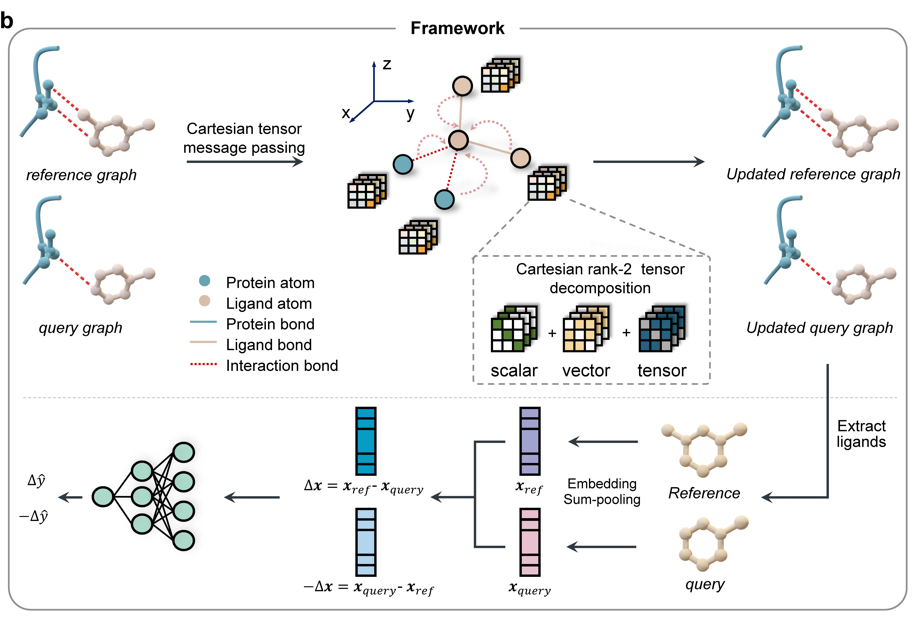
0. Environment
Our test environment information:
System Info
---------------------------------------
No LSB modules are available.
Distributor ID: Ubuntu
Description:    Ubuntu 18.04.6 LTS
Release:        18.04
Codename:       bionic
ldd --version
ldd (Ubuntu GLIBC 2.27-3ubuntu1.6) 2.27
---------------------------------------
GPU Info
NVIDIA-SMI 470.57.02
Driver Version: 470.57.02
CUDA Version: 11.4
You can follow the instructions to setup the environment (Please select the appropriate version of the software based on your hardware during installation):
conda create --name pbcnet python=3.8
conda install pytorch==1.12.1 torchvision==0.13.1 torchaudio==0.12.1 cudatoolkit=11.3 -c pytorch
pip install numpy
pip install pandas
pip install packaging
pip install PyYAML
pip install pydantic
pip install scipy
pip install matplotlib
pip install rdkit
pip install networkx psutil tqdm
pip install dataloader
pip install scikit-learn
pip install bio
pip install dgl==1.0.2 -f https://data.dgl.ai/wheels/cu113/repo.html --no-deps
1. Model weights and code
- The file
./PBCNet2.0.pthcontains the model weights. Load it using:
    # python
    model = torch.load(f"{code_path}/PBCNet2.0.pth", map_location=torch.device('cuda:1'), weights_only=False)
Note: Adjust code_path and GPU device settings as needed.
- The
./model_codedirectory provides the implementation of PBCNet2.0.
2. Reproducing Paper Results
The ./Results_in_paper directory contains code to reproduce all results reported in our paper.
Note: Update relevant paths during execution.
3. Data set
-
Test Data: Included in the
./datadirectory. -
Training Data: Available at Zendo(https://zenodo.org/records/15656365). To retrain PBCNet2.0:
2.1 Download the data. 2.2 Preprocess SDF/PDB files into PKL format using
./Graph2pickle.pyfor model compatibility.
4. Making prediction with PBCNet2.0
See the ./case/try.ipynb notebook for a step-by-step prediction example. Provide ligand (SDF) and protein (PDB) files to run predictions.
5. Fintuning the PBNCet2.0
Execute ./model_code/run_finetune.sh to fine-tune PBCNet2.0 using the FEP dataset.
Custom Data: Replace paths in relevant files to use your own data.
6. Retraining the PBNCet2.0
-
Download training data and input file
training_clip_862W.zipfrom Zendo(https://zenodo.org/records/15656365) and convert SDF/PDB files to PKL format using./Graph2pickle.py. -
Run
./model_code/run_train.sh.
7. License
MIT
1 maintainer

Metadata
1 maintainer
Release files for pbcnet 2.0.9
For a detailed explanation of source distributions (sdists) and built distributions (wheels), please see the package formats documentation.
Source distribution (sdist)
| File | Size | Uploaded | Provenance | Actions |
|---|---|---|---|---|
| pbcnet-2.0.9.tar.gz | 3.1 MB | Without provenance | Details for pbcnet-2.0.9.tar.gz |
Built distribution (wheel)
| File | Interpreter | ABI | Platform | Actions Reset |
|---|---|---|---|---|
| pbcnet-2.0.9-py3-none-any.whl | Python 3 | none | any | Details for pbcnet-2.0.9-py3-none-any.whl |
Total release size: 6.1 MB
Release files / pbcnet-2.0.9.tar.gz
| Download URL | pbcnet-2.0.9.tar.gz |
|---|---|
| Size | 3.1 MB |
| Tags | Source |
|
SHA-256 checksum How to use checksums |
d1f45ea873d23c0d0c438799cb9a0fc6108b4ea6471fff44c6bffaf191703aef
|
|
BLAKE2b-256 checksum How to use checksums |
38a885d785d20fc759220ed489fa781347525cc4c168dca03663f842e851c114
|
| Upload date | |
|
Uploaded using Trusted Publishing? What is trusted publishing? |
No |
| Uploaded via |
twine/6.1.0 CPython/3.12.5
|
Release files / pbcnet-2.0.9-py3-none-any.whl
| Download URL | pbcnet-2.0.9-py3-none-any.whl |
|---|---|
| Size | 2.9 MB |
| Tags | Python 3 |
|
SHA-256 checksum How to use checksums |
1761e5cc3ac709518292f3062e092b03913b6d7853eacf0773d6a27e27f6babf
|
|
BLAKE2b-256 checksum How to use checksums |
e6e00413df4f9068aa81e06293f174ca456c579ad3e3da206fcf4efe86d8ef79
|
| Upload date | |
|
Uploaded using Trusted Publishing? What is trusted publishing? |
No |
| Uploaded via |
twine/6.1.0 CPython/3.12.5
|
Security for pbcnet 2.0.9
Provenance
Provenance describes where a file came from. On PyPI, provenance is shared via attestations, which provide a verifiable record of the build or publishing details. View details, limitations and caveats.
No provenance found
None of the files in this release were uploaded with provenance metadata.
A note on package security
PyPI is a repository for distributing packages, not a service for auditing them. While third-party security researchers and our staff do their best to detect and remove malicious packages, PyPI cannot guarantee the quality, security or suitability of any given package.
To learn more about protecting yourself from malicious actors, visit our package security documentation.













