
pbtk - Reverse engineering Protobuf apps
Protobuf is a serialization format developed by Google and used in an increasing number of Android, web, desktop and more applications. It consists of a language for declaring data structures, which is then compiled to code or another kind of structure depending on the target implementation.
pbtk (Protobuf toolkit) is a full-fledged set of scripts, accessible through an unified GUI, that provides two main features:
-
Extracting Protobuf structures from programs, converting them back into readable .protos, supporting various implementations:
- All the main Java runtimes (base, Lite, Nano, Micro, J2ME), with full Proguard support, (2026: this still works well but mostly with old APKs)
- Binaries containing embedded reflection metadata (typically C++, sometimes Java and most other bindings), (2026: this still works well)
- Web applications using the JsProtoUrl runtime. (2026: this needs an update)
-
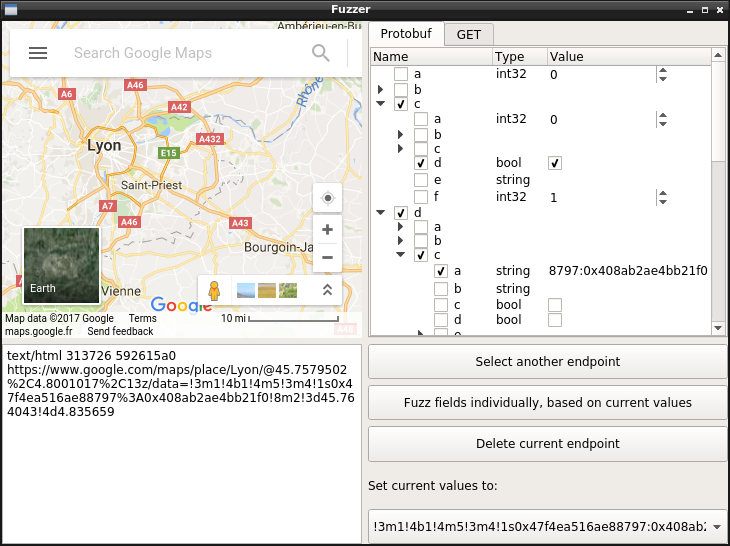
Editing, replaying and fuzzing data sent to Protobuf network endpoints, through a handy graphical interface that allows you to edit live the fields for a Protobuf message and view the result.
Installation
PBTK requires Python ≥ 3.5, PySide 6, Python-Protobuf 3, and a handful of executable programs (chromium, jad, dex2jar...) for running extractor scripts.
Ubuntu users can install it using snap:
$ sudo snap install pbtk
$ pbtk
Archlinux users can install directly through the package:
$ yay -S pbtk-git
$ pbtk
On most other distributions, you'll want to run it directly:
# For Ubuntu/Debian testing derivates:
$ sudo apt install python3-pip git openjdk-8-jre python3-qtpy-pyside6

# Then, using UV:
$ sudo snap install --classic astral-uv
$ uv tool install pbtk
$ pbtk

# Or using pipx:
$ sudo apt install pipx
$ pipx install pbtk
$ pbtk
Windows is also supported (with the same modules required). Once you run the GUI, it should warn you on what you are missing depending on what you try to do.
Command line usage (installing through package manager)
The GUI can be lanched through the main script:
pbtk
The following scripts can also be used standalone, without a GUI:
pbtk-jar-extract [-h] input_file [output_dir]
pbtk-from-binary [-h] input_file [output_dir]
pbtk-web-extract [-h] input_url [output_dir] # Needs update to work as of 2026
When install from snap, the exact commands differ:
pbtk.jar-extract [-h] input_file [output_dir]
pbtk.from-binary [-h] input_file [output_dir]
pbtk.web-extract [-h] input_url [output_dir]
Command line usage (local)
The GUI can be lanched through the main script:
uv sync # Download dependencies to the .venv folder
source .venv/bin/activate # Put the local scripts in $PATH for the current shell session
uv tool install -e . # Put the local scripts in $PATH all time
pbtk
The following scripts can also be used standalone, without a GUI:
pbtk-jar-extract [-h] input_file [output_dir]
pbtk-from-binary [-h] input_file [output_dir]
pbtk-web-extract [-h] input_url [output_dir] # Needs update to work as of 2026
Typical workflow
Let's say you're reverse engineering an Android application. You explored a bit the application with your favorite decompiler, and figured it transports Protobuf as POST data over HTTPS in a typical way.
You open PBTK and are greeted in a meaningful manner:
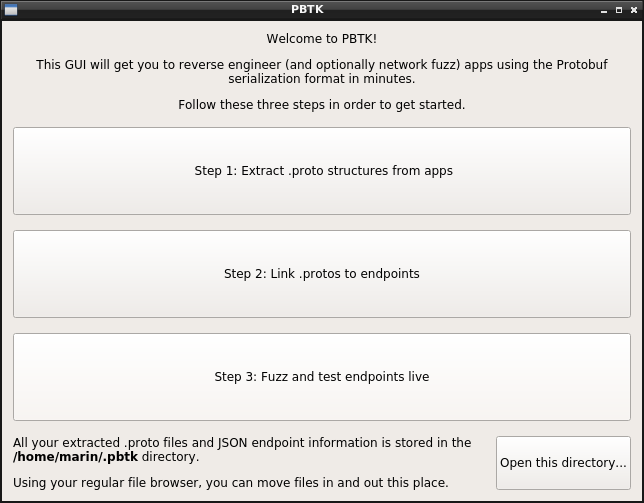
The first step is getting your .protos into text format. If you're targeting an Android app, dropping in an APK and waiting should do the magic work! (unless it's a really exotic implementation)
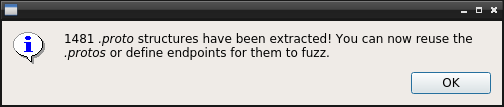
This being done, you jump to ~/.pbtk/protos/<your APK name> (either through the command line, or the button on the bottom of the welcome screen to open your file browser, the way you prefer). All the app's .protos are indeed here.
Back in your decompiler, you stumbled upon the class that constructs data sent to the HTTPS endpoint that interests you. It serializes the Protobuf message by calling a class made of generated code.
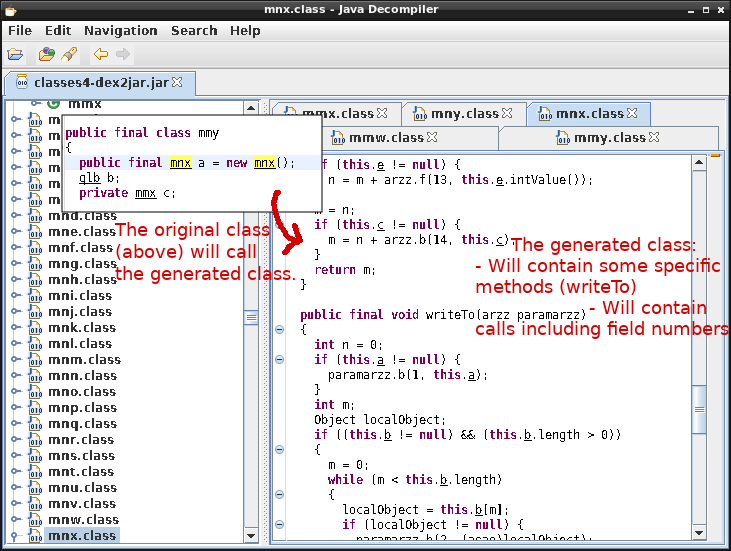
This latter class should have a perfect match inside your .protos directory (i.e com.foo.bar.a.b will match com/foo/bar/a/b.proto). Either way, grepping its name should enable you to reference it.
That's great: the next thing is going to Step 2, selecting your desired input .proto, and filling some information about your endpoint.
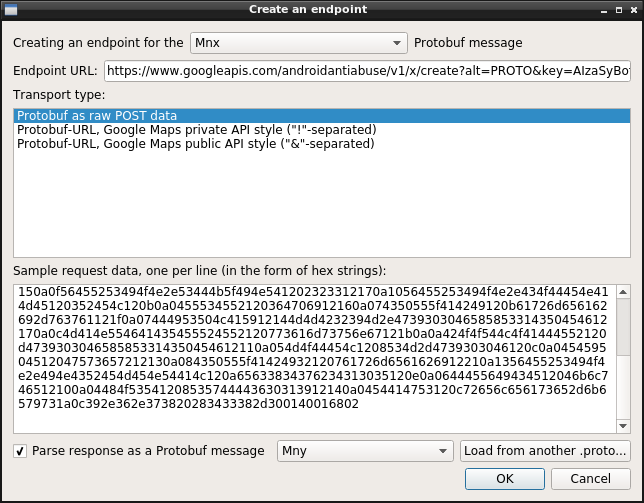
You may also give some sample raw Protobuf data, that was sent to this endpoint, captured through mitmproxy or Wireshark, and that you'll paste in a hex-encoded form.
Step 3 is about the fun part of clicking buttons and seeing what happens! You have a tree view representing every field in the Protobuf structure (repeated fields are suffixed by "+", required fields don't have checkboxes).
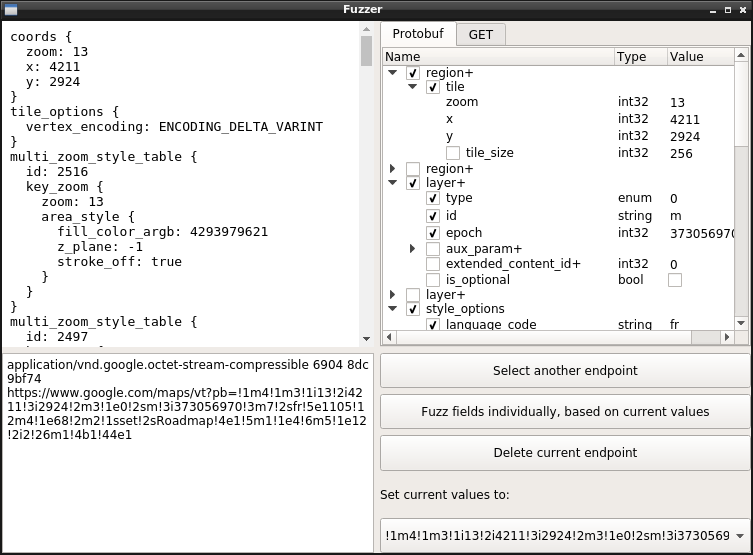
Just hover a field to have focus. If the field is an integer type, use the mouse wheel to increment/decrement it. Enum information appears on hover too.
Here it is! You can determine the meaning of every field with that. If you extracted .protos out of minified code, you can rename fields according to what you notice they mean, by clicking their names.
Happy reversing! 👌 🎉
Local data storage
PBTK stores extracted .proto information into ~/.pbtk/protos/ (or %APPDATA%\pbtk\protos on Windows).
You can move in, move out, rename, edit or erase data from this directory directly through your regular file browser and text editor, it's the expected way to do it and won't interfere with PBTK.
HTTP-based endpoints are stored into ~/.pbtk/endpoints/ as JSON objects. These objects are arrays of pairs of request/response information, which looks like this:
[{
    "request": {
        "transport": "pburl",
        "proto": "www.google.com/VectorTown.proto",
        "url": "https://www.google.com/VectorTown",
        "pb_param": "pb",
        "samples": [{
            "pb": "!....",
            "hl": "fr"
        }]
    },
    "response": {
        "format": "other"
    }
}]
Source code structure
PBTK uses two kinds of pluggable modules internally: extractors, and transports.
- An extractor supports extracting .proto structures from a target Protobuf implementation or platform.
Extractors are defined in src/pbtk/extractors/*.py. They are defined as a method preceded by a decorator, like this:
@register_extractor(name = 'my_extractor',
                    desc = 'Extract Protobuf structures from Foobar code (*.foo, *.bar)',
                    depends={'binaries': ['foobar-decompiler']})
def my_extractor(path):
    # Load contents of the `path` input file and do your stuff...

    # Then, yield extracted .protos using a generator:
    for i in do_your_extraction_work():
        yield proto_name + '.proto', proto_contents

    # Other kinds of information can be yield, such as endpoint information or progress to display.
- A transport supports a way of deserializing, reserializing and sending Protobuf data over the network. For example, the most commonly used transport is raw POST data over HTTP.
Transports are defined in src/pbtk/utils/transports.py. They are defined as a class preceded by a decorator, like this:
@register_transport(
    name = 'my_transport',
    desc = 'Protobuf as raw POST data',
    ui_data_form = 'hex strings'
)
class MyTransport():
    def __init__(self, pb_param, url):
        self.url = url

    def serialize_sample(self, sample):
        # We got a sample of input data from the user.
        # Verify that it is valid in the form described through "ui_data_form" parameter, fail with an exception or return False otherwise.
        # Optionally modify this data prior to returning it.
        bytes.fromhex(sample)
        return sample

    def load_sample(self, sample, pb_msg):
        # Parse input data into the provided Protobuf object.
        pb_msg.ParseFromString(bytes.fromhex(sample))

    def perform_request(self, pb_data, tab_data):
        # Perform a request using the provided URL and Protobuf object, and optionally other transport-specific side data.
        return post(url, pb_data.SerializeToString(), headers=USER_AGENT)
Forthcoming improvements
The following could be coming for further releases:
- Finishing the automatic fuzzing part.
- Support for extracting extensions out of Java code.
- Support for the JSPB (main JavaScript) runtime.
- If there's any other platform you wish to see supported, just drop an issue and I'll look at it.
I've tried to do my best to produce thoroughly readable and commented code (except for parts that are mostly self-describing, like connecting GUI signals) for most modules, so you can contribute.
Licensing
pbtk is released under the GNU GPL license (I, hereby, etc.).
There's no formalized rule for the letter case of the project name, the rule is just about following your heart ❤
1 maintainer

Metadata
1 maintainer
Release files for pbtk 1.1.3
For a detailed explanation of source distributions (sdists) and built distributions (wheels), please see the package formats documentation.
Source distribution (sdist)
| File | Size | Uploaded | Provenance | |
|---|---|---|---|---|
| pbtk-1.1.3.tar.gz | 25.0 MB | With provenance | Details |
Built distribution (wheel)
| File | Interpreter | ABI | Platform | Reset |
|---|---|---|---|---|
| pbtk-1.1.3-py3-none-any.whl | Python 3 | none | any | Details |
Total release size: 50.1 MB
Release files / pbtk-1.1.3.tar.gz
| Download URL | pbtk-1.1.3.tar.gz |
|---|---|
| Size | 25.0 MB |
| Tags | Source |
|
SHA-256 checksum How to use checksums |
2c9debfda94833a61440ff1972a0d81b6c4d24e69ab716340a12316d345ec62f
|
|
BLAKE2b-256 checksum How to use checksums |
f39670a3bf5fb7fdb6e001a3cc01626f8814c392652b39453757839786300f6d
|
| Upload date | |
|
Uploaded using Trusted Publishing? What is trusted publishing? |
Yes |
| Uploaded via |
twine/7.0.0 CPython/3.13.14
|
Provenance
Provenance describes where a file came from. On PyPI, provenance is shared via attestations, which provide a verifiable record of the build or publishing details. View details, limitations and caveats.


PyPI Publish Attestation
PyPI verified that this artifact, at this checksum, originated from the publisher listed below.
Signed by GitHub Actions, verified by PyPI on Aug 21, 2026.
Transparency logRelease files / pbtk-1.1.3-py3-none-any.whl
| Download URL | pbtk-1.1.3-py3-none-any.whl |
|---|---|
| Size | 25.1 MB |
| Tags | Python 3 |
|
SHA-256 checksum How to use checksums |
42bbe1667276f9d3c8315bd1789b62b45547086d944e3081c24a3f3ce48e9fa1
|
|
BLAKE2b-256 checksum How to use checksums |
6323f95d4a12d502a152a251b152fb96559b1f403f024777296593a858cdb5b3
|
| Upload date | |
|
Uploaded using Trusted Publishing? What is trusted publishing? |
Yes |
| Uploaded via |
twine/7.0.0 CPython/3.13.14
|
Provenance
Provenance describes where a file came from. On PyPI, provenance is shared via attestations, which provide a verifiable record of the build or publishing details. View details, limitations and caveats.
PyPI Publish Attestation
PyPI verified that this artifact, at this checksum, originated from the publisher listed below.
Signed by GitHub Actions, verified by PyPI on Aug 21, 2026.
Transparency logSecurity for pbtk 1.1.3
Provenance
Provenance describes where a file came from. On PyPI, provenance is shared via attestations, which provide a verifiable record of the build or publishing details. View details, limitations and caveats.
Full provenance
All 2 files in this release have been uploaded with provenance metadata.
Attestation for pbtk-1.1.3.tar.gz
PyPI Publish Attestation
PyPI verified that this artifact, at this checksum, originated from the publisher listed below.
Signed by GitHub Actions, verified by PyPI on Aug 21, 2026.
Transparency logA note on package security
PyPI is a repository for distributing packages, not a service for auditing them. While third-party security researchers and our staff do their best to detect and remove malicious packages, PyPI cannot guarantee the quality, security or suitability of any given package.
To learn more about protecting yourself from malicious actors, visit our package security documentation.














