


www.mischianti.org
MicroPython Library to use i2c analog IC with arduino and esp8266. Can read analog value and write analog value with only 2 wire (perfect for ESP-01).
Changelog
- 07/11/2023: v0.0.3 Fix on read when write is active and running #Forum
- 16/05/2023: v0.0.2 Minor fix on read and write #Forum
- 18/04/2023: v0.0.1 Initial commit of stable version.
I try to simplify the use of this IC, with a minimal set of operation.
Installation
To install the library execute the following command:
pip install pcf8591-library
Constructor: Pass the address of I2C
from PCF8591 import PCF8591
from machine import I2C, Pin

# Initialize the I2C bus
i2c = I2C(0, scl=Pin(22), sda=Pin(21))

# Initialize the PCF8591
pcf8591 = PCF8591(0x48, i2c)
if pcf8591.begin():
    print("PCF8591 found")
or
from PCF8591 import PCF8591

pcf8591 = PCF8591(0x48, sda=21, scl=22)
if pcf8591.begin():
    print("PCF8591 found")
To read all analog input in one
# Main loop
while True:
    # Read all analog input channels
    ain0, ain1, ain2, ain3 = pcf8591.analog_read_all()

    # Print the results
    print("AIN0:", ain0, "AIN1:", ain1, "AIN2:", ain2, "AIN3:", ain3)

    # Wait for 1 second
    utime.sleep(1)
If you want to read a single input:
print("AIN0 ", pcf8591.analog_read(PCF8591.AIN0))
print("AIN1 ", pcf8591.analog_read(PCF8591.AIN1))
print("AIN2 ", pcf8591.analog_read(PCF8591.AIN2))
print("AIN3 ", pcf8591.analog_read(PCF8591.AIN3))
If you want to write a value:
pcf8591.analog_write(255)
utime.sleep(1)
pcf8591.analog_write(128)
utime.sleep(1)
pcf8591.analog_write(0)
You can also read and write voltage
pcf8591.voltage_write(3.3)
utime.sleep(1)
pcf8591.voltage_write(1.65)
utime.sleep(1)
pcf8591.voltage_write(0)
or
print("AIN0 ", pcf8591.voltage_read(PCF8591.AIN0))
print("AIN1 ", pcf8591.voltage_read(PCF8591.AIN1))
print("AIN2 ", pcf8591.voltage_read(PCF8591.AIN2))
print("AIN3 ", pcf8591.voltage_read(PCF8591.AIN3))
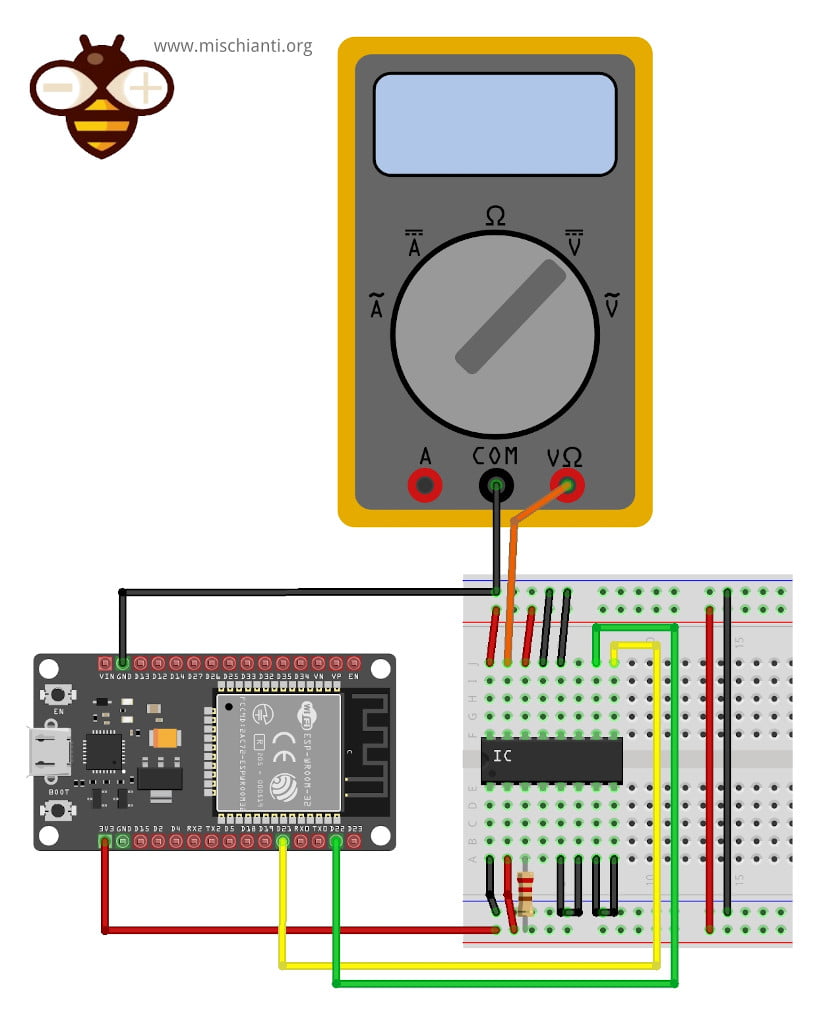
For the examples I use this wire schema on breadboard:
1 maintainer

Release files for pcf8591-library 0.0.3
For a detailed explanation of source distributions (sdists) and built distributions (wheels), please see the package formats documentation.
Source distribution (sdist)
| File | Size | Uploaded | |
|---|---|---|---|
| pcf8591-library-0.0.3.tar.gz | 6.2 kB | Details |
Built distribution (wheel)
| File | Interpreter | ABI | Platform | Reset |
|---|---|---|---|---|
| pcf8591_library-0.0.3-py3-none-any.whl | Python 3 | none | any | Details |
Total release size: 13.0 kB
Release files / pcf8591-library-0.0.3.tar.gz
| Download URL | pcf8591-library-0.0.3.tar.gz |
|---|---|
| Size | 6.2 kB |
| Tags | Source |
|
SHA-256 checksum How to use checksums |
169b44e5a5150ab82bfbe33c4919ecd6e06aa3ee0432406b2a2fa27b108b84b0
|
|
BLAKE2b-256 checksum How to use checksums |
454abc3d4afe1edfc8225568ac0fbf27a410ff335b9a7192ab8c6665ec13ab6a
|
| Upload date | |
|
Uploaded using Trusted Publishing? What is trusted publishing? |
No |
| Uploaded via |
twine/4.0.2 CPython/3.10.8
|
Release files / pcf8591_library-0.0.3-py3-none-any.whl
| Download URL | pcf8591_library-0.0.3-py3-none-any.whl |
|---|---|
| Size | 6.9 kB |
| Tags | Python 3 |
|
SHA-256 checksum How to use checksums |
701a4660f90996b3272bcf029502f65fc463eb23ca246352d60cd3dda6a52873
|
|
BLAKE2b-256 checksum How to use checksums |
a9ab96be293e54317f8bf7369b5b96bfab8e97d60bd21100f2ca83c399b236c8
|
| Upload date | |
|
Uploaded using Trusted Publishing? What is trusted publishing? |
No |
| Uploaded via |
twine/4.0.2 CPython/3.10.8
|














