
Cross-platform desktop app for secure remote PC control and management, featuring a lightweight built-in WebUI and API for local or remote access.

Project description

PCLink Server
The secure backbone for your personal PC remote control ecosystem.





PCLink is a modern, web-first server designed for secure remote PC management.
Featuring a high-performance FastAPI backend, a responsive Web UI, and an extensible plugin system.
🚀 Quick Start (For Users)
- Download: Grab the latest installer for your system:
- Windows:
.exeinstaller - Linux (Ubuntu/Debian):
.debpackage - Linux (Fedora/RPM):
.rpmpackage
- Windows:
- Setup: Launch PCLink and open
https://localhost:38080/ui/in your browser. - Pair: Open the PCLink Mobile App, scan the QR code from the Web UI, and approve the connection.
👉 New to PCLink? Check the Installation Guide for detailed instructions.
🛡️ Security & Antivirus Notice
PCLink provides powerful system integration (remote input, screen capture, terminal access, and extension support), which can occasionally trigger False Positive alerts (e.g., Wacatac.B!ml) from some Antivirus software like Windows Defender.
Rest assured:
- 🔍 Always Verified: Every release is scanned with 70+ AV engines via VirusTotal. Significant flags are extremely rare and inconsistent.
- 🏗️ Transparent: The project is fully Open Source. You can inspect every line of code or build it yourself.
- 📦 Recommendation: If you encounter a warning, we recommend using the
-installer.exeversion as it has a more robust structure.
🎨 Key Features
- 🌍 Web-First Management: Configure your server and manage devices from any browser.
- 🔌 Extensible Architecture: Add new features via the Extension System.
- 🔒 Zero-Trust Security: HTTPS-enforced, manual device approval, and secure session management.
- ⌨️ Total Input Control: Remote keyboard, mouse, volume, and media playback sync.
- 📁 File & Process management: Full-featured remote file browser and system process manager.
- 🐚 Modern Shell: WebSocket-powered terminal access for remote CLI management.
🏗️ Documentation Hub
We maintain comprehensive guides and technical details in our Project Wiki.
| 📚 User Guides | 🛠️ Development | ⚙️ Reference |
|---|---|---|
| 📖 Getting Started | 🏗️ Build from Source | 🔌 API Reference |
| 🌐 Web UI Guide | 🔌 Extension SDK | 🔒 Security Model |
| ⚠️ Troubleshooting | 🤝 Contributing | ⚡ Quick Commands |
🌐 The Ecosystem
- 🏠 PCLink Server (This Repo) - The core backend service.
- 📱 PCLink Mobile - Companion app for Android.
- 📦 PCLink Extensions - Official repository for community extensions.
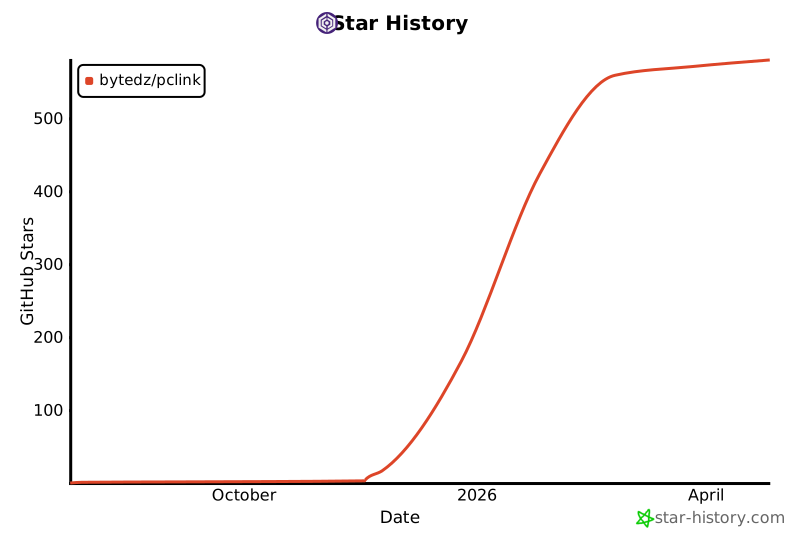
📈 Activity & Growth



🤝 Support & Maintainers

Azhar Zouhir
Creator & Lead Developer


Building the next generation of PC remote management.
🕊️ Free Palestine • 🇩🇿 Made with ❤️ in Algeria
Release history Release notifications | RSS feed


Download files
Download the file for your platform. If you're not sure which to choose, learn more about installing packages.
Source Distributions
Built Distribution
Filter files by name, interpreter, ABI, and platform.
If you're not sure about the file name format, learn more about wheel file names.
Copy a direct link to the current filters
File details
Details for the file pclink-3.3.1-py3-none-any.whl.
File metadata
- Download URL: pclink-3.3.1-py3-none-any.whl
- Upload date:
- Size: 238.8 kB
- Tags: Python 3
- Uploaded using Trusted Publishing? No
- Uploaded via: twine/6.1.0 CPython/3.13.7
File hashes
| Algorithm | Hash digest | |
|---|---|---|
| SHA256 |
4e76c15adc0aacaf260cd8cb590f8a562ec73640bcd30c96d441300b15efb638
|
|
| MD5 |
9c236502018e0387ebb64244a3f89fab
|
|
| BLAKE2b-256 |
9b2ab33915bcd6593b615c5c8c449601924d84ecf3453ad6f9c827c389244dbc
|






