
pcode
A terminal-native coding agent built to run many agents in parallel—without the chaos.
Use your existing Claude, Antigravity, or ChatGPT subscriptions (through their official SDKs and CLIs) or 25+ API providers. Keep real terminal scrollback you can expand or collapse live and after the fact, inspect every tool call and diff, and orchestrate background sessions from anywhere.
Documentation · Install · Quick start · Share feedback
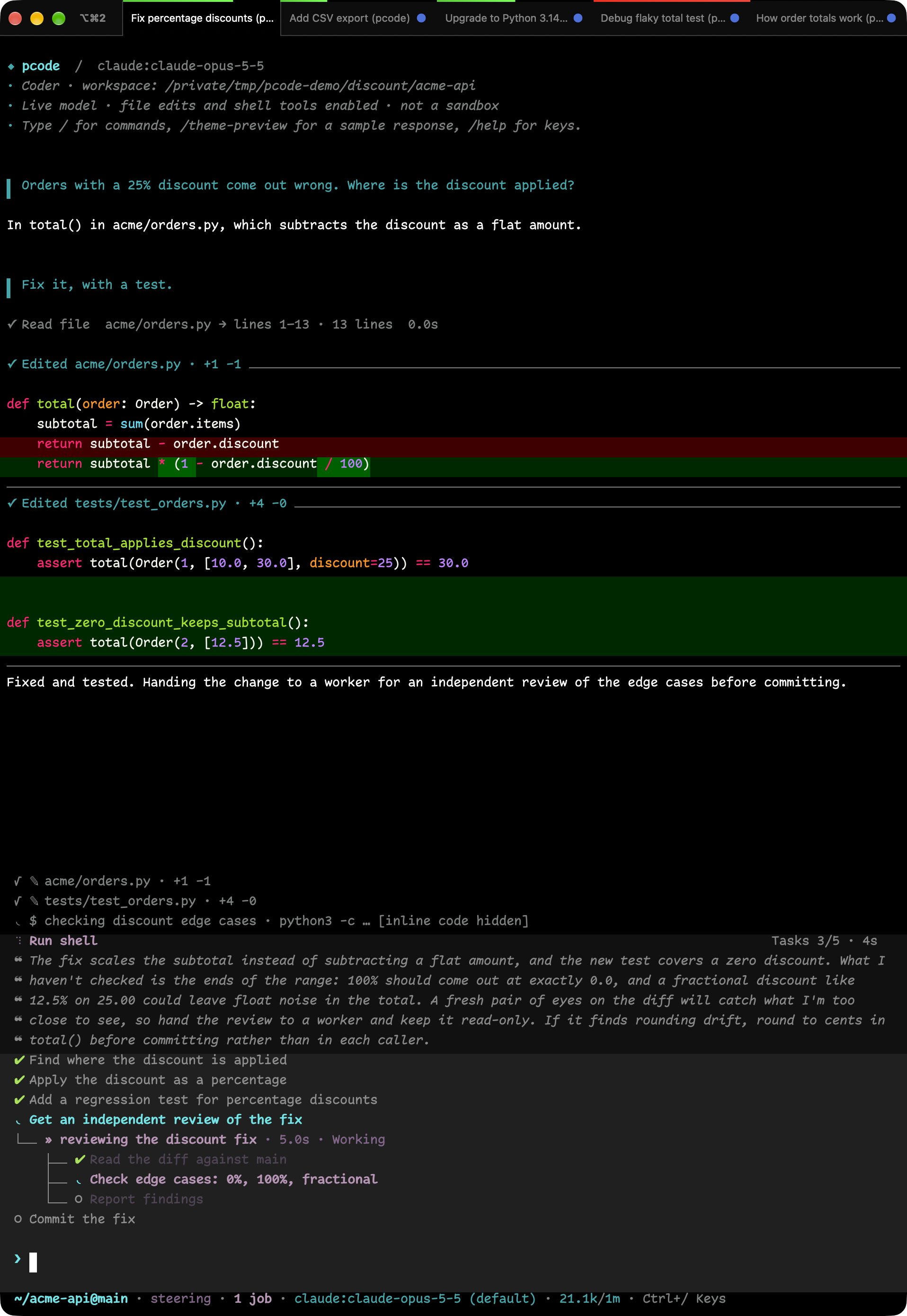
Five sessions in real terminal tabs with live titles and progress/status indicators, inline diffs, live thinking, a nested sub-agent reviewing the fix, and a background job running below.
Install
With Homebrew (includes shfmt and delta for richer command formatting and diffs):
brew tap cruxwell/pcode https://github.com/cruxwell/pcode.git
brew install cruxwell/pcode/pcode       # add --HEAD to track master
uv tool install --python 3.15 'pcode[claude]' # omit [claude] if you don't use a Claude subscription
Quick start
pcode -m claude:claude-sonnet-5                 # Claude subscription (/login claude)
pcode -m antigravity:gemini-4-neon              # Antigravity subscription (/login antigravity)
pcode -m openai-codex:gpt-5.6-luna              # ChatGPT subscription (/login openai-codex)
pcode -m anthropic:claude-sonnet-5              # or any API provider, with its key set
pcode                                           # reuses your saved model (Ctrl+L); with none, an offline preview
pcode -C /path/to/repo "Summarize open TODOs"
git diff | pcode -p --no-save                   # non-interactive: reply to stdout
pcode --continue                                # resume this directory's newest session
pcode --theme-preview                           # offline sample output and style gallery
Permissions & sandboxing: By default, the agent edits files and runs shell commands with your permissions and no approval prompt. Turn on the built-in OS-level sandbox anytime with
/extensions on sandbox, and read tool permissions before pointingpcodeat anything you care about.
Built to run many agents—without the chaos
Running one coding agent is easy. Running five or ten at once breaks down fast: agents trample each other's git state, terminal tabs multiply until you lose track of what finished, slow commands stall turns, and sub-agents turn into black boxes. pcode is built end-to-end for that workflow:
- Automatic worktree isolation. Give every session its own git worktree and branch (
--worktreeorpcode config project set worktree on), withworktree-setuphooks for dependencies or.envrcand optional isolated branches per sub-agent (worker_isolation)./worktree mergemerges main into the worktree first—even mid-turn—so conflicts never touch your main checkout, and/worktree cleanrefuses to lose unmerged work. - Terminal chrome & background hosts. In your terminal,
pcodesets live tab titles, step-weighted OSC 9;4 progress bars, and finish notifications. When you want sessions to outlive your terminal,/detach(orsession_host on) moves them into isolated background hosts you can attach to from anywhere (pcode --attach,Ctrl+^to flip between live turns,/fork PROMPTto race another approach mid-turn). - Conductor for multi-session orchestration. When you have too many sessions open to babysit yourself, open one session and let the built-in Conductor inspect, side-query (
ask_host), and drive all your other open or saved sessions—so you don't need a million tabs open or have to read every one yourself. - Sub-agents in plain sight & Manager mode. Watch every worker's plan, streamed text, reasoning, and tool calls live in
/agents—and answer their questions or steer them directly. For large multi-part tasks, opt-in/managermode (/extensions on manager) turns the main agent into a coordinator with diff review gates, shareddecisions.md, cross-sessionlessons.md, and token budgets. - A shell built for long-running work. Slow commands (tests, CI, dev servers) aren't killed on timeout or when you steer—they become tracked background jobs, wait on readiness lines, survive
pcoderestarts, and wake the agent when they finish so it can watch CI and fix what fails. - Cross-session recall. Ask "what did we decide about the retry logic last week?" and
pcodesearches your saved sessions across all worktrees (or recovers pre-compaction details from the current session) via local SQLite FTS and optional semantic search—with abandoned branches clearly labeled.
Your terminal, your view—live and after the fact
- It's just your terminal—no full-screen app. Replies, diffs, and output land in normal terminal scrollback, so native scrolling, mouse selection, tmux copy mode, terminal find, resize reflow, zero-lag type-ahead, and live auto light/dark themes all keep working.
- Customize what's shown live—and rewrite scrollback after the fact. Stream thoughts (
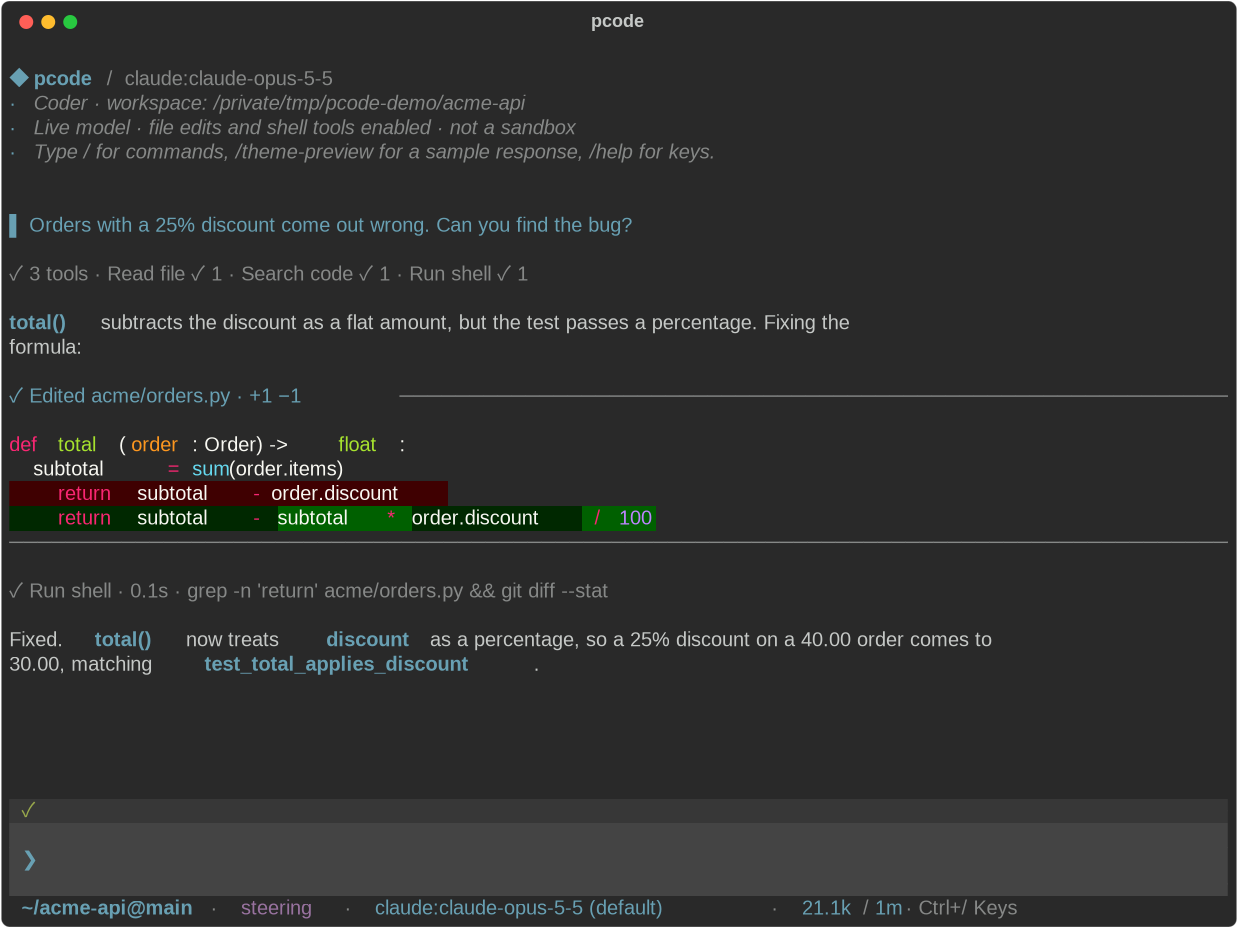
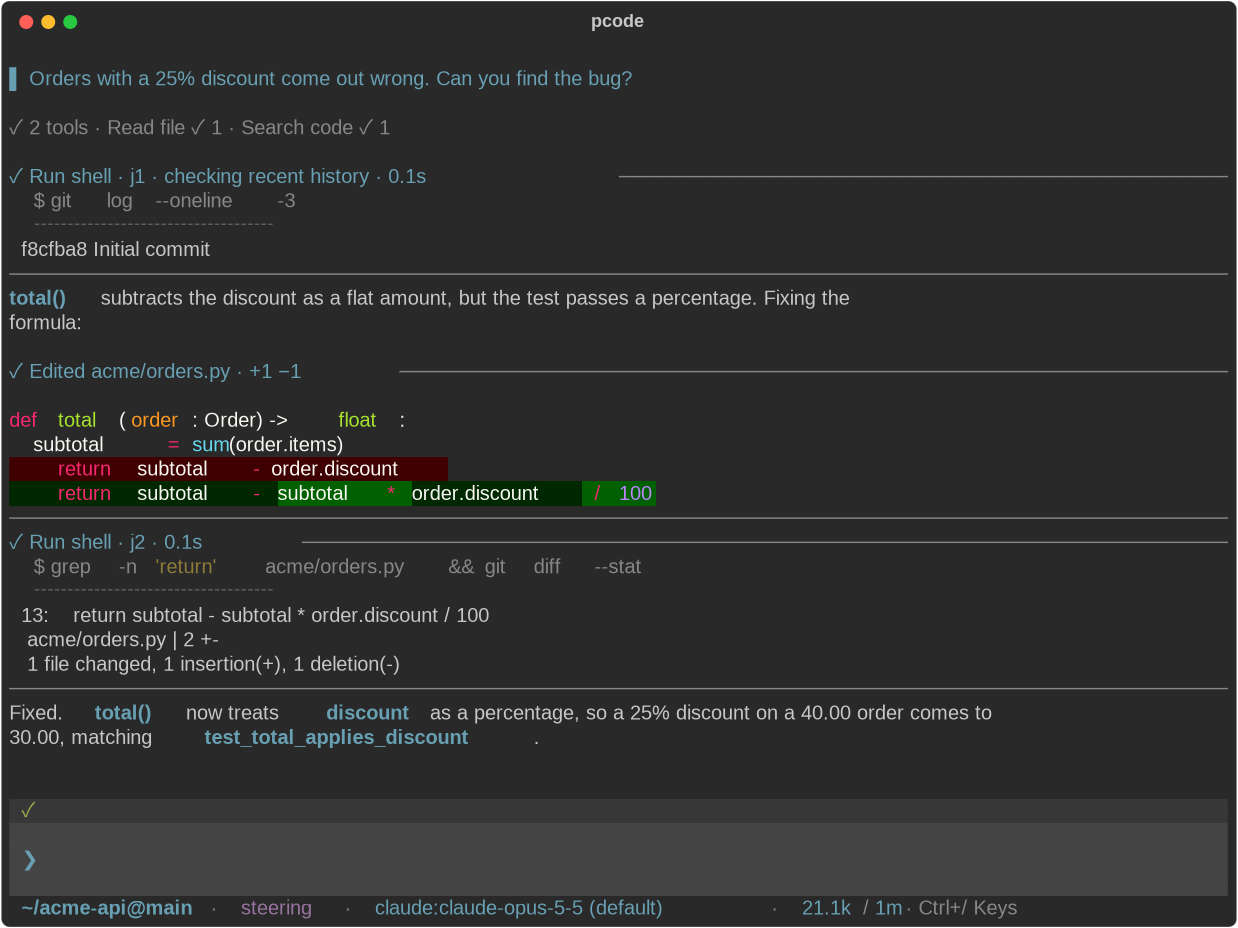
Ctrl+T), live command output (Ctrl+G), and diffs (Ctrl+Z, powered bydeltawith smart dedent)—or keep the transcript succinct and expand details later. Every toggle re-renders your entire scrollback in place without re-running tools; hidden output is never lost.
See the same turn folded into a one-line summary vs. expanded with full command output
Succinct summary (Ctrl+]) |
Expanded commands & output (Ctrl+G) |
|---|---|
 |
 |
- Inspectors that hide nothing.
/tools: Every tool call's exact input, timing, and full output—live mid-turn and across resumed sessions—with failure/edit filters and one-key copy./diffs: Full git diff browser with persistentSince reviewcheckpoints (Ctrl+A) and inline line-anchored review notes (Ctrl+N) that injectpath:line, diff context, and your notes straight back into your prompt./btw: Threaded side questions against the live running turn—supporting multi-model fan-out and an experimental Ghostty Smooth drawer—that you can/summarizeor/mergeback into the main thread./tree: Rewind to any earlier prompt, edit it, and branch without losing the path you left (inspired by pi).
- Vim mode & custom keybindings. Full vi editing with a Space leader in normal mode, custom escape sequences like
jj, and/bindto map keys to commands with arguments (keybindings).
Your subscriptions, the ToS-compliant way
pcode goes out of its way to follow provider terms of service rather than scraping or hijacking consumer auth—while letting you mix subscriptions and API models in one harness:
- Claude (
claude:): Runs through Anthropic's official Claude Agent SDK and the unmodified Claude Code login (claude auth login --claudeai).pcodenever sees or stores tokens and scrubs API/cloud env vars so requests strictly bill your subscription. - Antigravity (
antigravity:): Runs Google's officialagy acpCLI unmodified over the Agent Client Protocol (ACP)—the route permitted under Google's Antigravity ToS—withpcode's tools (workers,/browser,conductor,session_history,/advisor) bridged over MCP and API keys scrubbed. - ChatGPT (
openai-codex:): PKCE OAuth via/login openai-codex(or read-only fallback to Codex CLI). - 25+ API, cloud, and local providers: Anthropic, OpenAI, Google/Gemini, Vertex, Bedrock, Groq, xAI, DeepSeek, OpenRouter, Ollama, vLLM, and any other model Pydantic AI supports.
- Switch fluidly: Change models or reasoning effort mid-turn (
Ctrl+L,/effort), override a single turn inline ($provider:model+effortor+effort), delegate workers to different models, or pair a fast model with a frontier/advisor.
Real browser, OS sandbox, and remote workflows
- Real Chromium, Chrome, and Edge automation (
/browser)./browser launchdrives your real Chrome with a persistent profile (so Google and OAuth logins work and stick), or/browser attachjoins your already-open Chrome, Chromium, or Microsoft Edge in a🤖-marked tab—with localhost access and authenticated file download/upload. - Opt-in OS-level sandbox (
/extensions on sandbox). One unified read/write policy enforced on both file tools and shell commands via macOS Seatbelt (sandbox-exec) or Linuxbwrap, keeping SSH keys, cloud/provider credentials,.pcode/, and.git/hooks/protected while allowing/allow-writesgrants. - Plan in Obsidian, drive from Gmail.
/plan --obsidianwrites plans to org-scoped vaults with a desktop pcode bridge plugin—edit plans or drop> [!comment]callouts in Obsidian andpcodereceives a diff on the next turn.pcode --email-listenlets you kick off and continue locked-down, sandboxed worktree sessions from Gmail on your phone, then take over at a terminal withpcode --attach. - Lean context by default. Hybrid
code_modebatches read-only lookups in a sandboxed Python snippet to cut round-trips, MCP servers are off by default with OAuth and deferred tool search,/statusbreaks down prompt overhead with live prompt-cache drop alerts, and/reflectturns recurring session friction intoAGENTS.mdor skill updates.
Make it your own with Pydantic AI
An extension is a single Python file in ~/.config/pcode/extensions/ (or .pcode/extensions/ to share with a repo) that hot-reloads with /reload without losing your conversation—or you can just ask pcode to write one for you.
Because pcode is built directly on Pydantic AI and Harness, extensions have the full power of Pydantic AI in plain Python: add tools, lifecycle guardrails, slash commands, custom capabilities, or custom sub-agents without learning a proprietary plugin DSL. See extending pcode.
Documentation
Start & guides
- Getting started — Homebrew, uv, source installs, signing in,
--print, shell completions - Scrollback and transparency — live/retroactive scrollback,
/tools,/diffs - A shell for long-running work — background jobs, readiness lines, watching CI
- Parallel agents — worktrees, parallel sub-agents,
/agents - Extending pcode — one-file Python extensions, skills, settings
Reference
Providers & models · Configuration · Commands & keys · Keybindings · Terminal setup · Tools & sandbox · Manager mode · MCP servers · Working in a repository · Sessions, hosts & recall · Planning in Obsidian · Email remote control · Conversation tree · Side questions · Context, limits & caching · The transcript
Build locally with make docs-serve; make docs checks every page and anchor link. See PLAN.md for longer-term direction.
Contributing
- Bugs: open an issue
- Feedback & ideas: feedback discussion
- Security: SECURITY.md
- Setup & workflow: CONTRIBUTING.md, AGENTS.md, and contributor notes in
dev/
make test        # fast suite; real-tmux regressions skipped
make test-all    # full suite, before touching layout, streaming, the editor, or the prompt
1 maintainer

Metadata
1 maintainer
Release files for pcode 0.1.11
For a detailed explanation of source distributions (sdists) and built distributions (wheels), please see the package formats documentation.
Source distribution (sdist)
| File | Size | Uploaded | Provenance | Actions |
|---|---|---|---|---|
| pcode-0.1.11.tar.gz | 857.9 kB | With provenance | Details for pcode-0.1.11.tar.gz |
Built distribution (wheel)
| File | Interpreter | ABI | Platform | Actions Reset |
|---|---|---|---|---|
| pcode-0.1.11-py3-none-any.whl | Python 3 | none | any | Details for pcode-0.1.11-py3-none-any.whl |
Total release size: 1.8 MB
Release files / pcode-0.1.11.tar.gz
| Download URL | pcode-0.1.11.tar.gz |
|---|---|
| Size | 857.9 kB |
| Tags | Source |
|
SHA-256 checksum How to use checksums |
5bfdd151f6968c2e1f352667b596b2fa80cacdb3bb30a7dd4bd0ab93f12eb209
|
|
BLAKE2b-256 checksum How to use checksums |
9d7e2cb56c562a413b1c4c9f22693044f36468483e1962b2674afe0876e446fa
|
| Upload date | |
|
Uploaded using Trusted Publishing? What is trusted publishing? |
Yes |
| Uploaded via |
twine/7.0.0 CPython/3.13.16
|
Provenance
Provenance describes where a file came from. On PyPI, provenance is shared via attestations, which provide a verifiable record of the build or publishing details. View details, limitations and caveats.


PyPI Publish Attestation
PyPI verified that this artifact, at this checksum, originated from the publisher listed below.
Signed by GitHub Actions, verified by PyPI on Nov 23, 2026.
Transparency logRelease files / pcode-0.1.11-py3-none-any.whl
| Download URL | pcode-0.1.11-py3-none-any.whl |
|---|---|
| Size | 954.9 kB |
| Tags | Python 3 |
|
SHA-256 checksum How to use checksums |
c96576c5b7cc885bf92b0980f932514ec886e580a954c1fa8e93d86994385b5f
|
|
BLAKE2b-256 checksum How to use checksums |
eb0dd19212d035f587c4c33ad8732857202d6c178e9769ae8d651bfc7c1aaf7a
|
| Upload date | |
|
Uploaded using Trusted Publishing? What is trusted publishing? |
Yes |
| Uploaded via |
twine/7.0.0 CPython/3.13.16
|
Provenance
Provenance describes where a file came from. On PyPI, provenance is shared via attestations, which provide a verifiable record of the build or publishing details. View details, limitations and caveats.
PyPI Publish Attestation
PyPI verified that this artifact, at this checksum, originated from the publisher listed below.
Signed by GitHub Actions, verified by PyPI on Nov 23, 2026.
Transparency logSecurity for pcode 0.1.11
Provenance
Provenance describes where a file came from. On PyPI, provenance is shared via attestations, which provide a verifiable record of the build or publishing details. View details, limitations and caveats.
Full provenance
Both files in this release have been uploaded with provenance metadata.
Attestation for pcode-0.1.11.tar.gz
PyPI Publish Attestation
PyPI verified that this artifact, at this checksum, originated from the publisher listed below.
Signed by GitHub Actions, verified by PyPI on Nov 23, 2026.
Transparency logA note on package security
PyPI is a repository for distributing packages, not a service for auditing them. While third-party security researchers and our staff do their best to detect and remove malicious packages, PyPI cannot guarantee the quality, security or suitability of any given package.
To learn more about protecting yourself from malicious actors, visit our package security documentation.














