
pdb2reaction: End-to-End Reaction-Path Elucidation from PDB Structures Using Machine-Learning Interatomic Potentials


Overview
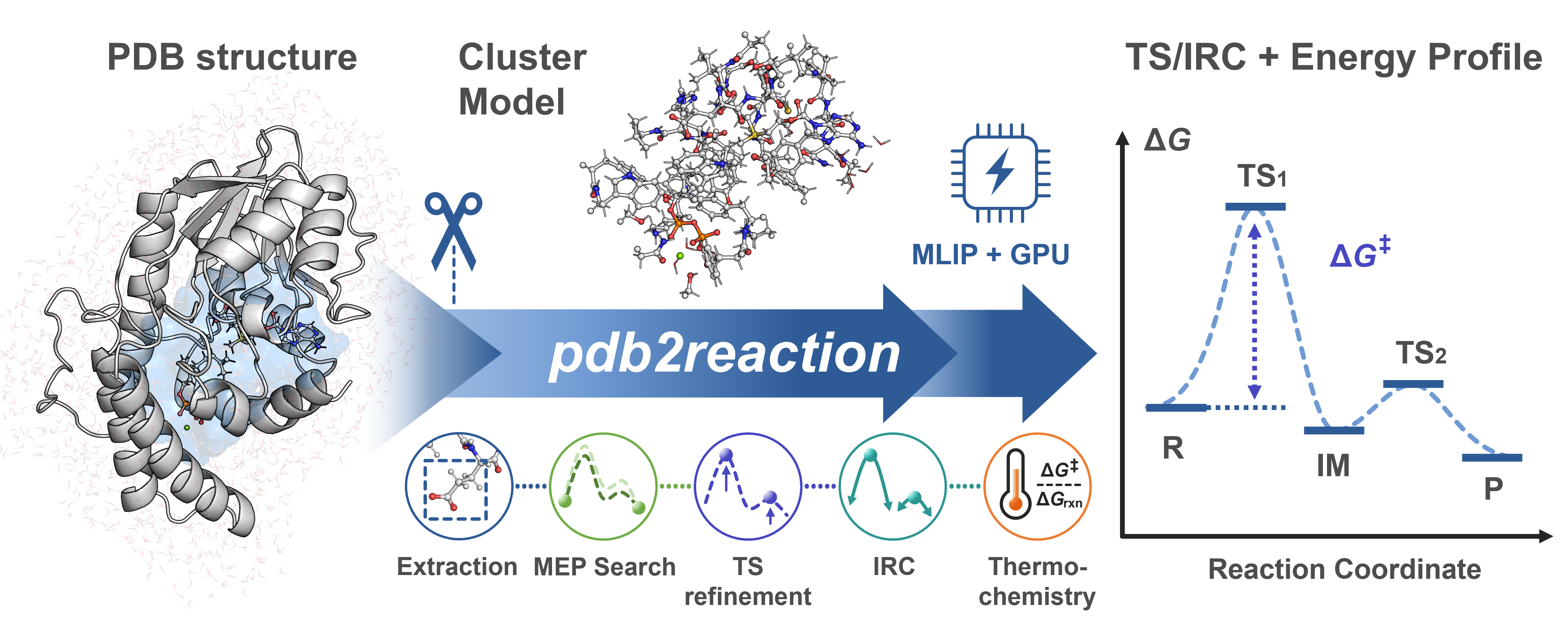
pdb2reaction is a Python CLI for elucidating enzymatic reaction pathways from PDB or mmCIF structures using machine-learning interatomic potentials (MLIPs). Given (i) two or more reaction-ordered structures, (ii) one structure with --scan-lists, or (iii) one TS candidate with --tsopt, it can run an MEP search and optionally chain TS optimization → IRC → thermochemical correction → DFT single-point. Active-site extraction is performed only when -c/--center is supplied; otherwise the PDB/mmCIF/XYZ/GJF model is used as-is. Each stage is also exposed as an individual subcommand.
Test a reaction mechanism in a single command:
# Multi-PDB mode (R + P endpoints → MEP, with TS optimization + thermo)
pdb2reaction all -i R.pdb P.pdb -c 'LIG' -l 'LIG:-1' --tsopt --thermo
Protein structures can be supplied in PDB or mmCIF format, including mmCIF files with multi-character chains and large residue IDs. Small molecules are accepted in PDB, mmCIF, XYZ, or GJF format, and prebuilt cluster models can also be supplied as PDB/mmCIF.
Prerequisites: PDB/mmCIF inputs must already contain hydrogens; reaction-ordered structures must share the same atom identities and order (only coordinates differ). Small-molecule
.xyz/.gjfinputs work when--center/-cand--ligand-charge/-lare omitted.
Colab GUI workspace
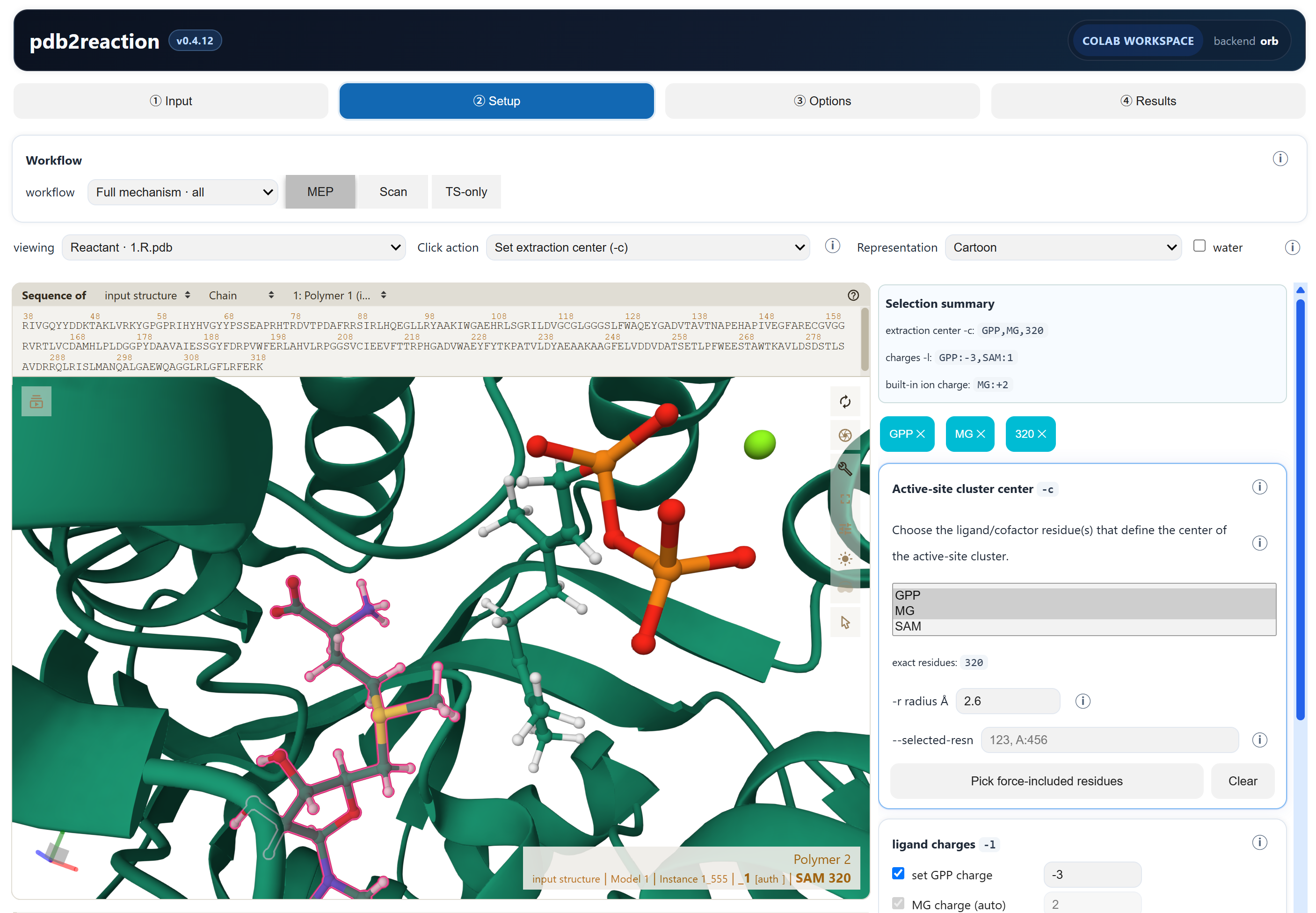
An interactive GUI workspace is available in Google Colab. It brings ordered structure input, Mol* visualization and atom picking, controls generated from the live CLI, execution, and linked MEP/IRC/result inspection into one notebook. Choose a GPU runtime and open the Colab GUI workspace.
Related tools
| Tool | Use case |
|---|---|
| mlmm-toolkit | ML/MM ONIOM with the full protein environment; automates MM parameterization and ML-region assignment from a single PDB. |
| uma_pysis | Lightweight YAML-driven UMA–pysisyphus interface for quick/exploratory reaction-mechanism studies (GS / TS / IRC / ΔG). |
pdb2reactionbundles a GPU-optimized pysisyphus fork that is not compatible with upstream pysisyphus — do not install it into an environment that already has upstream pysisyphus.
Documentation
- Getting Started · mmCIF and large structures · Installation · Examples · Troubleshooting
- YAML Reference · JSON Output Schema
- Full site: https://t-0hmura.github.io/pdb2reaction/
System requirements
| Component | Requirement |
|---|---|
| OS / Python | Linux recommended. Python >= 3.11. |
| GPU / CUDA / VRAM | CUDA-capable NVIDIA GPU recommended for production, with a compatible driver and official PyTorch 2.8 CUDA wheel (cu126, cu128, or cu129). Required VRAM is backend/model/system/workflow dependent; pilot the real calculation. |
| RAM / Disk | Size for the selected environment, model cache, structures, trajectories, and DFT scratch; no atom-count-only minimum is reliable. |
CPU-only execution works but is usually much slower; benchmark the selected backend/model. Full requirement and tuning details: docs/installation.md.
Installation
# 1. CUDA-enabled PyTorch (choose the official 2.8 wheel for your driver/GPU)
pip install 'torch==2.8.0' --index-url https://download.pytorch.org/whl/cu126

# 2. pdb2reaction (editable from a local clone, or `pip install pdb2reaction`)
pip install -e .

# 3. Authenticate Hugging Face once (only required for the default UMA backend)
#    Accept the FAIR Chemistry License v1 at https://huggingface.co/facebook/UMA, then:
hf auth login                               # interactive
# OR, for non-interactive CI/HPC jobs: export HF_TOKEN=hf_xxx
Optional extras (install only what you need):
| Extra | Adds |
|---|---|
[orb] / [aimnet] |
Orb / AIMNet2 MLIP backend (-b orb / -b aimnet2) — not HF-gated |
[dft] |
PySCF + GPU4PySCF single-point DFT (--dft / pdb2reaction dft) |
[mcp] |
Model Context Protocol server for agent clients |
The MACE backend (-b mace) is not a pip extra: mace-torch pins e3nn==0.4.4, which conflicts with fairchem-core's e3nn>=0.5 (UMA), so it needs a dedicated environment — pip uninstall -y fairchem-core && pip install mace-torch (see docs/installation.md).
CUDA module loads, alternative-backend recipes, DMF/cyipopt setup, Plotly Chromium, and HPC job-script templates: docs/installation.md and docs/hpc-example.md.
Quick Examples
Examples use GPP C6-methyltransferase BezA (Tsutsumi et al., Angew. Chem. Int. Ed. 2022, 61, e202111217) — runnable MEP and scan commands are in examples/run.sh.
# Multi-structure MEP (R + P → MEP, with TS + thermochemistry)
pdb2reaction -i examples/1.R.pdb examples/3.P.pdb -c 'SAM,GPP,MG' -l 'SAM:1,GPP:-3' \
    --tsopt --thermo --out-dir result_mep

# Scan mode (single structure → staged bond scan → MEP)
pdb2reaction -i examples/1.R.pdb -c 'SAM,GPP,MG' -l 'SAM:1,GPP:-3' \
    -s '[("CS1 SAM 320","GPP 321 C7",1.60)]' --tsopt --thermo --out-dir result_scan

# TS-only validation (single TS candidate → tsopt → IRC → freq)
pdb2reaction -i TS_candidate.pdb -c 'SAM,GPP,MG' -l 'SAM:1,GPP:-3' --tsopt --thermo --out-dir result_tsonly
pdb2reaction can also be used to investigate reaction mechanisms of small molecules and user-defined cluster models.
# Small molecule (gas-phase): .xyz / .gjf input — omit -c, set charge with -q
pdb2reaction -i reactant.xyz product.xyz -q 0 --tsopt --thermo --out-dir result_small

# Your own cluster model (already-trimmed PDB): omit -c to use it as-is
pdb2reaction -i cluster_R.pdb cluster_P.pdb -q 0 --tsopt --thermo --out-dir result_cluster
For hand-built clusters, standardize backbone ends at Cα (CA), place other
boundaries on aliphatic C–C single bonds whenever possible, avoid cutting
peptide/polar/conjugated/metal bonds, and use the identical atom order and cap
topology for every state. See the cluster-boundary checklist.
Per-stage walkthrough (extract → opt → path-opt → tsopt → irc → freq → dft): docs/getting-started.md and docs/quickstart-all.md.
Output
A non-dry all run writes the deliverables reached by its enabled stages to
--out-dir (default ./result_all/):
segments/seg_NN/{reactant,ts,product}.*— the canonical R / TS / P structures to citemep_trj.xyz(plusmep.pdbwhen topology is available andmep.ciffor bridged inputs) — the merged reaction path in MEP/scan-list modesenergy_diagram_MEP.png— MEP diagram when MEP construction and static-image export succeedsummary.log/summary.json
Pipeline scratch lives under _work/ (safe to delete). Full layout and filename conventions: docs/output-layout.md.
CLI Subcommands
| Subcommand | Role | Doc |
|---|---|---|
all (default) |
End-to-end: extract → MEP → TS → IRC → freq → DFT | all |
extract |
Build active-site cluster model | extract |
fix-altloc |
Resolve PDB alternate conformations | fix-altloc |
add-elem-info |
Repair PDB element columns (77–78) | add-elem-info |
opt |
Geometry optimization (L-BFGS / RFO) | opt |
tsopt |
TS optimization (Dimer / RS-P-RFO) | tsopt |
path-opt |
MEP via GSM or DMF | path-opt |
path-search |
Recursive MEP search with refinement | path-search |
scan / scan2d / scan3d |
1D / 2D / 3D bond-distance scans | scan · scan2d · scan3d |
freq |
Vibrational analysis + thermochemistry | freq |
irc |
IRC (EulerPC) | irc |
dft |
Single-point DFT (GPU4PySCF / PySCF) | dft |
sp |
Single-point MLIP energy / forces / Hessian | sp |
bond-summary |
Compare structures, report bond changes | bond-summary |
trj2fig / energy-diagram |
Energy plot / R→TS→P diagram | trj2fig · energy-diagram |
Getting Help
pdb2reaction --help                       # top-level
pdb2reaction <subcmd> --help              # core options
pdb2reaction <subcmd> --help-advanced     # full option set
Issues: https://github.com/t-0hmura/pdb2reaction/issues.
Citation
@misc{ohmura2026pdb2reaction,
  author = {Ohmura, Takuto and Sato, Hajime and Terada, Tohru},
  title  = {pdb2reaction: End-to-End Reaction-Path Elucidation from PDB Structures Using Machine-Learning Interatomic Potentials},
  year   = {2026}, doi = {10.26434/chemrxiv.15003538/v1}, note = {ChemRxiv preprint}
}
Agent Skills
Agent Skills for Claude Code / Codex / Cursor etc. in skills/ — copy into your project's skill location (e.g. .claude/skills/) to let an agent drive pdb2reaction workflows and subcommands.
Known limitations
- MACE + UMA cannot coexist (
e3nnversion conflict). Use separate conda envs. - DFT single-point cost depends strongly on basis, functional, grid, elements, and hardware; pilot one representative structure before batching.
- Every backend's TS requires an independent frequency calculation and IRC connectivity check. The pdb2reaction ORB default is fp64; independently validate frequencies and IRC results when selecting
fp32/TF32. - CPU-only execution is supported but usually much slower than GPU.
Contributing
Issues and pull requests are welcome — see CONTRIBUTING.md.
License
GNU General Public License v3 (GPL-3.0).
1 maintainer

Metadata
1 maintainer
Release files for pdb2reaction 0.4.13
For a detailed explanation of source distributions (sdists) and built distributions (wheels), please see the package formats documentation.
Source distribution (sdist)
| File | Size | Uploaded | |
|---|---|---|---|
| pdb2reaction-0.4.13.tar.gz | 2.4 MB | Details |
Built distribution (wheel)
| File | Interpreter | ABI | Platform | Reset |
|---|---|---|---|---|
| pdb2reaction-0.4.13-py3-none-any.whl | Python 3 | none | any | Details |
Total release size: 3.5 MB
Release files / pdb2reaction-0.4.13.tar.gz
| Download URL | pdb2reaction-0.4.13.tar.gz |
|---|---|
| Size | 2.4 MB |
| Tags | Source |
|
SHA-256 checksum How to use checksums |
a2741fb64b5193a0562baeb1e23eddbf83acaeee815a971153058aaab6734081
|
|
BLAKE2b-256 checksum How to use checksums |
f631fd58127c168d9aa49e539dd4dfbf667faba7a9725add927fb1d63a26272c
|
| Upload date | |
|
Uploaded using Trusted Publishing? What is trusted publishing? |
Yes |
| Uploaded via |
twine/7.0.0 CPython/3.13.14
|
Provenance
Provenance describes where a file came from. On PyPI, provenance is shared via attestations, which provide a verifiable record of the build or publishing details. View details, limitations and caveats.


PyPI Publish Attestation
PyPI verified that this artifact, at this checksum, originated from the publisher listed below.
Signed by GitHub Actions, verified by PyPI on Sep 2, 2026.
Transparency logRelease files / pdb2reaction-0.4.13-py3-none-any.whl
| Download URL | pdb2reaction-0.4.13-py3-none-any.whl |
|---|---|
| Size | 1.0 MB |
| Tags | Python 3 |
|
SHA-256 checksum How to use checksums |
a3f2056362671e2fcdd5bf4fc6759d5295a49bf54093d61d9c8adcf76cecf64b
|
|
BLAKE2b-256 checksum How to use checksums |
2ee168d97c6e7edd8d369b86487c1f9650eb3f9d6ba3243540fd4032819f5b05
|
| Upload date | |
|
Uploaded using Trusted Publishing? What is trusted publishing? |
Yes |
| Uploaded via |
twine/7.0.0 CPython/3.13.14
|
Provenance
Provenance describes where a file came from. On PyPI, provenance is shared via attestations, which provide a verifiable record of the build or publishing details. View details, limitations and caveats.
PyPI Publish Attestation
PyPI verified that this artifact, at this checksum, originated from the publisher listed below.
Signed by GitHub Actions, verified by PyPI on Sep 2, 2026.
Transparency log













