
A simple package to add code highlighting to the python debugger (PDB).
Verified details
These details have been verified by PyPIProject links
GitHub Statistics
Maintainers

Project description
PDB Color
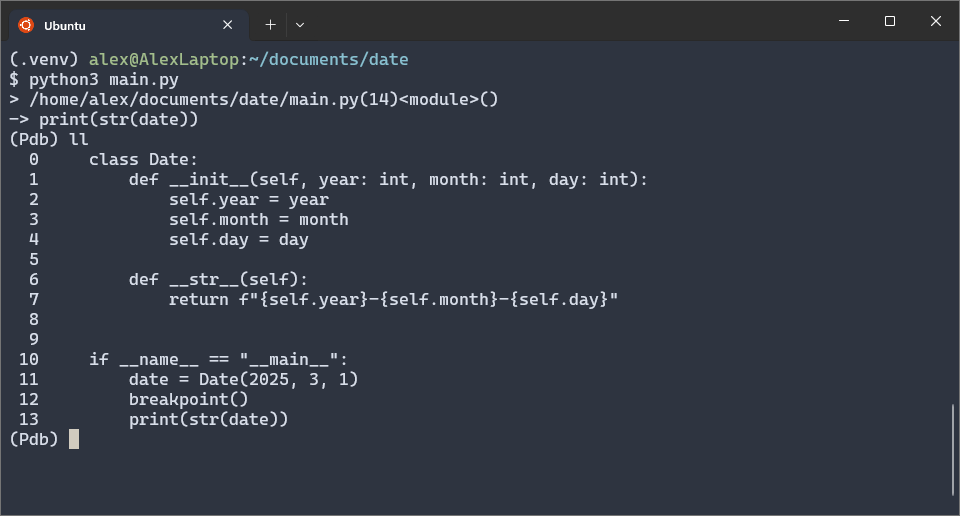
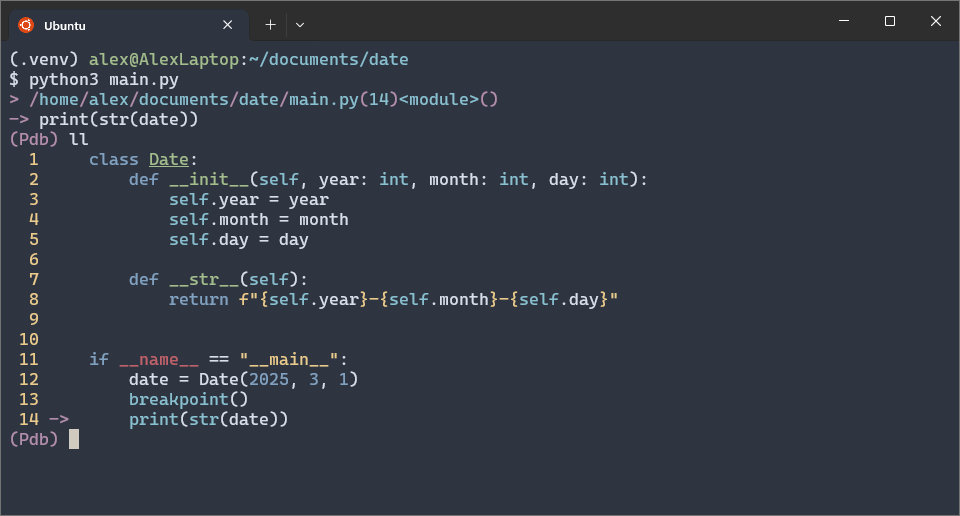
Add some color to the python debugger.
Using PDB:
Using PDB Color:
Installation
Install with pip:
pip install pdbcolor
Setup
To use PDB Color, you must set the PYTHONBREAKPOINT environment variable to
pdbcolor.set_trace. You can do this by setting PYTHONBREAKPOINT before your
python command. For example:
PYTHONBREAKPOINT=pdbcolor.set_trace python3 main.py
For convenience, add an alias for the prefix above to your terminal
configuration file (e.g. .bashrc or .zshrc). For example:
alias pdc='PYTHONBREAKPOINT=pdbcolor.set_trace'
This allows you to use PDB Color as follows:
pdc python3 main.py
You can avoid the prefix entirely by setting the PYTHONBREAKPOINT variable in
every terminal session. You can do this in your .bashrc with the following:
export PYTHONBREAKPOINT=pdbcolor.set_trace
This can cause unusual behaviour especially when working with pytest, so it
is generally recommended to use the pdc alias.
Autocomplete
PDB Color also has autocompletion by default which can be triggered using the TAB key. For example:
$ python3 main.py
> /home/alex/documents/pdbcolor/main.py(9)<module>()
-> y = 2
(Pdb) str.
str.capitalize(    str.isalpha(       str.ljust(         str.rpartition(
str.casefold(      str.isascii(       str.lower(         str.rsplit(
str.center(        str.isdecimal(     str.lstrip(        str.rstrip(
str.count(         str.isdigit(       str.maketrans(     str.split(
str.encode(        str.isidentifier(  str.mro()          str.splitlines(
str.endswith(      str.islower(       str.partition(     str.startswith(
str.expandtabs(    str.isnumeric(     str.removeprefix(  str.strip(
str.find(          str.isprintable(   str.removesuffix(  str.swapcase(
str.format(        str.isspace(       str.replace(       str.title(
str.format_map(    str.istitle(       str.rfind(         str.translate(
str.index(         str.isupper(       str.rindex(        str.upper(
str.isalnum(       str.join(          str.rjust(         str.zfill(
(Pdb) str.
Docstring Shorthand
Add ? to the end of your expressions to get the docstring for your object. For
example, "hello.upper?" gets the docstring for the upper function:
(Pdb) "hello".upper?
Return a copy of the string converted to uppercase.
Take care to be precise where you use ?. For example, using "hello".upper()?
produces a different docstring:
(Pdb) "hello".upper()?
str(object='') -> str
str(bytes_or_buffer[, encoding[, errors]]) -> str

Create a new string object from the given object. If encoding or
errors is specified, then the object must expose a data buffer
that will be decoded using the given encoding and error handler.
Otherwise, returns the result of object.__str__() (if defined)
or repr(object).
encoding defaults to 'utf-8'.
errors defaults to 'strict'.
This is the docstring for a string object because "hello".upper() evaluates to
a string. You get the same docstring using "hello"?:
(Pdb) "hello"?
str(object='') -> str
str(bytes_or_buffer[, encoding[, errors]]) -> str

Create a new string object from the given object. If encoding or
errors is specified, then the object must expose a data buffer
that will be decoded using the given encoding and error handler.
Otherwise, returns the result of object.__str__() (if defined)
or repr(object).
encoding defaults to 'utf-8'.
errors defaults to 'strict'.
Post-mortem debugging
PDB can can be triggered post-mortem (after an exception has been raised) with the following command:
python3 -m pdb -c continue main.py
PDB Color can be used instead by replacing pdb with pdbcolor.
python3 -m pdbcolor -c continue main.py
Pytest
To use PDB Color with pytest, use --pdbcls=pdbcolor:PdbColor. For example:
python3 -m pytest --pdbcls=pdbcolor:PdbColor
This drops you into PDB Color when a breakpoint is reached.
If you get a pytest OS error such as:
OSError: pytest: reading from stdin while output is captured! Consider using `-s`.
Using the -s flag stops the error but, for those interested, the error is
usually caused by setting PYTHONBREAKPOINT=pdbcolor.set_trace. Changing this
back to its default value should stop the error without needing the -s flag.
For example:
PYTHONBREAKPOINT=pdb.set_trace python3 -m pytest --pdbcls=pdbcolor:PdbColor
Configuring the Colors
You can configure PdbColor's colorscheme by putting a .pdbcolor.json file in
your home directory. Below is an example of a value .pdbcolor.json file:
{
    "prompt": "blue",
    "breakpoint_": "yellow",
    "currentline": "yellow"
}
Below is a description of each valid key and the element it controls:
breakpoint_: TheBcharacter used to represent breakpoints.currentline: The->that shows the current line the debugger is on when you use thelistcommand.line_prefix: The->when you use thewherecommand.eof: The end of file[EOF].path_prefix: The>character that goes before each path.return_: The--Return--characters.
Each key can have one of the following values:
blackredgreenyellowbluepurplecyanwhiteBlackRedGreenYellowBluePurpleCyanWhite
Project details
Verified details
These details have been verified by PyPIProject links
GitHub Statistics
Maintainers
Release history Release notifications | RSS feed


Download files
Download the file for your platform. If you're not sure which to choose, learn more about installing packages.
Source Distribution
Built Distribution
Filter files by name, interpreter, ABI, and platform.
If you're not sure about the file name format, learn more about wheel file names.
Copy a direct link to the current filters
File details
Details for the file pdbcolor-0.6.1.tar.gz.
File metadata
- Download URL: pdbcolor-0.6.1.tar.gz
- Upload date:
- Size: 10.5 kB
- Tags: Source
- Uploaded using Trusted Publishing? Yes
- Uploaded via: twine/6.1.0 CPython/3.13.12
File hashes
| Algorithm | Hash digest | |
|---|---|---|
| SHA256 |
d17619ae619b3fe135fc0e2fc1ef98f6520bbebe0a674d3388cf179d7b415aba
|
|
| MD5 |
902291b9c4877459045bb8a0cc0144dc
|
|
| BLAKE2b-256 |
c2661d859ae4e1b689eb9da70c06fb3f87fb8b8421080126709a930eec486bc5
|
Provenance
The following attestation bundles were made for pdbcolor-0.6.1.tar.gz:
Publisher:
workflow.yml on alex-gregory-ds/pdbcolor
-
Statement:
-
Statement type:
https://in-toto.io/Statement/v1 -
Predicate type:
https://docs.pypi.org/attestations/publish/v1 -
Subject name:
pdbcolor-0.6.1.tar.gz -
Subject digest:
d17619ae619b3fe135fc0e2fc1ef98f6520bbebe0a674d3388cf179d7b415aba - Sigstore transparency entry: 1382196257
- Sigstore integration time:
-
Permalink:
alex-gregory-ds/pdbcolor@b7a7db7448d1116fd041ef96e16c20189409f6d9 -
Branch / Tag:
refs/tags/0.6.1 - Owner: https://github.com/alex-gregory-ds
-
Access:
public
-
Token Issuer:
https://token.actions.githubusercontent.com -
Runner Environment:
github-hosted -
Publication workflow:
workflow.yml@b7a7db7448d1116fd041ef96e16c20189409f6d9 -
Trigger Event:
push
-
Statement type:
File details
Details for the file pdbcolor-0.6.1-py3-none-any.whl.
File metadata
- Download URL: pdbcolor-0.6.1-py3-none-any.whl
- Upload date:
- Size: 9.7 kB
- Tags: Python 3
- Uploaded using Trusted Publishing? Yes
- Uploaded via: twine/6.1.0 CPython/3.13.12
File hashes
| Algorithm | Hash digest | |
|---|---|---|
| SHA256 |
82573227f3295ac34e5ceff473f37085c0cd256177b7d8eaa758263d5e7c37ff
|
|
| MD5 |
6a87b4c0b127465176dd916e9bf644ad
|
|
| BLAKE2b-256 |
096bc2b773e1c4ca1d3a5d11c6cb62127596d1ddac5d71c7cd048482a904e882
|
Provenance
The following attestation bundles were made for pdbcolor-0.6.1-py3-none-any.whl:
Publisher:
workflow.yml on alex-gregory-ds/pdbcolor
-
Statement:
-
Statement type:
https://in-toto.io/Statement/v1 -
Predicate type:
https://docs.pypi.org/attestations/publish/v1 -
Subject name:
pdbcolor-0.6.1-py3-none-any.whl -
Subject digest:
82573227f3295ac34e5ceff473f37085c0cd256177b7d8eaa758263d5e7c37ff - Sigstore transparency entry: 1382196419
- Sigstore integration time:
-
Permalink:
alex-gregory-ds/pdbcolor@b7a7db7448d1116fd041ef96e16c20189409f6d9 -
Branch / Tag:
refs/tags/0.6.1 - Owner: https://github.com/alex-gregory-ds
-
Access:
public
-
Token Issuer:
https://token.actions.githubusercontent.com -
Runner Environment:
github-hosted -
Publication workflow:
workflow.yml@b7a7db7448d1116fd041ef96e16c20189409f6d9 -
Trigger Event:
push
-
Statement type:






