
Tiny date, time diff calculator with timers

Project description
pdd







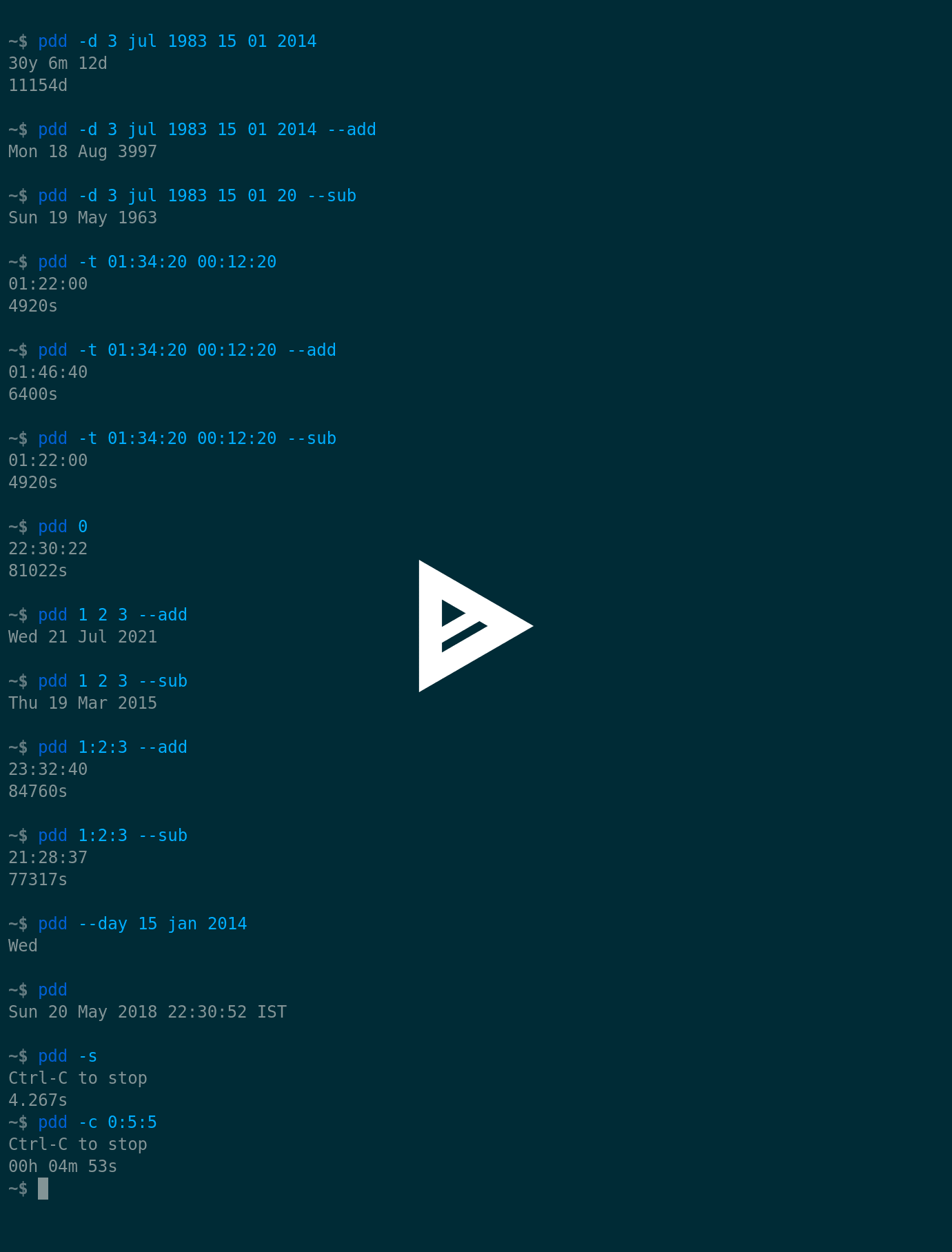
pdd (Python3 Date Diff) is a small cmdline utility to calculate date and time difference. It can also be used as a timer. If no program arguments are specified it shows the current date, time and timezone.
There are utilities and shell scripts which do what pdd does. However, pdd has been written with only one goal - simplicity. Users shouldn't have memorize anything.
Love smart and efficient terminal utilities? Explore my repositories. Buy me a cup of coffee if they help you.


Table of Contents
Features
- easy to use, minimal dependencies
- calculate date and time difference
- calculate diff from today and now
- add, subtract duration (timeslice) to/from date (time)
- countdown timer
- custom resolution stopwatch
- non-verbose mode for background timers
- show current date, time and timezone
Installation
Dependencies
pdd requires Python 3.5 (or later) and the dateutil module.
To install dateutil on Ubuntu, run:
$ sudo apt-get install python3-dateutil
or, using pip3:
$ sudo pip3 install python-dateutil
From a package manager
- AUR (
pacman -S pdd) - Debian (
apt-get install pdd) - Fedora (
dnf install pdd) - NixOS (
nix-env -i pdd) - PyPi (
pip3 install pdd) - Ubuntu (
apt-get install pdd) - Ubuntu PPA (
apt-get install pdd) - Void Linux (
xbps-install -S pdd)
Release packages
Packages for Arch Linux, CentOS, Debian, Fedora and Ubuntu are available with the latest stable release.
From source
If you have git installed, clone this repository. Otherwise download the latest latest stable release or development version (risky).
Install to default location (/usr/local):
$ sudo make install
To remove, run:
$ sudo make uninstall
PREFIX is supported, in case you want to install to a different location.
Running standalone
pdd is a standalone utility. From the containing directory, run:
$ ./pdd.py
Usage
cmdline options
usage: pdd [-h] [-d dd mmm yyyy [dd mmm yyyy | d m y]]
           [-t hh:mm:ss [hh:mm:ss | h:m:s]] [--add] [--sub]
           [--day dd mmm yyyy] [-c hh:mm:ss] [-s [resolution]] [-q]
           [keywords [keywords ...]]

Tiny date, time difference calculator with timers.

positional arguments:
  keywords              diff/add/subtract from today or now

optional arguments:
  -h, --help            show this help message and exit
  -d dd mmm yyyy [dd mmm yyyy | d m y]
                        calculate date difference
  -t hh:mm:ss [hh:mm:ss | h:m:s]
                        calculate time difference
  --add                 add to date (/today) or time (/now)
  --sub                 subtract from date (/today) or time (/now)
  --day dd mmm yyyy     show day of the week on a date
  -c hh:mm:ss           start a countdown timer
  -s [resolution]       start a stopwatch (default resolution: ms)
  -q                    quiet mode for background timer/stopwatch
Operational notes
- Time is in 24-hr format.
- Month can be specified as month number (e.g. Jan - 1, Dec - 12).
- The absolute difference is shown. Argument order is ignored.
- The end date is excluded in date difference calculations.
- Hour, minute or second can be omitted. Partial inputs are recognized as
mm:ssorss. - The keybind to stop timers is Ctrl-C.
Examples
-
Calculate diff from today:
$ pdd 15 Jan 2014 -
Calculate diff from now:
$ pdd 24:00:00 $ pdd 0 -
Calculate date diff:
$ pdd -d 3 jul 1983 15 1 2014 -
Calculate time diff:
$ pdd -t 45:50 6:17:33 -
Show current date, time and timezone:
$ pdd -
Specify time with roll-over:
$ pdd -t 5:80:75 6:17:33 -
Add a duration (1 day, 2 months, 3 years) to 28 Feb, 2000:
$ pdd -d 28 FEB 2000 1 2 3 --add -
Add a timeslice (1 hour 2 mins 3 secs) to 23:45:37:
$ pdd -t 23:45:37 1:2:3 --add -
Add a duration (1 day, 2 months, 3 years) to today:
$ pdd 1 2 3 --add -
Add a timeslice (1 hour 2 minutes 3 seconds) to now:
$ pdd 1:2:3 --add -
Subtract a duration (1 day) from 1 Mar, 2000:
$ pdd -d 01 Mar 2000 1 0 0 --sub -
Subtract a timeslice (1 sec) from midnight:
$ pdd -t 00:00:00 0:0:1 --sub -
Subtract a duration (1 day, 2 months, 3 years) from today:
$ pdd 1 2 3 --sub -
Subtract a timeslice (1 hour 2 minutes 3 seconds) from now:
$ pdd 1:2:3 --sub -
Show the day of the week on 15 Jan 2014:
$ pdd --day 15 Jan 2014 -
Start a countdown timer or stopwatch in quiet mode in the background:
$ pdd -qs &
$ pdd -qc 3:0:0 &
To see the final counter run
fgand press Ctrl-C.
Copyright
Copyright © 2017 Arun Prakash Jana


Download files
Download the file for your platform. If you're not sure which to choose, learn more about installing packages.
Source Distribution
Built Distribution
Filter files by name, interpreter, ABI, and platform.
If you're not sure about the file name format, learn more about wheel file names.
Copy a direct link to the current filters
File details
Details for the file pdd-1.2.tar.gz.
File metadata
- Download URL: pdd-1.2.tar.gz
- Upload date:
- Size: 8.2 kB
- Tags: Source
- Uploaded using Trusted Publishing? No
File hashes
| Algorithm | Hash digest | |
|---|---|---|
| SHA256 |
4591305a846a4ba26e7b702d77c6df135a4258c226daa9a01497955cc177913c
|
|
| MD5 |
d2d02e68fc084f63ebc4bc21e5b659bb
|
|
| BLAKE2b-256 |
b7177bd78295b41909adbc2c9f621cd1c43f35a7bb989e6662e07d5d595adde0
|
File details
Details for the file pdd-1.2-py3-none-any.whl.
File metadata
- Download URL: pdd-1.2-py3-none-any.whl
- Upload date:
- Size: 7.9 kB
- Tags: Python 3
- Uploaded using Trusted Publishing? No
File hashes
| Algorithm | Hash digest | |
|---|---|---|
| SHA256 |
30717f9b9c3dadd265d18cff0ea8656610a228349e0e81543373037795fcd086
|
|
| MD5 |
fc5d69c17b7ac646a16802b2fe10dd66
|
|
| BLAKE2b-256 |
01a6c19eee3737e4c4ce7e60df75903dd2bcf9e56680aa8901438d433c6b793e
|






