
pdf_a11y — Programmatic PDF Accessibility Remediation







Programmatic PDF accessibility remediation for organisations facing the EU Accessibility Act, US Section 508, ADA, and WCAG 2.2 audits — without sending sensitive documents to anyone's cloud. WCAG 2.2 / PDF/UA-1 / WTPDF 1.0 compliant in ~5 minutes per document. Validator-verified by veraPDF. Open source.
Who this is for
- Engineering & DevOps teams wiring PDF accessibility into existing CI/CD pipelines or document-processing back-ends. Headless HTTP API, CLI, and Python library on the same engine.
- Compliance, legal & accessibility officers preparing a document portfolio for an EU EAA, US Section 508, ADA, or WCAG 2.2 audit — without €50–150-per-page manual remediation costs or sending originals to a third-party cloud service.
- Document management & EDM vendors (DMS, intranet platforms, publishing tools) embedding accessibility remediation as a feature inside their own product — on-premises, no per-document SaaS fee.
Why now
The EU Accessibility Act (Directive 2019/882) has been enforceable since 28 June 2025, requiring accessible digital content from any private-sector body trading in the EU. The US Section 508 Refresh and incoming EN 301 549 v3.2.1 procurement standard tighten the same requirements for public-sector and supplier ecosystems. A document portfolio that fails a screen-reader audit is now a compliance liability for any organisation that publishes PDFs at scale — universities, banks, insurers, public-sector bodies, regulated enterprises.
Commercial services
The open-source pipeline is the whole engine — fully usable, fully self-hostable, no feature paywall. ASSERT I.K.E. sells time and judgment around it, not gated features. Reach out when you need:
- an air-gapped or on-premises deployment with a documented runbook;
- a local vision model provisioned and tuned for your document volume and GPU budget (vLLM, LM Studio, llama.cpp);
- a bulk remediation of an existing PDF portfolio, with the human-in-the-loop alt-text review process operated as a service;
- prioritised feature work on a specific milestone (MathML, OCR for scanned PDFs, EN 301 549 profile, PDF/UA-2 support).
Casual open-source support via ☕ Buy Me a Coffee. Full service breakdown: Funding & paid services.
How we keep it honest
Design choices that matter to your security, compliance, and engineering review — written for the technical reader your business stakeholder will forward this page to:
- Validator-gated output. Every remediated PDF passes through veraPDF (PDF/UA-1 and WTPDF 1.0 profiles) inside the pipeline. A document that does not pass is returned with its veraPDF rule failures attached; AI output is never marketed as "compliant" without machine- checkable proof.
- Deterministic core, AI only at the edges. Tagging, struct-tree fixes, contrast remediation, language detection, the WTPDF profile fixer, and the validator pass are all deterministic code paths. A vision-language model is invoked only for image alt text — and every generated description is reviewable + overridable through the human-in-the-loop screen before the PDF ships.
- Audit-ready artefacts. Each run emits a JSON report (every remediation decision with its WCAG / PDF/UA / WTPDF citation) plus both veraPDF HTML reports — these are the artefacts an accessibility auditor or procurement reviewer actually wants to see.
- No mandatory cloud round-trip. The default VLM is any OpenAI-compatible local server (LM Studio, vLLM, llama.cpp, Ollama). Documents do not leave your network unless you deliberately point at a cloud provider.
- Open source, end to end. Every fixer, every API endpoint, the full Docker recipe, and the security posture are in this repo. Your security team can read it before deployment instead of trusting a vendor's word.
- Honest about scope. § What it does NOT do lists what is best-effort or out of scope today (complex multi-column layouts, scanned PDFs without OCR, MathML, …). Read it before budgeting — we would rather lose a deal than ship a surprise.
A modular pipeline that takes an existing (often untagged) PDF and produces a WCAG 2.2 / PDF/UA-1 (ISO 14289-1) / WTPDF 1.0 Accessibility compliant document — without any paid service.
It is a practical, free, fully local alternative to Adobe Acrobat's Autotag / paid remediation services. It combines:
- the Apache-2.0
opendataloader-pdfstructure tagger (local, JVM-based), - a Vision Language Model for image alt text — any OpenAI-compatible inference engine (LM Studio, vLLM, llama.cpp server, Ollama, …) running a VL model like Qwen3-VL, or cloud Claude / GPT-4o,
- five content-stream post-processing passes that fix the things a raw tagger gets wrong, and
- a
WTPDFFixerfor the strict PDF 2.0 / WTPDF rules,
then validates the result with veraPDF.
It runs three ways: a point-and-click web app (Docker), a headless HTTP API for CI/CD, and a command-line tool / Python library.
Reference result, reproducible in 10 minutes. The repo bundles an actual European Commission publication — A short guide to the EU (examples/, 36 pages, ~10 MB, © European Union 2023, CC BY 4.0; see NOTICE for full attribution) — as a demo input. With default settings the pipeline takes it to 0 of 106 failures on veraPDF PDF/UA-1 and 0 of 1723 failures on veraPDF WTPDF 1.0 Accessibility. PAC 2024 reports 0 failures plus a few hundred soft warnings — soft, human-review tagging-style flags that are not ISO violations; see Validators. Run it yourself via the steps under Try it on the bundled example.
Contents
- Who this is for
- Why now
- Commercial services
- How we keep it honest
- Why this is an Adobe Autotag alternative
- What it actually fixes
- Run it 1 — Web app (Docker)
- Run it 2 — Headless API (CI/CD)
- Run it 3 — Command line
- Architecture
- Tagging engines
- Image alt-text providers
- Validators — what "compliant" means
- Human-in-the-loop workflow
- Configuration
- Performance
- What it does NOT do
- Troubleshooting
- Funding & paid services
- Container security posture
- License
- Liability & disclaimer
Why this is an Adobe Autotag alternative
Adobe Acrobat Autotag (and the Adobe PDF Services Autotag API) is a high-quality structure tagger. But tagging is only one step of remediation. Autotag output, on its own, is not a PDF/UA-1 document:
In our reverse-engineering tests, a file processed by Adobe Autotag alone still failed veraPDF PDF/UA-1 with over 1,300 rule violations — missing the XMP
pdfuaidmarker, role-mapped but unverified structure, link destinations, PUA/ActualText, WTPDF declarations, and more.
pdf_a11y does the whole job: metadata, tagging, the post-tagging
content-stream fixes, image alt text, contrast, language, the WTPDF 2.0
rules, then validation. The structure tagger is pluggable — you can set
tagging.engine: adobe — but the default opendataloader engine reaches
veraPDF compliance with no paid API and no data leaving your network.
| Adobe Acrobat / Autotag API | pdf_a11y (default config) |
|
|---|---|---|
| Cost | Per-seat licence / per-call API | Free, open-source |
| Data residency | Uploaded to Adobe cloud (Autotag API) | 100% local — no document leaves your network |
| Scope | Tagging (+ manual fixes in Acrobat) | Full pipeline: tag → fix → alt text → validate |
| veraPDF PDF/UA-1 out of the box | ❌ tagging only | ✅ |
| veraPDF WTPDF 1.0 out of the box | ❌ | ✅ |
| Batch / CI-CD | Limited | ✅ CLI + HTTP API |
| Automation of alt text | Manual | ✅ VLM-generated |
| Reproducible (config-as-code) | ❌ | ✅ single YAML file |
What it actually fixes
| WCAG / PDF/UA / WTPDF | Description | Coverage |
|---|---|---|
| 1.1.1 | Alt text on images | ✅ VLM-generated, written to /Figure StructElem + image XObject |
| 1.3.1 | Tagging / table headers | ✅ via opendataloader (Apache 2.0), or adobe / pdfix |
| 1.3.2 | Meaningful sequence | ✅ /Tabs=/S; reading-order analysis |
| 1.4.3 | Contrast minimum | ⚠ report + configured palette remap (hex → hex) |
| 2.4.2 | Page titled | ✅ full |
| 2.4.3 | Focus order | ✅ /Tabs = /S |
| 3.1.1 | Document language | ✅ full |
| 3.1.2 | Language of parts | ✅ detection + reporting |
| 4.1.2 | Name, role, value (forms) | ✅ tooltips from nearby text / field name / config |
| PDF/UA-1 5-1 | XMP pdfuaid:part marker |
✅ re-applied after taggers that rewrite XMP |
| PDF/UA-1 7.3-1 | Figure must have /Alt or /ActualText |
✅ VLM alt; placeholder retained for decoratives |
| WTPDF 6.1.3-1 | pdfd:Declarations accessibility URI |
✅ injected by WTPDFFixer |
| WTPDF 8.2.5.2-2 | /Document in PDF 2.0 namespace |
✅ injected by WTPDFFixer |
| WTPDF 8.4.3-1 | PUA glyphs need /ActualText |
✅ added to struct elems containing icon-font glyphs |
| WTPDF 8.8-1 | Internal links resolve to a structure element | ✅ /A /GoTo with dual /D (page) + /SD (struct) destinations |
| WTPDF 8.9.4.2-1 | Annot /Contents must byte-equal enclosing /Alt |
✅ synced via WTPDFFixer |
| PDF 2.0 §8.5 | No BMC/BDC inside path-construction state |
✅ post-tagging fixup of opendataloader output |
| Matterhorn 01-001 | Every BT/ET text object inside a marked-content sequence | ✅ BT/ET wrap fixup |
| Matterhorn 01-001 | TOC dot-leaders marked /Artifact, not tagged content |
✅ decorative-block demotion |
| ISO 14289-1 §7.1 | Artifacts classified (/Pagination header/footer, /Layout) |
✅ typed-artifact classification |
| PDF/UA-1 7.1-3 / WTPDF 8.2.2-1 | Stray painting ops left untagged by the tagger | ✅ post-tagging sweep wraps them as /Artifact BMC..EMC (ArtifactWrapFixer) |
| PDF/UA-1 7.20-2 | Form XObject with MCIDs referenced from >1 page (repeating headers/footers) | ✅ MCIDs stripped, struct-tree refs pruned, XObject demoted to /Artifact (SharedXObjectFixer) |
| ISO 32000-1 §7.9.7 | ParentTree /Nums keys in ascending order |
✅ _sort_parent_tree_nums — see note below |
✅ = fully automated · ⚠ = report-first, controlled by config
The ParentTree sort.
opendataloaderwrites theStructTreeRoot/ParentTreenumber tree with its/Numskeys out of order. ISO 32000-1 §7.9.7 requires number-tree keys ascending. An unsorted tree makes a validator unable to resolve marked content back to its structure element — in our testing on a large document this single defect produced ~16,800 "content not tagged" failures in PAC. Sorting the/Numsarray in place drove those to zero. It is the highest-impact fix in the pipeline and the reason raw tagger output (from any engine) needs post-processing.
Run it 1 — Web app (Docker)
A self-contained, self-explanatory web app for non-technical users. Upload a
PDF, optionally adjust a few settings, watch live progress, download the
remediated PDF plus veraPDF reports. The container bundles everything —
Python, a Java runtime (for opendataloader), and veraPDF. The only external
dependency is a vision-model endpoint, and its URL is configurable per upload.
Quick start — pull the published image (no build)
docker run -d --name pdf-a11y -p 8000:8000 \
  -e VLM_BASE_URL="http://your-vlm-host:1234/v1" \
  -e VLM_MODEL="qwen/qwen3-vl-30b" \
  -v pdf-a11y-jobs:/data/jobs \
  ghcr.io/adamopoulosa1980/pdf-accessibility:latest
The same image is mirrored to Docker Hub as
adamopoa/pdf-accessibility:latest if you prefer.
Pinned versions (:v2.2, :v2.3, …) are published on every release tag.
Quick start — build locally (active development)
From the webapp/ directory:
docker compose up -d --build
Open http://<server-host>:8000. Edit the environment: block in
webapp/docker-compose.yml first so VLM_BASE_URL
points at a vision-model server the host can reach.
Plain Docker (build from the project root)
docker build -f webapp/Dockerfile -t pdf-a11y-remediator:1.0 .

docker run -d --name pdf-a11y -p 8000:8000 \
  -e VLM_BASE_URL="http://your-vlm-host:1234/v1" \
  -e VLM_MODEL="qwen/qwen3-vl-30b" \
  -v pdf-a11y-jobs:/data/jobs \
  pdf-a11y-remediator:1.0
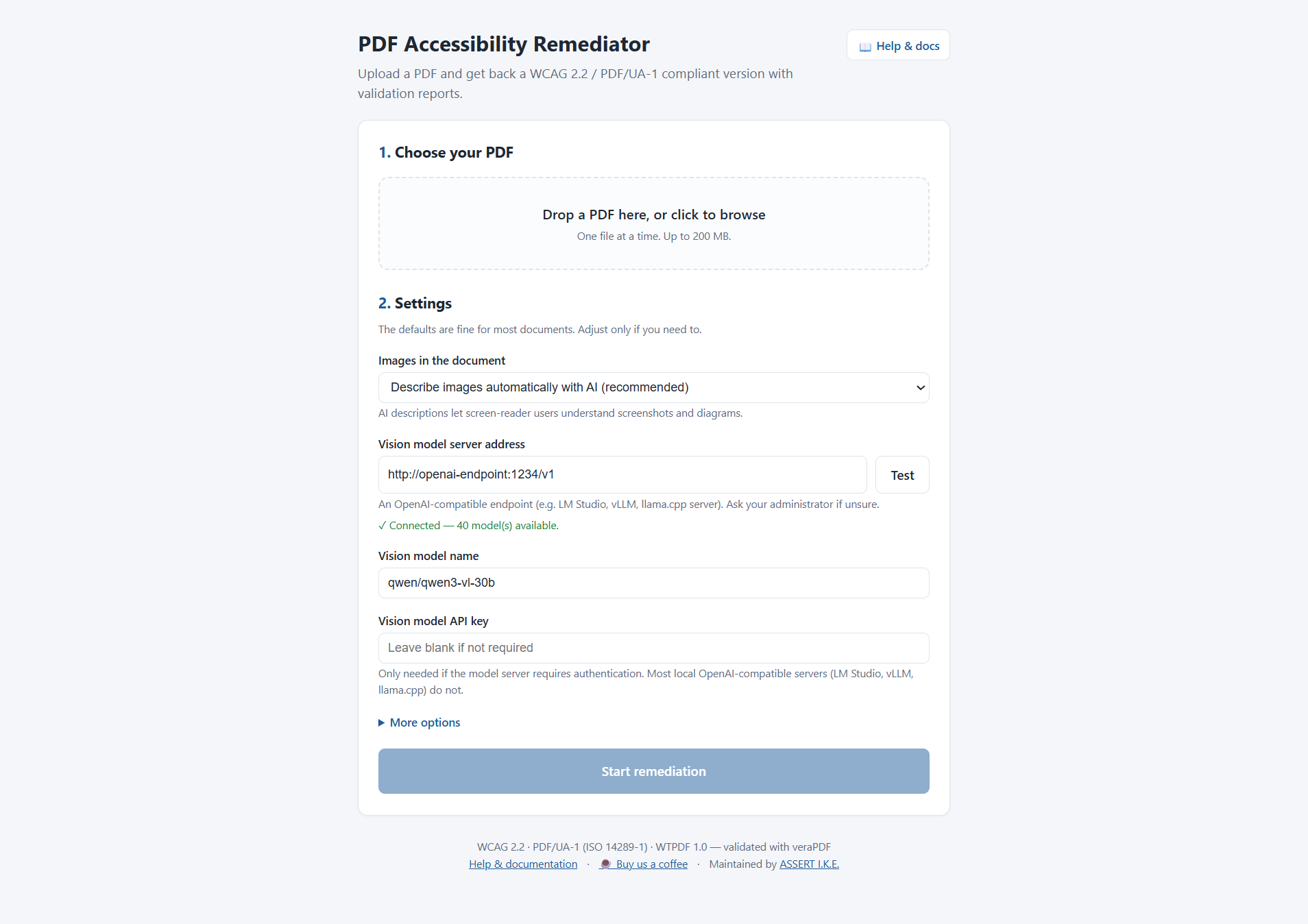
Using the web UI
-
Choose your PDF — drag-and-drop or browse.
-
Settings — defaults are fine; the vision-model address is pre-filled. A Test button confirms it is reachable. Optional API key field for servers that require authentication (most local OpenAI-compatible servers do not).
-
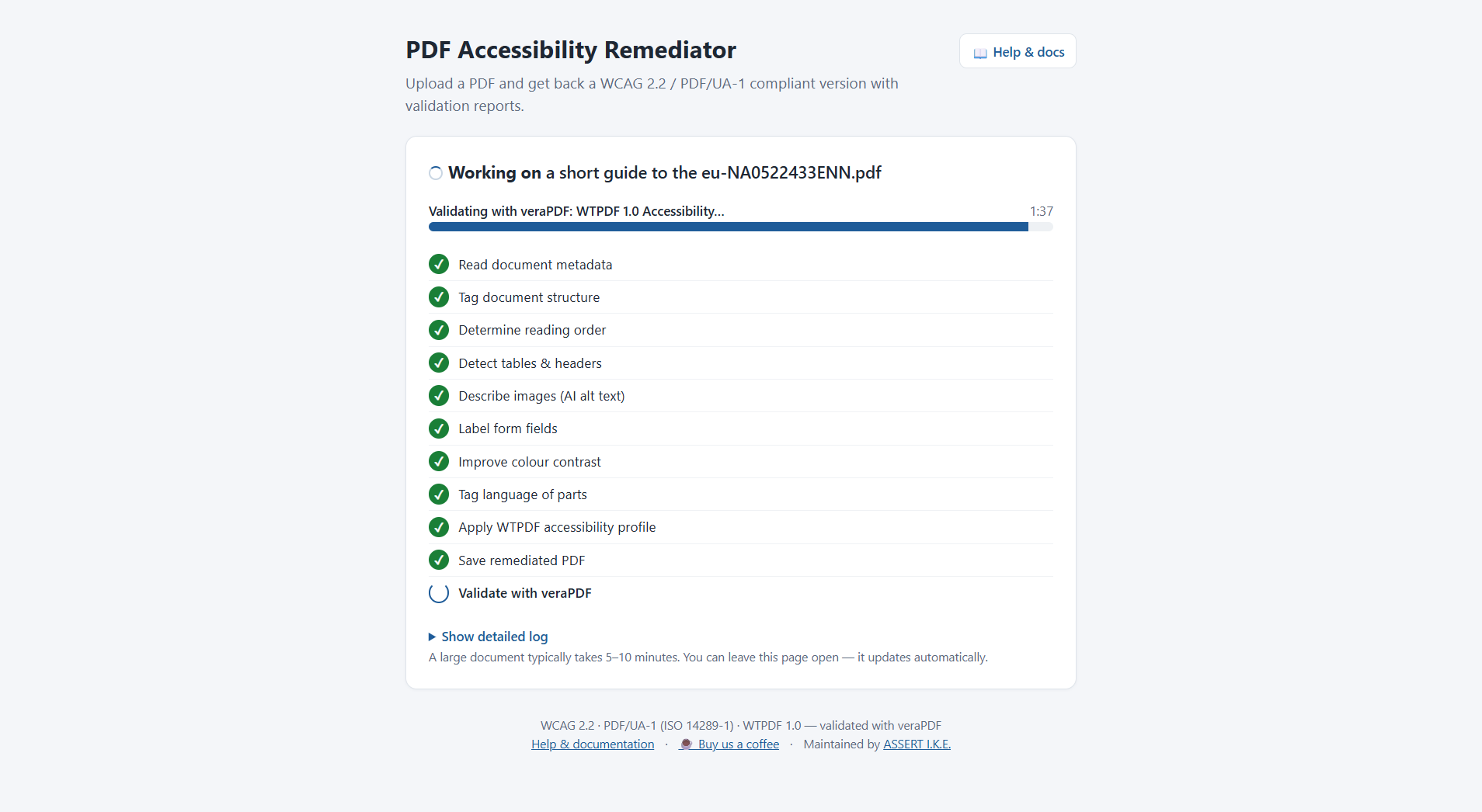
Start remediation — a live checklist shows each pipeline step; a large document takes 5–10 minutes.
-
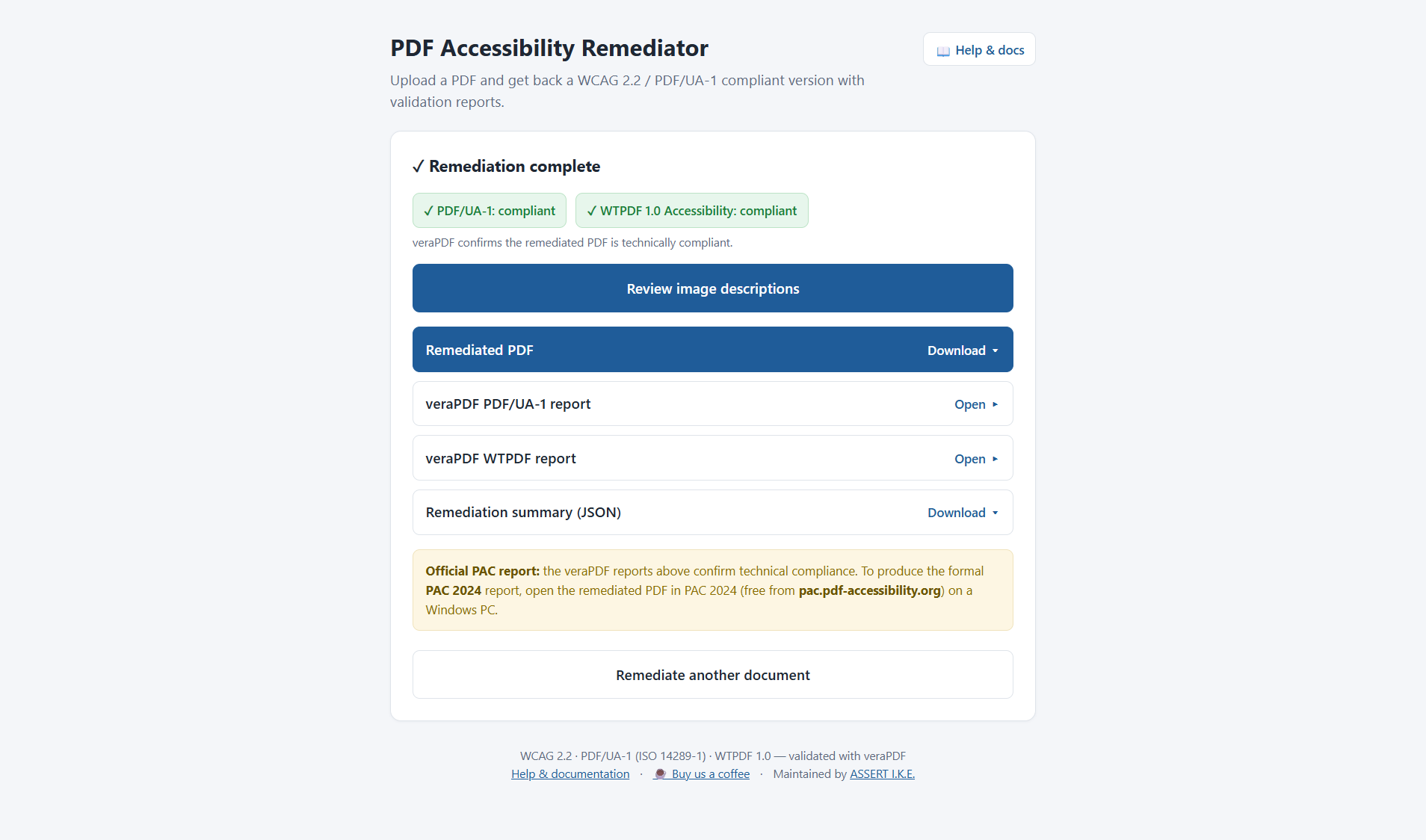
Download — the remediated PDF plus the veraPDF PDF/UA-1 and WTPDF reports, each with a pass/fail badge.
-
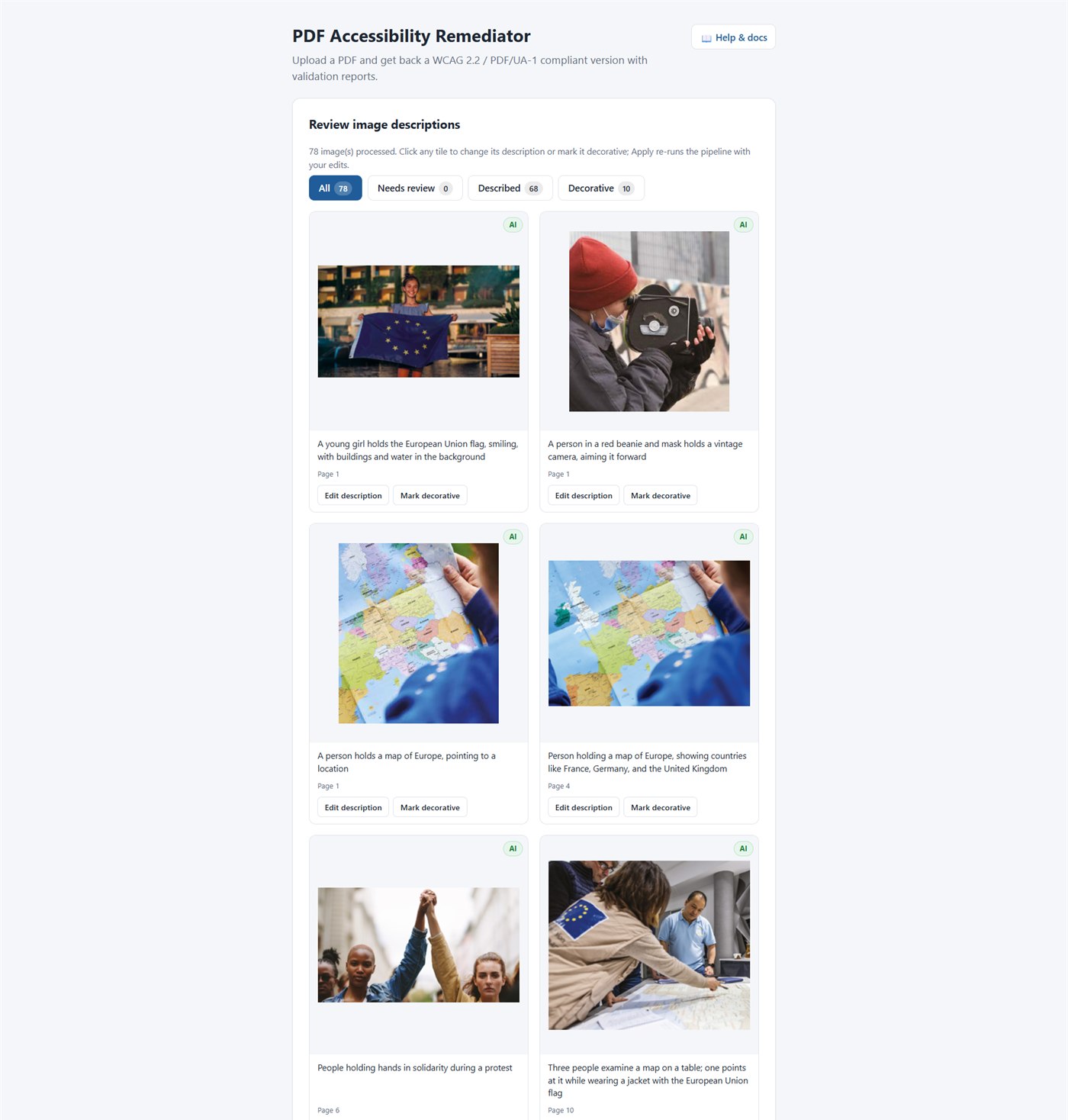
Review image descriptions (optional) — a button on the results card opens a thumbnail grid of every image the AI processed. Edit the description, mark it decorative, or accept it as-is; clicking Apply changes & re-run re-runs the pipeline on the same original PDF with your edits merged in. No more CSV-by-SHA-256 round-trips.
A Help & docs link in the UI opens this README at /help.
The official PAC 2024 report is produced by the user afterward, by opening the remediated PDF in PAC 2024 on Windows. veraPDF (bundled) gives the same technical verdict and is enough to gate a build.
Configuration (environment variables)
| Variable | Default | Purpose |
|---|---|---|
VLM_BASE_URL |
(from config file) | Vision-model server URL pre-filled in the UI |
VLM_MODEL |
(from config file) | Vision-model name pre-filled in the UI |
VLM_API_KEY |
(unset) | Deployment-wide VLM API key (used when a user leaves the key field blank) |
MAX_CONCURRENT_JOBS |
1 |
Documents processed at once |
JOB_RETENTION_HOURS |
24 |
Finished jobs + files are purged after this |
MAX_UPLOAD_MB |
200 |
Upload size limit |
JOBS_DIR |
/data/jobs |
Where uploads/results live (mount a volume) |
VERAPDF_PATH |
/opt/verapdf/verapdf |
veraPDF launcher |
VERAPDF_TIMEOUT |
1200 |
Per-profile veraPDF timeout (seconds) |
BASE_CONFIG |
/app/config/remediation_config.yaml |
Pipeline config baked into the image |
Per-upload settings always override the defaults. The tagging engine is fixed
to opendataloader in the web app (free, local, no keys).
Trusted network. The web app has no authentication — deploy it behind your network boundary, or in front of a reverse proxy that adds auth, as intended for an internal tool.
Run it 2 — Headless API (CI/CD)
The job API needs no browser. Interactive OpenAPI docs are at /docs:
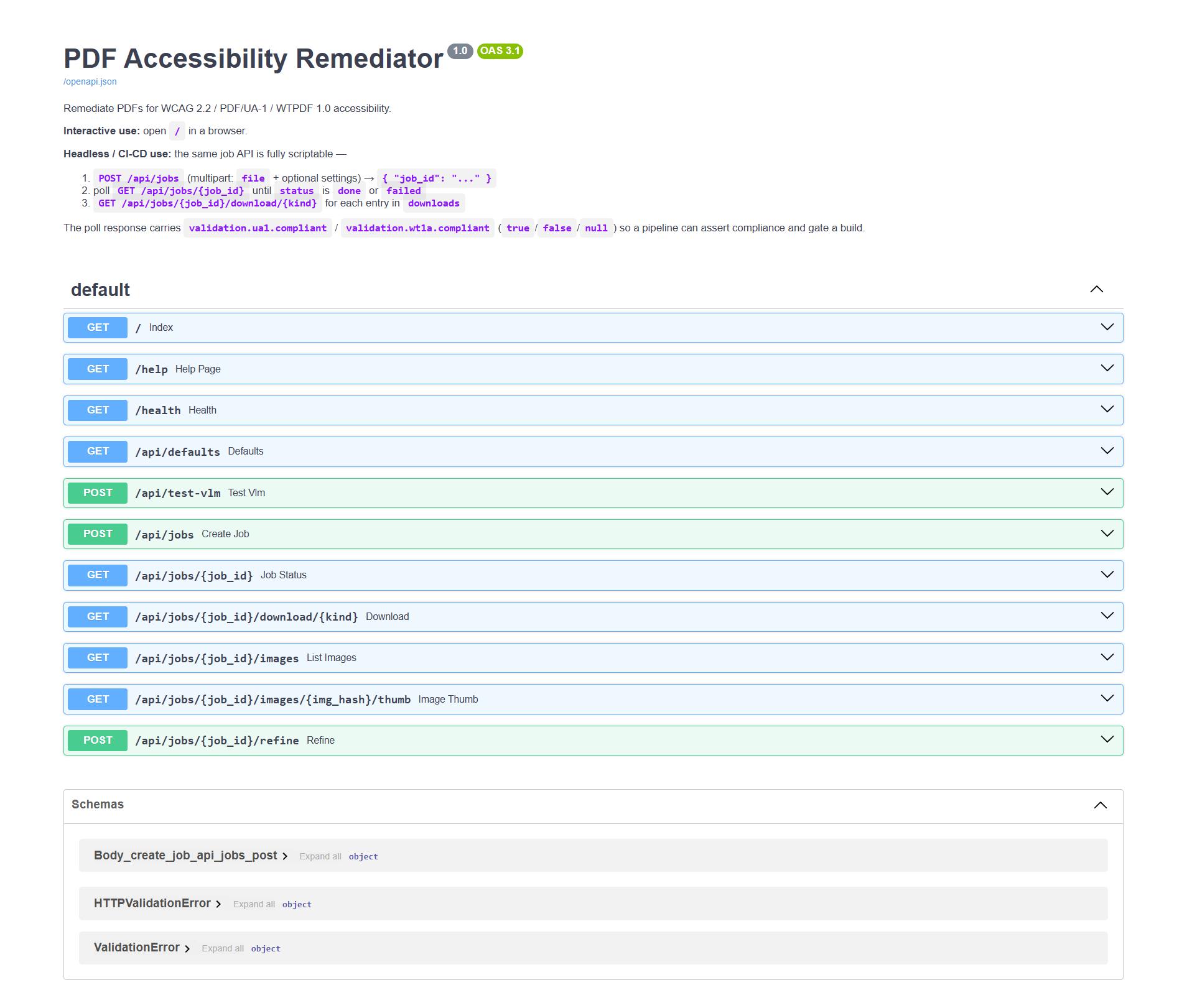
| Method & path | Purpose |
|---|---|
POST /api/jobs |
Submit a PDF (multipart file + settings) → { "job_id": ... } |
GET /api/jobs/{id} |
Poll status, progress, validation, downloads |
GET /api/jobs/{id}/download/{kind} |
Fetch an artefact (kind from the downloads map) |
GET /api/jobs/{id}/images |
List every image with current alt text + thumbnail URL (powers human-in-the-loop review) |
GET /api/jobs/{id}/images/{hash}/thumb |
PNG thumbnail for one image |
POST /api/jobs/{id}/refine |
Submit alt-text overrides; spawns a new job re-running on the same original PDF |
POST /api/test-vlm |
Check a VLM URL is reachable |
GET /health |
Liveness + veraPDF availability |
A poll response carries validation.ua1.compliant and
validation.wt1a.compliant (true / false / null) so a pipeline can
assert compliance and gate a build.
Human-in-the-loop alt text (UI + API)
The single hardest part of accessibility automation is the cases where the
vision model gets an image description wrong (or marks the cover-page logo
as "image 2"). The web app exposes a thumbnail-grid review screen for
those, and the same backend endpoints are public API so a CI/CD
pipeline can plug a human into the loop too.
Typical CI/CD pattern:
POST /api/jobs→ wait fordone.GET /api/jobs/{id}/images→ JSON with one entry per unique image (hash,alt,source,width,height,thumb_url,occurrences).sourceis one ofvlm/override/decorative_auto/decorative_vlm/manual_required/pending_vlm.- Filter where
source == "manual_required"(the VLM gave up). Post each one — with the thumbnail — to your review queue: Linear / Jira / ServiceNow / Slack / SharePoint list / whatever. - When a reviewer fills in a description, your webhook calls
POST /api/jobs/{id}/refinewith{ "overrides": { "<hash>": "alt text" } }. - The response gives a fresh
job_id; poll it like any other job. The resulting PDF carries every previous override plus the new one (refinements chain — each child remembers its parent's overrides).
Minimal curl:
# After a job finishes, list its images
curl -sf http://host:8000/api/jobs/$JOB/images | jq '.images[] |
  select(.source=="manual_required") | {hash, occurrences}'

# Submit reviewer-supplied alt text — gets back a new job_id
NEW=$(curl -sf -X POST http://host:8000/api/jobs/$JOB/refine \
  -H 'Content-Type: application/json' \
  -d '{"overrides":{"a3f5b8c1":"Diagram of the NCTS Phase 6 message flow",
                    "9e2d1a4f":"DECORATIVE"}}' | jq -r .job_id)

# Same poll loop as a normal job
curl -sf http://host:8000/api/jobs/$NEW
The value sentinel "DECORATIVE" (uppercase) marks the image as an
artifact instead of supplying alt text — same schema as the
images.alt_overrides config field, so a CI script that already produces
that file can post it straight to /refine unchanged.
Bundled client
webapp/client.py uploads, waits, downloads, and sets an exit code:
python webapp/client.py doc.pdf \
  --server http://host:8000 \
  --out ./results \
  --require-compliant       # exit 2 unless every veraPDF profile passes
Exit codes: 0 ok · 1 job failed · 2 not compliant · 3 usage/connection error.
Raw curl
JOB=$(curl -sf -F file=@doc.pdf -F image_strategy=vlm \
        http://host:8000/api/jobs | jq -r .job_id)

while :; do
  S=$(curl -sf http://host:8000/api/jobs/$JOB)
  echo "$S" | jq -r '.status + " — " + .phase'
  ST=$(echo "$S" | jq -r .status)
  [ "$ST" = done ] || [ "$ST" = failed ] && break
  sleep 5
done

curl -sf -o doc_a11y.pdf http://host:8000/api/jobs/$JOB/download/remediated_pdf
CLI inside the image (no server)
docker run --rm -v "$PWD:/work" -w /work pdf-a11y-remediator:1.0 \
  python -m pdf_a11y /work/doc.pdf --config /app/config/remediation_config.yaml
Run it 3 — Command line
Install from PyPI (recommended)
pip install pdf-a11y           # core library + CLI
pip install "pdf-a11y[webapp]" # also include the FastAPI web app
Two non-Python runtime dependencies still need to be on the host:
# 1. Java 11+ (for tagging.engine = opendataloader / adobe) — https://adoptium.net
# 2. veraPDF 1.30.1 — run one of the bundled installer scripts:
.\scripts\install-verapdf.ps1     # Windows
./scripts/install-verapdf.sh      # Linux / macOS
(The scripts/ directory is shipped inside the PyPI sdist; you can also
grab them from the GitHub repo.)
Install from the git clone (active development)
git clone https://github.com/adamopoulosa1980/pdf_accessibility.git
cd pdf_accessibility
pip install -r requirements.txt
# Same Java + veraPDF prerequisites as above.
Run it
# Everything tunable is in one file (config/remediation_config.yaml):
pdf_a11y path/to/document.pdf
# or, equivalently:
python -m pdf_a11y path/to/document.pdf
CLI flags
| Flag | Effect |
|---|---|
--config <path> |
Use a non-default config file (default: config/remediation_config.yaml). |
--recursive, -r |
When the input is a directory, process every *.pdf under it. |
--quiet, -q |
Suppress per-finding output. JSON reports are still written. |
Output goes to ./output/ by default:
<name>_a11y.pdf— remediated PDF<name>_report.json— full audit trail of every change, incl. veraPDF rule pass/fail and per-image VLM alt text<name>_original.pdf— backup of the source<name>_images_review.csv— images needing manual alt text (only if any)
As a library
pip install pdf-a11y
from pdf_a11y import Config, RemediationPipeline

cfg = Config.load("config/remediation_config.yaml")
report = RemediationPipeline(cfg).run("input.pdf")

print(f"Output: {report.output_pdf}")
for finding in report.findings:
    if finding.severity == "manual_required":
        print(f"NEEDS REVIEW: [{finding.wcag}] {finding.message}")
A default config file ships inside the package at
config/remediation_config.yaml — copy it next to your script (or
point Config.load(...) at a custom path) and tune. The veraPDF
launcher and Java runtime still need to be installed separately;
see Installing veraPDF below.
Try it on the bundled example
The repository ships a real-world test document at examples/a short guide to the eu-NA0522433ENN.pdf — the European Commission's A short guide to the EU (36 pages, ~10 MB, © European Union 2023, licensed under CC BY 4.0; full attribution in NOTICE). It has the failure modes that trip naive pipelines: untagged decorative graphics, repeating header/footer Form XObjects with MCIDs, complex multi-column layouts.
If you redistribute the remediated output, CC BY 4.0 requires you to credit the European Union and indicate the document has been modified for accessibility. The pipeline's own JSON report and the output filename suffix (
_a11y) are usually enough to satisfy the "indicate changes" obligation; the attribution line is on you.
# Install veraPDF first (see "Installing veraPDF" below)
.\scripts\install-verapdf.ps1

# Run the pipeline. To skip the VLM step (no model server needed), set
# `images.strategy: "decorative"` in the config; otherwise point
# `images.vlm.base_url` at an OpenAI-compatible server.
python -m pdf_a11y "examples/a short guide to the eu-NA0522433ENN.pdf"
You should see:
[1/9] Document metadata ...
[2/9] Tagging document structure ...
[2c/9] Marking untagged content as Artifact ...
[2d/9] Demoting shared MCID-bearing Form XObjects ...
[3/9] Reading order ...
...
[9/9] WTPDF accessibility profile ...
Done: output/a short guide to the eu-NA0522433ENN_a11y.pdf
  Summary: 106 fixed, 76 warnings, 0 need review, 0 errors
Confirm with veraPDF (both profiles):
.\tools\verapdf\verapdf.bat --format text --flavour ua1 `
  "output\a short guide to the eu-NA0522433ENN_a11y.pdf"
.\tools\verapdf\verapdf.bat --format text --flavour wt1a `
  "output\a short guide to the eu-NA0522433ENN_a11y.pdf"
Both should print PASS — 0 PDF/UA-1 failures, 0 WTPDF 1.0 Accessibility
failures.
Installing veraPDF
Required only for the local CLI pipeline — the Docker image installs
veraPDF itself (webapp/Dockerfile). The bundled
scripts download veraPDF 1.30.1 from upstream and install it into
tools/verapdf/:
# Windows
.\scripts\install-verapdf.ps1
# Linux / macOS
./scripts/install-verapdf.sh
Both scripts need a JRE (8+) on PATH. Bash also needs curl and unzip.
After install, the validation.verapdf_path default in
config/remediation_config.yaml already
points at the installed launcher — Linux/macOS users should drop the
.bat suffix.
Architecture
┌─────────────────────────────────────────────────────────────────────┐
│ MetadataFixer    /Lang, /Title, MarkInfo, XMP pdfuaid:part          │
│ StructureFixer   StructTreeRoot (opendataloader / adobe / pdfix /   │
│                  heuristic / skip), then FIVE post-processing       │
│                  passes on the tagged output:                       │
│                    1. BMC/BDC out of path-construction state        │
│                    2. wrap every BT/ET in a marked-content seq      │
│                    3. demote dot-leaders to /Artifact               │
│                    4. classify artifacts /Pagination | /Layout      │
│                    5. sort the ParentTree /Nums keys ascending      │
│ MetadataFixer*   re-applied (taggers replace XMP wholesale)         │
│ ReadingOrder     /Tabs = /S, geometric / tagged / ML analysis       │
│ TableFixer       header detection + per-table overrides             │
│ ImageAltText     VLM alt text → image XObject + matching /Figure    │
│                  StructElem (so PAC actually credits it)            │
│ FormFieldFixer   tooltips for AcroForm widgets                      │
│ ContrastFixer    scan + optional palette remap (hex → hex), incl.   │
│                  scn/SCN/sc/SC/rg/RG operators                      │
│ LanguageFixer    per-span lang detection                            │
│ WTPDFFixer       PDF 2.0 namespace on /Document, sync Link Alt &    │
│                  Contents, /A GoTo /D + /SD dual destinations,      │
│                  PUA /ActualText, pdfd:Declarations XMP             │
│ Validator        veraPDF (PDF/UA-1, WTPDF 1.0, or WCAG 2.2)         │
└─────────────────────────────────────────────────────────────────────┘
Each fixer is independent and runs in the order above so later fixers build
on earlier structure — ImageAltText writes /Alt onto the /Figure
elements created by StructureFixer, and WTPDFFixer patches the strict
PDF 2.0 / WTPDF-only rules the tagger doesn't get right. The pipeline cleans
up its own .tmp_* working files at the end of every run.
Tagging engines
The biggest quality lever is the structure-tagging engine. Switch via
tagging.engine in config/remediation_config.yaml.
| Engine | Cost | Quality | Notes |
|---|---|---|---|
opendataloader |
Free | High | Apache 2.0, runs locally via JVM. Recommended default. Requires Java 11+. ~10–15 s for a 200+ page document. |
adobe |
Paid | Highest | Adobe PDF Services Autotag. Best for very complex layouts / irregular tables. Tagging only — still needs the rest of this pipeline. |
pdfix |
Paid | High | Commercial alternative, on-prem option. |
heuristic |
Free | Low | Font-size heuristic; flat tree. Can increase PAC failures on complex docs — use only on simple linear documents. |
skip |
Free | n/a | Leave the existing tag tree alone. Use if the PDF is already well tagged. |
Whatever engine you pick, the five post-processing passes above still run — they are what turn raw tagger output into a validator-clean document.
Image alt-text providers
images.vlm.provider selects how alt text is generated. All providers share
max_alt_length, output_language, prefer_existing_caption, and resolve an
API key in the order: explicit api_key → env var named by api_key_env → none.
| Provider | Network | Notes |
|---|---|---|
openai_compatible |
Local or self-hosted | Any OpenAI-compatible chat-completions endpoint — LM Studio, vLLM, llama.cpp server, text-generation-webui, LiteLLM, Ollama in OpenAI mode, etc. Default model: Qwen3-VL-30B. Recommended for offline / sensitive docs. |
anthropic |
Cloud | Claude vision models. Fastest per-image with cloud. |
openai |
Cloud | GPT-4o / -4o-mini. |
ollama |
Local | LLaVA-family models via the Ollama HTTP API. |
images.strategy chooses the overall approach: vlm (describe with a model),
decorative (mark every image as an artifact), or prompt (emit a CSV of
images for manual description). For openai_compatible, a health check
fires once per run to fail fast if the server is unreachable or the
requested model isn't loaded.
Validators — what "compliant" means
Accessibility validators disagree with each other, by design. As the pdfix validator comparison puts it, results differ because of different interpretations of success criteria, the difficulty of turning human judgment into automated checks, and variations in rule coverage and validation logic.
| Validator | What it checks | Role here |
|---|---|---|
| veraPDF | The reference validator named by the ISO standards: PDF/UA-1, PDF/UA-2, WTPDF 1.0, formal PDF 32000 syntax. | The pipeline's automated gate — --flavour ua1 and --flavour wt1a. |
| PAC 2024 (axes4 / PDF/UA Foundation) | PDF/UA-1 + WCAG, with stricter heuristics that go beyond ISO requirements. Windows GUI, no headless mode. | Procurement screens, final human QA. |
| Adobe Acrobat Preflight PDF/UA | PDF/UA-1 profile inside Acrobat Pro. | Spot checks if you have Acrobat. |
| CommonLook PDF Validator | PDF/UA-1 + Section 508, checkpoint-by-checkpoint. | Formal audits / US federal. |
Machine-checkable vs. human-judgment. Accessibility validation can never
be fully automated. A tool can confirm a /Figure has a non-empty /Alt; it
cannot confirm the alt text is accurate and meaningful. It can confirm a
structure tree exists; it cannot confirm the reading order is logical or
that a table's headers are semantically correct. Many Matterhorn Protocol
failure conditions are explicitly flagged for human verification.
So "compliant" is not "zero findings in every tool." A document can be
fully PDF/UA-1 + WTPDF compliant per veraPDF (0 failures) and still show
hundreds of warnings in PAC, because PAC enforces tagging-style
preferences that are not ISO requirements — e.g. PAC wants a hyperlink's
entire visible text under a single /Link, even though sibling /Link
elements are perfectly valid PDF.
On a representative large document, this pipeline reaches:
- veraPDF PDF/UA-1: 0 failures
- veraPDF WTPDF 1.0 Accessibility: 0 failures
- PAC 2024: 0 failures; the residual warnings are mostly
/Figureand/Link"possibly inappropriate use" — soft, human-review flags reflectingopendataloader's generic/L//LI//Linktable-of-contents style versus Adobe's/TOC//TOCI//Referenceconvention. They are not ISO violations. Driving them to literally zero requirestagging.engine: adobe.
The practical takeaway, echoing the pdfix article: combine validators and treat the result as a readable, navigable document — not a checkbox. This pipeline gates on veraPDF (the ISO reference) and leaves PAC for human sign-off.
Human-in-the-loop workflow
The web app's Review image descriptions screen lets a non-technical reviewer audit every AI-generated alt text in a single grid, edit descriptions, or mark images decorative — then re-run the pipeline with the corrections merged in:
For the headless / CLI path:
- First pass — run with defaults. Inspect
<name>_report.jsonand<name>_images_review.csvfor items that need decisions. - Fill in overrides in config/remediation_config.yaml:
images.alt_overrides— hashes + final alt text (orDECORATIVE)tables.overrides— header row/col counts for ambiguous tablescontrast.color_mappings— chosen replacement coloursforms.form_field_labels— fields the heuristic missed
- Second pass — rerun. The pipeline is idempotent.
Configuration
All tunables live in a single file:
config/remediation_config.yaml. Every
parameter the pipeline reads is exposed there with inline documentation;
alternate providers and engines are kept as commented stubs so switching
between e.g. openai_compatible ↔ anthropic ↔ openai is a
search-and-replace.
Performance
End-to-end on a typical 200+ page document with several hundred images,
Qwen3-VL-30B served by an OpenAI-compatible inference engine,
opendataloader tagger: ~7–8 minutes total. Stage breakdown:
opendataloadertagger: ~10–15 s- Five content-stream post-processing passes: ~3–5 s
- VLM alt text per image: ~1–2 s local (Qwen3-VL on dual GPU) / ~2–4 s cloud
- Contrast scan + remap: ~5–10 s (5,000+ operator rewrites on a doc this size)
WTPDFFixer: ~3–5 s- veraPDF validation (per profile): ~5–15 s
Tune images.vlm.concurrency to your hardware: a local 30B-class model is
reliable at 2–4; higher values tend to time out. Cloud providers handle
8+. For batch jobs use --recursive, or the web app's queue.
What it does NOT do
- Rewrite reading order in complex multi-column PDFs without a real
tagger: detected and reported, fixed only with
engine: opendataloader/adobe. - Merge sibling struct elements for one logical span (e.g. a
/Ptext immediately followed by a sibling/Link). PAC dislikes the split; veraPDF does not. Adobe Autotag avoids it naturally;opendataloaderdoes not. - Choose colours — by design: the config asks you for the replacement palette.
- Math/equation tagging — out of scope; use MathML-aware tools.
- Scanned PDFs — run OCR first (e.g.
ocrmypdf), then this pipeline. - Run PAC headlessly — PAC ships as a Windows GUI only.
Troubleshooting
- "Unknown VLM provider: openai_compatible" — install
openai>=1.50(theopenai_compatibleprovider uses the OpenAI Python client to talk to any OpenAI-compatible server). - Health check fails — "Cannot reach the OpenAI-compatible server" —
the
base_urlinimages.vlmis wrong or the server is down. Check it from the host (curl <base_url>/models). - Health check fails — "Model not loaded" — the
modelinimages.vlm.modeldoesn't match anything the server advertises at/v1/models. Substring matches are accepted (qwen3-vl-30bmatchesqwen/qwen3-vl-30b). In LM Studio load the VL model in the developer tab; in vLLM / llama.cpp pass the right--modelat startup. - Many images land in
_images_review.csv— the local VLM is overloaded. Lowerimages.vlm.concurrency(2–4 for a 30B model). Failed images are listed and can be re-run on a second pass. veraPDF executable not found— setvalidation.verapdf_path(or theVERAPDF_PATHenv var) to an absolute path. On Windows the.batlauncher must be invoked with an absolute path.Operator 'BMC' not allowed in this current statein PAC — a knownopendataloader-pdf≤ 2.4.4 quirk; the pipeline's post-tagging fixup (pdf_a11y/fixers/structure.py) clears it. Make sure you're on current pipeline code.- Many "content not tagged" / "Text object not tagged" errors in PAC —
the five post-processing passes (incl. the ParentTree
/Numssort) clear the bulk of these. The residue isopendataloader's tagging-style choices — not ISO violations; veraPDF reports the document fully PDF/UA-1 + WTPDF compliant. For a literally-zero PAC report, usetagging.engine: adobe. - Web app job fails immediately — open Show detailed log in the UI, or
GET /api/jobs/{id}and readlog_tail. Most often the VLM URL is wrong or unreachable; use the Test button.
Funding & paid services
pdf_a11y is developed and maintained by ASSERT I.K.E. If the project
saves your team time, please consider supporting continued development:
☕ Buy Me a Coffee → buymeacoffee.com/alexadamopoulos
One-off or recurring contributions go directly into feature work, keeping the validator and tagging engines current, and maintaining the public Docker image.
For engagements beyond what the open-source project covers, ASSERT I.K.E. offers commercial services:
- Feature requests — prioritized implementation of a specific fixer, validator profile, output format, or workflow integration.
- Install & integration support — guided setup of the pipeline, containerized deployment, or CI/CD wiring on your infrastructure.
- On-premises deployment — air-gapped installations, hardened containers, and SSO / Active Directory integration for the web app.
- Local inference configuration — provisioning a VLM server (vLLM, LM Studio, llama.cpp) sized for your document volume, including model selection, GPU sizing, and concurrency tuning.
- Bulk remediation projects — running the pipeline at scale over a document corpus, with human-in-the-loop alt-text review and acceptance testing.
Contact: info@assert.gr
Container security posture
The published Docker images (ghcr.io/adamopoulosa1980/pdf-accessibility,
adamopoa/pdf-accessibility) are continuously scanned by Docker Scout.
What we actively eliminate on every release:
- Application CVEs — Python package pins are bumped any time Docker
Scout flags a CVE with an upstream fix (see
webapp/requirements.txt). v2.4 cleared 4 High + 3 Medium CVEs frompython-multipart,starlette, andmarkdown. - Base-image CVEs that have a Debian backport — the Dockerfile runs
apt-get upgrade -yso each build pulls every available patch since the upstreampython:3.11-slim(Debian Bookworm) was last refreshed. - Pip self-CVEs —
pip install --upgrade pipruns before the project requirements install, so the pip used to resolve our dependencies is always the latest patched release. - Build-time-only tools —
curlandunzipare installed only long enough to fetch veraPDF, then purged in the same layer so they aren't part of the runtime attack surface. - Healthcheck without
curl— uses Python'surllibso droppingcurldoesn't cost us liveness probing.
What remains (and why):
A small number of Low / Unspecified CVEs in libldap2, libnss3,
and similar Debian system libraries persist in the final image. These
are pulled in transitively by default-jre-headless (Java's JNDI / TLS
plumbing). They are:
- Won't-fix upstream. Debian's security team has triaged each as "minor issue" — no backported patch will ever land.
- Not in the executed code path. This pipeline never opens an LDAP connection from the JVM, never invokes NSS-based crypto, and serves no untrusted input to either subsystem.
- Visible by design. We do not mask them via VEX exceptions so downstream operators can make their own evaluation.
If your threat model requires zero Low CVEs (e.g. an air-gapped public-
sector deployment with no acceptable-risk register), info@assert.gr
can build you a custom image on a hardened JRE base (Eclipse Temurin
on Ubuntu Noble, or a Distroless multi-stage). Otherwise, the published
image is fit for production use as-is.
License
pdf_a11y is released under the Apache License, Version 2.0.
See LICENSE for the full text and NOTICE for
attribution.
Practically, this means:
- You may use, modify, distribute, and embed the pipeline in your own products — open-source or proprietary — without paying anyone.
- You must retain the copyright notice and the LICENSE/NOTICE files in copies you distribute, and indicate any substantive changes.
- The Apache-2.0 patent grant protects you from patent claims from contributors regarding their contributions.
- The software is provided "AS IS" with no warranty — see the Liability section below for the long-form version.
Contributions are welcomed under the same Apache-2.0 license — see CONTRIBUTING.md. No separate Contributor License Agreement is required (inbound = outbound).
What stays paid:
The license makes the code free. It does not give anyone our time, our responsiveness, an SLA, an NDA-able relationship for sensitive document portfolios, a contractual indemnity, or a commitment to ship your feature by a specific date. Those are what ASSERT I.K.E. sells — see Commercial services and Funding & paid services.
Liability & disclaimer
THE SOFTWARE IS PROVIDED "AS IS", WITHOUT WARRANTY OF ANY KIND, EXPRESS OR IMPLIED, INCLUDING BUT NOT LIMITED TO THE WARRANTIES OF MERCHANTABILITY, FITNESS FOR A PARTICULAR PURPOSE, AND NON-INFRINGEMENT. IN NO EVENT SHALL THE AUTHORS OR ASSERT I.K.E. BE LIABLE FOR ANY CLAIM, DAMAGES, OR OTHER LIABILITY ARISING FROM THE USE OF, OR INABILITY TO USE, THIS SOFTWARE OR THE PDFs IT PRODUCES.
In plain terms — what a "compliant" result from this pipeline does and does not mean:
- A veraPDF PDF/UA-1 or WTPDF pass is a machine-checkable conformance result, not a guarantee of usability for any specific reader. Screen readers, refreshable Braille displays, and cognitive-load considerations sit beyond what the validators measure.
- Image alt text is generated by a vision-language model. Outputs can
be inaccurate, biased, or miss domain-specific terminology. The
_images_review.csvworkflow exists precisely so a human can audit and override before the final PDF is published. - Reading-order heuristics, language detection, and colour remediation are best-effort transformations. Edge cases — multi-column layouts with floating figures, mathematical notation, watermarks, hand-drawn diagrams — may still require manual fixes in Acrobat or an equivalent editor.
- You remain responsible for verifying that any document published to a regulated audience (EU EAA 2025, US Section 508, ADA, WCAG 2.2 AA, etc.) meets the applicable standard. Run PAC 2024, NVDA, or a manual accessibility audit before release.
- This project is independent and not affiliated with veraPDF, Adobe, the W3C, or any standards body. References to those names are nominative use only.
1 maintainer

Metadata
1 maintainer
Release files for pdf-a11y 2.10.0
For a detailed explanation of source distributions (sdists) and built distributions (wheels), please see the package formats documentation.
Source distribution (sdist)
| File | Size | Uploaded | |
|---|---|---|---|
| pdf_a11y-2.10.0.tar.gz | 97.5 kB | Details |
Built distribution (wheel)
| File | Interpreter | ABI | Platform | Reset |
|---|---|---|---|---|
| pdf_a11y-2.10.0-py3-none-any.whl | Python 3 | none | any | Details |
Total release size: 180.2 kB
Release files / pdf_a11y-2.10.0.tar.gz
| Download URL | pdf_a11y-2.10.0.tar.gz |
|---|---|
| Size | 97.5 kB |
| Tags | Source |
|
SHA-256 checksum How to use checksums |
944a03823f5cfde2ab08c913f98a778bfb280ca0c42ff4ffb2df47bee9cf76d6
|
|
BLAKE2b-256 checksum How to use checksums |
9357544540a71d635b0bc9f4814d9594d4d581008c708cc967b8bf652a57cc51
|
| Upload date | |
|
Uploaded using Trusted Publishing? What is trusted publishing? |
No |
| Uploaded via |
twine/6.2.0 CPython/3.11.15
|
Release files / pdf_a11y-2.10.0-py3-none-any.whl
| Download URL | pdf_a11y-2.10.0-py3-none-any.whl |
|---|---|
| Size | 82.7 kB |
| Tags | Python 3 |
|
SHA-256 checksum How to use checksums |
e7e619aee76bb001f610ecdcb831f7c435bfabf6f78b1cb57ce3ac700766a554
|
|
BLAKE2b-256 checksum How to use checksums |
bb6b28b0be8a9264e1b21b799eba065bdd56ed80f6b05ed9ae8ce4be7f9caea8
|
| Upload date | |
|
Uploaded using Trusted Publishing? What is trusted publishing? |
No |
| Uploaded via |
twine/6.2.0 CPython/3.11.15
|













