


2-up Cut & Stack用PDF面付けGUIツール
2-up Cut & Stack とは
印刷した用紙の束を中央で2つに裁断し、一方の束をもう一方の束の上に重ねるだけで、ページ順が正しく揃う面付け方式です。 A4横向きの用紙にA5サイズを2ページ分印刷し、半分にカットしてA5サイズの冊子を作成するのに適しています。
主な機能
| 機能 | 説明 |
|---|---|
| 自動面付け | ページ数を4の倍数に自動調整(必要に応じて白紙を挿入)し、Cut & Stack用に再配置します。 |
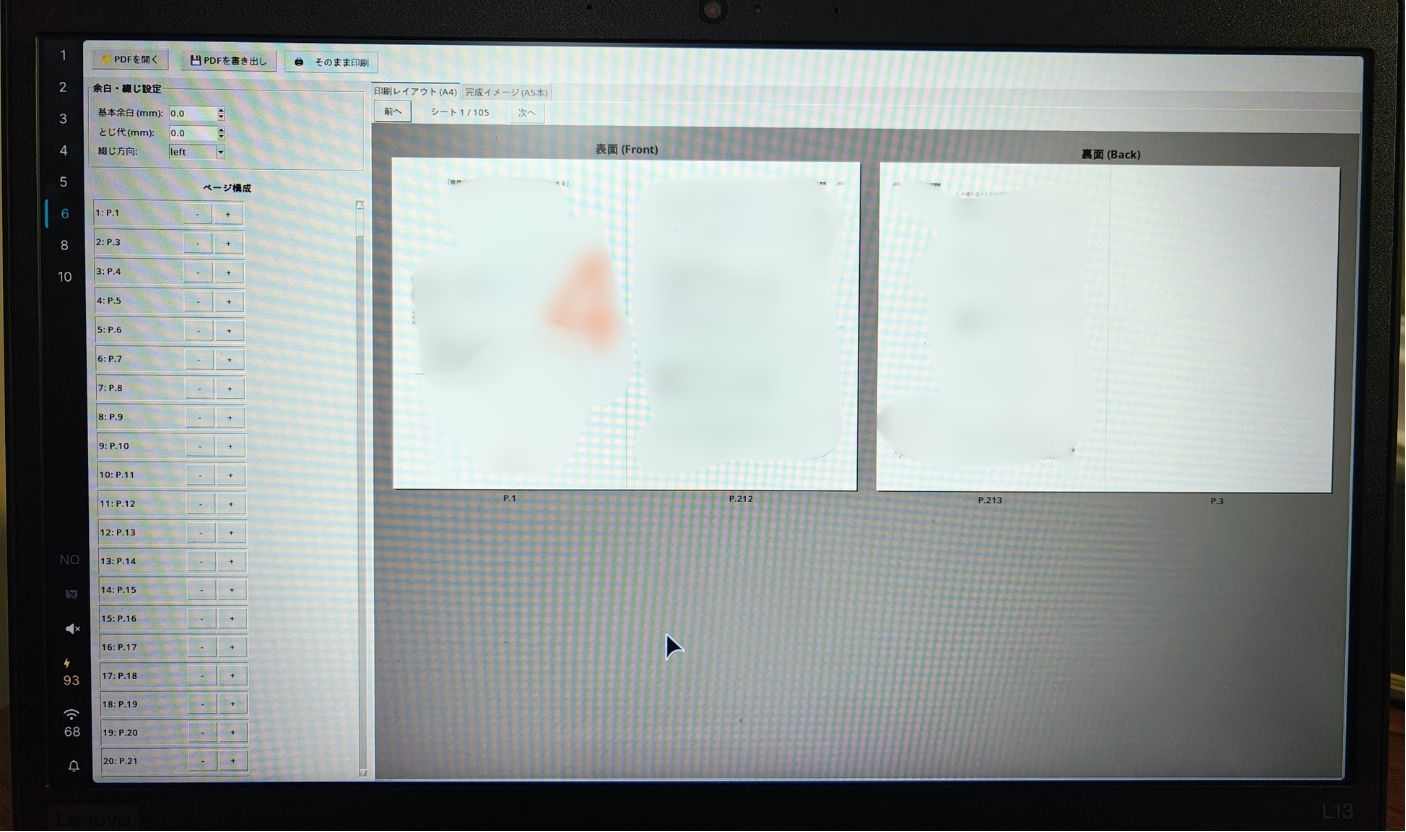
| レイアウトプレビュー | A4用紙の表面・裏面の印刷レイアウト、余白、とじ代を視覚的に確認できます。 |
| 完成プレビュー | 製本後の見開き状態(A5本)をページ順にシミュレーション確認できます。 |
| ページ管理 | プレビューを確認しながら、任意の場所への白紙挿入や、不要ページの削除が行えます。 |
| 余白設定 | 基本余白ととじ代(ミリ単位)、および綴じ方向(左綴じ/右綴じ)を調整できます。 |
| 直接印刷・出力 | 面付け済みPDFのエクスポート、およびシステムプリンターへの直接印刷(Linux環境)に対応しています。 |
インストール
リポジトリから直接インストールする
pip install git+https://github.com/Sh1ragami/pdf-imposer.git
ローカルから開発モードでインストールする
git clone https://github.com/Sh1ragami/pdf-imposer.git
cd pdf-imposer
pip install -e .
使い方
コマンドラインから起動する
インストール後、以下のコマンドで起動します。
pdf-imposer
ソースコードから直接実行する
pip install -r requirements.txt
PYTHONPATH=src python3 -m pdf_imposer.app
必要動作環境
- OS: Linux, macOS, Windows (Tkinterが動作する環境)
- Python: 3.8以上
- 主要ライブラリ: PyMuPDF, Pillow, tkinter (標準ライブラリ)
ライセンス
1 maintainer

Metadata
1 maintainer
Release files for pdf-imposer 1.0.0
For a detailed explanation of source distributions (sdists) and built distributions (wheels), please see the package formats documentation.
Source distribution (sdist)
| File | Size | Uploaded | Provenance | Actions |
|---|---|---|---|---|
| pdf_imposer-1.0.0.tar.gz | 12.3 kB | Without provenance | Details for pdf_imposer-1.0.0.tar.gz |
Built distribution (wheel)
| File | Interpreter | ABI | Platform | Actions Reset |
|---|---|---|---|---|
| pdf_imposer-1.0.0-py3-none-any.whl | Python 3 | none | any | Details for pdf_imposer-1.0.0-py3-none-any.whl |
Total release size: 23.8 kB
Release files / pdf_imposer-1.0.0.tar.gz
| Download URL | pdf_imposer-1.0.0.tar.gz |
|---|---|
| Size | 12.3 kB |
| Tags | Source |
|
SHA-256 checksum How to use checksums |
d300392cd8d7af0a6bcf57b61f03be4e70d1f1f22fc565d606b80b7d89a3aa4a
|
|
BLAKE2b-256 checksum How to use checksums |
26fe9564b3ba50c95d5e08d071dc4a3cb2fd82ed26f9e93547f1e6152062c6f0
|
| Upload date | |
|
Uploaded using Trusted Publishing? What is trusted publishing? |
No |
| Uploaded via |
twine/6.2.0 CPython/3.14.6
|
Release files / pdf_imposer-1.0.0-py3-none-any.whl
| Download URL | pdf_imposer-1.0.0-py3-none-any.whl |
|---|---|
| Size | 11.4 kB |
| Tags | Python 3 |
|
SHA-256 checksum How to use checksums |
cddeca1c0cf001f35373e32b3b3c70347fe7282c4b5cafe10160643ef582f22a
|
|
BLAKE2b-256 checksum How to use checksums |
0f8cfb6ba15459cdbc9131d4314678920b6f477fadea7437d3acdf3f343c8b10
|
| Upload date | |
|
Uploaded using Trusted Publishing? What is trusted publishing? |
No |
| Uploaded via |
twine/6.2.0 CPython/3.14.6
|
Security for pdf-imposer 1.0.0
Provenance
Provenance describes where a file came from. On PyPI, provenance is shared via attestations, which provide a verifiable record of the build or publishing details. View details, limitations and caveats.
No provenance found
None of the files in this release were uploaded with provenance metadata.
A note on package security
PyPI is a repository for distributing packages, not a service for auditing them. While third-party security researchers and our staff do their best to detect and remove malicious packages, PyPI cannot guarantee the quality, security or suitability of any given package.
To learn more about protecting yourself from malicious actors, visit our package security documentation.













