
pdf-mcp




Agentic RAG over your PDFs, one file or a whole folder, as a single MCP tool.
The agent decides when to search; pdf-mcp does the retrieval and hands back excerpts. It is an MCP server that lets Claude Code and other AI agents search one PDF or a whole folder by meaning or keyword, read only the pages that matter, and cleanly pull out tables, images, and scanned text, even from multi-column and Japanese layouts, with optional CUDA acceleration for warming large corpora.
mcp-name: io.github.jztan/pdf-mcp
Try it in your browser
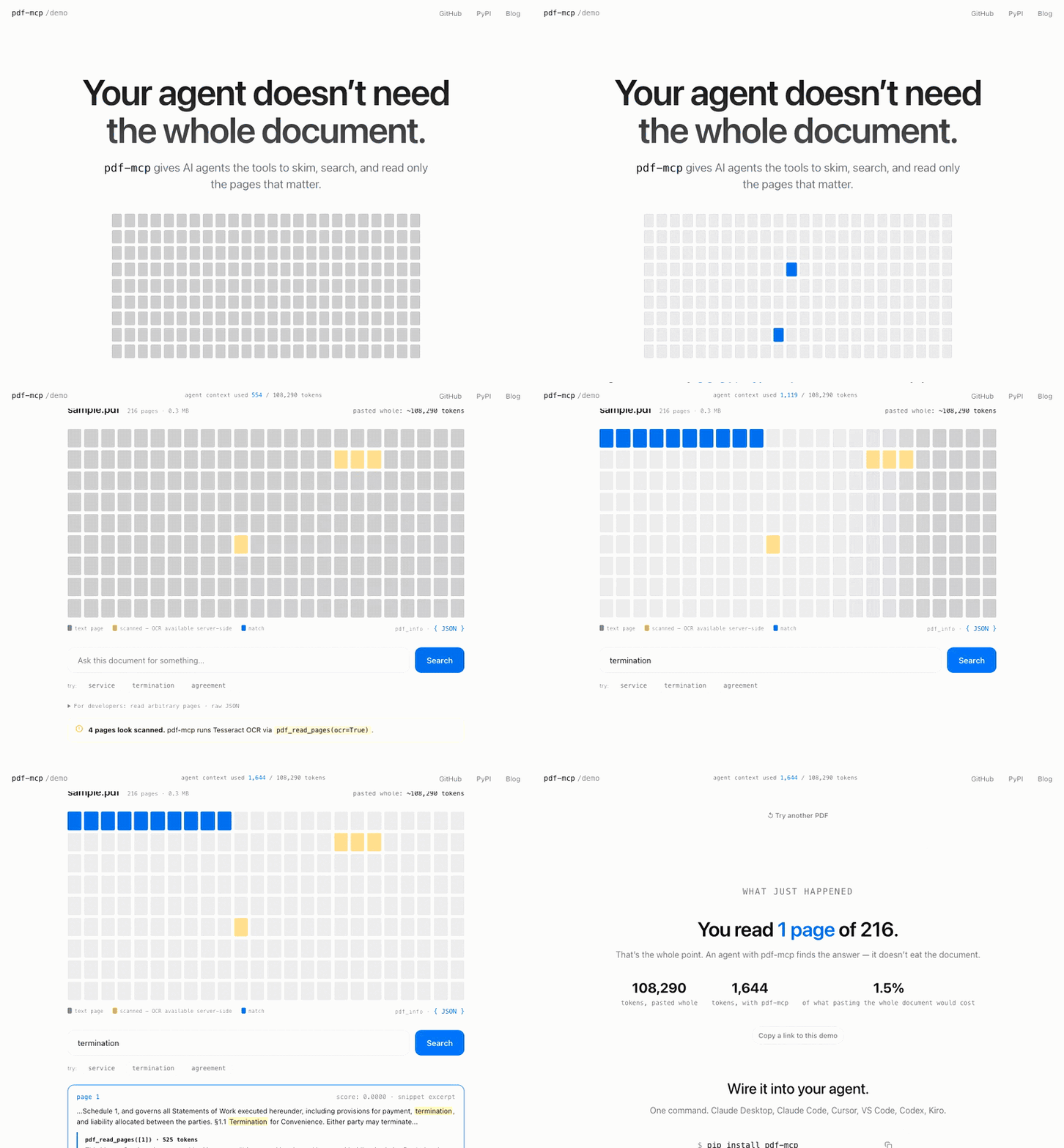
Drop in any PDF, or a whole folder of them, and watch an agent triage the corpus, search across every document at once, and read only the pages that matter, using a fraction of the tokens. 100% client-side, no install required.
Why pdf-mcp?
| Without pdf-mcp | With pdf-mcp | |
|---|---|---|
| Large PDFs | Context overflow | Read only the pages you need |
| Finding content | Load everything | Hybrid search: BM25 keyword + semantic |
| Folders of PDFs | One document at a time | Warm, triage, and search a whole folder |
| Warming a big folder | Minutes of CPU embedding | Length-sorted small-batch CPU encode; optional CUDA embedding, one to two orders of magnitude faster on an NVIDIA card |
| Tables and charts | Lost in raw text | Structured rows, and (x, y) data from vector charts |
| Multi-column and vertical layouts | Columns interleaved | Correct reading order, including Japanese tategaki |
| Scanned PDFs | No text at all | OCR via Tesseract, parallel across pages |
| Repeated access | Re-parse every time | SQLite cache that survives restarts |
| Hidden or injected text | Silently ingested | Flagged as untrusted, nothing stripped |
Installation
Claude Desktop: nothing to install first
- Download pdf-mcp.mcpb.
- In Claude Desktop, open Settings > Extensions, drag the file onto that page, and click Install.
- Ask Claude about a PDF by its location, for example "Use pdf-mcp to summarize C:\Users\me\Downloads\report.pdf", or about a whole folder.
The first start downloads pdf-mcp's components (about 250 MB) and can take a few minutes; later starts take seconds. OCR for scanned pages is included: the first scanned page downloads an English-only Tesseract (about 14 MB). Needs Windows 10 or later, or macOS 13 or later (14 on Apple Silicon), and works in Claude Desktop's Chat. Updating, uninstalling and other details are in docs/clients.md.
Claude Code and other MCP clients
Needs Python 3.10 or later. Install the pdf-mcp command with
uv or pipx:
uv tool install pdf-mcp # or: pipx install pdf-mcp
pip install pdf-mcp works inside a virtual environment; Homebrew's Python
and recent Debian and Ubuntu refuse a system-wide pip install.
Then add it to your client. For Claude Code:
claude mcp add pdf-mcp -- pdf-mcp
For VS Code, Cursor, Codex CLI, Kiro or any other MCP client, see docs/clients.md. Then ask your agent to read a PDF.
Search, the corpus tools, tables and multi-column and CJK reading order work out of the box. OCR on scanned pages also needs Tesseract:
brew install tesseract                             # macOS
sudo apt install tesseract-ocr                     # Ubuntu/Debian
winget install -e --id UB-Mannheim.TesseractOCR    # Windows
Optional: CUDA embedding on an NVIDIA card warms large folders one to two orders of magnitude faster; see docs/configuration.md.
From Python
pdf-mcp's tools are also plain Python functions, so you can import them and hand a PDF to the Anthropic SDK without running a server. Two runnable scripts, for a question and for a whole document: examples/.
Why this exists, and what broke along the way: Claude's 100-page PDF limit and how I got around it
Tools
13 specialized tools rather than one monolithic one. Typical pattern:
pdf_info to plan, pdf_search to locate (its paragraph excerpts often
answer the question outright), pdf_read_pages when you need more. For a
folder, pdf_corpus_overview to triage, then pdf_corpus_search.
| Tool | What it does |
|---|---|
pdf_info |
Page count, metadata, TOC summary, scanned-page detection. Call first. |
pdf_search |
Hybrid search (keyword + semantic), page or section granularity, paragraph or context-window excerpts with source coordinates, the enclosing outline section and a table's lead-in sentence |
pdf_read_pages |
Read specific pages or ranges, with OCR on demand, tables, and embedded images |
pdf_read_all |
Read a whole document in one call, byte-capped |
pdf_get_toc |
Full table of contents for documents with many bookmarks |
pdf_render_pages |
Render pages as PNG for vision models: diagrams, handwriting, scans |
pdf_extract_chart |
Chart data as exact (x, y) tables, read from plot geometry |
pdf_corpus_warm |
Warm a folder of PDFs into the cache within a time budget |
pdf_corpus_overview |
Per-document triage cards for a folder |
pdf_corpus_search |
Search across a folder, with document and page provenance; excerpt_style="auto" picks the excerpt unit per query |
pdf_cache_stats |
Per-document cache breakdown and total size |
pdf_cache_clear |
Clear expired or all cache entries |
server_info |
Which optional features and config are active |
Text returned by any of these is untrusted content extracted from a PDF.
pdf_info(content_trust=True) reports hidden text a human reader cannot
see, and the read tools flag it per page.
Example prompts:
"Read the PDF at /path/to/document.pdf"
"Which pages discuss supply chain risks?"
"Find sections about the training process"
"Show me what page 5 looks like"
"OCR pages 3-5 of the scanned PDF"
Full reference, every parameter and response shape: docs/tool-reference.md. Embedding model selection: docs/embedding-models.md.
Example Workflow
For a large document (e.g., a 200-page annual report):
User: "Summarize the risk factors in this annual report"

Agent workflow:
1. pdf_info("report.pdf")
   → 200 pages, TOC shows "Risk Factors" on page 89

2. pdf_search("report.pdf", "risk factors")
   → Matches with structural paragraph excerpts: each excerpt
     is the bullet, paragraph, or heading that matched, not a
     fixed-width window. Often enough to answer directly.

3. If excerpts are sufficient → synthesize answer

4. If more context needed:
   pdf_read_pages("report.pdf", "89-95")
   → Full page text for deeper reading
Remote / HTTP transport
STDIO is the default and is what every example above uses. pdf-mcp-http
serves the same tools over HTTP, for clients that cannot spawn a process
(the Anthropic API MCP connector, claude.ai custom connectors) and for a
warm corpus shared by several clients.
export PDF_MCP_AUTH_TOKEN="$(openssl rand -hex 32)"
pdf-mcp-http
Paths resolve on the server, so an HTTP agent reads what is already there:
files under an allow-listed root, or a URL the server fetches. It cannot
hand over a file from its own machine. It is single-tenant and fails
closed: with no auth token and no [paths] allow list, the process exits
rather than serving an open endpoint.
Docker images are published to GHCR for amd64 and arm64, with everything baked in, so every tool works on the first request:
./deploy.sh              # token, image, start, health-check
cp your.pdf documents/   # this folder is the server's /data/pdfs
Read docs/remote-access.md for the trust boundary and threat model before deploying, and docs/configuration.md for setup, client config, and token rotation.
Configuration
pdf-mcp works out of the box. To restrict which paths and URL hosts the server may touch, tune cache and worker settings, or add your own content-trust phrases, see docs/configuration.md.
Roadmap
See ROADMAP.md for planned features and release history.
Contributing
Contributions are welcome. See docs/contributing.md for setup, checks, the coherence eval harness, and quality-loop guidelines.
Contributors
Thank you to everyone who has helped improve this project through code, reviews, testing, and feature requests:
@Summer907 · @ebbsanchez · @VooDisss · @DerDennisOP · @deepdmk · @TheSOV · @janLo

Per-release contributor credits are listed in the Changelog.
Security
Found a vulnerability? See SECURITY.md for the threat model, reporting channel, and expected response timeline. Please do not open a public GitHub issue for unpatched security reports.
License
MIT. See LICENSE.
Links
Blog posts
The story behind the releases. Building pdf-mcp keeps surprising me: benchmarks that go the wrong way, formats that break everything, features I had to remove. I write about that thinking in The Dispatch. Come along if that's your kind of thing.
Background, benchmarks, and design notes from building pdf-mcp:
Getting started
- How I Built pdf-mcp: The problem with large PDFs in AI agents and a working solution
- How to Send PDFs Over 100 Pages to Claude's API: Measuring the real page and token ceilings on the Claude API, and the two ways around them: search the PDF on disk for questions, window the text and render only the picture pages for whole-document tasks
- How Claude Code Actually Reads PDFs: How AI agents use pdf-mcp tools to read and navigate PDF documents
- How AI Agents Should Read PDFs: 5 Patterns That Survived Production: Five production-tested patterns for how agents should navigate PDFs at scale
Corpus & multi-document search
- A Knowledge Base Is Just a Folder: Turning a folder of PDFs into an agent knowledge base with the corpus tools, no ingestion pipeline or vector store
- Cross-Document Retrieval for AI Agents Without a Vector Database: Why BM25 scores don't merge across per-document indexes but ranks do, and how two-stage RRF puts a gold document in the top 3 on 84.8% of 184 graded queries over a 100-PDF corpus
- How Amazon Bedrock Helped Me Make My RAG Better: Benchmarking pdf_corpus_search against Bedrock Knowledge Bases at an equal 2,000-token budget for four cents surfaced two bugs eight months of self-testing missed: an excerpt picker discarding answers from pages it had already retrieved, and one embedding per page hiding short answers
Search & retrieval
- Semantic vs Keyword Search for AI Agents: Benchmarks and a dual-search routing pattern: FTS5 for exact identifiers, embeddings for natural language
- Hybrid Search vs Query Routing for AI Agents: Why pdf-mcp uses hybrid RRF instead of query routing: benchmarks showing RRF wins across query types
- Section Chunking vs Page Chunking for AI Agents: Why section-aware search delivers full section content in one call while page-mode costs 2–6 extra tool calls per query
- Section-Level RAG: Why BM25 Beat Hybrid Search in My Benchmark: Why pdf-mcp's section-grain search is BM25-only: hybrid RRF caused a 33% lexical regression at section grain, so granularity decides the search technique
- How One Search Change Eliminated an Entire Agent Step: Switching pdf_search from fixed-width snippets to paragraph excerpts turned it from a pivot tool into a terminal tool: 97% vs 80% answer containment across a 30-query benchmark
Engineering & security
- MCP Server Security: 8 Vulnerabilities: What we found when we audited an MCP server for security holes
- Your LLM Is Free QA for Your MCP Server: Four Payload UX bugs in pdf-mcp that schema tests missed but Claude Desktop surfaced during real use
- Why Multi-Column PDFs Scramble Reading Order in RAG: Fixing two-column extraction (0.564 → 0.816 fidelity), the title-page author-grid regression it caused, and the aggregate metric that stayed blind to both
- How I Fixed Vertical Japanese PDF Extraction: Tategaki pages extract scrambled because reading order is geometric, not stored; rebuilding it from glyph positions (columns right to left, characters top to bottom), with no OCR and no new dependency
1 maintainer

Metadata
1 maintainer
Release files for pdf-mcp 3.4.0
For a detailed explanation of source distributions (sdists) and built distributions (wheels), please see the package formats documentation.
Source distribution (sdist)
| File | Size | Uploaded | |
|---|---|---|---|
| pdf_mcp-3.4.0.tar.gz | 14.7 MB | Details |
Built distribution (wheel)
| File | Interpreter | ABI | Platform | Reset |
|---|---|---|---|---|
| pdf_mcp-3.4.0-py3-none-any.whl | Python 3 | none | any | Details |
Total release size: 15.1 MB
Release files / pdf_mcp-3.4.0.tar.gz
| Download URL | pdf_mcp-3.4.0.tar.gz |
|---|---|
| Size | 14.7 MB |
| Tags | Source |
|
SHA-256 checksum How to use checksums |
dbb34a8561e14f845efcf1648506fc90b00b807fdd6ffc9b8c4aa865bbf5194e
|
|
BLAKE2b-256 checksum How to use checksums |
0b246174d661a01d2c9f72a10320c622ed10403e7cfe2a3f30c79c3bcc02e5f5
|
| Upload date | |
|
Uploaded using Trusted Publishing? What is trusted publishing? |
No |
| Uploaded via |
twine/7.0.0 CPython/3.12.14
|
Release files / pdf_mcp-3.4.0-py3-none-any.whl
| Download URL | pdf_mcp-3.4.0-py3-none-any.whl |
|---|---|
| Size | 359.0 kB |
| Tags | Python 3 |
|
SHA-256 checksum How to use checksums |
16dc1f1ca1f1a0b4e681b6c1d1c0dbb64fa643d6ac762df0301f362b6253d5f9
|
|
BLAKE2b-256 checksum How to use checksums |
d21959ab9ed757c9144c453727b82561f9bb8cd7898b66aca0b1aae931456c22
|
| Upload date | |
|
Uploaded using Trusted Publishing? What is trusted publishing? |
No |
| Uploaded via |
twine/7.0.0 CPython/3.12.14
|














