
PDF & Image to CSV Table Extractor
100% local, private, zero-config table extraction powered by a native OpenCV multi-table engine + PDFium native text fast path + RapidOCR — extracts all tables from PDFs, single/multiple images, or folders of images and automatically groups tables with matching columns into separate, schema-matched CSV files or Pythonic data structures, with automatic native-text vs. OCR routing, multi-core CPU parallelism, pluggable/installable RapidOCR language packs, repeated-header & headerless-continuation merging, stacked header flattening, implicit sub-row splitting, headless visual debugging, and CPU / NVIDIA CUDA / AMD ROCm acceleration.
100% Local & Private: Everything runs entirely on your own machine — no cloud services, no external API keys, no telemetry, and no documents ever leave your environment. Once language models are cached (or pre-installed via
pdf2csv-tables languages install), extraction works completely offline / air-gapped.
Key Features
- 100% local & offline-ready engine (
OpenCV + RapidOCR): Runs completely on-device via ONNX Runtime (or local PyTorch GPU) — no cloud APIs, no API keys, no external OS binaries, and zero network calls during extraction once models are cached. - Unified PDF & image inputs (CLI and Python library):
- Accepts PDFs (
--pdf-mode renderdefault viapypdfium2, or--pdf-mode embeddedraw scan extraction with automatic logo filtering & render fallback on hybrid PDFs), - Single images (
.png,.jpg,.jpeg,.webp,.tif,.tiff,.bmp, including multi-frame TIFFs and automatic EXIF orientation), - Multiple images or a folder of images (naturally sorted
page_1.png, page_2.png, ..., page_10.pngand processed seamlessly like pages of a multi-page PDF), - In-memory inputs in Python (
bytesfor PDFs or images,PIL.Image.Image, or sequences of images/paths).
- Accepts PDFs (
- Native OpenCV multi-table & borderless detector + fast native PDF text layer:
- Connected-component morphological grid & joint detector finds all bordered tables on every page while ignoring prose, diagrams, and decorative page frames.
- Automatic native PDF text-layer fast path (
--text-source auto, default): extracts exact word coordinates directly viapypdfium2on digital PDFs (40×–80× faster, 0.95 s for 16-pagewarn_report.pdf, zero OCR typos) and automatically falls back to RapidOCR on image-only scans, raster images, or broken font maps. Override anytime with--text-source ocror--text-source native. - Auto-deskews tilted scans (
--deskew) while skipping redundant deskew on straight digital PDFs. - Splits tall unruled data bands (e.g., 5-row visual grouping blocks) into individual rows while preserving wrapped multi-line prose cells.
- Detects horizontally merged cells from missing vertical dividers and extracts whitespace-aligned borderless tables (
--borderless). - Paired with tuned single-pass RapidOCR (
onnxruntime) with table-ROI cropping on prose-heavy scans (--no-borderless) and configurable multi-core CPU parallelism (--workers/-j/PDF2CSV_WORKERS).
- Smart column detection, repeated headers & headerless continuations:
- Handles multi-page tables with repeated headers on every page, without repeated headers (headerless continuations), or mixed (headers repeated on some pages and omitted on others).
- Deduplicates repeated single-row, 2-row stacked/spanning, and mid-table headers automatically (or keep them via
--keep-repeated-headers). - Promotes full-width banner titles into
manifest.json(schema.title) and flattens stacked 2-row spanning headers into clean column names. - Fuzzy-matches column headers across pages (Unicode-safe for Latin, Cyrillic, Hebrew, Arabic, CJK; absorbs OCR typos like
Descriptlon↔Description). - Matches headerless continuations via column count, normalized/table-relative column spans (even on margin-shifted duplex scans), and column data-type profiles.
- Keeps tables with different headers in separate CSV files — even when they share the same column count.
- Pluggable & user-installable RapidOCR language packs:
- Built-in support for English, European Latin (
de,fr,es,it,pt,nl,pl,sv,da,fi,no,cs,hu,ro,tr,vi, ...), Cyrillic (ru,uk,bg,sr,be), Arabic (ar,fa,ur), Chinese (zh,zh_tw), Japanese (ja), Korean (ko), Devanagari (hi), Thai (th), Greek (el), Tamil (ta), Telugu (te), and Kannada (ka). - Manage offline/cached models (
languages list,languages install,languages remove), add custom ONNX recognition models + character dictionaries (languages add,.zip/folder packs), or plug in Python packages viaentry_points(pdf_table_extractor.languages).
- Built-in support for English, European Latin (
- Hardware acceleration: Automatic
--device auto|cpu|cuda|rocmrouting,pdf2csv-tables doctordiagnostics, and multi-target Docker images (cpu,cuda,rocm).
Pipeline Overview
  Input: PDF / Image(s) / Folder / bytes
                   │
                   ▼
   1. Document Loader (pypdfium2 raster + native text boxes / PIL, EXIF, lazy --pages)
                   │
                   ▼   [Multi-core CPU worker pool via --workers / -j / PDF2CSV_WORKERS]
   2. Preprocessing (auto-deskew on scans; skipped on straight digital PDFs)
                   │
                   ▼
   3. Native OpenCV Grid Detector (bordered grids, horizontal merges, sub-rows & borderless)
                   │
          ┌────────┴────────────────────────────┐
          ▼ (--text-source auto: digital PDF)   ▼ (scanned PDF / images / --text-source ocr)
   3a. Native PDF Text Layer             3b. Tuned RapidOCR (table-ROI crop on prose scans)
       (exact PDFium word boxes,             ◄── Pluggable Language Packs (ONNX / plugins)
        ~11 ms/page, zero OCR typos)         ◄── Accelerator (CPU / NVIDIA CUDA / AMD ROCm)
          └────────┬────────────────────────────┘
                   ▼
   4. Column & Schema Engine (repeated & headerless merging,
                              banner strip, stacked header flatten)
                   │
                   ▼
   5. Per-Schema CSVs / Pythonic API + manifest.json + debug overlays
Installation
From PyPI (recommended)
Requires Python 3.11 – 3.14 (Linux, macOS, Windows).
# With pip (100% local, CPU-ready, zero external OS binaries)
pip install pdf-to-csv-table-extractor

# Optional Arabic / Persian / Urdu RTL support (installs python-bidi)
pip install "pdf-to-csv-table-extractor[rtl]"

# Or with uv
uv add pdf-to-csv-table-extractor

# Or run one-shot via uvx without creating a virtualenv
uvx --from pdf-to-csv-table-extractor pdf2csv-tables extract document.pdf -o output/

# Optional NVIDIA CUDA ONNX Runtime acceleration (swap CPU onnxruntime AFTER install)
pip install pdf-to-csv-table-extractor
pip uninstall -y onnxruntime && pip install "onnxruntime-gpu>=1.18.0"
Install from a local git checkout
git clone https://github.com/vitali84/pdf-to-csv-table-extactor.git
cd pdf-to-csv-table-extactor
uv sync   # or: pip install .
Examples
Note: The example PDFs under
samples/are available in the GitHub repository (excluded from the PyPI wheel to keep installs lean). Substitute any local PDF, image, or folder of images.
Example 1 — Zero-Config PDF Extraction
pdf2csv-tables extract samples/warn_report.pdf --pages 1 -o output/ --debug-dir debug_out/
Ignores the agency logo, title block, and publication note, detects the 7-column header and all 36 data rows, and writes a schema-named CSV alongside its manifest:
| Notice Date | Effective | Received | Company | City | No. Of | Layoff/Closure |
|---|---|---|---|---|---|---|
| 06/22/2015 | 03/25/2016 | 07/01/2015 | Maxim Integrated Product | San Jose | 150 | Closure Permanent |
| 06/30/2015 | 08/29/2015 | 07/01/2015 | McGraw-Hill Education | Monterey | 137 | Layoff Unknown at this time |
| 06/30/2015 | 08/30/2015 | 07/01/2015 | Long Beach Memorial Medical Center | Long Beach | 90 | Layoff Permanent |
| 07/01/2015 | 09/02/2015 | 07/01/2015 | Leidos | El Segundo | 72 | Layoff Permanent |
| 07/01/2015 | 09/30/2016 | 07/01/2015 | Bosch Healthcare Systems, Inc. | Palo Alto | 55 | Closure Permanent |
Showing the first 5 of 36 extracted rows from samples/warn_report.pdf (page 1). Omit --pages 1 to extract and merge all 16 pages (643 rows) in under 1 second via the automatic native PDF text fast path.
View output files & raw CSV excerpt
output/
├── warn_report_table_01_notice_date_effective_received.csv   # 36 rows x 7 columns
└── warn_report_manifest.json
Notice Date,Effective,Received,Company,City,No. Of,Layoff/Closure
06/22/2015,03/25/2016,07/01/2015,Maxim Integrated Product,San Jose,150,Closure Permanent
06/30/2015,08/29/2015,07/01/2015,McGraw-Hill Education,Monterey,137,Layoff Unknown at this time
06/30/2015,08/30/2015,07/01/2015,Long Beach Memorial Medical Center,Long Beach,90,Layoff Permanent
07/01/2015,09/02/2015,07/01/2015,Leidos,El Segundo,72,Layoff Permanent
07/01/2015,09/30/2016,07/01/2015,"Bosch Healthcare Systems, Inc.",Palo Alto,55,Closure Permanent
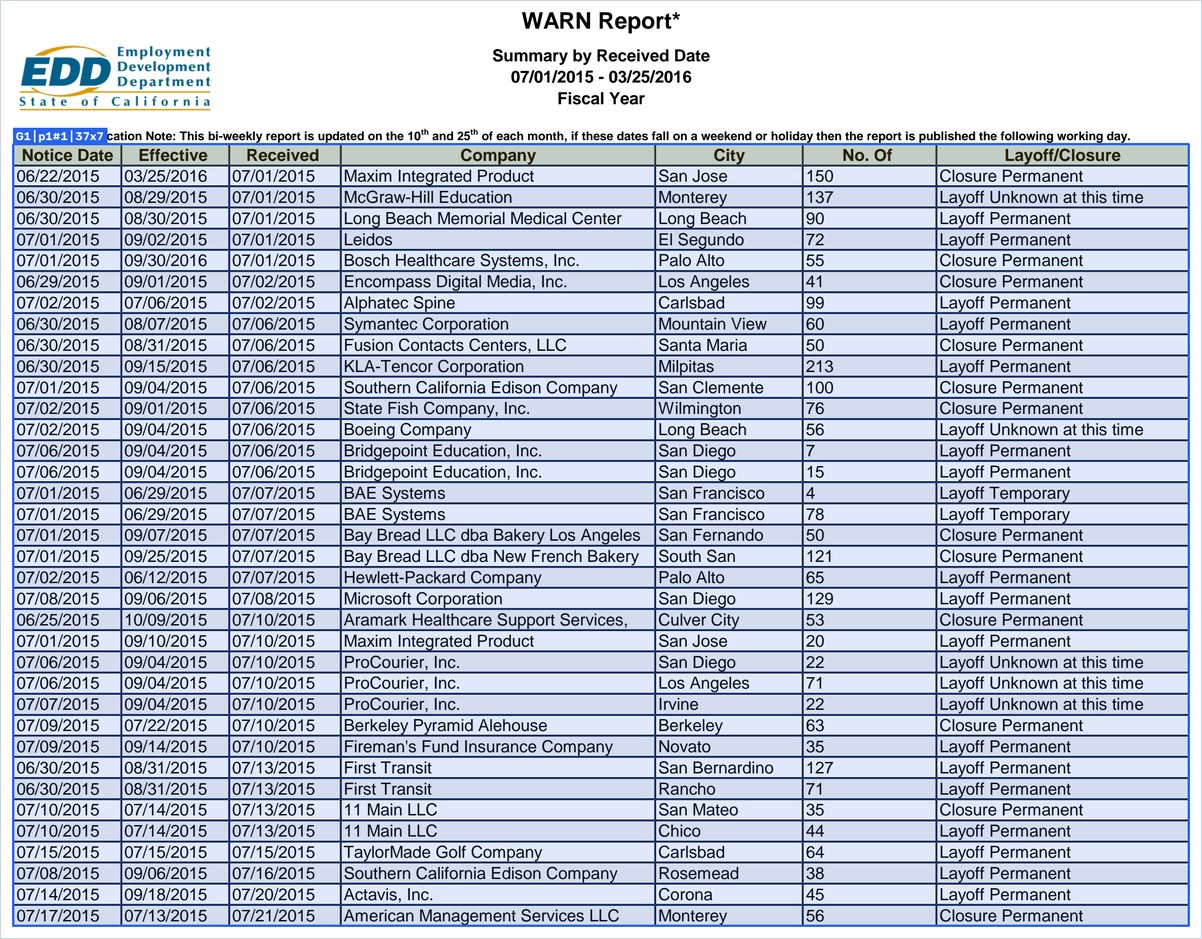
Headless debug overlay (--debug-dir): amber highlights the detected header row; blue outlines every extracted cell.
Example 2 — Single Image, Multiple Images, or a Folder of Images
Images work the exact same way as PDFs — including auto-deskewing, multi-table detection, repeated-header deduplication, and headerless cross-page continuation merging:
# Single image (.png, .jpg, .jpeg, .webp, .tif, .tiff, .bmp)
pdf2csv-tables extract scan_page1.png -o output/

# Folder of images (sorted naturally: page_1.png, page_2.png, ..., page_10.png -> merged CSVs)
pdf2csv-tables extract ./monthly_scans/ -o output/ --zip

# Multiple image files merged as pages of one document
pdf2csv-tables extract page_1.png page_2.png page_3.png -o output/

# Or treat each image argument as an independent document
pdf2csv-tables extract invoice_a.png invoice_b.png --separate-images -o output/
Example 3 — Multiple Tables & Prose on the Same Page
pdf2csv-tables extract samples/multiple_tables.pdf -o output/ --debug-dir debug_out/
Ignores the prose paragraph between the two tables and writes two separate CSV files (G1 blue 4-column table and G2 green 3-column table):
output/
├── multiple_tables_table_01_4cols.csv   # 7 rows x 4 columns
├── multiple_tables_table_02_3cols.csv   # 3 rows x 3 columns
└── multiple_tables_manifest.json
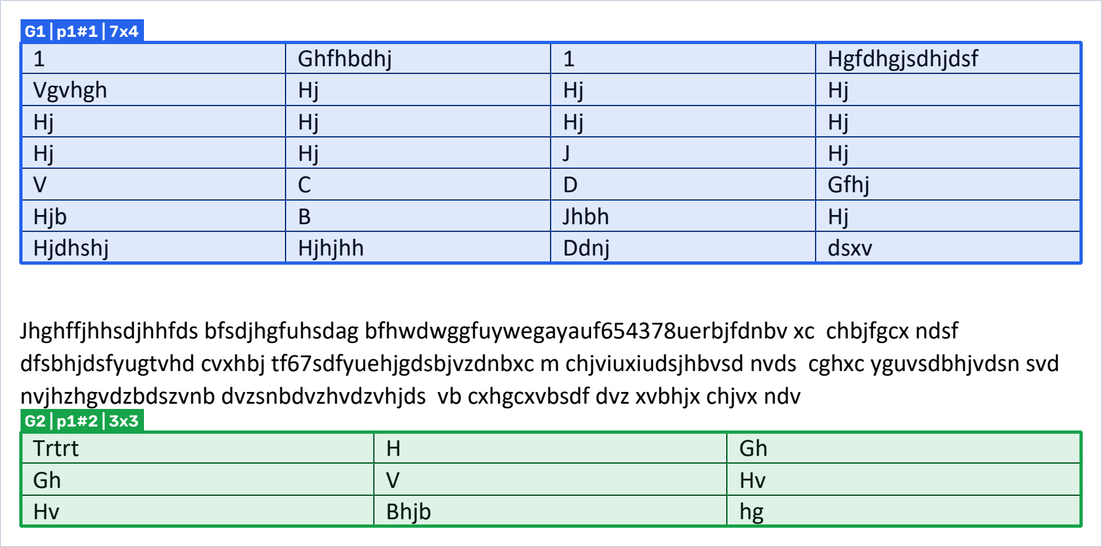
Two distinct tables on the same page (G1 blue 4-column, G2 green 3-column) with surrounding prose ignored.
Example 4 — Tilted Image-Only Scan with Stacked Spanning Headers
pdf2csv-tables extract samples/foo_scanned.pdf \
  --pdf-mode embedded \
  --deskew \
  -o output/ \
  --debug-dir debug_out/
On samples/foo_scanned.pdf (zero PDF text layer, tilted ~1.8°, warm paper gradient, noise, and JPEG artifacts), the pipeline automatically deskews the page (-1.74°), ignores headings and numbered lists, detects the horizontally merged Percent Fuel Savings header span, and outputs output/foo_scanned_table_01_cycle_name_ki_1_km_distance_mi.csv:
Cycle Name,KI (1/km),Distance (mi),Percent Fuel Savings - Improved Speed,Percent Fuel Savings - Decreased Accel,Percent Fuel Savings - Eliminate Stops,Percent Fuel Savings - Decreased Idle
2012_2,3.30,1.3,5.9%,9.5%,29.2%,17.4%
2145_1,0.68,11.2,2.4%,0.1%,9.5%,2.7%
4234_1,0.59,58.7,8.5%,1.3%,8.5%,3.3%
2032_2,0.17,57.8,21.7%,0.3%,2.7%,1.2%
4171_1,0.07,173.9,58.1%,1.6%,2.1%,0.5%
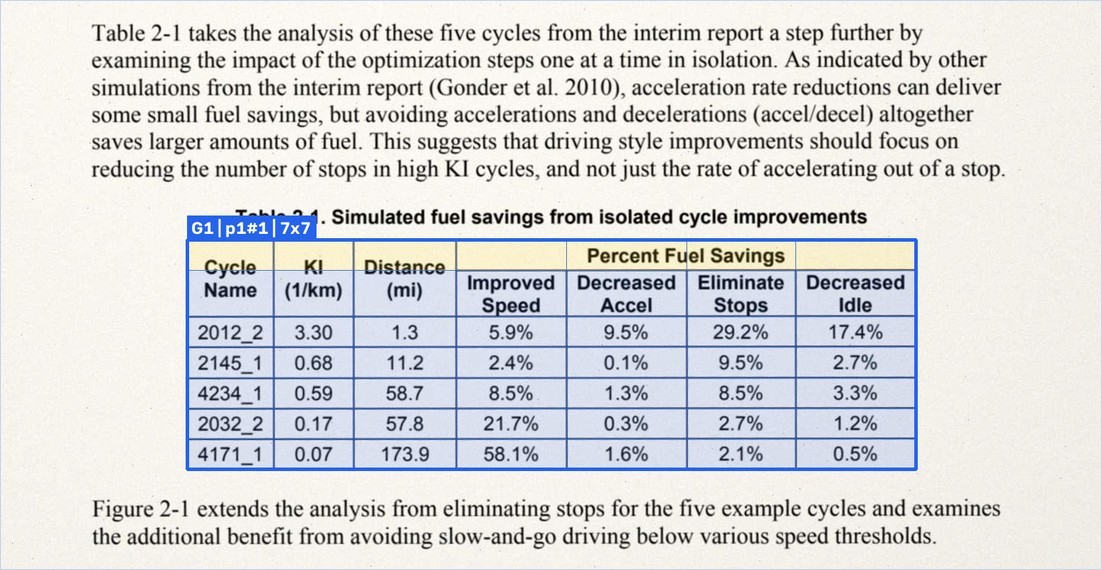
Tilted JPEG scan auto-deskewed (-1.74°) with stacked Percent Fuel Savings spanning header detected.
Example 5 — Multi-Page Mixed Document (Repeated Headers, Headerless Continuations & Separate CSVs)
When a multi-page PDF (or folder of scanned images) mixes cover prose, multiple distinct tables per page, repeated headers on some pages, no headers on continuation pages, blank dividers, tilted scans, and borderless tables:
pdf2csv-tables extract quarterly_report.pdf -o output/ --merge schema --zip --utf8-bom
Tables with matching column schemas are automatically merged across pages into one CSV per schema (deduplicating repeated headers while keeping all continuation rows), while different tables stay in separate CSVs:
output/
├── quarterly_report_table_01_date_merchant_category.csv   # Pages 2, 3 (continuation), 5 (dedup header)
├── quarterly_report_table_02_metric_value.csv             # Pages 2, 5 (dedup header)
├── quarterly_report_table_03_sku_product_qty.csv          # Page 3
├── quarterly_report_table_04_employee_department_ext.csv  # Page 6 (borderless)
├── quarterly_report_manifest.json
└── quarterly_report_tables.zip
Useful grouping flags:
--merge schema(default) — group by column headers & continuations into separate CSVs--merge none— emit one CSV per individual table without cross-page merging--merge all— concatenate all detected tables into a single CSV--deduplicate-headers(default) /--keep-repeated-headers— control whether repeated header rows on subsequent pages are removed or kept
Example 6 — Complex Real-World PDFs, Text-Source Routing & Multi-Core Parallelism
# Multi-page report with headerless continuations across all 16 pages -> 643 rows in <1s (auto native text + parallel workers)
pdf2csv-tables extract samples/warn_report.pdf --no-borderless -o output/

# Force RapidOCR even on digital PDFs (e.g. broken font encodings) with 4 parallel CPU workers
pdf2csv-tables extract samples/warn_report.pdf --pages 1-3 --no-borderless --text-source ocr -j 4 -o output/

# Strict native PDF text only (never invokes OCR; skips image-only pages)
pdf2csv-tables extract samples/background_checks.pdf --no-borderless --text-source native -o output/

# Two complex tables with banner title & wrapped paragraph cells -> banner promoted to schema.title
pdf2csv-tables extract samples/twotables_1.pdf -o output/
Key extraction & performance flags:
--text-source auto|ocr|native(default:auto) — use fast native PDF text boxes on digital PDFs with automatic RapidOCR fallback on scans/images/garbled fonts;ocrforces RapidOCR on every page;nativeuses only the PDF text layer.--workers / -j <N>orPDF2CSV_WORKERS=<N>(default:0= auto) — parallel CPU page workers (0auto-scales up to 8 workers for native-text grids and up to 4 workers for CPU OCR;1runs sequentially; GPU OCR stays single-worker to avoid VRAM contention).--min-confidence <0-100>(default:40) — minimum OCR token confidence threshold.--implicit-rows / --no-implicit-rows(default: enabled) — split tall unruled visual bands into individual rows.--fallback-render / --no-fallback-render(default: enabled) — fall back to page rendering when--pdf-mode embeddedencounters vector pages.
Example 7 — Managing & Plugging In RapidOCR Languages
Defaults to English (en) with zero configuration. RapidOCR's built-in language models download on demand or can be explicitly pre-installed, removed, or extended with custom ONNX recognition models + character dictionaries:
# List built-in, cached/installed, custom, and plugin language packs
pdf2csv-tables languages

# Pre-download built-in RapidOCR models for offline / Docker use
pdf2csv-tables languages install de ru ja

# Use any built-in or installed language (or set PDF2CSV_LANG once)
pdf2csv-tables extract rechnung.pdf --lang de
export PDF2CSV_LANG=ru
pdf2csv-tables extract report.pdf

# Add a custom RapidOCR / PaddleOCR ONNX recognition model + character dict (e.g. Armenian or custom font)
pdf2csv-tables languages add hy \
  --model ./armenian_rec.onnx \
  --dict ./armenian_keys.txt \
  --name "Armenian" \
  --aliases hye,armenian

# Or install a portable folder / .zip language pack containing `language.json` + model + dict
pdf2csv-tables languages install ./armenian_pack.zip

# Remove a custom language pack or cached model
pdf2csv-tables languages remove hy
Store language packs in a custom directory via --lang-dir /path/to/langs or export PDF2CSV_LANG_DIR=/path/to/langs (defaults to ~/.local/share/pdf-to-csv-table-extractor/languages). For right-to-left Arabic, Persian, or Urdu (--lang ar|fa|ur), install the optional RTL extra: pip install "pdf-to-csv-table-extractor[rtl]".
Third-party Python packages can also register language packs automatically via standard entry points in their pyproject.toml:
[project.entry-points."pdf_table_extractor.languages"]
armenian = "my_armenian_pack:get_language_pack"
Example 8 — Python Library API (PDFs, Images, Folders, Pythonic Formats & Custom Languages)
Use extract_tables (or extract_pdf_tables) directly from Python with PDF paths, image paths, folders of images, lists of images, PIL.Image.Image, or raw bytes, and consume results as native Python dicts/lists, JSON, Markdown, pandas.DataFrame, polars.DataFrame, or CSVs:
from pathlib import Path
from pdf_table_extractor import (
    ExtractionConfig,
    LanguagePack,
    extract_tables,
    install_language,
    register_language,
)

# 1. Works identically on a PDF, single image, list of images, folder of images, PIL.Image, or bytes
result = extract_tables("samples/foo.pdf")
# result = extract_tables("scan_page1.png")
# result = extract_tables("./monthly_scans/")
# result = extract_tables(["page_1.png", "page_2.png", "page_3.png"])
# result = extract_tables(Path("samples/foo.pdf").read_bytes())

print(len(result))  # number of distinct logical tables
print(f"native={result.native_text_pages}p, ocr={result.ocr_pages}p")

for table in result:  # iterate directly over logical tables
    print(table.slug, table.headers, f"rows={len(table)}", f"pages={table.page_numbers}")

    # Native Python formats (zero extra dependencies)
    records = table.to_records()  # list[dict[str, str]]  (like csv.DictReader)
    columns = table.to_columns()  # dict[str, list[str]]  (column-oriented)
    rows = table.to_rows()  # list[list[str]]
    csv_str = table.to_csv_string()  # in-memory CSV string
    md = table.to_markdown()  # GitHub-Flavored Markdown (great for LLM/RAG)
    js = table.to_json()  # JSON array of row objects

    # Optional DataFrame conversions (lazy import if pandas / polars is installed)
    # df = table.to_dataframe()
    # pl_df = table.to_polars()

# Access by index, slice, or slug, or convert the entire document at once
first_table = result[0]
first_two = result[:2]
all_records = result.to_records()  # {slug: list[dict[str, str]]}
full_dict = result.to_dict()  # metadata + all tables & records
full_json = result.to_json()  # complete JSON string
all_md = result.to_markdown()  # all tables as Markdown sections

# 2. Pre-install a built-in RapidOCR language or register a custom ONNX language pack in Python
install_language("de")
register_language(
    LanguagePack(
        code="custom_font",
        name="Custom Font",
        model_path=Path("./custom_rec.onnx"),
        keys_path=Path("./custom_keys.txt"),
    )
)

# 3. Custom config + file export
cfg = ExtractionConfig(
    pdf_mode="embedded",  # extracts raw PDF scans, auto-falls back to render on vector pages
    text_source="auto",  # "auto" (native PDF text + OCR fallback) | "ocr" | "native"
    workers=0,  # 0 = auto multi-core CPU parallelism, 1 = sequential, N = explicit workers
    pages="1-5",
    ocr_lang="de",
    merge="schema",  # "schema" | "none" | "all"
    deduplicate_headers=True,
    device="auto",  # "auto" | "cpu" | "cuda" | "rocm"
    debug_dir=Path("debug_out"),
)
res = extract_tables("./scanned_folder/", cfg)
res.export_csvs("output/", write_manifest=True, utf8_bom=True)
res.export_zip("output/all_tables.zip")
GPU Acceleration (NVIDIA CUDA & AMD ROCm)
Digital PDFs with embedded text extract in milliseconds on CPU via the native text fast path. For scanned PDFs, image folders, and --text-source ocr workloads, RapidOCR accounts for 85%–97% of runtime — running on a GPU delivers 3×–6.6× faster single-stream throughput (while multi-core CPUs also accelerate multi-page scans via --workers). By default, --device auto automatically uses an available GPU and falls back cleanly to CPU when none is installed.
1. Check Your GPU Readiness
pdf2csv-tables doctor
Look for Recommended --device: cuda (NVIDIA) or Recommended --device: rocm (AMD) in the output.
2. Install the GPU Runtime
NVIDIA CUDA
onnxruntime (CPU) and onnxruntime-gpu share the same Python package namespace and must not be co-installed. Install the package first, then swap onnxruntime for onnxruntime-gpu:
# With pip
pip install pdf-to-csv-table-extractor
pip uninstall -y onnxruntime && pip install "onnxruntime-gpu>=1.18.0"

# Or with uv (inside a uv-managed repo venv, run with `uv run --no-sync` afterwards)
uv pip uninstall onnxruntime
uv pip install "onnxruntime-gpu>=1.18.0"
AMD ROCm (Linux)
Make sure your user belongs to the render and video groups (sudo usermod -aG render,video "$USER" and re-login) so /dev/kfd and /dev/dri are accessible. Two runtimes are supported:
# Option A (Recommended — self-contained wheel; activates RapidOCR's PyTorch HIP engine)
# Replace rocm7.1 with your installed ROCm series (e.g. rocm6.2, rocm6.4, rocm7.1):
pip install torch --index-url https://download.pytorch.org/whl/rocm7.1
# Or with uv:
uv pip install torch --index-url https://download.pytorch.org/whl/rocm7.1

# Option B (ONNX Runtime MIGraphX — requires host MIGraphX matching your ROCm release)
pip uninstall -y onnxruntime
pip install onnxruntime-migraphx
Note for AMD ROCm (MIOpen warmup): On the very first run on a fresh AMD GPU, MIOpen compiles and caches convolution kernels on disk (
~/.config/miopen/), which takes ~15–20 s once per new image shape. Every subsequent run reuses the cache at full GPU speed.
3. Run on GPU (CLI & Python Library)
CLI
# Auto-detect GPU (default)
pdf2csv-tables extract samples/warn_report.pdf -o output/

# Explicitly target NVIDIA CUDA or AMD ROCm
pdf2csv-tables extract samples/warn_report.pdf --device cuda -o output/
pdf2csv-tables extract samples/warn_report.pdf --device rocm -o output/

# Multi-GPU selection + fail fast if GPU is unavailable (recommended in CI / production)
pdf2csv-tables extract samples/warn_report.pdf --device cuda --gpu-id 1 --strict-device -o output/

# Force CPU even when a GPU is installed (optionally tune multi-core workers via -j / --workers / PDF2CSV_WORKERS)
pdf2csv-tables extract samples/warn_report.pdf --device cpu -j 4 -o output/

# Control text strategy: auto (default: native PDF text + OCR fallback), ocr (always OCR), or native
pdf2csv-tables extract samples/warn_report.pdf --text-source ocr --workers 4 -o output/
(If you installed GPU wheels manually into a uv environment with uv pip install, invoke the CLI via uv run --no-sync pdf2csv-tables ... so uv does not re-sync back to CPU-only packages from uv.lock.)
Python Library
from pdf_table_extractor import ExtractionConfig, extract_tables, probe_hardware

hw = probe_hardware()
print("Recommended device:", hw.recommended_device)  # "cuda" | "rocm" | "cpu"

result = extract_tables(
    "samples/warn_report.pdf",
    ExtractionConfig(
        device="auto",  # "auto" | "cpu" | "cuda" | "rocm"
        gpu_id=0,  # GPU index on multi-GPU machines
        strict_device=True,  # raise RuntimeError instead of silently falling back to CPU
        text_source="auto",  # "auto" (native PDF text + OCR fallback) | "ocr" | "native"
        workers=0,  # 0 = auto multi-core CPU parallelism, 1 = sequential, N = explicit workers
    ),
)
print(f"Ran on: {result.resolved_device} ({result.execution_provider})")
Docker (CPU, CUDA & ROCm)
The multi-target Dockerfile builds ready-to-run CLI images for cpu (default), cuda, and rocm — no local GPU Python setup required:
# Build CPU image and run one-shot extraction on PDFs or image folders
docker build --target cpu -t pdf2csv-tables:cpu .
docker run --rm -v "$PWD:/data" pdf2csv-tables:cpu extract /data/samples/warn_report.pdf -o /data/out

# Or run via Docker Compose profiles (place PDFs or images under ./data)
docker compose --profile cpu run --rm cpu extract /data/report.pdf -o /data/out
docker compose --profile cuda run --rm cuda extract /data/report.pdf -o /data/out --device cuda
docker compose --profile rocm run --rm rocm extract /data/report.pdf -o /data/out --device rocm
Performance Benchmarks (Native Fast Path, Tuned CPU OCR & GPU)
1. Default Mode (--text-source auto) vs. Forced CPU OCR (--text-source ocr)
Measured on Intel Core Ultra 7 270K Plus, Python 3.14, ONNX Runtime 1.32.0, default 250 DPI:
| Sample | Pages | Rows | Default (--text-source auto) |
Tuned CPU OCR (--text-source ocr) |
Notes |
|---|---|---|---|---|---|
multiple_tables.pdf (2 tables + prose) |
1 | 10 | 0.05 s | 0.84 s | Digital PDF (native text) |
foo.pdf (prose + 7-col table) |
1 | 5 | 0.08 s | 1.49 s | Digital PDF (native text) |
twotables_1.pdf (2 tables + paragraphs) |
1 | 5 | 0.09 s | 1.62 s | Digital PDF (native text) |
background_checks.pdf (dense 56×25) |
1 | 56 | 0.12 s | 5.72 s | Digital PDF (native text) |
warn_report.pdf (all 16 pages) |
16 | 643 | 0.95 s (16.8 p/s, auto workers) | 17.91 s (auto workers) | Digital PDF (native text) |
foo_scanned.pdf (tilted JPEG scan) |
1 | 5 | 0.55 s (--no-borderless) / 1.47 s |
0.55 s / 1.47 s | Image-only scan (auto → RapidOCR + ROI crop) |
Multi-Core CPU Scaling (
samples/warn_report.pdf, all 16 pages / 643 rows):
- Default (
--text-source auto):workers=11.14 s →workers=0(auto) 0.95 s (58× faster than single-stream OCR).- Forced OCR (
--text-source ocr):workers=129.26 s →workers=0(auto, 4 workers) 17.91 s (3.1× faster than untuned sequential OCR).
2. OCR Stage Breakdown: Single-Thread Baseline CPU vs. GPU (Scanned / --text-source ocr)
Measured head-to-head on CPU (Intel Core Ultra 7 270K Plus, ONNX Runtime 1.32.0 CPUExecutionProvider) vs. GPU (AMD Radeon RX 9070 XT gfx1201, ROCm 7.1, PyTorch 2.13.0+rocm7.1 HIP via RapidOCR's Torch engine), default 250 DPI, warm steady-state (pure OCR workload):
| Sample | Pages | Rows (CPU / GPU) | CPU Total | GPU Total (RX 9070 XT) | Total Speedup | CPU OCR | GPU OCR | OCR Speedup |
|---|---|---|---|---|---|---|---|---|
multiple_tables.pdf (2 tables + prose) |
1 | 10 / 10 | 1.90 s | 0.50 s | 3.78× | 1,758 ms | 380 ms | 4.62× |
twotables_1.pdf (2 tables + paragraphs) |
1 | 5 / 5 | 3.31 s | 1.01 s | 3.28× | 2,946 ms | 800 ms | 3.68× |
foo.pdf (prose + 7-col table) |
1 | 5 / 5 | 2.92 s | 0.95 s | 3.08× | 2,632 ms | 734 ms | 3.59× |
foo_scanned.pdf (tilted JPEG scan) |
1 | 5 / 5 | 2.60 s | 0.86 s | 3.03× | 2,395 ms | 644 ms | 3.72× |
background_checks.pdf (dense 56×25) |
1 | 56 / 56 | 9.47 s | 3.30 s | 2.87× | 9,192 ms | 3,029 ms | 3.03× |
warn_report.pdf (all 16 pages) |
16 | 643 / 643 | 55.47 s | 19.79 s | 2.80× | 50,383 ms | 15,191 ms | 3.32× |
3. Reproducing Benchmarks on Your Hardware
# Default auto mode (uses native PDF text on digital PDFs, RapidOCR on scans)
uv run python benchmarks/benchmark.py --device cpu --text-source auto

# Pure OCR benchmark on CPU or GPU
uv run python benchmarks/benchmark.py --device cpu --text-source ocr --json bench_cpu.json
uv run --no-sync python benchmarks/benchmark.py --device auto --text-source ocr --json bench_gpu.json
Development & Testing
uv sync --extra dev
uv run pytest
uv run ruff check .
uv run ruff format --check .
uv run mypy --strict src
uv run mypy tests
Author
Vitali Mogilevsky
License
MIT License — see LICENSE for details.
1 maintainer

Metadata
1 maintainer
Release files for pdf-to-csv-table-extractor 1.0.0
For a detailed explanation of source distributions (sdists) and built distributions (wheels), please see the package formats documentation.
Source distribution (sdist)
| File | Size | Uploaded | Provenance | Actions |
|---|---|---|---|---|
| pdf_to_csv_table_extractor-1.0.0.tar.gz | 86.8 kB | With provenance | Details for pdf_to_csv_table_extractor-1.0.0.tar.gz |
Built distribution (wheel)
| File | Interpreter | ABI | Platform | Actions Reset |
|---|---|---|---|---|
| pdf_to_csv_table_extractor-1.0.0-py3-none-any.whl | Python 3 | none | any | Details for pdf_to_csv_table_extractor-1.0.0-py3-none-any.whl |
Total release size: 171.2 kB
Release files / pdf_to_csv_table_extractor-1.0.0.tar.gz
| Download URL | pdf_to_csv_table_extractor-1.0.0.tar.gz |
|---|---|
| Size | 86.8 kB |
| Tags | Source |
|
SHA-256 checksum How to use checksums |
6fccac99eebccdbc149a3871d3cdbaa99362381520cf6c99ef0ea5aa1171a3a1
|
|
BLAKE2b-256 checksum How to use checksums |
2311797bb5bb08c26eff1132596a89c7a86e2e66ca8f1e3bc6b461a7b2971430
|
| Upload date | |
|
Uploaded using Trusted Publishing? What is trusted publishing? |
Yes |
| Uploaded via |
twine/7.0.0 CPython/3.13.16
|
Provenance
Provenance describes where a file came from. On PyPI, provenance is shared via attestations, which provide a verifiable record of the build or publishing details. View details, limitations and caveats.


PyPI Publish Attestation
PyPI verified that this artifact, at this checksum, originated from the publisher listed below.
Signed by GitHub Actions, verified by PyPI on Nov 26, 2026.
Transparency logRelease files / pdf_to_csv_table_extractor-1.0.0-py3-none-any.whl
| Download URL | pdf_to_csv_table_extractor-1.0.0-py3-none-any.whl |
|---|---|
| Size | 84.4 kB |
| Tags | Python 3 |
|
SHA-256 checksum How to use checksums |
775d014b77f308d8ee48ecf0dae01875cb69538c694df94db75f06c308f593e5
|
|
BLAKE2b-256 checksum How to use checksums |
d88b0bb1bc799d6c816340ae29a7773149d4369e5c0a99990935f397774c92e2
|
| Upload date | |
|
Uploaded using Trusted Publishing? What is trusted publishing? |
Yes |
| Uploaded via |
twine/7.0.0 CPython/3.13.16
|
Provenance
Provenance describes where a file came from. On PyPI, provenance is shared via attestations, which provide a verifiable record of the build or publishing details. View details, limitations and caveats.
PyPI Publish Attestation
PyPI verified that this artifact, at this checksum, originated from the publisher listed below.
Signed by GitHub Actions, verified by PyPI on Nov 26, 2026.
Transparency logSecurity for pdf-to-csv-table-extractor 1.0.0
Provenance
Provenance describes where a file came from. On PyPI, provenance is shared via attestations, which provide a verifiable record of the build or publishing details. View details, limitations and caveats.
Full provenance
Both files in this release have been uploaded with provenance metadata.
Attestation for pdf_to_csv_table_extractor-1.0.0.tar.gz
PyPI Publish Attestation
PyPI verified that this artifact, at this checksum, originated from the publisher listed below.
Signed by GitHub Actions, verified by PyPI on Nov 26, 2026.
Transparency logA note on package security
PyPI is a repository for distributing packages, not a service for auditing them. While third-party security researchers and our staff do their best to detect and remove malicious packages, PyPI cannot guarantee the quality, security or suitability of any given package.
To learn more about protecting yourself from malicious actors, visit our package security documentation.













