
📄 pdf-tool
Local PDF tools for the command line, AI agents and the desktop. Nothing leaves your computer.
English · Español




Merge, split, compress, protect and watermark PDFs, or turn images into PDFs, with a CLI built for scripts and AI agents, an agent skill, and a desktop app for everyone else. Free, open source, no ads, and 100% offline: your files are never uploaded anywhere.
pipx install pdf-tool-cli
pdf-tool compress report.pdf --target-mb 2
🧰 Tools
| Command | What it does |
|---|---|
pdf-tool compress |
Shrinks one or more PDFs to a target size in MB. |
pdf-tool merge |
Combines several PDFs into one, in the order you give. |
pdf-tool split |
Splits a PDF by page ranges, one page per file, or every N pages. |
pdf-tool images2pdf |
Turns each JPG/PNG image into its own PDF. |
pdf-tool protect |
Adds or removes the password of one or more PDFs. |
pdf-tool watermark |
Repeats a text diagonally across every page. |
It never overwrites your files: outputs go next to the original (or to
--output-dir) with a new name.
⌨️ Command line
pipx install pdf-tool-cli                      # or: uv tool install pdf-tool-cli
pdf-tool list --json                           # tools, accepted inputs and parameters
pdf-tool compress big.pdf --target-mb 2 --json # result as JSON
pdf-tool compress big.pdf --target-mb 2 --mode preserve   # keep text and links
pdf-tool merge a.pdf b.pdf c.pdf --output-name report
pdf-tool split doc.pdf --ranges "1-3, 5, 8-"
printf '%s' "$PASSWORD" | pdf-tool protect doc.pdf --password-stdin
- Help:
pdf-tool <tool> --helplists every flag. - JSON for agents:
--jsonprints a stable structure (ok,summary,outputs, per-fileitems,warnings,metricssuch as sizes before and after compressing). - Exit codes:
0success ·1processing failed ·2invalid usage ·3batch finished but some files failed. - Passwords are read from stdin (
--password-stdin) or thePDFTOOL_PASSWORDvariable, never from arguments. - Language: messages and output file names follow your system language;
--lang enor--lang esoverrides it (or setPDFTOOL_LANG). - Compression modes:
max(default) tries to reduce images first and only turns pages into images if that is the only way to reach the target (it warns you).preservenever does, so text, links and annotations are kept.
Requires Python 3.11+. pipx install 'pdf-tool-cli[gui]' also installs the
desktop app (command pdftool).
🤖 Use it with AI agents
A skill
teaches your agent to use pdf-tool instead of writing throwaway scripts: it
asks before installing the CLI, runs the tools with --json and explains the
result in your language. It follows the open
Agent Skills format, so it works with Claude Code,
Codex, Cursor, Gemini CLI, GitHub Copilot and others. Pick one way:
1. Claude Code (plugin, recommended): updates itself from main.
/plugin marketplace add juanMaAV92/pdf-tool
/plugin install pdf-tool@pdf-tool
2. Any agent, with skills
(needs Node.js): detects your agents and copies the skill into each one's
folder. Add -g to have it in every project; update it with
npx skills update.
npx skills add juanMaAV92/pdf-tool
3. By hand: copy the
skills/pdf-tool
folder into your agent's skills folder
(paths per agent).
Copy it again to update.
In all three, the CLI is installed separately (pipx install pdf-tool-cli); if
it is missing, the skill asks for permission to install it.
🖥️ Desktop app
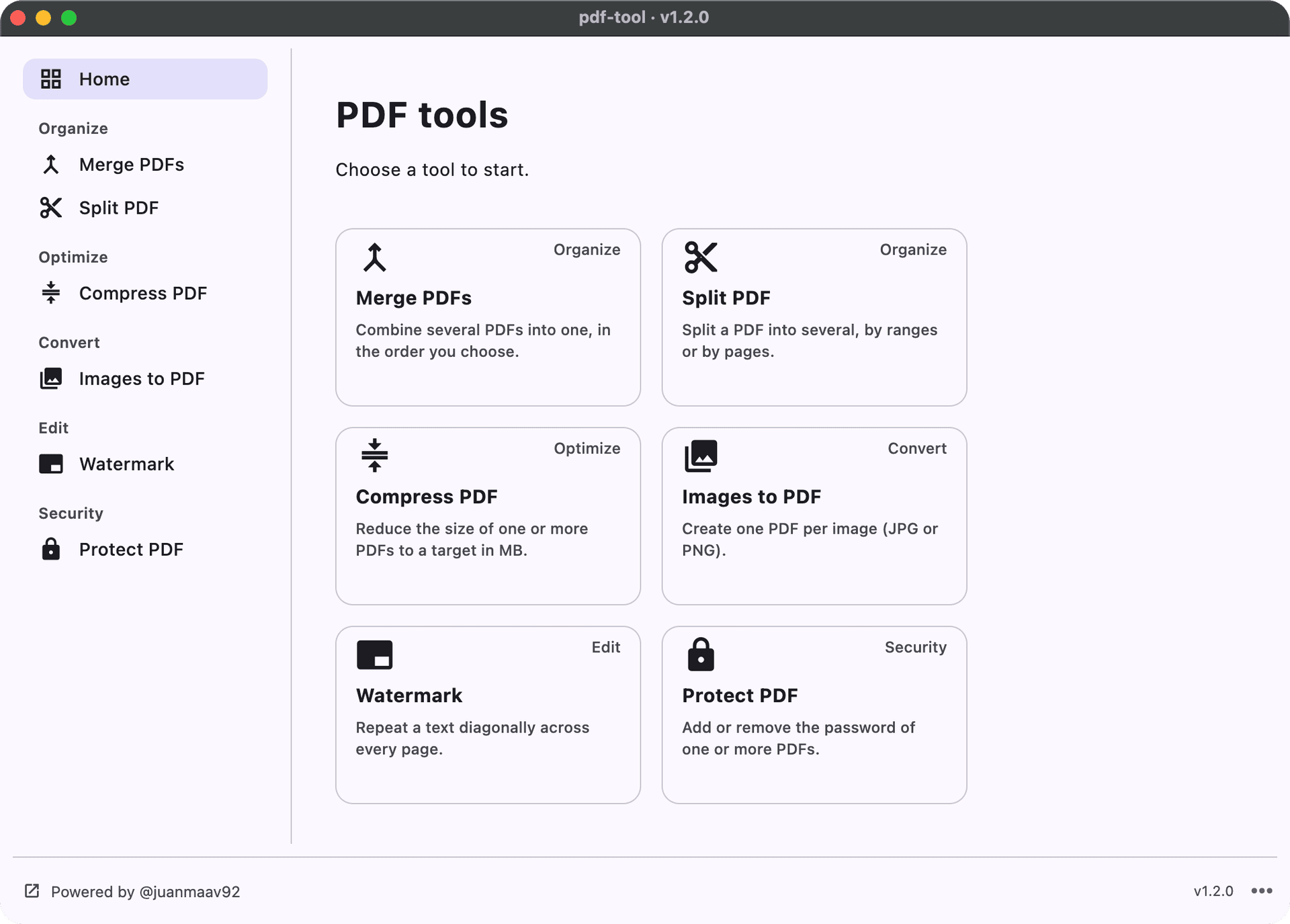
The same six tools with a simple interface, in English or Spanish, for macOS and Windows. No Python needed.

- macOS: open the
.dmgand drag pdf-tool to Applications. The app is not signed, so the first time go to System Settings → Privacy & Security and click Open Anyway. - Windows: run the installer. If SmartScreen appears: More info → Run anyway.
Step-by-step guide, screenshots and FAQ:
juanmaav92.github.io/en/pdf-tool.
Every release publishes SHA256SUMS.txt so you can check the download.
🤝 Contributing
Issues and pull requests are welcome. Adding a tool means creating one folder:
the app and the CLI discover it on their own. Translations are welcome too:
copy pdftool/i18n/locales/en.json to <code>.json and translate it. The
roadmap
lists what comes next.
🛠️ Developer setup
Requirements
- Python 3.11+ and Poetry
Run
poetry install --all-extras   # includes Flet (the [gui] extra) for the app
poetry run pdftool            # opens the app
poetry run pdf-tool --help    # the CLI
poetry run pytest             # tests
Add a tool
- Create
pdftool/tools/<id>/withparams.py,logic.py(pure function + tests),spec.py(registers the tool, no Flet),panel.pyand an empty__init__.py. - Add its texts to
pdftool/i18n/locales/en.jsonandes.json, and an example to the skill. - The app shows it in the sidebar and the CLI offers it as
pdf-tool <id>, both automatically.
Details in AGENTS.md.
Release (automated with GitHub Actions)
git tag vX.Y.Z
git push origin vX.Y.Z
release.yml runs the tests, builds macOS (.dmg) and Windows (Inno Setup
installer) in parallel, bakes the tag version into the build and creates a
draft GitHub Release with both installers. Review it and click Publish
release so installed apps detect the update. It also publishes the package to
PyPI (pdf-tool-cli, via Trusted Publishing); that step waits for your
approval in Actions (pypi environment), because a PyPI version cannot be
replaced. The tag is the only source of the version number.
PRs that change the app, the packaging or its dependencies also run Package smoke, which builds the macOS DMG and silently installs the Windows installer. Before a major release, follow the manual checklist.
Local build (to debug packaging)
poetry run flet build macos --project pdf-tool --product pdf-tool     # -> build/macos/pdf-tool.app
poetry run flet build windows --project pdf-tool --product pdf-tool   # -> build/windows/
--project pdf-tool is required: without it, flet build takes the package
name (pdf-tool-cli) and the app changes identity.
📄 License
The pdf-tool source code is MIT. It uses PyMuPDF, licensed under the AGPL, so the installers and the PyPI package, which include it, are distributed under the terms of the AGPL. Your documents are unaffected: they stay yours and never leave your computer.
1 maintainer

Metadata
1 maintainer
Release files for pdf-tool-cli 1.2.0
For a detailed explanation of source distributions (sdists) and built distributions (wheels), please see the package formats documentation.
Source distribution (sdist)
| File | Size | Uploaded | Provenance | Actions |
|---|---|---|---|---|
| pdf_tool_cli-1.2.0.tar.gz | 70.5 kB | With provenance | Details for pdf_tool_cli-1.2.0.tar.gz |
Built distribution (wheel)
| File | Interpreter | ABI | Platform | Actions Reset |
|---|---|---|---|---|
| pdf_tool_cli-1.2.0-py3-none-any.whl | Python 3 | none | any | Details for pdf_tool_cli-1.2.0-py3-none-any.whl |
Total release size: 163.3 kB
Release files / pdf_tool_cli-1.2.0.tar.gz
| Download URL | pdf_tool_cli-1.2.0.tar.gz |
|---|---|
| Size | 70.5 kB |
| Tags | Source |
|
SHA-256 checksum How to use checksums |
4d6dfebd414622017f7eae2be359d7d9dfdbabf14395860013231ff968d5a9d3
|
|
BLAKE2b-256 checksum How to use checksums |
c1c0b02b21983e232d6154276998fad7f7834b3e923250dda41dba9417313447
|
| Upload date | |
|
Uploaded using Trusted Publishing? What is trusted publishing? |
Yes |
| Uploaded via |
twine/7.0.0 CPython/3.13.16
|
Provenance
Provenance describes where a file came from. On PyPI, provenance is shared via attestations, which provide a verifiable record of the build or publishing details. View details, limitations and caveats.


PyPI Publish Attestation
PyPI verified that this artifact, at this checksum, originated from the publisher listed below.
Signed by GitHub Actions, verified by PyPI on Nov 1, 2026.
Transparency logRelease files / pdf_tool_cli-1.2.0-py3-none-any.whl
| Download URL | pdf_tool_cli-1.2.0-py3-none-any.whl |
|---|---|
| Size | 92.8 kB |
| Tags | Python 3 |
|
SHA-256 checksum How to use checksums |
9523486bc0f5c70b44e390aca776999cdc926b9c64538ec11a0adc480f46eef4
|
|
BLAKE2b-256 checksum How to use checksums |
fc1c117b0aa35446554d020794fe6585da5ff63bc9de827d38ef17b06fc90e9c
|
| Upload date | |
|
Uploaded using Trusted Publishing? What is trusted publishing? |
Yes |
| Uploaded via |
twine/7.0.0 CPython/3.13.16
|
Provenance
Provenance describes where a file came from. On PyPI, provenance is shared via attestations, which provide a verifiable record of the build or publishing details. View details, limitations and caveats.
PyPI Publish Attestation
PyPI verified that this artifact, at this checksum, originated from the publisher listed below.
Signed by GitHub Actions, verified by PyPI on Nov 1, 2026.
Transparency logSecurity for pdf-tool-cli 1.2.0
Provenance
Provenance describes where a file came from. On PyPI, provenance is shared via attestations, which provide a verifiable record of the build or publishing details. View details, limitations and caveats.
Full provenance
All 2 files in this release have been uploaded with provenance metadata.
Attestation for pdf_tool_cli-1.2.0.tar.gz
PyPI Publish Attestation
PyPI verified that this artifact, at this checksum, originated from the publisher listed below.
Signed by GitHub Actions, verified by PyPI on Nov 1, 2026.
Transparency logA note on package security
PyPI is a repository for distributing packages, not a service for auditing them. While third-party security researchers and our staff do their best to detect and remove malicious packages, PyPI cannot guarantee the quality, security or suitability of any given package.
To learn more about protecting yourself from malicious actors, visit our package security documentation.














