
pdf-tooling
An Apache-2.0 PDF toolkit CLI in Python. One safe command-line tool (pdftooling) for the common PDF chores — merge, split, extract, delete, rotate, reorder, rasterize, compose, create, text, tables, compress, repair, linearize, encrypt, decrypt, permissions, meta, watermark, stamp, ocr and convert, plus doctor, info and version — built on a permissively licensed engine stack (pypdf, pypdfium2, reportlab, pikepdf, pdfplumber, Tesseract, LibreOffice) with nothing AGPL or GPL on the call graph.
Safety is first-class: a global --dry-run, no-clobber by default, atomic write-to-temp-then-rename, and inputs that are never mutated unless you ask for --in-place.
- Website: https://armandoherra.github.io/pdf-tooling/ — the public landing page (source in
website/).
Getting Started
To try it without installing anything permanently, run it through uv:
uvx pdf-tooling --help
To keep it:
uv tool install pdf-tooling
# or: pip install pdf-tooling
pdftooling --help
From source
# Prerequisites: Python >= 3.11 and uv (https://docs.astral.sh/uv/)
git clone https://github.com/ArmandoHerra/pdf-tooling.git
cd pdf-tooling
uv sync
uv run pdftooling --help
Platforms. Linux and macOS. macOS 15 or later on Apple silicon; Intel Macs are not supported. The reason is pikepdf, a runtime engine, which publishes its macOS wheels only as macosx_15_0_arm64.
uv sync installs the runtime stack and the development tooling, so there is no separate bootstrap step.
Recipes
Each recipe runs as written once its input files exist. Under uvx, write uvx pdf-tooling where a recipe says pdftooling.
Merge
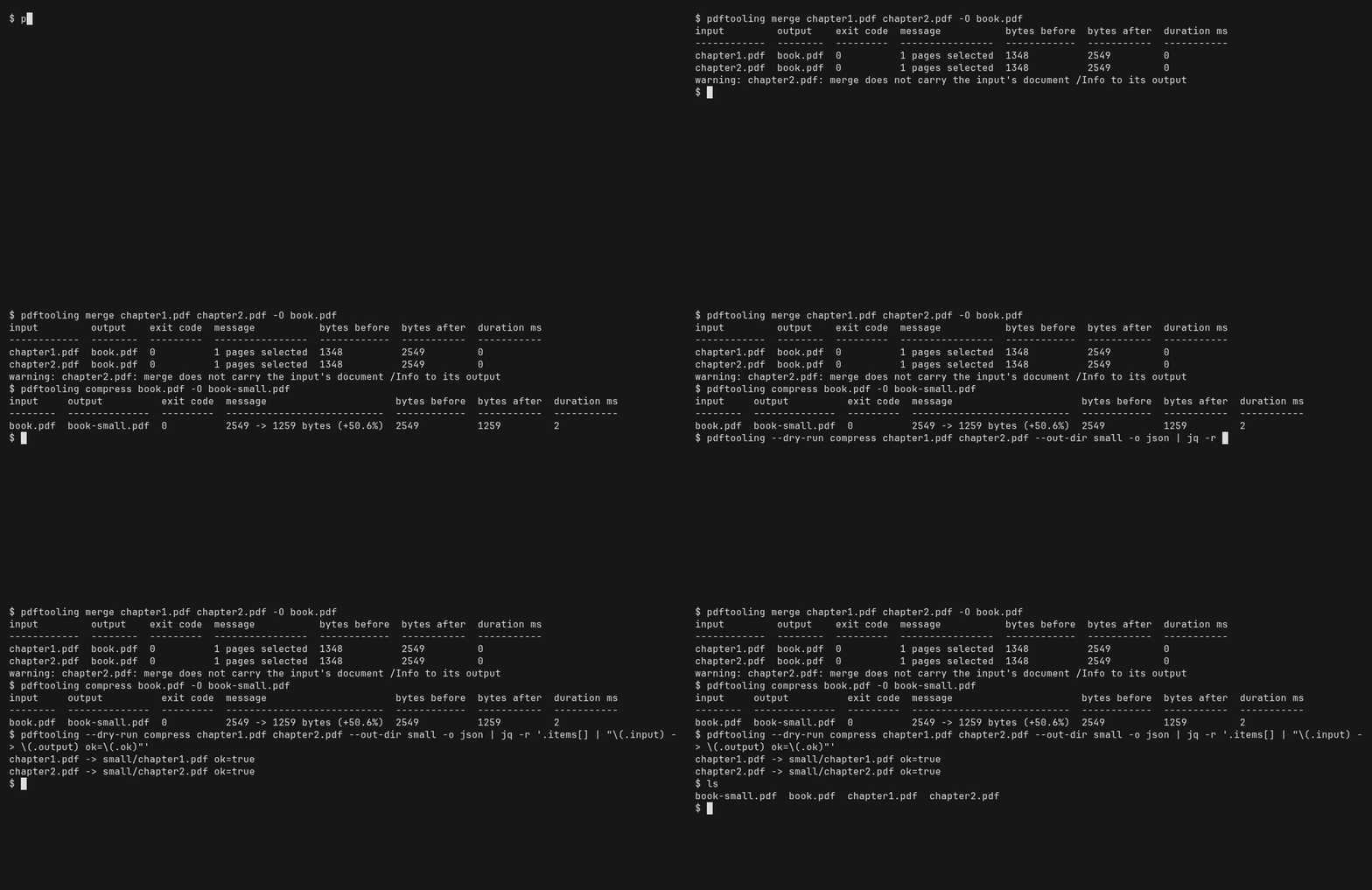
pdftooling merge chapter1.pdf chapter2.pdf -O book.pdf
The output is a new file: an existing book.pdf is never overwritten unless you pass -f.
Compress
pdftooling compress book.pdf -O book-small.pdf
The default pass is structural. --images downsample adds an opt-in, lossy image pass; see Compression ceiling below for what to expect.
OCR
pdftooling ocr scan.pdf -O scan-searchable.pdf
ocr needs the tesseract binary, and pdftooling doctor says whether it resolved. No accuracy is claimed for the result.
Encrypt, and open it again, with password files
chmod 600 owner.txt user.txt
pdftooling encrypt book.pdf --owner-password-file owner.txt --user-password-file user.txt -O book-locked.pdf
pdftooling decrypt book-locked.pdf --password-file user.txt -O book-open.pdf
Put each password on a line of its own file with an editor or a secrets manager, or pass - to read it from standard input. Never echo or printf a password into a file: that puts it in your shell history. Passwords are never accepted as flag values. encrypt takes the --owner-password-file and --user-password-file pair; decrypt takes --password-file.
Preview, then script against it
pdftooling --dry-run compress chapter1.pdf chapter2.pdf --out-dir small -o json | jq -r '.items[] | "\(.input) -> \(.output) ok=\(.ok)"'
A dry run writes nothing and reports the exit code the real run would return.
What exists today
The CLI spine, the output contract and the exit-code contract are in place end-to-end, and every verb named at the top of this file — structure, raster, compose, text, optimize, crypto and overlay operations alike — is shipped behind them, not merely specified.
The complete top-level roster, by family:
| Family | Commands |
|---|---|
| Structure | merge, split, extract, delete, rotate, reorder |
| Raster & compose | rasterize, compose, create |
| Text | text, tables |
| Optimize | compress, repair, linearize |
| Crypto | encrypt, decrypt, permissions |
| Metadata & overlay | meta (get / set), watermark, stamp |
| Engine-backed | ocr, convert |
| Diagnostics | doctor, info, version |
That table is asserted against the live command tree by set-inclusion, so a verb
shipped tomorrow turns the check red with no author action — but
uv run pdftooling --help remains the authoritative list.
uv run pdftooling --help               # the full verb tree; always the authoritative list
uv run pdftooling doctor               # which engines resolved, and how
uv run pdftooling merge a.pdf b.pdf -O merged.pdf
uv run pdftooling rotate report.pdf --pages 2-4 --angle 90 -O rotated.pdf
uv run pdftooling compress report.pdf -O small.pdf
uv run pdftooling --version            # tool, Python and engine versions on one line
uv run pdftooling --help is the authoritative list of what is actually available at any moment — if a verb is not printed there, it does not exist yet.
Page selection across verbs. split always operates on the whole document and takes no --pages; to act on a subset of pages, use extract (keep a subset), delete (remove pages) or reorder (permute), each of which accepts --pages.
When to use something else
Cells are read from each project's own README or documentation. "Not listed" means the feature does not appear in that source, not that it cannot be done.
| Tool | License | Built in | OCR | Office → PDF | Encryption | Windows | Pick it when |
|---|---|---|---|---|---|---|---|
| pdf-tooling | Apache-2.0 |
Python | yes (tesseract) |
yes (LibreOffice) | yes | no; Linux and macOS on Apple silicon | you want the common chores behind a single CLI with a public JSON and exit-code contract, a global --dry-run, and nothing AGPL, GPL or LGPL on the call graph |
| qpdf | Apache-2.0 |
C++ | no; it does not render PDFs or extract text | not listed | yes | yes (release assets) | you need linearization, encryption, splitting, merging or inspection from a native binary or a C++ library. pdf-tooling reaches the qpdf library through pikepdf |
| pdfcpu | Apache-2.0 |
Go | not listed | not listed | yes | yes (release assets) | you need Windows binaries, a Go library, or commands pdf-tooling does not have: bookmarks, attachments, portfolio, form, signatures, nup and booklet |
| pdfly | BSD-3-Clause |
Python, on pypdf | not listed | not listed | not listed | not stated; pure Python | you want a small pure-Python CLI that can sign a PDF and verify it with check-sign, or lay pages out with booklet |
| OCRmyPDF | MPL-2.0 |
Python | yes; adding a text layer is its purpose | not listed | not listed | yes (native Windows install documented) | OCR is the whole job and you need --deskew, --rotate-pages, PDF/A output via --output-type pdfa or --jobs for multi-core runs; pdf-tooling's ocr offers --lang, --dpi, --psm, --pages and --skip-text-pages |
Sources:
- qpdf: https://github.com/qpdf/qpdf (README, license and release assets).
- pdfcpu: https://github.com/pdfcpu/pdfcpu (README feature and command lists, license and release assets).
- pdfly: https://github.com/py-pdf/pdfly (README command list and license;
pyproject.tomldependencies) and https://pdfly.readthedocs.io. - OCRmyPDF: https://github.com/ocrmypdf/OCRmyPDF (README features and options, license) and https://ocrmypdf.readthedocs.io/en/latest/installation.html (native Windows install).
- pikepdf: https://github.com/pikepdf/pikepdf (README: based on qpdf).
- pdf-tooling: this README,
pdftooling ocr --helpandpdftooling doctor.
Checked on 2026-10-08.
Output contract
Rendered payloads go to stdout; diagnostics, warnings and progress go to stderr. -o selects the shape and defaults to table when stdout is a terminal and json when it is not, so piping into jq needs no flag.
| Shape | Behaviour |
|---|---|
-o table |
An aligned, plain-text table. |
-o json |
One object, carrying schema_version. |
-o ndjson |
One object per item, one per line, each line carrying its own schema_version so a single streamed line is self-describing. |
-o table is the shape meant for a person reading a terminal. Its columns, their names, their order and the whole layout may change in any release, without a major version bump, so anything that parses output should ask for -o json or -o ndjson instead — the structured shapes this section freezes.
Errors are the one deliberate asymmetry: with -o table an error is a one-line error: … on stderr, but with -o json/-o ndjson it is an object on stdout, so a machine consumer reading stdout never has to also read stderr to learn that the run failed. That holds for every failure you can reach, an unknown flag and a missing argument included: those are usage errors (exit 2) carrying the same envelope, not a human Usage: block.
A command group does not take the global block. meta groups meta get and meta set, and the global flags are declared at the root and on every verb, never on a group — so pdftooling meta -o json is a usage error (exit 2) rather than a run. It names the two positions that do work: pdftooling -o json meta get FILE (before the group) and pdftooling meta get FILE -o json (after the subcommand).
Global flags with no command at all — pdftooling -o json — are an incomplete invocation and exit 2 as well, pointing at --help. pdftooling on its own, with no arguments, still prints help and exits 0.
The collection key
Every -o json envelope that carries a collection of rows carries them under items. doctor and info additionally publish that same list under a name of their own, and both names are frozen: doctor's ports is pinned by the plan's own pdftooling doctor -o json | jq '.ports[] | select(.available == false)' example, and info's documents is its shipped shape. Neither is being renamed. The alias was added beside them so that a single jq expression works against every verb.
| Verb | Primary key | Universal alias | Relationship |
|---|---|---|---|
| every verb that returns an operation result | items |
items |
the same list |
info |
documents |
items |
the same list |
doctor |
ports |
items |
the same list |
meta get publishes a single document's report rather than a collection, so it has no row collection and names none.
Every -o json envelope also carries exit_code, warnings and duration_ms, on every verb. warnings is a list and is [] when empty — never null, never absent. exit_code is the code the process exits with for the run the envelope describes, and duration_ms is 0 on the verbs whose output must be reproducible byte-for-byte.
A batch reports every input, and never denies a file it wrote
A multi-input run writing into --out-dir records every input by name, in command-line order, in the payload's collection — the inputs that succeeded and the input that failed alike. A failing input is recorded, the run continues, and the run exits 1 at the end; each row carries its own ok, exit_code and message. A row that succeeded names its artifact in output, and that path is on disk.
That includes an input that failed because of its password: its row carries exit_code 6, and the run still exits 1. A --dry-run that does not test a supplied password (see Exit codes) predicts such a row as planned.
This is a behaviour change on a failure path, inside the pre-1.0.0 window. A multi-input --out-dir failure used to emit the error envelope — {"schema_version": 1, "error": {…, "path": null}}, with no collection at all — in place of the operation envelope, so the input that succeeded went unreported and the input that failed went unnamed even while its sibling's artifact sat on disk. A script that parsed such a failure by reading payload["error"] now finds payload["items"] instead. schema_version stays 1: no key is renamed, removed, retyped or repurposed, and the error envelope itself is unchanged.
Failures that are properties of the invocation rather than of an input stay run-scoped and keep the error envelope: a usage error, a directory where a file was expected, a nonexistent input, a missing engine, and the refusals the safety gate raises. A missing engine fails identically for every input, so it stays a single accurate diagnosis carrying its own exit code rather than becoming a row per input that also changes what the process exits with. A single-input run likewise reports that item's own code, which is what keeps the per-input codes distinguishable at all.
schema_version is 1, and this is what would move it
schema_version is 1 and stays 1 for as long as the envelope changes only by addition. Adding a key never moves it; nor does adding a verb, an item field, or an output format. It increments on the first change a consumer that reads keys by name cannot survive, which is exactly this list:
- a published key is renamed;
- a published key is removed;
- a published key's type changes — including
[]becomingnull, or a scalar becoming an object; - a published key's meaning changes while its name and type stay the same.
An increment requires a major version bump; a major version bump does not require an increment.
The structured shapes and the exit-code table below are public API from v1.0.0. Breaking either requires a major version bump and a schema_version increment. Pre-1.0 releases are explicitly still moving.
Exit codes
Uniform across every verb.
| Code | Name | Meaning |
|---|---|---|
| 0 | OK |
Success — including an empty-but-valid report. A --dry-run mirrors the code the real run would return, so it is not always 0 — except where an out-of-process engine decides the operand at load time, which a preview may not start, and except where a supplied password's correctness would decide it, which a preview declines to test; see the notes below this table. |
| 1 | FAILURE |
The operation ran and failed — corrupt input, engine error, unwritable destination. |
| 2 | USAGE |
Bad invocation — unknown flag, mutually exclusive flags, malformed page range, unknown subcommand, a global flag at a command group, or global flags with no command. |
| 3 | ENGINE_MISSING |
A required engine or binary is unavailable. The message always carries an install hint. |
| 4 | NO_INPUT |
Valid invocation, nothing to act on. |
| 5 | REFUSED |
A safety gate declined. |
| 6 | AUTH |
Password required, incorrect, or of the wrong kind. |
The carve-out on code 0, and its limit. convert and ocr hand the operand to a system binary — soffice and tesseract — and a --dry-run may not start either: a preview writes nothing, anywhere, and starting an engine to look would break that. The spawn-free triage a preview does run decides the container, not the engine's verdict on the package inside it, so a readable, marker-bearing office document that soffice then refuses at load time predicts 0 and really exits 1. Every dry item of those verbs therefore carries engine_verified set to false in its detail, so the preview never reads as an unqualified success. The limit is exact: the carve-out covers an out-of-process engine's decision about an operand, and nothing else.
The carve-out on code 0 for a supplied password, and its limit. Whether a password can be resolved — a flag, an environment variable, a terminal to prompt at — is decidable from existence alone, so a preview predicts it: an encrypted operand with no password to resolve predicts 6 and exits 6. Whether a resolved password is correct is decidable only by trying it, and a preview that tried it would have read the secret inside the planning path and published a right-or-wrong verdict into plans that land in CI artifacts — a preview must not become an oracle. So an encrypted document reached with a resolvable but wrong password predicts 0 and really exits 6, wherever the preview plans without opening it. Every dry item that names a password source therefore also carries password_verified set to false in its detail, so the preview never reads as a verified success. The limit is exact: the carve-out covers a supplied password's correctness, and nothing else.
Safety contract
--dry-runplans and reports; it writes nothing, anywhere.- Outputs never clobber. An existing target needs
-f/--force. On a non-interactive run, overwriting in a multi-input invocation (merge,delete,convert, etc.) additionally requires-y: bulk (more than a single input) plus destructive (in-place or clobbering) on a non-terminal stdin is refused with exit 5 rather than prompted. - Every write is write-to-temp-on-the-target-filesystem,
fsync, then an atomic rename. - A hard kill —
SIGKILL, the kernel's OOM killer, or a CI timeout that escalates toSIGKILL— cannot be handled by any process, so it can leave hidden temp files named.pdftoolkit-followed by a short random suffix, mode0600, beside the destination. Your file is untouched: a temp is only ever renamed over it once complete. pdftooling never deletes these files, including on a later run into the same directory, because a leftover is the only evidence that a run was killed.pdftooling doctor --strict, run from a directory that contains the destination, lists them; delete them once no pdftooling run is writing to that directory. - An output keeps the permission bits of the file it replaces, and a destination that did not exist is created at
0666 & ~umask— what a shell redirect would have produced. The.baksidecar keeps the original's bits too, so a backup is never more permissive than the file it backs up. - Inputs are never mutated unless you pass
--in-place, which writes a.baksidecar first.--no-backupsuppresses the sidecar and requires--in-place— on its own it is a usage error. - An encrypted input is never written out unencrypted by default: the verbs that write a PDF from it —
rotate,extract,delete,reorder,merge,split,watermark,stamp,ocr,compress,repair,linearize,meta set— refuse it unless--allow-decrypted-outputis given (see What a write does not carry). A verb that writes no PDF (an extraction or report verb) is not gated, andencryptanddecryptchange encryption by design. - A password is never accepted as a command-line value.
--password-filetakes a path or-, becauseargvis world-readable in/procand lands in shell history.
Compression ceiling
Structure-level compression plus optional image downsampling is the ceiling of a permissive stack: Ghostscript is AGPL-3.0+ and deliberately excluded, so compress builds on pikepdf/libqpdf object streams and an opt-in Pillow image pass instead. --images downsample's resample threshold is computed against the page's own width in inches (the page box), never an image's placement rectangle, which under-downsamples a small image on a large page — a stated, conservative limitation.
Render budget
No page of any PDF may make rasterize or ocr allocate a bitmap above 178,956,970 pixels (width times height). The budget is per page and is compared on the bitmap the renderer allocates, after the page's own crop box and /Rotate are applied; the renderer does not apply /UserUnit, so neither does the budget. A page over the budget refuses the whole run at exit 5 before anything is written, and --dry-run predicts the same refusal. The message names the page, its pixel size, the budget and the largest whole --dpi that fits (and the largest --width, under --width).
rasterize --dpi above 2400 (or not finite) and --width above 32768 exit 2. ocr inherits the area budget and keeps its own --dpi range. Under ocr --skip-text-pages, a page that is not rendered is not measured.
The recourse is a lower --dpi or --width. There is no override.
Encryption, passwords and permissions
encrypt writes AES-256 (revision 6) by default. --legacy selects RC4-128, which is cryptographically broken and exists only for readers that predate PDF 1.7 ExtensionLevel 3; it also leaves document metadata unencrypted, because the format cannot encrypt metadata without AES. Every cryptographic operation is libqpdf's, reached through pikepdf. This tool implements no cryptography of its own — no key derivation, no cipher, no password comparison.
A password is never accepted as a command-line value. There is no --password, no --user-password and no --owner-password: argv is world-readable in /proc and lands in shell history, so the harm would happen before the tool could refuse. Passing any of those three spellings is a usage error (exit 2) naming the three supported paths, in order of preference — in the separated form (--password hunter2) and in the joined one (--password=hunter2) alike, and the value is never echoed back in either:
| Path | Spelling | Notes |
|---|---|---|
| A file | --password-file PATH, --owner-password-file PATH, --user-password-file PATH |
The first line only. A single trailing newline is stripped; no other whitespace is, because a password may legitimately end in a space. |
| Standard input | the same flags with - |
One line. Only one slot may read from stdin per run. |
| The environment | PDF_TOOLING_PASSWORD, PDF_TOOLING_OWNER_PASSWORD |
Consulted only when no flag was given for that slot. |
| A prompt | none | Only when stdin is a terminal. Never on a pipe, where it would hang. |
With none of those available the run exits 6 and writes nothing.
Run chmod 600 on any password file. The tool warns when one is readable by group or other, and recommends exactly that — it warns rather than refuses, because refusing to read a 0644 file would break more scripts than it protects.
The environment channel is weaker than a file, and this document says so rather than implying otherwise. A process's environment is readable through /proc/<pid>/environ by any process running as the same user, and it is inherited by every child the tool spawns. A password file with restrictive permissions is the stronger choice; the environment variable exists because a CI system often has no better option.
No secure erasure is claimed, anywhere. A resolved password is held in a buffer that is zeroed after use, but Python may already have copied it while decoding the file, and swap and core dumps are outside a process's control. The same goes for the .bak sidecar and for temporary files: they are deleted, not shredded.
encrypt --in-place and meta set --clear-all --in-place each need one more word from you: they are the two places where the safety default and the security default point in opposite directions. The .bak sidecar is a copy of the original, so an in-place encryption would leave plaintext sitting next to the ciphertext, and an in-place --clear-all would leave every metadata field it removed sitting next to the cleaned file — silently. So both refuse (exit 5) unless you pass --no-backup (keep no copy) or -y (keep it, knowingly; the run then warns, naming the .bak).
The permission vocabularies
pdftooling info -o json and pdftooling permissions -o json are both public output, and they spell some of their permission tokens differently. That is a documented divergence, not a defect to be tidied: both spellings shipped, both are schema_version: 1 public API, and renaming either would break a published contract. So the crossing is published here instead. --allow accepts the left column only — the right column is info's output spelling and is not an input token.
--allow / permissions |
info |
ISO 32000-1 Table 22 bit |
|---|---|---|
print |
print |
3 |
modify |
modify |
4 |
copy |
copy |
5 |
annotate |
annotate |
6 |
forms |
fill-forms |
9 |
accessibility |
extract-accessibility |
10 |
assemble |
assemble |
11 |
print-highres |
print-high-resolution |
12 |
The tokens spelled identically on both surfaces need no translation; the ones that diverge are the same bit under a different name. Without this table, a consumer that runs both verbs against the same encrypted document sees phantom differences on every file. The table is derived from the source constants by a test, so it cannot rot away from what the tool actually emits.
Permission bits are advisory. They are a request to the reader, not a lock: only cooperating readers honour them, any reader holding the file may ignore every bit, and a reader that can display a page can extract it. Encryption protects the content; the bits on their own protect nothing. --allow takes a comma-separated, repeatable list from print, print-highres, copy, modify, annotate, forms, assemble, accessibility, plus the exclusive all and none; omitting it grants nothing. accessibility is granted whatever you ask for — PDF 2.0 deprecated that bit and conforming readers always permit it — and permissions reports what the document actually grants rather than what was requested. print-highres also grants print: a reader permitted to print at full resolution may obviously print at low resolution, and the format has no spelling for “high but not low”, so asking for the one token grants two. That is the format's behaviour rather than this tool's choice, and it is disclosed at the flag that causes it instead of being left for permissions to reveal afterwards.
What a write does not carry
A verb that rebuilds or rewrites a document does not carry everything its input held, and it reports what it dropped instead of staying quiet.
Written unencrypted from an encrypted input: rotate, extract, delete, reorder, merge, split, watermark, stamp, ocr, compress, repair, linearize, meta set.
Each of those verbs refuses an encrypted input by default: the run exits with the REFUSED code, names every encrypted input, and writes nothing — no output, no .bak, no temporary file — and --dry-run predicts the same refusal. --allow-decrypted-output permits the unencrypted output, and the warning still says so.
Carry the input's /Info and XMP packet unchanged: rotate, extract, delete, reorder, split, watermark, stamp, ocr, compress, repair, linearize, meta set, encrypt, decrypt.
merge carries the first input's /Info and XMP packet; each other input whose metadata is not carried is named in a warning, and a later input that needs a password is reported as not checked. split carries them into every part. Nothing in them is rewritten: the producer entry, the dates and the XMP packet are the input's. To write an output without them, run meta set --clear-all on it.
meta set --clear-all empties the document-level /Info dictionary and removes the document-level XMP packet from the file: the output keeps no copy of either, referenced or not, and is written as a single revision. It leaves page-level XMP, /PieceInfo, annotation authors, embedded-file metadata and the trailer /ID in place, and meta get reports those. Before 1.1.1, --clear-all unlinked the packet but left a copy of it in the file as an unreferenced object, which meta get and most tools do not show; a file cleared by an earlier version still holds that copy.
encrypt and decrypt change encryption by design. With --allow-decrypted-output, an owner-only input needs no password for any of this; a password that is supplied must open it. Every drop is reported as a warnings entry and as a warning: line on stderr, and --dry-run predicts the same lines. Without --allow-decrypted-output, --in-place on an encrypted input leaves it untouched; with it, the ciphertext is replaced, and the .bak keeps it unless --no-backup is given.
--password-file is global: honoured or refused, never silently ignored
--password-file (and its resolution siblings — the PDF_TOOLING_PASSWORD environment variable and the interactive prompt) is declared on every verb, because any of them may meet a password-protected input — including the report-only ones. A verb that can open an encrypted document uses the resolved password there to read it (the output it writes is not encrypted; see What a write does not carry), on the SAME first-hit-wins chain encrypt/decrypt already document above; a verb that structurally cannot use a password (it takes no document operand, or it already declares its own dedicated password flag) refuses it up front, at exit 2, naming the flag rather than accepting it and doing nothing — the same "declared but silently inert" shape this tool refuses for every other global flag (see the safety contract above). There is no hand-maintained list of which verbs fall into which group here: run the verb's own --help to see the flag declared, or try it — a verb that cannot honour it says so immediately, before any document is opened.
A supplied password is checked even when the document would open without one: an owner-only document that the supplied password does not open is an authentication failure on every verb, exactly as a wrong user password is.
decrypt round-trips the page tree byte for byte: the decoded content streams, the page dictionaries and every embedded image's raw bytes come back identical. The whole file does not, and nothing here claims it does — /ID, /Encrypt, the trailer, the cross-reference table and object numbering all legitimately change on any resave.
OCR and Office conversion
ocr and convert are the two verbs that depend on a system binary rather than a Python wheel — the two verbs pdftooling doctor can legitimately report as unavailable.
ocr drives the tesseract binary. For every selected page it renders the page, recognises a text-only layer, and overlays that layer on the original page object — the page's own image is never re-rendered, and a byte-level check proves the image stream is identical before and after. --skip-text-pages leaves a page that already has extractable text untouched (no render, no OCR call). This build ships whatever tessdata language packs the host has installed; --lang is validated against exactly that list (pdftooling doctor), and a pack that is not installed exits 3 with an install hint naming it. No accuracy or confidence claim is made anywhere in this tool — ocr is described here by its engine, not by a quality promise.
convert drives headless LibreOffice (soffice) to turn an office document into a PDF. Each invocation gets its own isolated LibreOffice profile directory and converts into a private scratch location first — LibreOffice never writes to the destination directly, and the destination is only touched through this tool's one write chokepoint. An exit 0 from soffice having produced no output file is treated as a failure here, not a success, because that is a real and well-known LibreOffice failure mode. --timeout bounds one conversion; on expiry the whole process group is killed, so no soffice.bin daemon is left running. Each throwaway profile is pre-seeded so that LibreOffice loads no linked image, remote or local, never updates links on load, runs no macros and disables OLE/DDE active content, and the document is handed over by absolute path.
What this does not cover. The hardening above is verified against a narrow engine and document scope, and nothing here claims more:
- LibreOffice still parses the untrusted document in-process. A parser defect in LibreOffice is not mitigated here, and the conversion runs with the caller's network access and filesystem permissions. For untrusted input, run
convertwithout network (for example in a container with no network, or underunshare -n). - Only Writer documents (ODT and DOCX) are proven by a test. Spreadsheet and presentation vectors such as
WEBSERVICE()and external references rely on the seeded settings without a test. - The macro and active-content settings are seeded but not exercised by a test.
- Fonts come from the host: a document cannot fetch a font, but output appearance depends on the installed fonts, and fonts embedded in the document are still parsed.
- Hyperlinks remain clickable links in the PDF. They are not followed during conversion.
- The
sofficechild inherits the caller's environment (tracked asB-427). - The settings were verified against LibreOffice 24.2.7.
Upgrading to 1.2
A 1.1.x invocation or script that relied on any of the following observes a different exit code or message at 1.2. These changes shipped in 1.2.0 on 2026-10-08.
| In 1.1 | In 1.2 | What to change |
|---|---|---|
meta set --clear-all --in-place exited 0 and kept a .bak sidecar holding the original /Info and XMP packet, with no warning; -y changed nothing |
refused at exit 5 before anything is written (no output, no .bak; the input is byte-identical); --dry-run predicts the same 5 |
pass --no-backup to keep no copy, or -y to keep the .bak knowingly — the run then warns, naming it. meta set --in-place without --clear-all is unchanged |
a multi-input run (compress, delete, extract, reorder, rotate, ocr, text, tables, rasterize) in which an input failed on its password exited 6 |
it exits 1, like any other failing input; the input's row still carries exit_code 6. A single-input run still exits 6 |
read items[].exit_code to tell a password failure from another failure; do not branch on the run's 6 for a batch |
an owner-only encrypted input with a --password-file that does not open it exited 0 on rotate, delete, extract, reorder, merge, split, watermark, stamp, meta set (under --allow-decrypted-output), info and meta get, and 6 on the others |
it exits 6 on every verb; in a batch, that input's row fails with 6 and the run exits 1 |
supply the owner password, or run owner-only inputs without --password-file |
in a multi-input text or tables run, an owner-only input with a non-matching password ended the whole run with the error envelope |
the input is reported as a failed row and the other inputs are processed | read the per-item rows |
schema_version stays 1, the published exit-code table is unchanged, and no verb was removed.
Re-derived at 1ffa890 on 2026-10-08.
Upgrading to 1.1
A 1.0.1 invocation or script that relied on any of the following observes a different exit code or message at 1.1. These changes shipped in 1.1.0 on 2026-10-07.
| In 1.0.1 | In 1.1 | What to change |
|---|---|---|
rasterize or ocr on a page whose bitmap is larger than 178,956,970 pixels allocated it (several GB for a hostile page box) or died on a raw MemoryError at exit 1; --dry-run predicted 0 |
the whole run is refused at exit 5 before anything is written, naming the page, its pixel size, the budget and the largest --dpi that fits; --dry-run predicts the same 5. This includes ocr --dpi 1200 on A3 or larger pages, which is now refused |
lower --dpi (or --width) to the value the message names; for ocr --dpi 1200 on A3 or larger pages, pass a lower --dpi. There is no override |
rasterize --dpi accepted any positive value, including nan and inf, and --width any positive integer |
--dpi above 2400 or not finite, and --width above 32768, exit 2 |
pass a value inside the range |
convert loaded images a document links to (a URL or a local file) and rendered them into the PDF |
linked images are not loaded, and the PDF shows LibreOffice's placeholder; images stored inside the document are unaffected | embed the images in the document before converting |
a verb that writes its output unencrypted (rotate, extract, delete, reorder, merge, split, watermark, stamp, ocr, compress, repair, linearize, meta set) wrote a plaintext output from an encrypted input at exit 0, with only a warning — an owner-only input with no password at all, and an encrypted stamp --from source |
the run is refused at exit 5 before anything is written, naming every encrypted input; a batch with any encrypted input is refused whole, and --dry-run predicts it |
pass --allow-decrypted-output where a decrypted output is intended; the exit code is then 1.0.1's, and the output carries the input's /Info and XMP (see the metadata row) with a W-ENC warning naming each encrypted input, a stamp --from source included |
--in-place (including --no-backup) on an encrypted input replaced the ciphertext with plaintext |
refused at exit 5; the input is left byte-identical and no .bak is made |
as above |
such a run with an encrypted input and a missing or wrong password, a missing sibling input, a malformed page range or another in-verb usage error exited 6, 4, 3 or 2 |
exits 5 first; the other codes answer once --allow-decrypted-output is given |
scripts that branch on 6 for an encrypted input of these verbs add the flag |
rotate, extract, delete, reorder, merge, split, watermark, stamp and ocr wrote an output whose /Info held only /Producer: pypdf and no XMP packet, and warned that the input's were not carried |
the output carries the input's /Info and XMP packet unchanged (merge: the first input's; split: into every part); the warning is gone except for merge's other inputs |
to publish a document without its metadata, run pdftooling meta set --clear-all on the output; do not rely on a page operation to strip it |
schema_version stays 1, the published exit-code table is unchanged, and no verb was removed.
Re-derived at 14d839a on 2026-10-07.
Upgrading to 1.0.0
A 0.3.1 invocation, script or import that relied on any of the following stops working, or observes a different shape, at 1.0.0. Beyond this table, the sole remaining movement in this file's contract is the -o table row under ## Output contract, which no longer describes an ANSI-styling behaviour the renderer never had.
| In 0.3.1 | In 1.0.0 | What to change |
|---|---|---|
the deprecated pdftoolkit console script (and its hyphenated sibling) |
removed — the shell reports command not found | use pdftooling or pdf-tooling |
PDF_TOOLKIT_PASSWORD / PDF_TOOLKIT_OWNER_PASSWORD |
PDF_TOOLING_PASSWORD / PDF_TOOLING_OWNER_PASSWORD |
rename the variable anywhere a script or CI job sets it — an unrecognised name is not an error, so the password is silently unread and the run exits 6 |
PdfToolkitError as the public base exception |
PdfToolingError |
update any except/import naming the old class |
info on a nonexistent input nested the failure inside documents[0].error |
the same input returns a top-level error key and no documents key |
read error at the top level; the exit code stays 4 |
convert --dry-run over a batch containing an item the real run fails on predicted a clean batch |
the preview now predicts the real run's own exit code and per-item ok |
do not trust a --dry-run result captured before the upgrade |
--no-color, and the NO_COLOR environment variable it honoured |
removed — the flag is not declared, so passing it is an unknown-flag usage error that exits 2 carrying the usual envelope, and NO_COLOR is read nowhere |
drop both from any script, alias or CI job. Neither ever changed a byte of output: this tool emits no ANSI styling at all, deliberately |
-O or --out-dir naming a destination that was also an input of the same run overwrote that input under -f, at exit 0 with "ok": true and no .bak sidecar |
the run is refused at exit 5, naming the destination and the input it collides with; no flag reaches it |
point the destination somewhere that is not an input. A script that relied on the old behaviour was destroying its input irreversibly |
every file written landed at mode 0600, whatever the destination's prior mode and whatever the umask |
an overwrite preserves the destination's existing permission bits, and a newly created file gets 0666 & ~umask |
set umask where a specific mode matters. Files this tool writes are no longer forced private |
schema_version stays 1, the published exit-code table is unchanged, and no verb was removed.
Re-derived at d3fca0c on 2026-09-15.
Naming
The names below are this project's contract. They differ deliberately, and a reader citing any of them should cite the table rather than the prose around it.
| Kind | Name |
|---|---|
| PyPI distribution | pdf-tooling |
| Repository | pdf-tooling |
| Import package | pdf_tooling |
| Console script | pdftooling |
| Aliases | pdf-tooling |
Why the names differ. The PyPI distribution is pdf-tooling because pdf-toolkit
sits too close to names already on PyPI, and the distribution called pdftoolkit there
is an unrelated GPL-3.0 project that is not this software. The repository followed the
distribution; the import package and the console script followed it in turn, once the
deprecated aliases below made moving a published surface safe.
The deprecated console scripts. pdftoolkit and pdf-toolkit were migration
aliases for pdftooling/pdf-tooling — same behaviour, same exit codes — each
printing one line on stderr naming the replacement. Both are removed at v1.0.0.
Release history, so the install lines above can be read against it. v0.1.0 was
git-install-only and was never published to PyPI under either name; v0.1.1 is the
first published release, as pdf-tooling; v0.2.0 is the first published under the
renamed repository; v0.3.0 is the first release to ship the renamed pdftooling
console script and the pdf_tooling import package. The old pdf_toolkit import
package was renamed away entirely at that release, not kept as an alias. pdftoolkit
and pdf-toolkit shipped as deprecated console-script aliases from that same release.
Development
Current phase: Phase 1 (v1) complete — per-spec status lives in ai_plans/pdf-tooling/specs/SPEC-INDEX.md; history in changelog.md.
make test      # run the test suite
make ci        # the full local gate: format, lint, types, tests, licenses, SAST, CVEs
make help lists every target. make ci is a subset of CI, run with the same commands — it does not predict CI. What runs locally, what does not, and why is declared in .github/gate-parity.toml and printed by make ci's own epilogue on every run. No target degrades to a weaker substitute or exits 0 when its check did not run.
Contributions are accepted under the Developer Certificate of Origin (git commit -s). See CONTRIBUTING.md for the commit conventions and TESTING.md for how to run each suite.
Releases
Every release is built and published by CI from a tag. Publication uses PyPI Trusted Publishing over OIDC: the workflow holds no upload token at all, so nothing can be published from a developer's machine.
The wheel and the sdist both carry attested provenance on PyPI, served from PyPI's integrity endpoint beside each file. You can verify that the artifact you installed was built from this repository, by this workflow, at the tag it claims.
Known issues
Found a bug? Open an issue: https://github.com/ArmandoHerra/pdf-tooling/issues. A report
that names the verb, the flags, the input and what you expected is enough to act on, and
pdftooling doctor output helps whenever an engine is involved. Every fix that ships is
recorded in changelog.md, written by the commit that made it.
Security reports go through the private channel described in SECURITY.md, not a public issue.
Known limitations
- Platforms: there is no Windows build, and macOS support is Apple silicon only; see Getting Started.
- Compression: it is structural plus an opt-in image pass, not a rewrite of the page content; see Compression ceiling.
ocrandconvert: they depend on system binaries thatpdftooling doctorreports on; see OCR and Office conversion.convert: it parses the untrusted document in-process, so run it without network for input you do not trust; see OCR and Office conversion.- Permission bits: they are advisory, and a reader that can display a page can extract it; see Encryption, passwords and permissions.
- Oversized pages: a page whose bitmap would exceed the render budget is refused, not shrunk; see Render budget.
- Page operations: they carry the input's metadata unless told otherwise; see What a write does not carry under Output contract.
License
Apache-2.0 — see LICENSE and NOTICE. THIRD_PARTY_LICENSES is generated from the resolved environment and ships in both the sdist and the wheel. pdftk is GPL-licensed; this project is Apache-2.0, and its engine policy forbids anything under AGPL, GPL or LGPL from appearing as an import, an optional extra, or a subprocess fallback.
1 maintainer

Metadata
1 maintainer
Release files for pdf-tooling 1.2.2
For a detailed explanation of source distributions (sdists) and built distributions (wheels), please see the package formats documentation.
Source distribution (sdist)
| File | Size | Uploaded | Provenance | |
|---|---|---|---|---|
| pdf_tooling-1.2.2.tar.gz | 2.3 MB | With provenance | Details |
Built distribution (wheel)
| File | Interpreter | ABI | Platform | Reset |
|---|---|---|---|---|
| pdf_tooling-1.2.2-py3-none-any.whl | Python 3 | none | any | Details |
Total release size: 2.8 MB
Release files / pdf_tooling-1.2.2.tar.gz
| Download URL | pdf_tooling-1.2.2.tar.gz |
|---|---|
| Size | 2.3 MB |
| Tags | Source |
|
SHA-256 checksum How to use checksums |
e6612b5678f119ab289ab3abaf07131c893040179b47aa7b972e3a420c392076
|
|
BLAKE2b-256 checksum How to use checksums |
99268fd2a4ec3a00caf53a0e5d337d0914d9c3e0f518484379202275ca98fe73
|
| Upload date | |
|
Uploaded using Trusted Publishing? What is trusted publishing? |
Yes |
| Uploaded via |
twine/7.0.0 CPython/3.13.14
|
Provenance
Provenance describes where a file came from. On PyPI, provenance is shared via attestations, which provide a verifiable record of the build or publishing details. View details, limitations and caveats.


PyPI Publish Attestation
PyPI verified that this artifact, at this checksum, originated from the publisher listed below.
Signed by GitHub Actions, verified by PyPI on Oct 26, 2026.
Transparency logRelease files / pdf_tooling-1.2.2-py3-none-any.whl
| Download URL | pdf_tooling-1.2.2-py3-none-any.whl |
|---|---|
| Size | 506.5 kB |
| Tags | Python 3 |
|
SHA-256 checksum How to use checksums |
91ddb3c8471e0e8c7e5ff86aa4795879b55d92712f233322a3b125a036d3ec17
|
|
BLAKE2b-256 checksum How to use checksums |
907414697a05c307afae5024c4f2cbc4dea81cb0397d96187556579945d7f2d7
|
| Upload date | |
|
Uploaded using Trusted Publishing? What is trusted publishing? |
Yes |
| Uploaded via |
twine/7.0.0 CPython/3.13.14
|
Provenance
Provenance describes where a file came from. On PyPI, provenance is shared via attestations, which provide a verifiable record of the build or publishing details. View details, limitations and caveats.
PyPI Publish Attestation
PyPI verified that this artifact, at this checksum, originated from the publisher listed below.
Signed by GitHub Actions, verified by PyPI on Oct 26, 2026.
Transparency logSecurity for pdf-tooling 1.2.2
Provenance
Provenance describes where a file came from. On PyPI, provenance is shared via attestations, which provide a verifiable record of the build or publishing details. View details, limitations and caveats.
Full provenance
All 2 files in this release have been uploaded with provenance metadata.
Attestation for pdf_tooling-1.2.2.tar.gz
PyPI Publish Attestation
PyPI verified that this artifact, at this checksum, originated from the publisher listed below.
Signed by GitHub Actions, verified by PyPI on Oct 26, 2026.
Transparency logA note on package security
PyPI is a repository for distributing packages, not a service for auditing them. While third-party security researchers and our staff do their best to detect and remove malicious packages, PyPI cannot guarantee the quality, security or suitability of any given package.
To learn more about protecting yourself from malicious actors, visit our package security documentation.














