
pdf-watermark
A python CLI tool to add watermarks to a PDF. Allows for processing whole directories while keeping the directory structure.
Description
There are multiple similar tools out there but I couldn't find one that really suited my needs. This project also serves as an excuse to play with building and distributing a python CLI tool.
With this tool you can add a watermark to a PDF file. The watermark can either be a text string that you provide, or an image (PNG being the recommanded format).
This tool provides two commands.
- insert: The watermark is placed once on each page at a specific position.
- grid: The watermark is repeated multiple times on each page in a grid pattern.
Below is an example of a PDF before using this tool, after using this tool with the grid command and a text watermark, and after using this tool with the grid command and an image watermark.
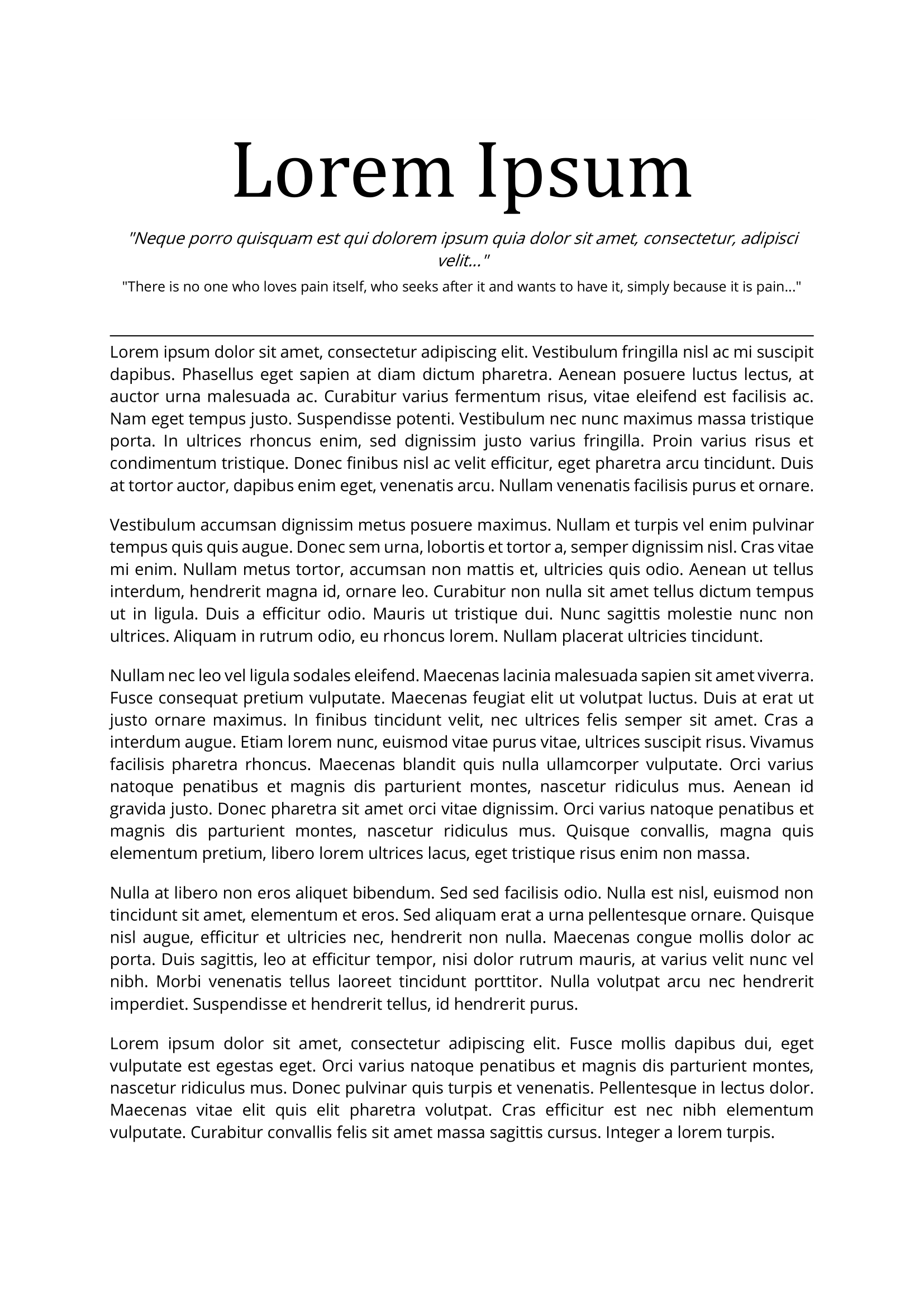
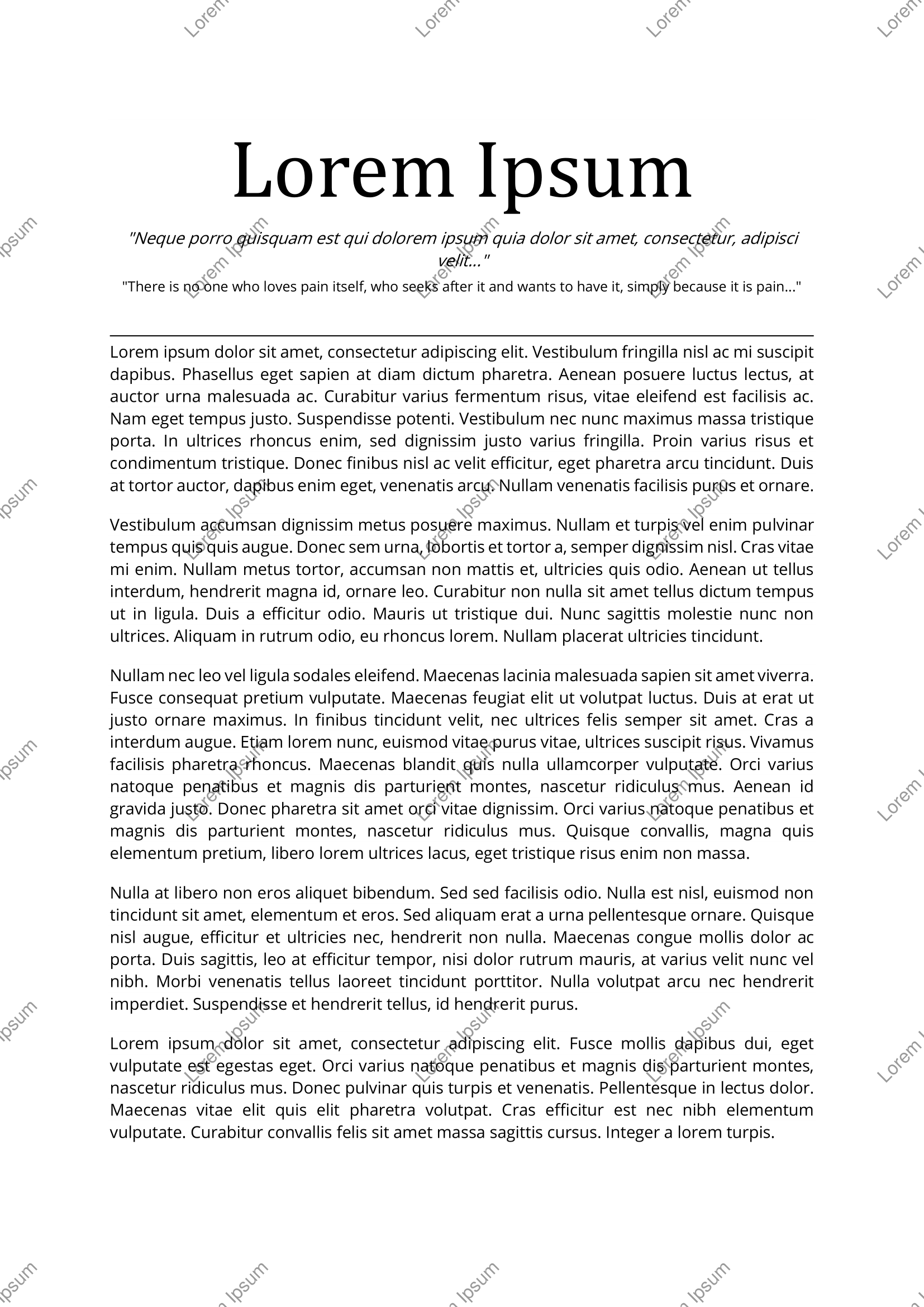
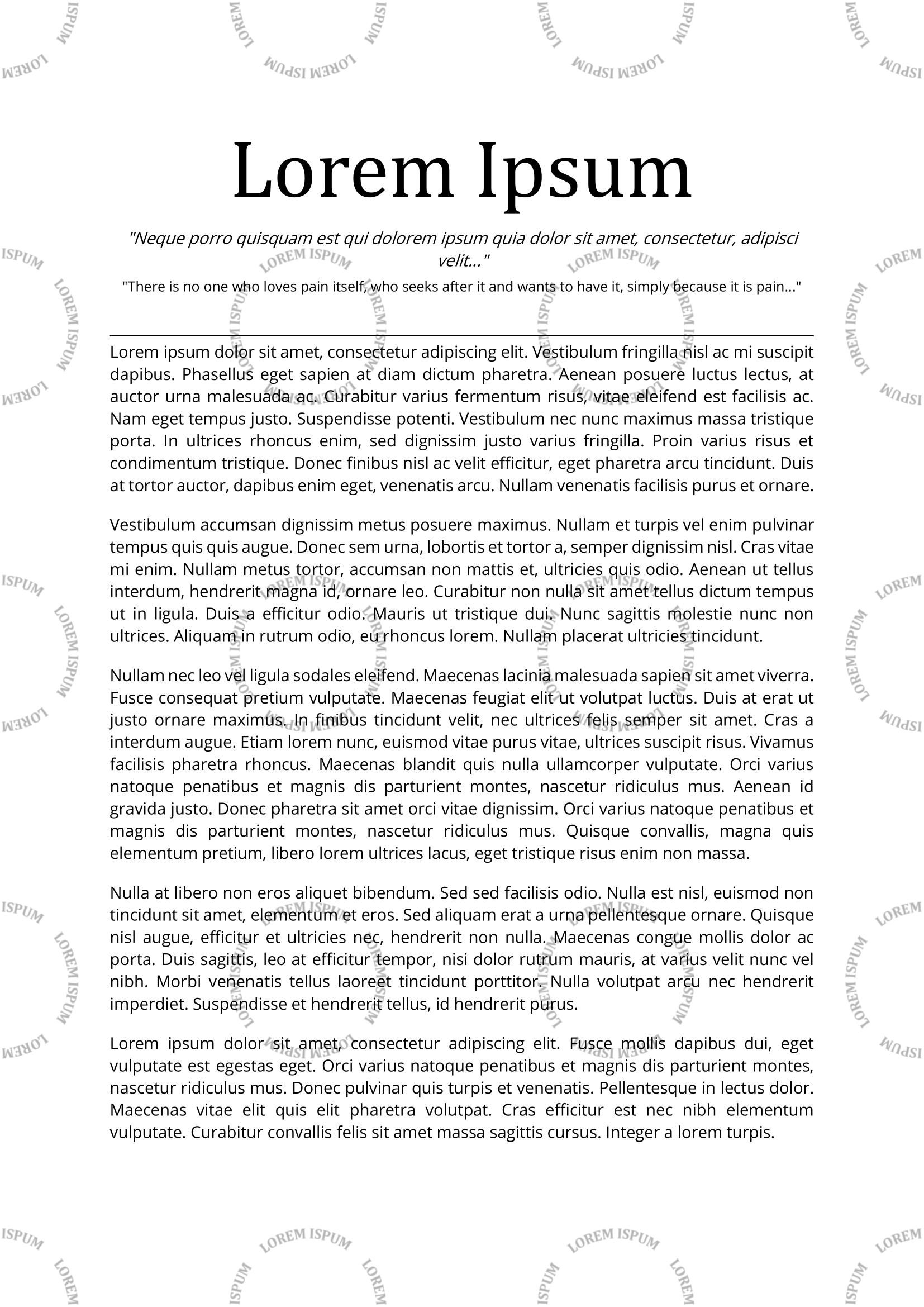
Many options are available to customize the watermark, such as the position, the opacity, the angle, the color, the font, the size, etc. A detailed list of options is available below.
Getting Started
Dependencies
- This project was built with python 3.11. However it should also run just fine with older versions.
- See
requirements.txtfor the list of dependencies. - Some options require parts of the
popplerlibrary to be installed (--save-as-image and --unselectable). Please refer to the pdf2image or poppler documentation for installation instructions.
Installing
This package is available on PyPi.
pip install pdf-watermark
The project can also be used with uvx without installing it manually:
uvx run pdf-watermark <command and options>
Usage
TLDR
watermark grid input.pdf "watermark text" -s output.pdf # Grid pattern for a single file
watermark insert input_folder "watermark_image.png" # Insert image for a whole directory, overwriting the input files
Detailed usage
Usage: watermark [OPTIONS] COMMAND [ARGS]...

  Add a watermark to one or more PDF files.

  The watermark can be repeated in a grid pattern using the grid command, or
  inserted at a specific position using the insert command.

Options:
  --help  Show this message and exit.

Commands:
  grid    Add a watermark in a grid pattern.
  insert  Add a watermark at a specific position.
insert command:
Usage: watermark insert [OPTIONS] FILE WATERMARK

  Add a watermark at a specific position.

  Add a WATERMARK to one or more PDF files referenced by FILE. WATERMARK can
  be either a string or a path to an image file. FILE can be a single file or
  a directory, in which case all PDF files in the directory will be
  watermarked.

Options:
  -s, --save PATH                 File or folder to save results to. By
                                  default, the input files are overwritten.
  --dry-run                       Enumerate affected files without modifying
                                  them.
  --workers INTEGER               Number of parallel workers to use. This can
                                  speed up processing of multiple files.
                                  [default: 1]
  --verbose BOOLEAN               Print information about the files being
                                  processed.  [default: True]
  -y, --y FLOAT                   Position of the watermark with respect to
                                  the vertical direction. Must be between 0
                                  and 1.  [default: 0.5]
  -x, --x FLOAT                   Position of the watermark with respect to
                                  the horizontal direction. Must be between 0
                                  and 1.  [default: 0.5]
  -ha, --horizontal-alignment TEXT
                                  Alignment of the watermark with respect to
                                  the horizontal direction. Can be one of
                                  'left', 'right' and 'center'.  [default:
                                  center]
  -o, --opacity FLOAT             Watermark opacity between 0 (invisible) and
                                  1 (no transparency).  [default: 0.1]
  -a, --angle FLOAT               Watermark inclination in degrees.  [default:
                                  45]
  -tc, --text-color TEXT          Text color in hexadecimal format, e.g.
                                  #000000.  [default: #000000]
  -tf, --text-font TEXT           Text font to use. Supported fonts are those
                                  supported by reportlab, or available on the
                                  system or in the custom fonts folder.
                                  [default: Helvetica]
  -ts, --text-size INTEGER        Text font size.  [default: 12]
  --unselectable                  Make the watermark text unselectable. This
                                  works by drawing the text as an image, and
                                  thus results in a larger file size.
  -is, --image-scale FLOAT        Scale factor for the image. Note that before
                                  this factor is applied, the image is already
                                  scaled down to fit in the boxes.  [default:
                                  1]
  --save-as-image                 Convert each PDF page to an image. This
                                  makes removing the watermark more difficult
                                  but also increases the file size.
  --dpi INTEGER                   DPI to use when saving the PDF as an image.
                                  [default: 300]
  --custom-fonts-folder PATH      Folder path containing custom font files
                                  (TTF, OTF, etc.) to search for non-standard
                                  fonts.
  --help                          Show this message and exit.
grid command:
Usage: watermark grid [OPTIONS] FILE WATERMARK

  Add a watermark in a grid pattern.

  Add a WATERMARK to one or more PDF files referenced by FILE. WATERMARK can
  be either a string or a path to an image file. FILE can be a single file or
  a directory, in which case all PDF files in the directory will be
  watermarked.

Options:
  -s, --save PATH                 File or folder to save results to. By
                                  default, the input files are overwritten.
  --dry-run                       Enumerate affected files without modifying
                                  them.
  --workers INTEGER               Number of parallel workers to use. This can
                                  speed up processing of multiple files.
                                  [default: 1]
  --verbose BOOLEAN               Print information about the files being
                                  processed.  [default: True]
  -h, --horizontal-boxes INTEGER  Number of repetitions of the watermark along
                                  the horizontal direction.  [default: 3]
  -v, --vertical-boxes INTEGER    Number of repetitions of the watermark along
                                  the vertical direction.  [default: 6]
  -m, --margin                    Wether to leave a margin around the page or
                                  not. When False (default), the watermark
                                  will be cut on the PDF edges.
  -o, --opacity FLOAT             Watermark opacity between 0 (invisible) and
                                  1 (no transparency).  [default: 0.1]
  -a, --angle FLOAT               Watermark inclination in degrees.  [default:
                                  45]
  -tc, --text-color TEXT          Text color in hexadecimal format, e.g.
                                  #000000.  [default: #000000]
  -tf, --text-font TEXT           Text font to use. Supported fonts are those
                                  supported by reportlab, or available on the
                                  system or in the custom fonts folder.
                                  [default: Helvetica]
  -ts, --text-size INTEGER        Text font size.  [default: 12]
  --unselectable                  Make the watermark text unselectable. This
                                  works by drawing the text as an image, and
                                  thus results in a larger file size.
  -is, --image-scale FLOAT        Scale factor for the image. Note that before
                                  this factor is applied, the image is already
                                  scaled down to fit in the boxes.  [default:
                                  1]
  --save-as-image                 Convert each PDF page to an image. This
                                  makes removing the watermark more difficult
                                  but also increases the file size.
  --dpi INTEGER                   DPI to use when saving the PDF as an image.
                                  [default: 300]
  --custom-fonts-folder PATH      Folder path containing custom font files
                                  (TTF, OTF, etc.) to search for non-standard
                                  fonts.
  --help                          Show this message and exit.
Fonts
The default fonts provided by reportlab are available, including non-Latin fonts for Chinese, Japanese and Korean characters.
- Helvetica
- Helvetica-Bold
- Helvetica-BoldOblique
- Helvetica-Oblique
- Times-Roman
- Times-Bold
- Times-BoldItalic
- Times-Italic
- Courier
- Courier-Bold
- Courier-BoldOblique
- Courier-Oblique
- Symbol
- ZapfDingbats
- STSong-Light
- MSung-Light
- HYGothic-Medium
- HeiseiMin-W3
- HeiseiKakuGo-W5
You can also provide your own fonts in two ways:
- Either by placing the font files (TTF, OTF, etc.) in a default folder where reportlab can find them (depending on the values in
reportlab.rl_config.TTFSearchpath, e.g. on Linux it can be/usr/share/fonts, on Windows it can beC:\Windows\Fonts, on MacOS it can be~/Library/Fonts, etc.). - Or by providing a custom folder containing the font files using the
--custom-fonts-folderoption.
In either case, note that the --text-font option must be set to the exact name of the font (without the file extension). For example, if you have a font file named MyFont-BoldItalic.ttf, you should set --text-font "MyFont-BoldItalic". There is no support for loading font family files at the moment. The recommended approach to provided custom fonts is to use TTF or OTF files.
Contributing
Contributions are always welcome, whether it is for bug fixes, new features or just to improve the documentation and code quality. Feel free to open an issue or a pull request.
Building the package
This project relies on uv.
pip install uv
make install
Checklist before opening a pull request
- The code is formatted with
ruff. - The tests pass.
- The readme is updated if necessary (especially if the command line interface changes).
Authors
Version History
- 1.0.0
- Add text watermark support.
- Add image watermark support.
- Add CLI.
- Add complex directories support.
- 2.0.0
- Move tool to subcommand grid.
- Add insert command.
- 2.1.0
- Add --unselectable and --save-as-image options.
- Fix bug with temporary files on Windows.
- 2.1.2
- Fix missing Poppler dependancy.
- Add test and lint to CI.
- 2.2.0
- Support PDFs with pages of different sizes.
- 2.2.1
- Support line breaks in text watermark.
- 2.2.2
- Support uppercase PDF extension.
- 2.2.3
- Improve tooling and CI
- Add --dry-run option
- Add --verbose option
- Add parallel processing with --workers option
- 3.0.0
- Add support for uvx execution
- Extend font support, enabling custom fonts and non-latin characters
- Migrate to dataclass-click, refactor codebase
- 3.0.1
- Fix
TypeError: Cannot use PosixPath as a filename or file
- Fix
- 3.1.0
- Preserve PDF metadata when adding a watermark
License
This project is licensed under the MIT License - see the LICENSE file for details.
Acknowledgments
- dataclass-click: Great tool to create click command line interfaces from dataclasses.
- readme template
1 maintainer

Metadata
1 maintainer
Release files for pdf-watermark 3.1.0
For a detailed explanation of source distributions (sdists) and built distributions (wheels), please see the package formats documentation.
Source distribution (sdist)
| File | Size | Uploaded | |
|---|---|---|---|
| pdf_watermark-3.1.0.tar.gz | 1.0 MB | Details |
Built distribution (wheel)
| File | Interpreter | ABI | Platform | Reset |
|---|---|---|---|---|
| pdf_watermark-3.1.0-py3-none-any.whl | Python 3 | none | any | Details |
Total release size: 1.1 MB
Release files / pdf_watermark-3.1.0.tar.gz
| Download URL | pdf_watermark-3.1.0.tar.gz |
|---|---|
| Size | 1.0 MB |
| Tags | Source |
|
SHA-256 checksum How to use checksums |
6027558d09ebfe6d71a6cc68ab629923652fd2b43f0b558cadf001c782426f78
|
|
BLAKE2b-256 checksum How to use checksums |
4207ac8a46f0f6f7dfdf909428c239fd6ca62ca68eb15eb286c1b66af0976ba1
|
| Upload date | |
|
Uploaded using Trusted Publishing? What is trusted publishing? |
Yes |
| Uploaded via |
twine/6.1.0 CPython/3.13.14
|
Provenance
Provenance describes where a file came from. On PyPI, provenance is shared via attestations, which provide a verifiable record of the build or publishing details. View details, limitations and caveats.


PyPI Publish Attestation
PyPI verified that this artifact, at this checksum, originated from the publisher listed below.
Signed by GitHub Actions, verified by PyPI on Jul 27, 2026.
Transparency logRelease files / pdf_watermark-3.1.0-py3-none-any.whl
| Download URL | pdf_watermark-3.1.0-py3-none-any.whl |
|---|---|
| Size | 15.5 kB |
| Tags | Python 3 |
|
SHA-256 checksum How to use checksums |
dd34918190c5859fd51f876834fb4d651acc793b47eb606af03df384114235f8
|
|
BLAKE2b-256 checksum How to use checksums |
8d0943d53c33c9a9f9b6a237bd8106827c75a59456216bdd470146c822a75611
|
| Upload date | |
|
Uploaded using Trusted Publishing? What is trusted publishing? |
Yes |
| Uploaded via |
twine/6.1.0 CPython/3.13.14
|
Provenance
Provenance describes where a file came from. On PyPI, provenance is shared via attestations, which provide a verifiable record of the build or publishing details. View details, limitations and caveats.
PyPI Publish Attestation
PyPI verified that this artifact, at this checksum, originated from the publisher listed below.
Signed by GitHub Actions, verified by PyPI on Jul 27, 2026.
Transparency log













