
pdfblah


Trustworthy, true edits to native PDFs, from the command line. Replace, redact, and remove text, scrub or anonymize personal data, mail-merge a template, and read or edit metadata. Fonts, spacing, and alignment stay perfect, and nothing you didn't ask for is touched.
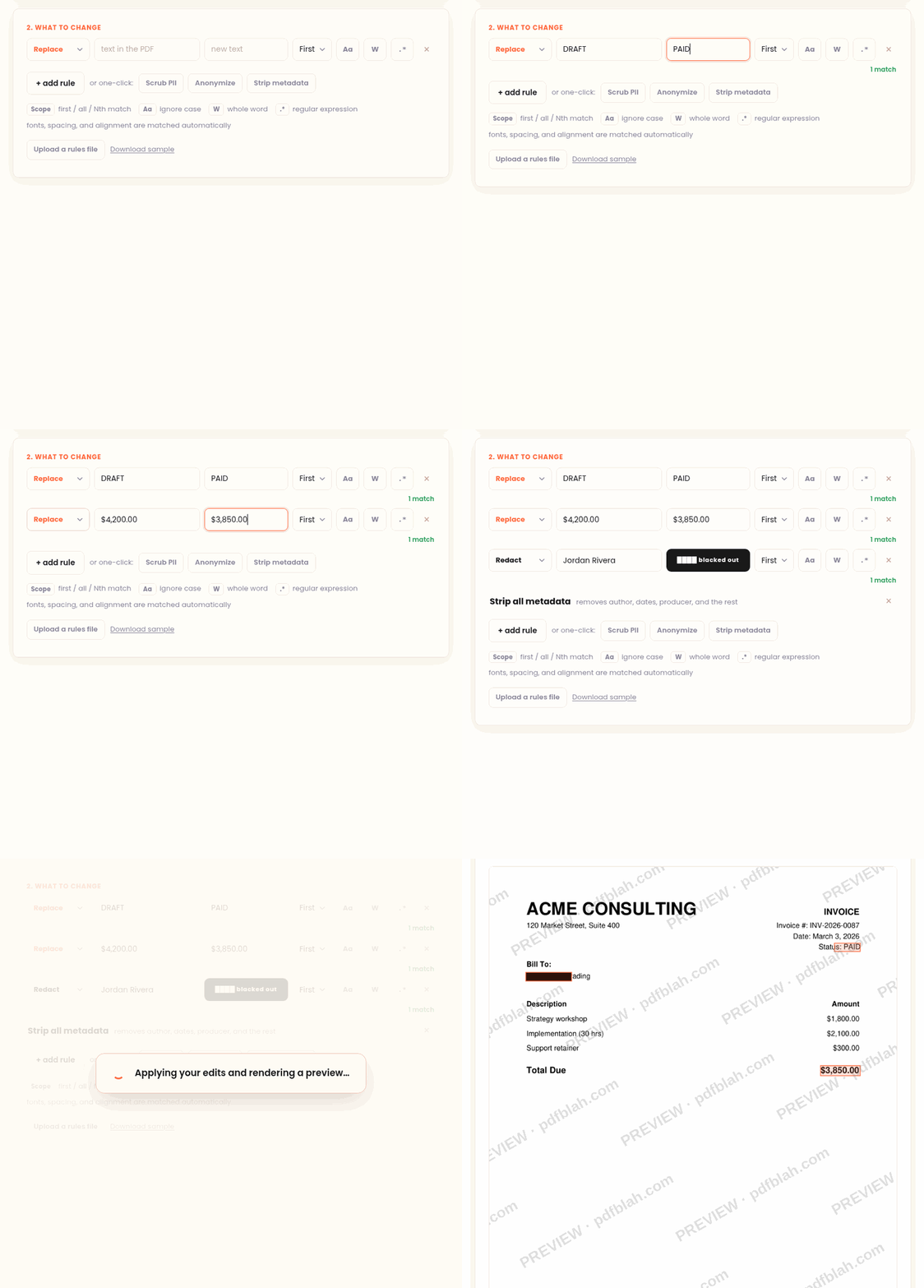
Most tools "edit" a PDF by painting a box over the old text and drawing new text
on top, which leaves the original underneath (copy and paste still reveals it) and
often adds a watermark. pdfblah rewrites the real text in the content stream, so:
- the old text is genuinely gone (
pdftotext, Ctrl-F, and copy show only the new value) - no overlay, no watermark
- your metadata (dates, Producer, XMP) is kept byte for byte, unless you choose to edit it
- alignment is auto-detected and kept, so right-aligned numbers stay flush
- fonts it cannot reproduce are refused instead of garbled
Pure Python. No system dependencies.
Install
pipx install pdfblah # recommended, isolated; or: pip install pdfblah
On a Mac with Homebrew, use Homebrew's pipx:
brew install pipx && pipx install pdfblah
Also works with uv: uv tool install pdfblah.
Use
Replace the first match:
pdfblah in.pdf out.pdf --find "Old Name" --replace "New Name"
Options:
--scope all         change every match           (default: first)
--scope 3           change the 3rd match
--ci                ignore case
--word              whole word only ("cat" will not match "category")
--regex             treat --find as a regex (\1 backrefs work in --replace)
--page 2            only page 2
--replace ""        delete the text
Many rules from a file (FIND | REPLACE | FLAGS per line):
pdfblah in.pdf out.pdf --rules rules.txt
# rules.txt
Old Company Name | New Company Name | all
CONFIDENTIAL DRAFT | FINAL | ci
Jane Doe | John Smith | all word
Total | Sum | 2
delete this phrase |
Commands
The same engine (locate real text, then substitute something) as four presets.
redact removes the matched text for real (gone from pdftotext, Ctrl-F and copy)
and draws a bar over each spot. --no-bar removes the text with no mark.
pdfblah redact in.pdf out.pdf --find "Account 12345"
pdfblah redact in.pdf out.pdf --find "\d{3}-\d{2}-\d{4}" --regex   # every SSN
scrub finds structured personal data (email, IBAN, credit card, SSN, phone) and removes it, or masks it. Cards and IBANs are checksum-validated, so ordinary numbers are left alone.
pdfblah scrub in.pdf out.pdf
pdfblah scrub in.pdf out.pdf --types email,credit_card --mask "[redacted]"
anonymize replaces detected data with realistic, shape-preserving fakes so a
document is safe to share. The same value maps to the same fake; --seed makes it
reproducible. Names are swapped only when you list them.
pdfblah anonymize in.pdf out.pdf --names "Alison Cohen,Matthew Reider" --seed 7
merge fills a template once per data row: every {{column}} placeholder becomes
that row's value, one output PDF per row.
pdfblah merge template.pdf people.csv --out ./letters --name-col name
meta reports everything metadata-ish (DocInfo, XMP, pages, version, encryption), which often reveals more than you expect (author, software, timestamps). With an output file it can strip or set fields. Every other command keeps metadata intact.
pdfblah meta in.pdf                                  # report what's in there
pdfblah meta in.pdf clean.pdf --strip                # remove all metadata
pdfblah meta in.pdf out.pdf --set author="Jane Roe"  # set a field
Metadata edits can also ride along with any other command, or live in a rules file:
pdfblah redact in.pdf out.pdf --find "Acme Corp" --strip-metadata
pdfblah in.pdf out.pdf --find OLD --replace NEW --set-metadata author="Ops"
# rules.txt
@strip-metadata
@set-metadata author = Redacted Dept
CONFIDENTIAL | PUBLIC | all
Library
from pdfblah import process, redact, scrub, anonymize, merge, apply_rules

process("in.pdf", "out.pdf", "999.00", "42.00", scope="all", ci=True)
process("in.pdf", "out.pdf", r"\d{4}-\d{4}", "REDACTED", scope="all", regex=True)
redact("in.pdf", "out.pdf", "Account 12345")
scrub("in.pdf", "out.pdf", types=["email", "credit_card"])
anonymize("in.pdf", "out.pdf", names=["Alison Cohen"], seed=7)
merge("template.pdf", [{"name": "Alice"}], "./out")
Each call returns a report dict (ok, count, refused, reason, ...).
What it does not do
Scanned PDFs (image only, no text layer) cannot be edited. Fonts that are not embedded and not standard, or use a custom encoding, are refused rather than rendered wrong. This is by design: a wrong-looking edit is worse than a clear "no".
Hosted version
Want it without installing anything, or for a non-technical colleague? The hosted version at pdfblah.com does the same edit in the browser: upload, preview for free, download.
License
MIT, (c) 2026 Kuvop LLC.
1 maintainer

Release files for pdfblah 0.4.1
For a detailed explanation of source distributions (sdists) and built distributions (wheels), please see the package formats documentation.
Source distribution (sdist)
| File | Size | Uploaded | |
|---|---|---|---|
| pdfblah-0.4.1.tar.gz | 28.2 kB | Details |
Built distribution (wheel)
| File | Interpreter | ABI | Platform | Reset |
|---|---|---|---|---|
| pdfblah-0.4.1-py3-none-any.whl | Python 3 | none | any | Details |
Total release size: 53.6 kB
Release files / pdfblah-0.4.1.tar.gz
| Download URL | pdfblah-0.4.1.tar.gz |
|---|---|
| Size | 28.2 kB |
| Tags | Source |
|
SHA-256 checksum How to use checksums |
b5f35ecc12526e672467d524e7346ce442961f6221d46d62cf2313cf074ee95c
|
|
BLAKE2b-256 checksum How to use checksums |
ee50e9afe502dc558cc9d88949879e12d5430c117ffb1627177643a2e48e321e
|
| Upload date | |
|
Uploaded using Trusted Publishing? What is trusted publishing? |
Yes |
| Uploaded via |
twine/6.1.0 CPython/3.13.12
|
Provenance
Provenance describes where a file came from. On PyPI, provenance is shared via attestations, which provide a verifiable record of the build or publishing details. View details, limitations and caveats.


PyPI Publish Attestation
PyPI verified that this artifact, at this checksum, originated from the publisher listed below.
Signed by GitHub Actions, verified by PyPI on Jul 6, 2026.
Transparency logRelease files / pdfblah-0.4.1-py3-none-any.whl
| Download URL | pdfblah-0.4.1-py3-none-any.whl |
|---|---|
| Size | 25.4 kB |
| Tags | Python 3 |
|
SHA-256 checksum How to use checksums |
163ce5b2f3455ec4460cc15c805b9f5a27dbd789fa747fc98268743d5b932a24
|
|
BLAKE2b-256 checksum How to use checksums |
0becc51d140479aafa1b099ba0ea0b81f7121e9ff00f5ab536bc0c340a8bbe71
|
| Upload date | |
|
Uploaded using Trusted Publishing? What is trusted publishing? |
Yes |
| Uploaded via |
twine/6.1.0 CPython/3.13.12
|
Provenance
Provenance describes where a file came from. On PyPI, provenance is shared via attestations, which provide a verifiable record of the build or publishing details. View details, limitations and caveats.
PyPI Publish Attestation
PyPI verified that this artifact, at this checksum, originated from the publisher listed below.
Signed by GitHub Actions, verified by PyPI on Jul 6, 2026.
Transparency log













