
A python wrapper for the Doc2X API and comes with native texts processing (to improve texts recall in RAG).
Verified details
These details have been verified by PyPIProject links
GitHub Statistics
Maintainers

Project description
 pdfdeal



Handle PDF more easily and simply, utilizing Doc2X's powerful document conversion capabilities for retained format file conversion/RAG enhancement.
Introduction
Doc2X Support
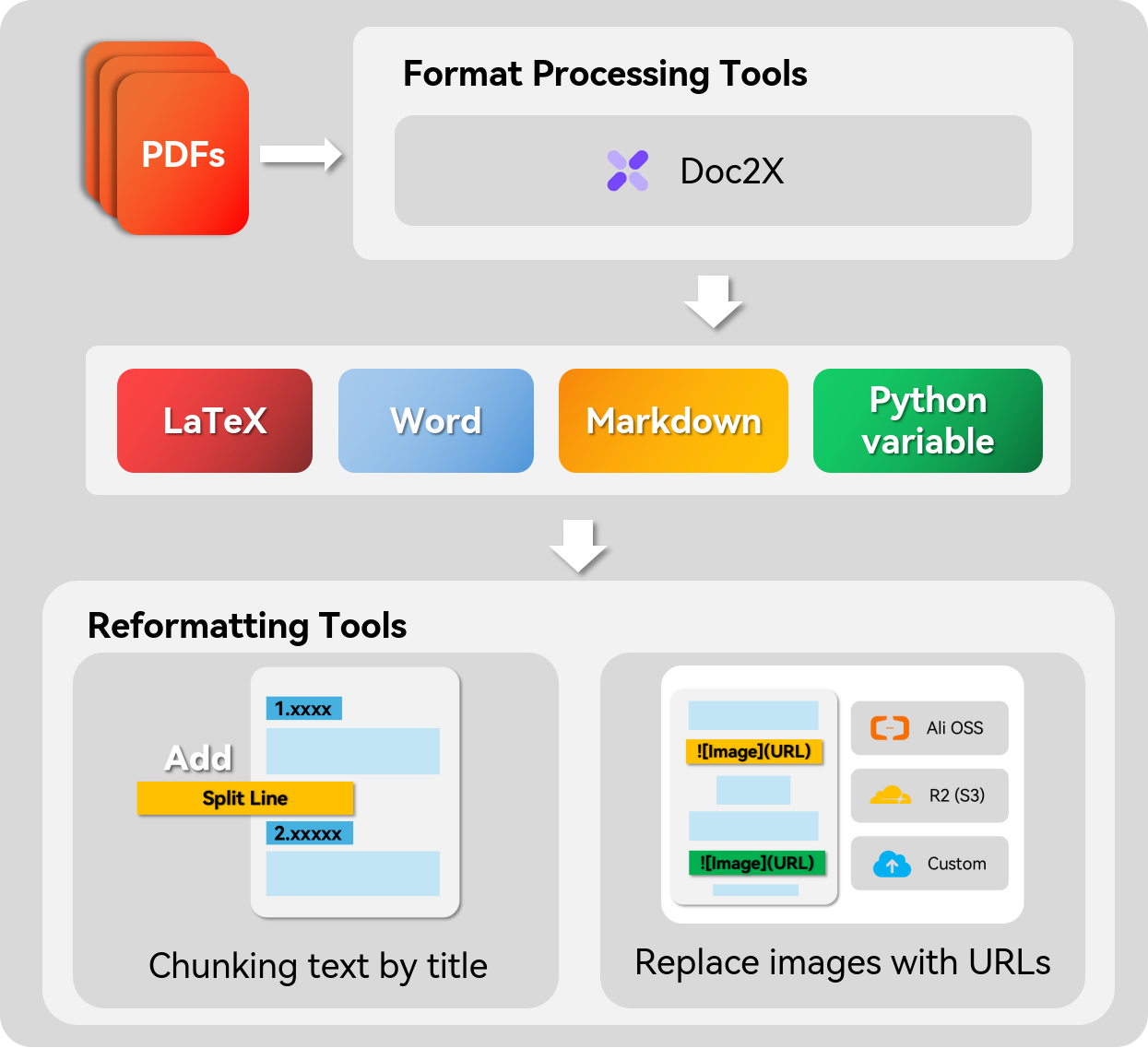
Doc2X is a new universal document OCR tool that can convert images or PDF files into Markdown/LaTeX text with formulas and text formatting. It performs better than similar tools in most scenarios. pdfdeal provides abstract packaged classes to use Doc2X for requests.
Processing PDFs
Use various OCR or PDF recognition tools to identify images and add them to the original text. You can set the output format to use PDF, which will ensure that the recognized text retains the same page numbers as the original in the new PDF. It also offers various practical file processing tools.
After conversion and pre-processing of PDF using Doc2X, you can achieve better recognition rates when used with knowledge base applications such as graphrag, Dify, and FastGPT.
Markdown Document Processing Features
pdfdeal also provides a series of powerful tools to handle Markdown documents:
- Convert HTML tables to Markdown format: Allows conversion of HTML formatted tables to Markdown format for easy use in Markdown documents.
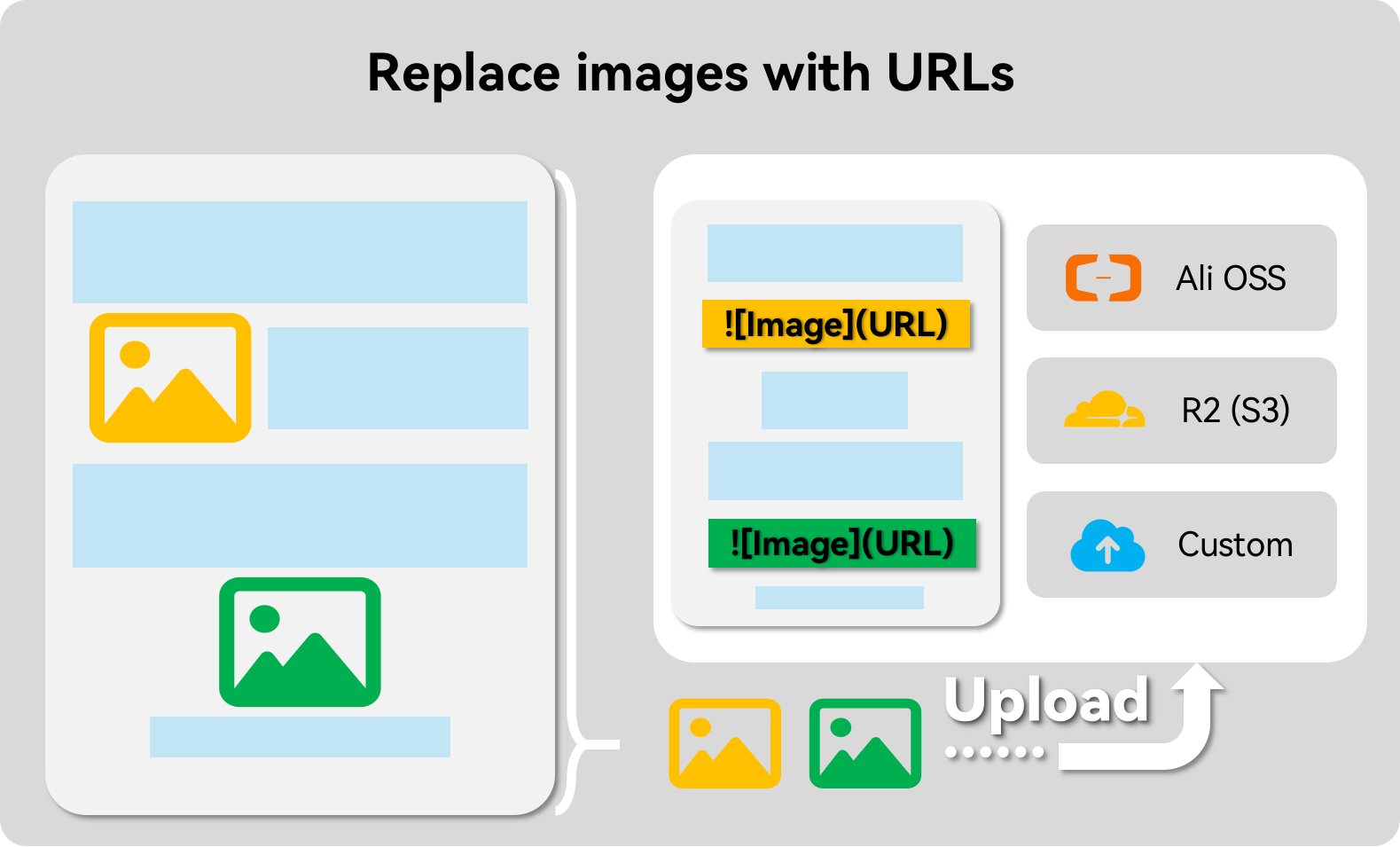
- Upload images to remote storage services: Supports uploading local or online images in Markdown documents to remote storage services to ensure image persistence and accessibility.
- Convert online images to local images: Allows downloading and converting online images in Markdown documents to local images for offline use.
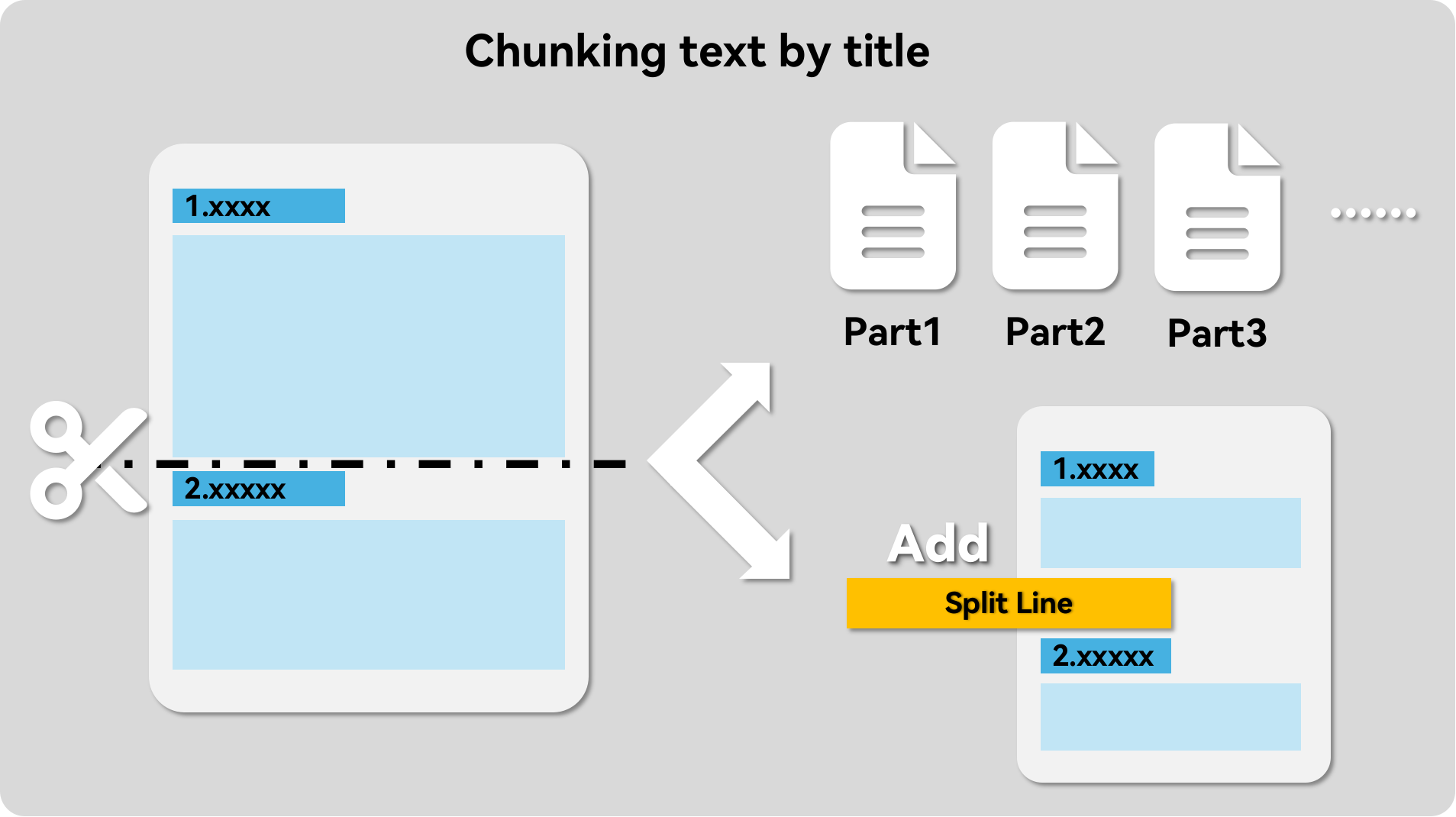
- Document splitting and separator addition: Supports splitting Markdown documents by headings or adding separators within documents for better organization and management.
For detailed feature introduction and usage, please refer to the documentation link.
Cases
graphrag
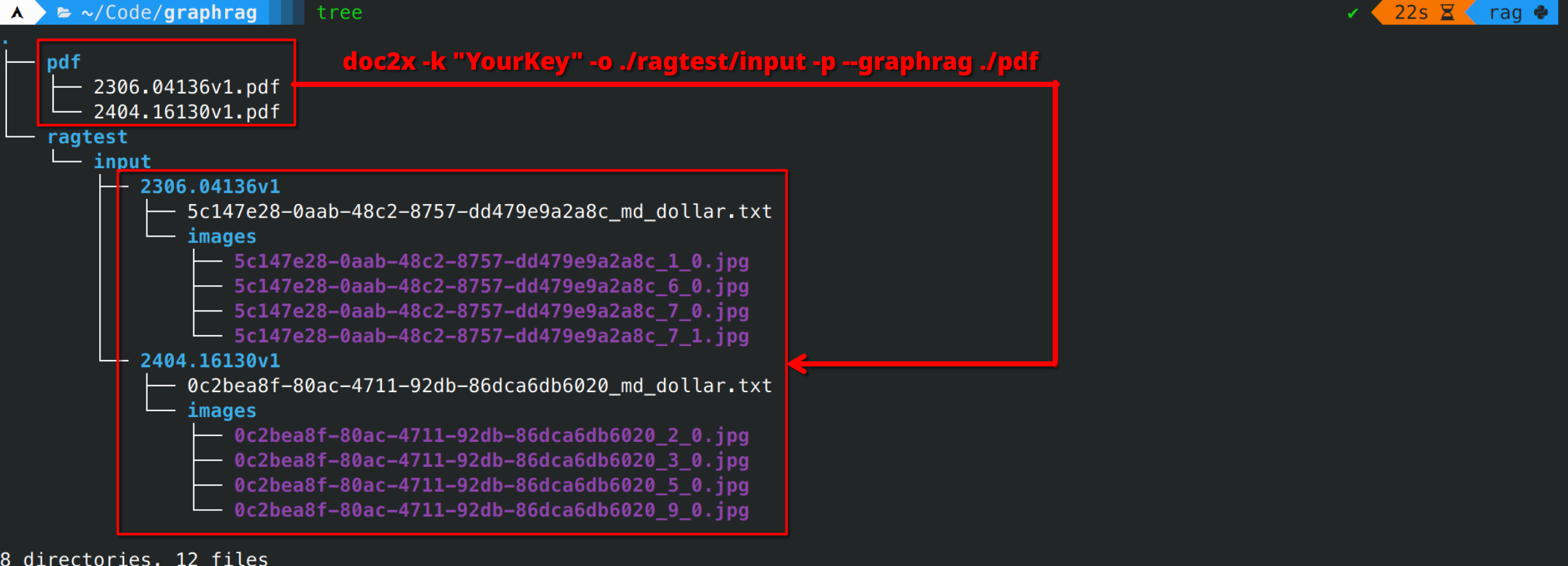
See how to use it with graphrag, its not supported to recognize pdf, but you can use the CLI tool doc2x to convert it to a txt document for use.
Fastgpt/Dify or other RAG system
Or for knowledge base applications, you can use pdfdeal's built-in variety of enhancements to documents, such as uploading images to remote storage services, adding breaks by paragraph, etc. See Integration with RAG applications.
Documentation
For details, please refer to the documentation
Or check out the documentation repository pdfdeal-docs.
Quick Start
For details, please refer to the documentation
Installation
Install using pip:
pip install --upgrade pdfdeal
If you need document processing tools:
pip install --upgrade "pdfdeal[rag]"
Use the Doc2X PDF API to process all PDF files in a specified folder
from pdfdeal import Doc2X

client = Doc2X(apikey="Your API key",debug=True)
success, failed, flag = client.pdf2file(
    pdf_file="tests/pdf",
    output_path="./Output",
    output_format="docx",
)
print(success)
print(failed)
print(flag)
Use the Doc2X PDF API to process the specified PDF file and specify the name of the exported file
from pdfdeal import Doc2X

client = Doc2X(apikey="Your API key",debug=True)
success, failed, flag = client.pdf2file(
    pdf_file="tests/pdf/sample.pdf",
    output_path="./Output/test/single/pdf2file",
    output_names=["sample1.zip"],
    output_format="md_dollar",
)
print(success)
print(failed)
print(flag)
See the online documentation for details.
Project details
Verified details
These details have been verified by PyPIProject links
GitHub Statistics
Maintainers
Release history Release notifications | RSS feed


Download files
Download the file for your platform. If you're not sure which to choose, learn more about installing packages.
Source Distribution
Built Distribution
Filter files by name, interpreter, ABI, and platform.
If you're not sure about the file name format, learn more about wheel file names.
Copy a direct link to the current filters
File details
Details for the file pdfdeal-1.0.1.tar.gz.
File metadata
- Download URL: pdfdeal-1.0.1.tar.gz
- Upload date:
- Size: 118.6 kB
- Tags: Source
- Uploaded using Trusted Publishing? Yes
- Uploaded via: twine/6.0.1 CPython/3.12.8
File hashes
| Algorithm | Hash digest | |
|---|---|---|
| SHA256 |
f32bf4bdbc8dc4ee97e864f77bca253c2ac89ffd719759b5b0198bd2eac45f1d
|
|
| MD5 |
856b14a1041b1a5518a0e2c266d4e22a
|
|
| BLAKE2b-256 |
bcaff38588eee5c2b382ac270369a7b3941c34655477e9bd85664c0be5fee92e
|
Provenance
The following attestation bundles were made for pdfdeal-1.0.1.tar.gz:
Publisher:
python-publish.yml on Menghuan1918/pdfdeal
-
Statement:
-
Statement type:
https://in-toto.io/Statement/v1 -
Predicate type:
https://docs.pypi.org/attestations/publish/v1 -
Subject name:
pdfdeal-1.0.1.tar.gz -
Subject digest:
f32bf4bdbc8dc4ee97e864f77bca253c2ac89ffd719759b5b0198bd2eac45f1d - Sigstore transparency entry: 156270388
- Sigstore integration time:
-
Permalink:
Menghuan1918/pdfdeal@52bd716673a6610a3629774bb16eba5f42ae7061 -
Branch / Tag:
refs/tags/v1.0.1 - Owner: https://github.com/Menghuan1918
-
Access:
public
-
Token Issuer:
https://token.actions.githubusercontent.com -
Runner Environment:
github-hosted -
Publication workflow:
python-publish.yml@52bd716673a6610a3629774bb16eba5f42ae7061 -
Trigger Event:
release
-
Statement type:
File details
Details for the file pdfdeal-1.0.1-py3-none-any.whl.
File metadata
- Download URL: pdfdeal-1.0.1-py3-none-any.whl
- Upload date:
- Size: 46.9 kB
- Tags: Python 3
- Uploaded using Trusted Publishing? Yes
- Uploaded via: twine/6.0.1 CPython/3.12.8
File hashes
| Algorithm | Hash digest | |
|---|---|---|
| SHA256 |
4fca17fb4bd32bb3e0e5ae59bc61b8b078d3944a04c6cb5b3017f09a2c25f41b
|
|
| MD5 |
fdbd3ebe8d3912d314ee2dd06d71fc76
|
|
| BLAKE2b-256 |
8a85454319fbab24156106b1fcbc9bf5e6fe1ba21cf21db2a107161242480989
|
Provenance
The following attestation bundles were made for pdfdeal-1.0.1-py3-none-any.whl:
Publisher:
python-publish.yml on Menghuan1918/pdfdeal
-
Statement:
-
Statement type:
https://in-toto.io/Statement/v1 -
Predicate type:
https://docs.pypi.org/attestations/publish/v1 -
Subject name:
pdfdeal-1.0.1-py3-none-any.whl -
Subject digest:
4fca17fb4bd32bb3e0e5ae59bc61b8b078d3944a04c6cb5b3017f09a2c25f41b - Sigstore transparency entry: 156270390
- Sigstore integration time:
-
Permalink:
Menghuan1918/pdfdeal@52bd716673a6610a3629774bb16eba5f42ae7061 -
Branch / Tag:
refs/tags/v1.0.1 - Owner: https://github.com/Menghuan1918
-
Access:
public
-
Token Issuer:
https://token.actions.githubusercontent.com -
Runner Environment:
github-hosted -
Publication workflow:
python-publish.yml@52bd716673a6610a3629774bb16eba5f42ae7061 -
Trigger Event:
release
-
Statement type:






