
pdfdelta 

pdfdelta: visual PDF diff for academic papers
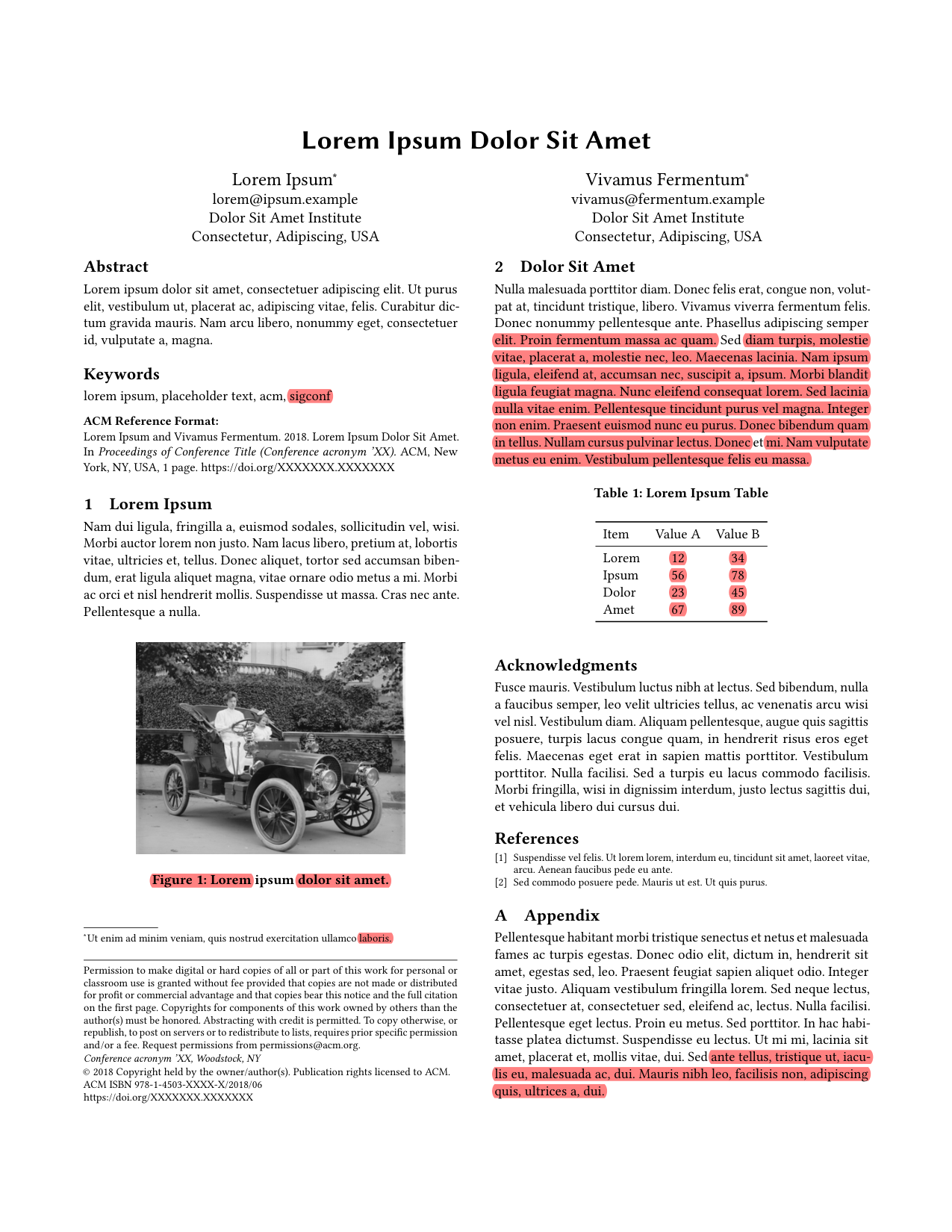
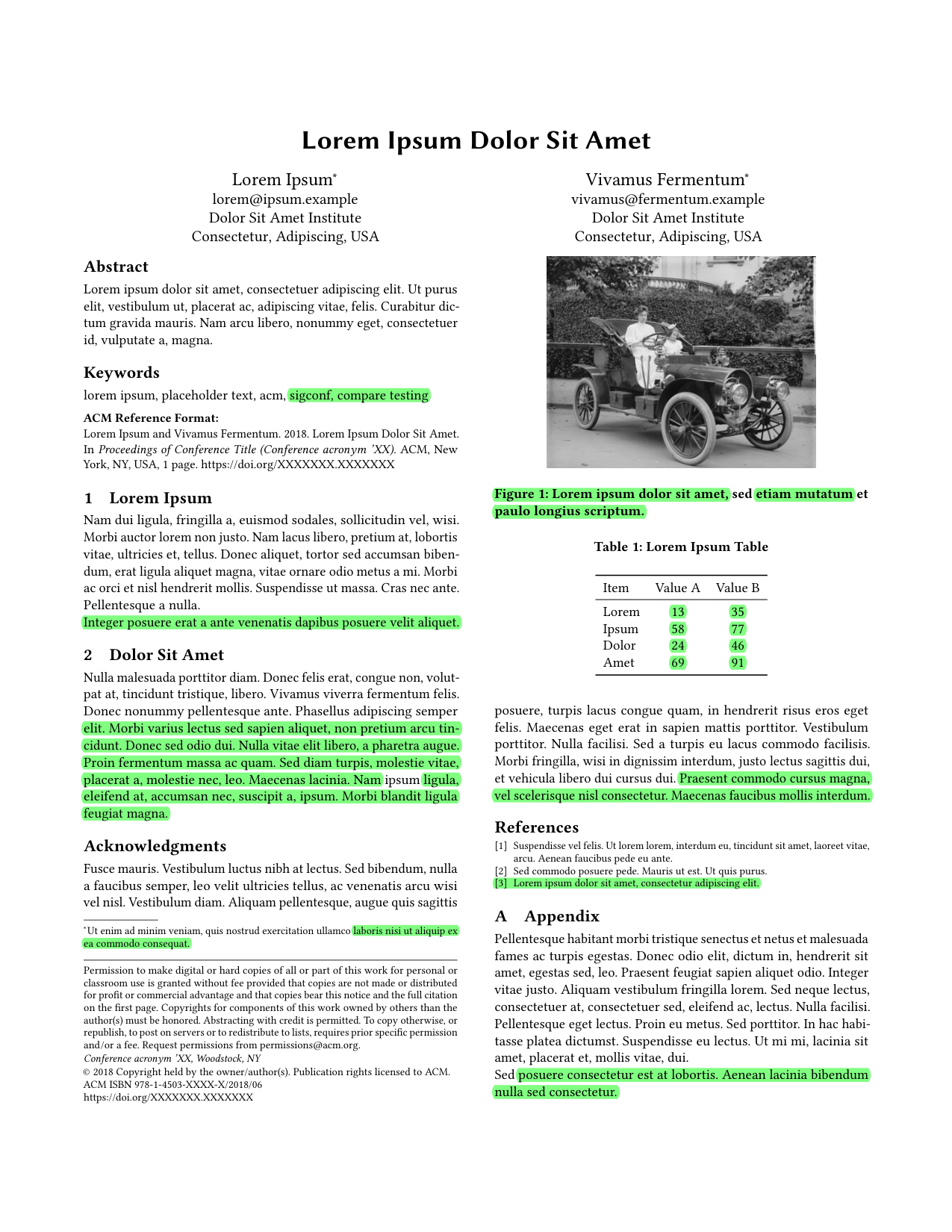
pdfdelta compares two academic paper PDFs and highlights deletions on the old PDF and additions on the new PDF while preserving the original page layout. It is built for paper revision review, especially arXiv updates, camera-ready drafts, advisor edits, coauthor edits, and LaTeX-generated PDFs.
pip install pdfdelta
pdfdelta old.pdf new.pdf
This writes two annotated PDFs in the current directory:
old_marked.pdf- the old PDF with deletions highlightednew_marked.pdf- the new PDF with additions highlighted
Good For
- Comparing arXiv and camera-ready paper revisions
- Checking advisor or coauthor edits
- Reviewing LaTeX-generated PDFs
- Finding small wording changes without being distracted by layout or reflow
Why pdfdelta?
- Text diff loses page layout and makes it harder to review visual change tracking in context.
- Image diff can be too sensitive to tiny rendering changes, antialiasing, or page rasterization differences.
- latexdiff requires LaTeX source and may not work for arbitrary PDFs.
- Acrobat-style comparison is often heavyweight, proprietary, or harder to automate from the command line.
pdfdelta is a lightweight CLI for visual PDF diff, PDF comparison, document comparison, and LaTeX PDF diff workflows where the PDF itself is the review artifact.
Usage
Options
| Flag | Default | Description |
|---|---|---|
--old-out |
old_marked.pdf |
Output path for the annotated old PDF |
--new-out |
new_marked.pdf |
Output path for the annotated new PDF |
--opacity |
0.35 |
Highlight opacity from 0.0 to 1.0 |
Command-Line Example
pdfdelta examples/old.pdf examples/new.pdf \
  --old-out examples/old_marked.pdf \
  --new-out examples/new_marked.pdf
To install directly from the repository:
pip install git+https://github.com/mli55/pdfdelta.git
Python API Example
The CLI is the primary interface. pdfdelta also exposes low-level functions if you want to build your own comparison or annotation flow:
from pdfdelta.annotate import apply_annotations
from pdfdelta.compare import compare_documents
from pdfdelta.extract import extract_document

old_pages = extract_document("old.pdf")
new_pages = extract_document("new.pdf")

old_rects, new_rects = compare_documents(old_pages, new_pages)

apply_annotations("old.pdf", "old_marked.pdf", old_rects, color=(1.0, 0.0, 0.0))
apply_annotations("new.pdf", "new_marked.pdf", new_rects, color=(0.0, 1.0, 0.0))
Limitations
pdfdelta is intended for PDFs with extractable text, such as PDFs generated from LaTeX, Word, or other publishing tools. It is not designed for scanned PDFs, OCR-heavy documents, or image-only pages unless the text layer is accurate enough for comparison.
Please open an issue if you see bad alignment, missing highlights, unexpected highlights, weird page layouts, or a PDF comparison case that should work for academic paper revisions but does not.
How It Works
 old.pdf    new.pdf
   |           |
   v           v
 Extract words with PyMuPDF word text + bounding boxes
   |
   v
 Global diff across flattened pages
   |
   v
 Word-level and sub-word diff
   |
   v
 Reflow filter to suppress cross-page and cross-column noise
   |
   v
 Annotate original PDFs
   |
   v
 old_marked.pdf
 new_marked.pdf
GitHub Metadata Recommendations
- Description: Visual PDF diff for academic papers, optimized for paper revisions.
- Website: https://pypi.org/project/pdfdelta/
- Topics:
pdf,diff,visual-diff,pdf-diff,document-comparison,latex,academic-writing,pymupdf,python,cli
License
MIT
1 maintainer

Download files
Download the file for your platform. If you're not sure which to choose, learn more about installing packages.
Source Distribution
Built Distribution
Filter files by name, interpreter, ABI, and platform.
If you're not sure about the file name format, learn more about wheel file names.
Copy a direct link to the current filters
File details
Details for the file pdfdelta-0.1.4.tar.gz.
File metadata
- Download URL: pdfdelta-0.1.4.tar.gz
- Upload date:
- Size: 16.3 kB
- Tags: Source
- Uploaded using Trusted Publishing? No
- Uploaded via:
twine/7.0.0 CPython/3.12.3
File hashes
| Algorithm | Hash digest | |
|---|---|---|
| SHA256 |
e25bce49ea14d1c22c82fbf7126ec9517525e3aa39ab08b6f666d5bbdd64dfba
|
|
| MD5 |
7622cc57a93d7a9a59812bbcdb685da6
|
|
| BLAKE2b-256 |
48951035ed58f38f48553822341356f33397fcaf1be1fed8574f7990b9a707c5
|
File details
Details for the file pdfdelta-0.1.4-py3-none-any.whl.
File metadata
- Download URL: pdfdelta-0.1.4-py3-none-any.whl
- Upload date:
- Size: 14.1 kB
- Tags: Python 3
- Uploaded using Trusted Publishing? No
- Uploaded via:
twine/7.0.0 CPython/3.12.3
File hashes
| Algorithm | Hash digest | |
|---|---|---|
| SHA256 |
137356a9ce35556b0f23980e33cad2f9cad2307590a42c571667d9acd0c64b96
|
|
| MD5 |
72c5046bac7d447b03bbc172ceba894b
|
|
| BLAKE2b-256 |
416bdc09eb4ce33dac26be568b15a3b7d139248bccf1379f87178b8fde243c3d
|







