
pdfexorcist 





pdfexorcist extracts tables from PDFs, scans and photos. It runs
severalenginges to read a cell and uses a majority vote to decide its value.
uvx pdfexorcist extract report.pdf # writes report.csv
Try it in your browser, nothing to install: https://saketkc.github.io/pdfexorcist/
Docs: https://saketkc.github.io/pdfexorcist/cli/
Install with uv
With uv (pip install works the same):
curl -LsSf https://astral.sh/uv/install.sh | sh      # macOS/Linux; Windows: winget install astral-sh.uv
uv tool install pdfexorcist                          # puts the pdfexorcist command on your PATH
uv tool install "pdfexorcist[all]"                   # with every engine (or pick: [paddleocr,ocrmac])
uvx pdfexorcist report.pdf                           # or run once without installing
uv add pdfexorcist                                   # as a library in a uv project
pdftotext requires Poppler (brew install poppler, apt install poppler-utils).
Examples
NFHS-6 fact sheet
URL='https://www.nfhsiips.in/downloadFile.php?link=NFHS-6_StateFact_Chandigarh+%28UT%29__Chandigarh+Compendium.pdf&path=assets%2Fpublication%2FNFHS-6%2FStateFact%2FChandigarh+%28UT%29%2F'

pdfexorcist inspect "$URL"                    # which pages are text, and what to run
pdfexorcist extract "$URL" --pages 9-12       # generic parser
pdfexorcist extract "$URL" --recipe examples/nfhs6/district.toml   # from a checkout
The recipe keys rows by printed indicator number and names the columns.
  pdftotext   404 readings  0.0s
  pdfplumber  404 readings  0.4s
  pymupdf     404 readings  0.0s
  camelot     384 readings  1.1s
  pdfium      384 readings  0.1s

Agreed          404  100.0% of cells
Unresolved        0
Checks      2 rules  all passed

Wrote NFHS-6_StateFact_Chandigarh (UT)__Chandigarh Compendium.csv (table layout, 101 rows).
geo,indicator_no,level,nfhs6_urban,nfhs6_rural,nfhs6_total,nfhs5_total
Chandigarh,1,state,6.1,6.1,6.1,5.9
Chandigarh,2,state,20.6,21.2,20.7,23.3
Chandigarh,3,state,11.0,8.6,10.9,10.9
examples/nfhs5/state.toml reads NFHS-5 fact sheets.
A tweeted photo
BMC posts Mumbai lake levels as a photo:
pdfexorcist extract https://x.com/mybmc/status/2106224821864698086 \
    --recipe examples/lake_photo/recipe.toml          # needs OCR engines: [all]
Reading tweet_2106224821864698086_1.jpg with 4 engines (3 must agree)
Agreed      125  100.0% of cells
Unresolved    0
lake,year,level,rise_fall_24h,useful_content_ml,pct_useful_content,today_rain_mm,total_rain_mm
Upper Vaitarna,2026,603.27,0.0,219332.0,96.6,0.0,3896.0
Modak Sagar,2026,159.48,-0.25,99153.0,76.91,0.0,3260.0
Tansa,2026,128.2,-0.03,136822.0,94.31,0.0,2970.0
The recipe uses min_unopposed = 2 for values two engines agree on when no
engine disagrees.
Daily government report
Maharashtra's Water Resources Department publishes dam storage at one link:
pdfexorcist extract https://mwrdpravah.in/damsafety/control/pdfLatestReportEng \
    --recipe examples/pravah_dams/recipe.toml -o pravah.csv
Agreed        1,380  100.0% of cells
Unresolved        0
Checks      2 rules  all passed
dam,region,district,sr,date,time,dead,live_cap,gross_cap,live,gross,pct_live,pct_live_last_year
Bhatsa,Kokan,Thane,2,02/10/2026,07:26 AM,34.00,942.10,976.10,929.20,963.20,98.63,98.63
Modaksagar,Kokan,Thane,4,02/10/2026,07:33 AM,76.06,128.92,204.98,101.17,177.23,78.48,99.97
Tansa,Kokan,Thane,5,02/10/2026,07:35 AM,12.08,172.52,184.60,164.83,176.91,95.54,99.55
Details: Pravah example.
Several tables in one PDF
One recipe reads the NEET (UG) 2024 result press release tables.
pdfexorcist extract https://www.nta.ac.in/Download/Notice/Notice_20240604195244.pdf \
    --recipe examples/nta_notice/recipe.toml -o neet2024.csv
Agreed         615  100.0% of cells
Unresolved       0
Failed checks    6  agreed values that break a rule
  x Table 1: registered >= categories: 6 cells
table,row,2019,2020,2021,2022,2023,2024
highlights,Number of Candidates registered,1519375,1597435,1614777,1872343,2087462,2406079
highlights,Un-Reserved,534072,475534,46-853,565964,592110,647260
language,English,1204968,1263273,1265520,1476024,1672914,1892355

table,row,2023_registered,2023_appeared,2023_qualified,2024_registered,2024_appeared,2024_qualified
gender,Female,1184513,1156618,655599,1376863,1334982,769222
state,Total,2087462,2038596,1145976,2406079,2333297,1316268
The recipe reports the printed 46-853 value as a failed check. Details:
NEET 2024 example.
A scanned list
OCR reads the NTA NEET (UG) 2026 toppers scan.
pdfexorcist extract https://cdnbbsr.s3waas.gov.in/s37bc1ec1d9c3426357e69acd5bf320061/uploads/2026/07/20260716180970800.pdf \
    --recipe examples/nta_toppers/recipe.toml --pages 1-6 -o neet_top138.csv
  paddleocr  966 readings  253.2s
  ocrmac     928 readings  7.5s
  glmocr     845 readings  5.4s

Agreed          965  99.9% of cells
Unresolved        1  engines disagreed: left blank, not guessed
Checks      2 rules  all passed
sr_no,rank,percentile,category,state
1,1,99.9999,General,PUNJAB
5,5,99.99965,OBC-NCL (Central List),MAHARASHTRA
44,44,99.9976999,General,CHANDIGARH (UT)
The checks require ranks to rise and percentiles to fall. Details: NEET toppers example.
pdfexorcist.extract(url) accepts file links and downloads into
$PDFEXORCIST_CACHE (default ~/.cache/pdfexorcist).
Command line
Install it, then run it on a PDF:
pip install pdfexorcist     # the fifth text engine, pdftotext, also needs poppler: brew install poppler
pdfexorcist                 # a welcome screen with the common commands
Common commands:
pdfexorcist inspect report.pdf            # text or scan? and which command to run
pdfexorcist extract report.pdf            # writes report.csv next to the PDF
pdfexorcist engines                       # which engines are installed, and how to add more
extract writes an agreed-value grid and a report.review.csv file for
unresolved cells. It requires --force to overwrite an output file.
| Option | What it does |
|---|---|
--pages 3-5 |
read only these pages ("1-3,7", "10-") |
--ocr |
also read the pixels with the installed OCR engines: use it for scans and photos (an image turns it on by itself) |
-o out.xlsx |
where to write; the ending picks the format (csv, xlsx, parquet, json); a name without one is a folder |
--layout cells |
one row per cell with every engine's reading |
--engines a,b,c / --min-agree 3 |
choose the engines, and how many must agree |
--jobs 4 |
use 4 worker processes: engines at once, and each engine's pages in chunks |
--json --quiet |
a machine-readable summary on stdout, for scripts |
python -m pdfexorcist also works. pdfexorcist report.pdf means
pdfexorcist extract report.pdf.
Recipes: save the settings for a tricky table
A recipe is a TOML file with parsing and validation settings:
pdfexorcist recipe new report.pdf         # asks; or script it with --yes and options
pdfexorcist recipe show report.recipe.toml
pdfexorcist recipe check report.recipe.toml
pdfexorcist extract next_year.pdf --recipe report.recipe.toml
Settings: recipe reference.
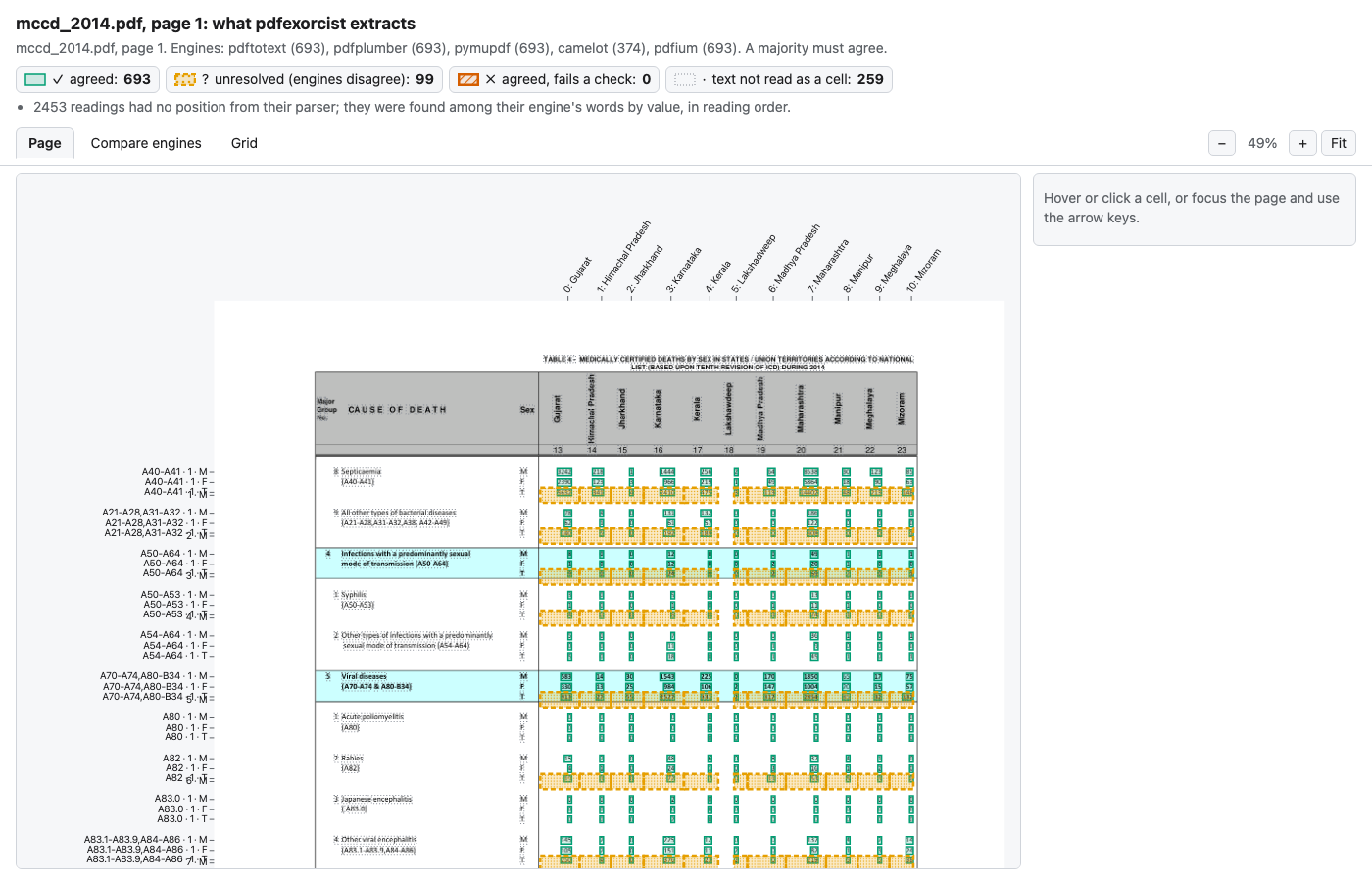
Inspect extracted cells
pdfexorcist show report.pdf --page 3                  # writes report.p3.show.html
pdfexorcist show report.pdf -p 3 --recipe mccd.toml --open
pdfexorcist show photo.jpg --png                      # also a static annotated PNG
pdfexorcist compare report.pdf --page 3               # opens on the engines side by side
Plug-in points
pdfexorcist has 3 steps that you can replace with a function that you write.
These steps are the plug-in points.
The default steps work for most tables.
Use a plug-in point only when a default step gives incorrect results for your PDF.
| Plug-in point | Use it when | Your function | Give it to extract() with |
|---|---|---|---|
| 1. Extractor | No installed engine can read your PDF. | Reads the PDF and yields the lines of each page. | @register("name") and methods=[...] |
| 2. Parser | The default parser gives incorrect keys for your table layout. | Changes the lines into rows with key columns and a value. |
parse= and key= |
| 3. Validator | You know a rule that the values must obey, for example a total. | Gives True for each row that fails the rule. |
checks=[...] |
1. Extractor
An extractor is one engine that reads the PDF. The vote compares the values that all the engines read.
To add an extractor, do these steps:
- Write a function that receives the path of the PDF.
- For each page, yield the page number and a list of lines. The first page is page 1.
- Make each line a list of
(x, text)cells.xis the horizontal position of the cell. - Use one unit for
xin one engine. You can use points or character columns. - Put
@register("my_ocr")above the function. - Give the name of the engine in
methods=[...], or in--engineson the command line.
@register also adds the engine to the default engines.
To prevent this, write @register("my_ocr", default=False).
If you know the box of each cell, yield pdfexorcist.cells.BoxCell(x, "text", (x0, y0, x1, y1)). Do not yield (x, "text").
pdfexorcist show uses the box to mark the cell on the page.
Two engines that use the same OCR model make the same errors.
If your engine uses the same model as a different engine, put the two engines in one group of families.
The two engines then have one vote.
2. Parser
The parser gives a key to each value.
The vote compares only values that have the same key.
The default parser, parse_rows, uses the key (page, row, col).
row is the row label, and col is the position of the value in the row.
To write a parser, do these steps:
- Write a function that receives the pages from one engine. Each page is
(page_no, lines). - For each value, yield one
dict. Put the key columns and a"value"item in thedict. - Give the function in
parse=. - Give the names of the key columns in
key=.
Make sure that a value gets the same key from all the engines. If the key changes between engines, the engines cannot agree.
3. Validator
A validator is a rule that the values must obey.
The validators examine the values after the vote.
A validator does not remove rows.
It writes its name in the failed column of each row that fails.
To write a validator, do these steps:
- Write a function that receives the result
DataFrame. - Return a
boolSeries.Trueshows that the row fails the rule. - Put
@check("name of the rule")above the function. The name goes into thefailedcolumn. - Give the function in
checks=[...].
For a rule of type "total = sum of the parts", use total_check. You do not have to write a function.
Example
This example uses the 3 plug-in points together:
from pdfexorcist import extract, register, check, total_check


# 1. extractor: an OCR engine for scanned pages
@register("my_ocr")
def my_ocr(pdf):
    yield page_no, [[(x, "text"), ...], ...]  # lines of (x, text) cells


# 2. parser: one key for each value in your layout
def my_parser(pages):
    for page_no, lines in pages:
        ...
        yield {
            "page": page_no,
            "cause": "A40-A41",
            "sex": "M",
            "col": 3,
            "value": "51210",
        }


# 3. validator: a rule that the values must obey
@check("septicaemia <= its chapter")
def septic(df):
    return df.value.astype(float) > ...  # True = row fails


res = extract(
    "report.pdf",
    parse=my_parser,
    key=["page", "cause", "sex", "col"],
    checks=[septic, total_check("sex", "T", ["M", "F"], by=["cause", "col"], op=">=")],
)
res[res.failed != ""]  # values that failed a rule
Scanned PDFs
pdfexorcist also handles PDFs whose text layer comes from OCR.
extract(
    "scan.pdf",
    methods=["pdfplumber", "tesseract", "chandra"],
    parse=parse_by_columns,
    families={"tesseract": ["pdfplumber", "tesseract"]},
)
Images (photos, screenshots, tweeted scans)
extract() accepts image files with OCR engines:
extract(
    "report.jpg",
    methods=["chandra", "glmocr", "paddleocr", "ocrmac"],
    min_agree=3,
    parse=my_parser,
)
Recipe reference
A recipe is a TOML file: key = value lines under [section] headers, text
in quotes, lists in brackets, # starts a comment. Every section is optional;
a missing setting keeps the default, as pdfexorcist extract does without a
recipe. pdfexorcist recipe check FILE names the line of any
mistake. Command-line options (--pages, --engines, ...) override the recipe.
Every setting is shown below; a real recipe uses a few (some exclude others, e.g.
function and key belong to type = "custom").
name = "Crime in India: State/UT table"
description = "Cases by State/UT"
sample = "report.pdf"            # the file it was made with (for your reference)

[pages]                          # default: every page
select = "3-5, 9"                # page numbers; "21-" runs to the last page
start = 'TABLE\s*4\s*[-:.].*STATES'  # or: from the first page whose text matches,
stop = 'TABLE\s*5'               #   up to (not including) the next page that matches
match = 'All India'              # only pages whose text matches
fit_boxes = false                # default true: widen a page to cover text drawn outside
                                 #   it; false when that text is another page's

[engines]
use = ["pdfplumber", "pymupdf", "pdfium"]  # default: the installed default engines
ocr = false                      # true: add the installed OCR engines (when use is not given)
min_agree = 3                    # default: a strict majority, at least 3 (2 with families or only OCR engines)
min_unopposed = 2                # also accept a value this many read when none read another (off)
families = { ocr_layer = ["pdfplumber", "pymupdf"] }  # engines that are not independent vote once

[normalize]                      # rewrite every value before the vote
remove_commas = true             # "1,020" -> "1020"
remove_footnote_marks = true     # "490*" -> "490" (a lone "*" placeholder stays)
raised_dots = true               # "65·3" -> "65.3"
minus_signs = true               # "−4" -> "-4"
function = "clean.py:fix"        # your own: value -> new value, or None to drop it

[parser]
type = "rows"                    # "rows": a label, then values in reading order (default)
                                 # "columns": values placed by their position (scans, photos, blank cells)
                                 # "custom": your own function (below)
min_values = 2                   # skip lines with fewer values (titles, footnotes)
tolerance = 0.45                 # "columns" only: how far from a column a value may sit
function = "my_parser.py:parse"  # "custom": pages -> one dict per value
key = ["page", "code", "sex", "col"]  # "custom": the columns that identify a cell

[[checks]]                       # one [[checks]] block per rule; repeat it for more
column = "label"                 # the column naming the total and its parts
rule = "TOTAL ALL INDIA = TOTAL STATE(S) + TOTAL UT(S)"
by = ["page", "col"]             # checked separately within each of these
where = "col <= 2"               # optional: only the cells this pandas query keeps
tolerance = 0.01                 # optional: allowed relative gap (1%)
abs_tolerance = 0.15             # optional: allowed absolute gap (rounded numbers)
missing = "fail"                 # optional: a listed part that is missing fails (default "skip")
name = "States + UTs = India"    # optional: the name written in the failed column

[[checks]]                       # the same rule as total and parts, for a total column:
column = "col"
total = 0                        #   the total's name (text or a number)
parts = [3, 6]                   #   its parts; leave out for "every other"
op = "="                         #   =, >= or <= (default =); not used with rule
value = "value"                  #   the column holding the numbers (default "value")

[[checks]]
function = "my_checks.py:rules"  # your own check, a list of checks, or a function returning them

[postprocess]
function = "my_parser.py:name_states"  # after the vote: (cells, pdf) -> cells, e.g. add a State column

[output]
layout = "table"                 # "table": a grid of agreed values (default); "cells": one row per cell
columns = "col"                  # the column spread across the grid (default "col")
rows = ["code", "sex"]           # the columns that name a grid row (default: the rest of the key)
format = "csv"                   # csv, xlsx, parquet or json
Rules. rule is the total, then =, >= or <=, then its parts joined
by +: "T = M + F", "T >= M + F" (the total may exceed its parts), or
"All India = rest" for every other row of the group. Values that break a
rule are kept, named in the failed column and listed for review, and the run
exits with code 1. A rule whose total or parts never appear is reported, so a
typo cannot pass as "all checks passed". The generic parsers name cells by
page, row, col (the value's place in its line, from 0) and label (the
line's text): a total row is column = "label", a total column is
column = "col" with by = ["page", "row"].
Your own Python. function = "file.py:name" loads name from a .py
file in the recipe's folder (or below it); that file may import its
neighbours. The functions have the library's signatures: a parser takes
(page_no, lines) pairs and yields dicts with the key columns and value
(see examples/mccd/mccd_table4.py); a check takes the agreed cells
and returns True where a row fails (see checks.py); a postprocess step takes
the cells and the PDF the engines read (only the recipe's pages, numbered from
- and returns the cells. Page numbers in the output are the original ones. A
recipe that names a
.pyfile runs that code: only use recipes you trust.
Engines
| Engine | Reads | Default |
|---|---|---|
pdftotext (poppler) |
text layer | yes |
pdfplumber (pdfminer) |
text layer | yes |
pymupdf (MuPDF) |
text layer | yes |
pdfium (PDFium, Chrome's engine) |
text layer | yes |
camelot (stream tables) |
text layer | yes |
tesseract |
rendered page (OCR, CPU) | opt-in |
chandra (Chandra OCR 2 VLM, MPS/CUDA) |
rendered page | opt-in, pip install "pdfexorcist[chandra]" |
paddleocr (PP-OCR, Linux/macOS/Windows, CPU) |
rendered page | opt-in, pip install "pdfexorcist[paddleocr]" |
ocrmac (Apple Vision, macOS only) |
rendered page | opt-in, pip install "pdfexorcist[ocrmac]" |
glmocr (GLM-OCR 0.9B VLM via MLX, Apple Silicon; tables only) |
rendered page | opt-in, pip install "pdfexorcist[glmocr]" |
Development and releases
Use uv pip install -e . --group dev. See CHANGELOG.md.
From a checkout (local testing)
git clone https://github.com/saketkc/pdfexorcist && cd pdfexorcist
uv venv && source .venv/bin/activate     # Windows: .venv\Scripts\activate
uv pip install -e . --group dev          # editable install + pytest, ruff, mypy, parquet/xlsx writers
uv pip install -e ".[paddleocr,ocrmac]"        # optional: OCR engines to test

pdfexorcist extract tests/fixtures/srs/srs_2019-23.pdf --recipe examples/srs_life_table/recipe.toml
uvx --from . pdfexorcist --help          # or run the checkout without a venv

pytest -q tests                          # the suite; OCR tests are skipped
PDFEXORCIST_OCR_TESTS=1 pytest -q tests  # also the slow OCR tests (needs the OCR extras)
ruff check pdfexorcist tests examples .github/scripts      # lint, as CI runs it
ruff format --check pdfexorcist tests examples .github/scripts
mypy pdfexorcist
Each examples/ recipe runs on a fixture in tests/fixtures/.
1 maintainer

Metadata
1 maintainer
Release files for pdfexorcist 0.1.1
For a detailed explanation of source distributions (sdists) and built distributions (wheels), please see the package formats documentation.
Source distribution (sdist)
| File | Size | Uploaded | |
|---|---|---|---|
| pdfexorcist-0.1.1.tar.gz | 12.7 MB | Details |
Built distribution (wheel)
| File | Interpreter | ABI | Platform | Reset |
|---|---|---|---|---|
| pdfexorcist-0.1.1-py3-none-any.whl | Python 3 | none | any | Details |
Total release size: 12.8 MB
Release files / pdfexorcist-0.1.1.tar.gz
| Download URL | pdfexorcist-0.1.1.tar.gz |
|---|---|
| Size | 12.7 MB |
| Tags | Source |
|
SHA-256 checksum How to use checksums |
29111534f33f3393eb20a8ed2aaa9685ee7994f7f4d99928f736a1e748fcaa62
|
|
BLAKE2b-256 checksum How to use checksums |
3ed1ba85db4c12d14506f59e4eac31cdced94e48bbc59d55aa733be1c8b09a74
|
| Upload date | |
|
Uploaded using Trusted Publishing? What is trusted publishing? |
Yes |
| Uploaded via |
twine/7.0.0 CPython/3.13.14
|
Provenance
Provenance describes where a file came from. On PyPI, provenance is shared via attestations, which provide a verifiable record of the build or publishing details. View details, limitations and caveats.


PyPI Publish Attestation
PyPI verified that this artifact, at this checksum, originated from the publisher listed below.
Signed by GitHub Actions, verified by PyPI on Oct 4, 2026.
Transparency logRelease files / pdfexorcist-0.1.1-py3-none-any.whl
| Download URL | pdfexorcist-0.1.1-py3-none-any.whl |
|---|---|
| Size | 109.4 kB |
| Tags | Python 3 |
|
SHA-256 checksum How to use checksums |
9a4a5538617f25151d9899d64b51823478a169174a99ccea3a1110c39ddee9d8
|
|
BLAKE2b-256 checksum How to use checksums |
d8556289803cb810d3525306d9cdc2f5131ae11a88961a73a19125f51f778f2e
|
| Upload date | |
|
Uploaded using Trusted Publishing? What is trusted publishing? |
Yes |
| Uploaded via |
twine/7.0.0 CPython/3.13.14
|
Provenance
Provenance describes where a file came from. On PyPI, provenance is shared via attestations, which provide a verifiable record of the build or publishing details. View details, limitations and caveats.
PyPI Publish Attestation
PyPI verified that this artifact, at this checksum, originated from the publisher listed below.
Signed by GitHub Actions, verified by PyPI on Oct 4, 2026.
Transparency log












