
Interactive TUI for exploring PDF object structure

Project description
pdftree
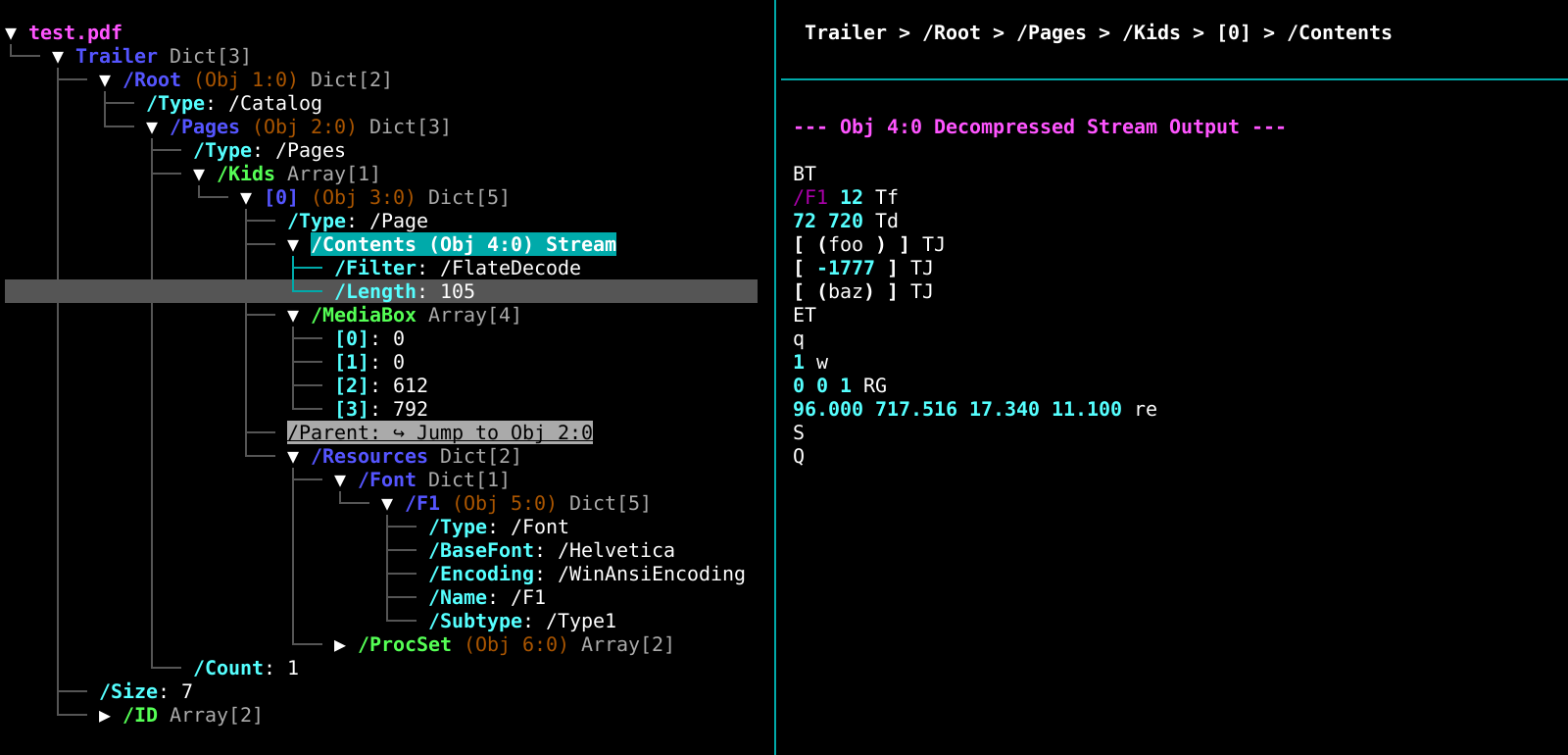
A Text User Interface for inspecting and modifying PDF object structures. Built with Python, Textual, and pikepdf.
Features
-
Tree Inspection: Navigate the internal dictionary, array, and stream structures of PDF files using Vim-style keybindings.
-
Stream Decoding: Decompresses and displays the raw text of PDF content streams in a secondary pane: navigate to a stream and press
enter. -
Stream Editing: Press
eon a stream node to extract it to a temporary file, open it in your local$EDITOR, and inject the saved changes back into the PDF. -
Stream Normalization: Press
fto format dense content streams, parsing the data to place one PDF operator per line. -
Stream and Image Extraction: Press
sto save an uncompressed stream to disk, orxto extract an image stream. -
Reference Navigation: Follow object references (e.g.,
/Parent) via interactive links, or jump to specific pages usingg. -
Search: Search forward (
/) and backward (?) through tree node labels.
Installation
pdftree requires Python 3.10 or higher.
Install it globally using pipx (recommended for CLI tools):
pipx install pdftree
Or install it via standard pip:
pip install pdftree
Usage
Launch the TUI by passing the path to any PDF file:
pdftree path/to/document.pdf
Keybindings
You can press F1 or H at any time inside the app to bring up this cheat sheet.
| Key | Action |
|---|---|
| F1 / H | Show/Hide the help menu |
| / | Search forward |
| ? | Search backward |
| n / p | Repeat search forward / backward |
| Esc / Ctrl+G | Cancel search or close modals |
| j / k / ↓ / ↑ | Navigate tree vertically |
| h / ← | Collapse node / Jump to parent |
| l / → | Expand node / Jump to first child |
| g | Go to page... |
| s | Save stream content to disk |
| f | Format/normalize stream content |
| e | Edit stream content in $EDITOR |
| w | Save the modified PDF to disk |
| x | Extract image to disk |
| Enter | Follow link / Open stream |
| Ctrl+Z | Suspend process |
| Ctrl+L | Force screen redraw |
| q / Ctrl+C | Quit application (prompts if unsaved changes) |
License
MPL-2.0
Release history Release notifications | RSS feed


Download files
Download the file for your platform. If you're not sure which to choose, learn more about installing packages.
Source Distribution
Built Distribution
Filter files by name, interpreter, ABI, and platform.
If you're not sure about the file name format, learn more about wheel file names.
Copy a direct link to the current filters
File details
Details for the file pdftree-0.2.0.tar.gz.
File metadata
- Download URL: pdftree-0.2.0.tar.gz
- Upload date:
- Size: 16.1 kB
- Tags: Source
- Uploaded using Trusted Publishing? Yes
- Uploaded via: twine/6.1.0 CPython/3.13.12
File hashes
| Algorithm | Hash digest | |
|---|---|---|
| SHA256 |
0965978f0e3988b409fedd6a4d2fcba832ca0f8c147a5e620c45c2c705d1f5b3
|
|
| MD5 |
f58261f240048dedc18d49d879f2dc91
|
|
| BLAKE2b-256 |
f8321fc3a21984519330883361bd6c733f23202ec015d7dff1df8e662bda7d41
|
Provenance
The following attestation bundles were made for pdftree-0.2.0.tar.gz:
Publisher:
publish.yml on qooxzuub/pdftree
-
Statement:
-
Statement type:
https://in-toto.io/Statement/v1 -
Predicate type:
https://docs.pypi.org/attestations/publish/v1 -
Subject name:
pdftree-0.2.0.tar.gz -
Subject digest:
0965978f0e3988b409fedd6a4d2fcba832ca0f8c147a5e620c45c2c705d1f5b3 - Sigstore transparency entry: 1287796018
- Sigstore integration time:
-
Permalink:
qooxzuub/pdftree@ca45883a1c92c844c4ba17059a058e56860e8272 -
Branch / Tag:
refs/tags/v0.2.0 - Owner: https://github.com/qooxzuub
-
Access:
public
-
Token Issuer:
https://token.actions.githubusercontent.com -
Runner Environment:
github-hosted -
Publication workflow:
publish.yml@ca45883a1c92c844c4ba17059a058e56860e8272 -
Trigger Event:
push
-
Statement type:
File details
Details for the file pdftree-0.2.0-py3-none-any.whl.
File metadata
- Download URL: pdftree-0.2.0-py3-none-any.whl
- Upload date:
- Size: 19.0 kB
- Tags: Python 3
- Uploaded using Trusted Publishing? Yes
- Uploaded via: twine/6.1.0 CPython/3.13.12
File hashes
| Algorithm | Hash digest | |
|---|---|---|
| SHA256 |
854b73ef3872f801388d8b8f9204bc4a9b0a6b7acb88674ef1580e98de800a32
|
|
| MD5 |
7e6e58936a02b63718d8b4d5d78e13a0
|
|
| BLAKE2b-256 |
c6dcc51cd2dfd9d101a337017a7ce724e4d72c9e836cfeeecaa8e44ea6b5ac1e
|
Provenance
The following attestation bundles were made for pdftree-0.2.0-py3-none-any.whl:
Publisher:
publish.yml on qooxzuub/pdftree
-
Statement:
-
Statement type:
https://in-toto.io/Statement/v1 -
Predicate type:
https://docs.pypi.org/attestations/publish/v1 -
Subject name:
pdftree-0.2.0-py3-none-any.whl -
Subject digest:
854b73ef3872f801388d8b8f9204bc4a9b0a6b7acb88674ef1580e98de800a32 - Sigstore transparency entry: 1287796066
- Sigstore integration time:
-
Permalink:
qooxzuub/pdftree@ca45883a1c92c844c4ba17059a058e56860e8272 -
Branch / Tag:
refs/tags/v0.2.0 - Owner: https://github.com/qooxzuub
-
Access:
public
-
Token Issuer:
https://token.actions.githubusercontent.com -
Runner Environment:
github-hosted -
Publication workflow:
publish.yml@ca45883a1c92c844c4ba17059a058e56860e8272 -
Trigger Event:
push
-
Statement type:






