
PDGen
PDGen is a Python library for generating UML diagrams from Python code using PlantUML. It simplifies UML generation by allowing you to annotate your classes and methods directly in your code, and then generates a UML diagram based on these annotations.
Features
- Simple Annotations: Mark classes and methods to include in your UML diagram using the
@include_in_umldecorator. - PlantUML Integration: Generates UML diagrams in PlantUML format.
- Customizable Output: Save your diagram as an image and optionally output the UML text.
Installation
Install PDGen via pip:
pip install pdgen
Quick Start
Here’s how you can use PDGen to generate a UML diagram:
import logging
from pathlib import Path

# Configure logging to see debug output
logging.basicConfig(level=logging.DEBUG)

from pdgen import include_in_uml, generate_diagram
from dataclasses import dataclass

@include_in_uml
class Bike:
    def __init__(self, name: str):
        self.name = name


@include_in_uml
@dataclass
class Car:
    _name: str
    _length: float

    def set_name(self, name: str) -> None:
        self._name = name

    def get_name(self) -> str:
        return self._name

    @include_in_uml
    def drive(self):
        pass

    @include_in_uml
    def get_fuel_level(self) -> float:
        pass

    @include_in_uml
    def _turn_off_lights(self) -> None:
        pass

if __name__ == '__main__':
    # Generate a UML diagram
    generate_diagram(Path("diagram_new.png"), Path("diagram_new.txt"))
Output
The above script generates:
diagram_new.png: A UML diagram image.diagram_new.txt: The PlantUML source text for the diagram.
Example UML Diagram
The generated UML diagram includes the annotated classes and methods:
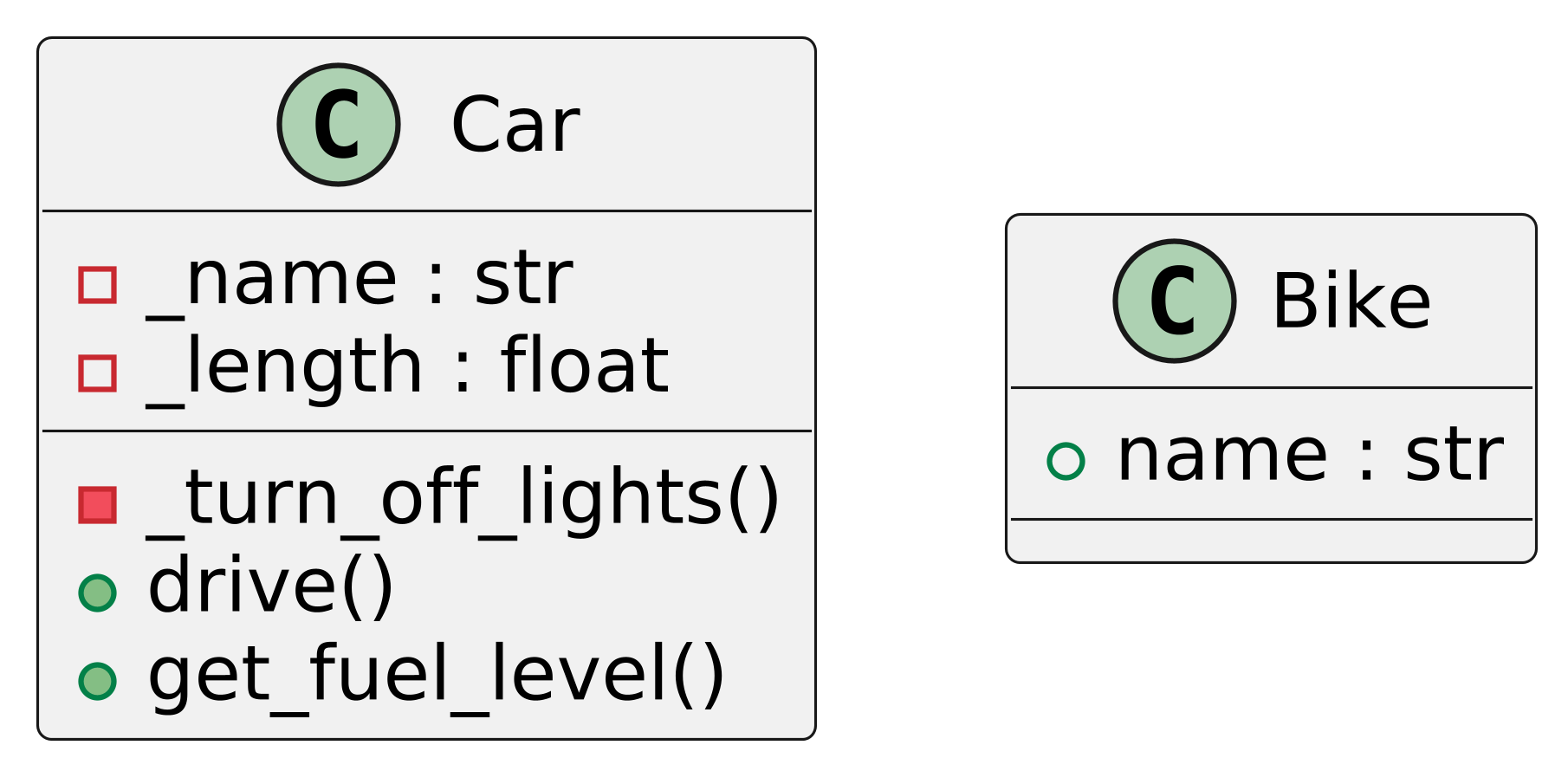
@startuml
skinparam dpi 600

class Car {
    - _name : str
    - _length : float
    - _turn_off_lights()
    + drive()
    + get_fuel_level()
}


class Bike {
    + name : str
}

@enduml
API Reference
@include_in_uml
A decorator used to mark classes or methods for inclusion in the UML diagram.
generate_diagram(output_path: Path, uml_text_path: Path)
Generates a UML diagram and optionally saves the PlantUML source.
output_path: Path to save the generated UML diagram (e.g., PNG format).uml_text_path: Path to save the PlantUML source text.
Logging
PDGen uses Python's logging module to output debug information. You can configure the logging level in your script for better insights into the generation process.
import logging
logging.basicConfig(level=logging.DEBUG)
Contributing
Contributions are welcome!
License
This project is licensed under the MIT License. See the LICENSE file for details.
Links
1 maintainer

Metadata
1 maintainer
Release files for pdgen 0.3.2
For a detailed explanation of source distributions (sdists) and built distributions (wheels), please see the package formats documentation.
Source distribution (sdist)
| File | Size | Uploaded | Provenance | Actions |
|---|---|---|---|---|
| pdgen-0.3.2.tar.gz | 13.6 kB | Without provenance | Details for pdgen-0.3.2.tar.gz |
Built distribution (wheel)
| File | Interpreter | ABI | Platform | Actions Reset |
|---|---|---|---|---|
| pdgen-0.3.2-py3-none-any.whl | Python 3 | none | any | Details for pdgen-0.3.2-py3-none-any.whl |
Total release size: 36.5 kB
Release files / pdgen-0.3.2.tar.gz
| Download URL | pdgen-0.3.2.tar.gz |
|---|---|
| Size | 13.6 kB |
| Tags | Source |
|
SHA-256 checksum How to use checksums |
8b486023e102ac22ed82034d729dd6b5cce32923638757baff2501f4eaeded99
|
|
BLAKE2b-256 checksum How to use checksums |
24ae32a6fcb28247d81a20c5544d27929531764061d03b110666baa84cb41850
|
| Upload date | |
|
Uploaded using Trusted Publishing? What is trusted publishing? |
No |
| Uploaded via |
poetry/1.8.4 CPython/3.13.0 Windows/11
|
Release files / pdgen-0.3.2-py3-none-any.whl
| Download URL | pdgen-0.3.2-py3-none-any.whl |
|---|---|
| Size | 22.9 kB |
| Tags | Python 3 |
|
SHA-256 checksum How to use checksums |
88d32b4701753a8d00adf451e62caf7a7f300b6d8e0bcea00e73987d93e34298
|
|
BLAKE2b-256 checksum How to use checksums |
be160aaba2373c9e257c7c0267a95f4ca98c5a3ee85bdb56e1a07743b99e1364
|
| Upload date | |
|
Uploaded using Trusted Publishing? What is trusted publishing? |
No |
| Uploaded via |
poetry/1.8.4 CPython/3.13.0 Windows/11
|
Security for pdgen 0.3.2
Provenance
Provenance describes where a file came from. On PyPI, provenance is shared via attestations, which provide a verifiable record of the build or publishing details. View details, limitations and caveats.
No provenance found
None of the files in this release were uploaded with provenance metadata.
A note on package security
PyPI is a repository for distributing packages, not a service for auditing them. While third-party security researchers and our staff do their best to detect and remove malicious packages, PyPI cannot guarantee the quality, security or suitability of any given package.
To learn more about protecting yourself from malicious actors, visit our package security documentation.














