
pdir2: Pretty dir() printing with joy




Have you ever dreamed of a better output of dir()? I do. So I created this.
Features
-
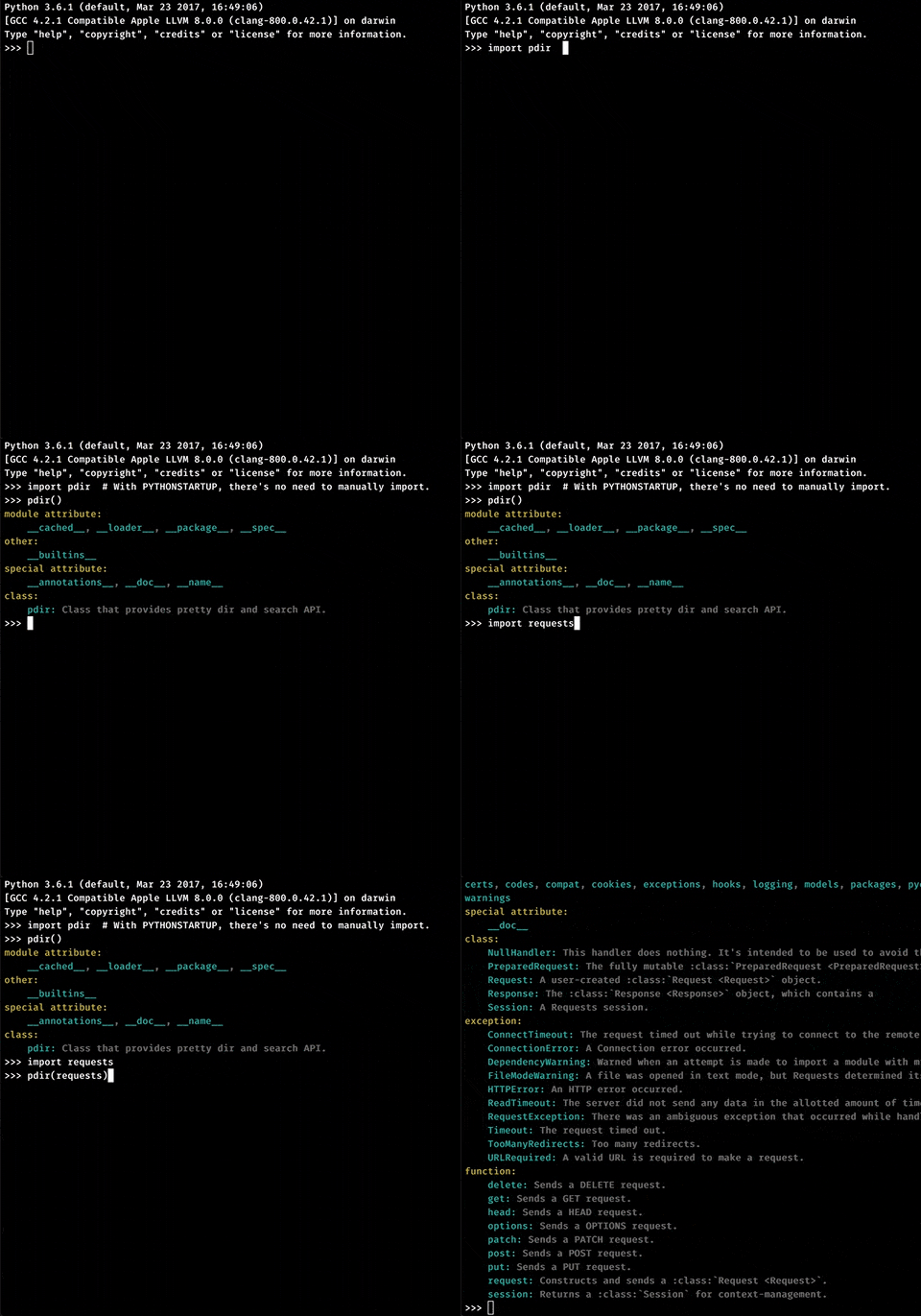
Attributes are grouped by types/functionalities, with beautiful colors.
-
Support color customization, here's how.
-
Support all platforms including Windows(Thanks to colorama).
-
Support ipython, ptpython, bpython and Jupyter Notebook! See wiki for details.
-
The return value of
pdir()can still be used as a list of names. -
✨ Attribute searching
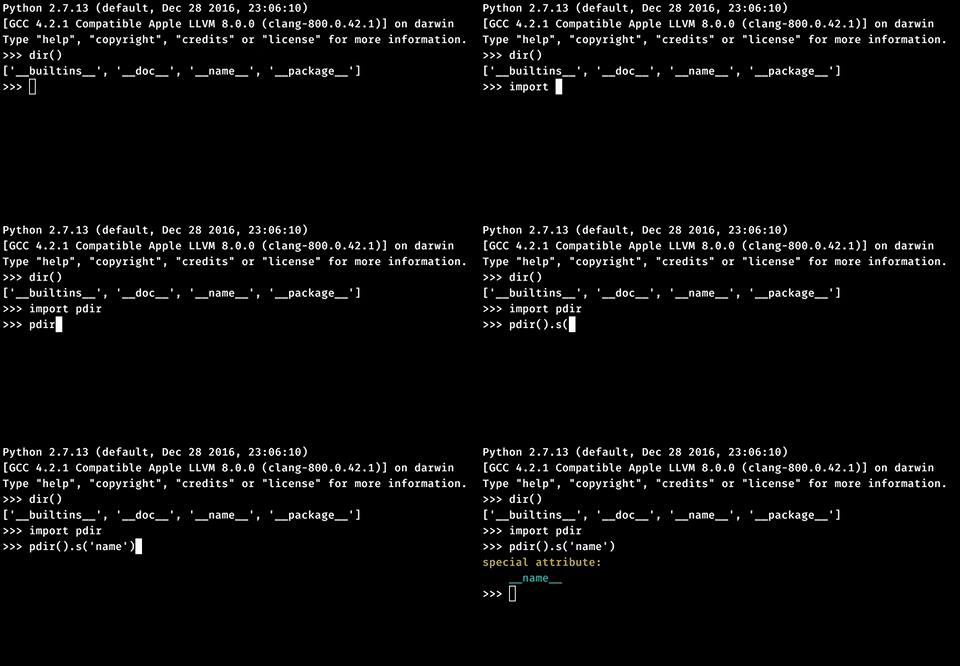
You can search for certain names with
.s()or.search():Search is case-insensitive by default.
search(name, case_sensitive=True)does case-sensitive searching. -
🌟 Attribute filtering
properties: Find properties/variables defined in the inspected object.methods: Find methods/functions defined in the inspected object.public: Find public attributes.own: Find attributes that are not inherited from parent classes.These filters can be chained! Order does NOT matter.
For example, use
pdir(obj).public.own.methodsto find all public own methods.You can also call
searchon the returned results.See a complete example.
Install
Generic
pip install pdir2
About the name. I wanted to call it "pdir", but there's already one with this name on pypi. Mine is better, of course.
Fedora
dnf install python3-pdir2
Automatic Import
As a better alternative of dir(), it's more convenient to automatically import
pdir2 when launching REPL. Luckily, Python provides a way to do this. In you .bashrc(or .zshrc), add this line:
export PYTHONSTARTUP=$HOME/.pythonstartup
Then, create .pythonstartup in your home folder. Add one line:
import pdir
Next time you launch REPL, pdir() is already there, Hooray!
Development
-
Set up development environment
-
Install dev dependencies
Simply run
pdm install.If you want to work on a specific Python version, run
pdm use [PYTHON_VERSION]first to switch PDM to that version (e.g.pdm use 3.9if you want to debug a Python 3.9 specific issue). -
Run tests
Run
pdm run tox
The guide may be incomplete. Please file bugs if you encounter any issues.
1 maintainer

Metadata
1 maintainer
Release files for pdir2 1.1.3
For a detailed explanation of source distributions (sdists) and built distributions (wheels), please see the package formats documentation.
Source distribution (sdist)
| File | Size | Uploaded | Provenance | Actions |
|---|---|---|---|---|
| pdir2-1.1.3.tar.gz | 19.5 kB | Without provenance | Details for pdir2-1.1.3.tar.gz |
Built distribution (wheel)
| File | Interpreter | ABI | Platform | Actions Reset |
|---|---|---|---|---|
| pdir2-1.1.3-py3-none-any.whl | Python 3 | none | any | Details for pdir2-1.1.3-py3-none-any.whl |
Total release size: 33.2 kB
Release files / pdir2-1.1.3.tar.gz
| Download URL | pdir2-1.1.3.tar.gz |
|---|---|
| Size | 19.5 kB |
| Tags | Source |
|
SHA-256 checksum How to use checksums |
8db5a4c23b54e90ca0babeae6a4e0b8ead8919a91369a6f00bf4d2b15c46b0cd
|
|
BLAKE2b-256 checksum How to use checksums |
088ab0b48fc62e635adaa0017f7ed1a3c1ede83ab51ead573128219d74c0d36c
|
| Upload date | |
|
Uploaded using Trusted Publishing? What is trusted publishing? |
No |
| Uploaded via |
twine/7.0.0 CPython/3.13.7
|
Release files / pdir2-1.1.3-py3-none-any.whl
| Download URL | pdir2-1.1.3-py3-none-any.whl |
|---|---|
| Size | 13.7 kB |
| Tags | Python 3 |
|
SHA-256 checksum How to use checksums |
ef23a3e35b77f0f6b4165c9cee17676993dfe605a03f23811631e1cc3dbb3218
|
|
BLAKE2b-256 checksum How to use checksums |
fab88e455a9be970ba700913c46d9e5ea1cb6cec8d0bb5ebb79fb51d1f1ab56f
|
| Upload date | |
|
Uploaded using Trusted Publishing? What is trusted publishing? |
No |
| Uploaded via |
twine/7.0.0 CPython/3.13.7
|
Security for pdir2 1.1.3
Provenance
Provenance describes where a file came from. On PyPI, provenance is shared via attestations, which provide a verifiable record of the build or publishing details. View details, limitations and caveats.
No provenance found
None of the files in this release were uploaded with provenance metadata.
A note on package security
PyPI is a repository for distributing packages, not a service for auditing them. While third-party security researchers and our staff do their best to detect and remove malicious packages, PyPI cannot guarantee the quality, security or suitability of any given package.
To learn more about protecting yourself from malicious actors, visit our package security documentation.














