
A modern Python package and dependency manager supporting the latest PEP standards
Project description











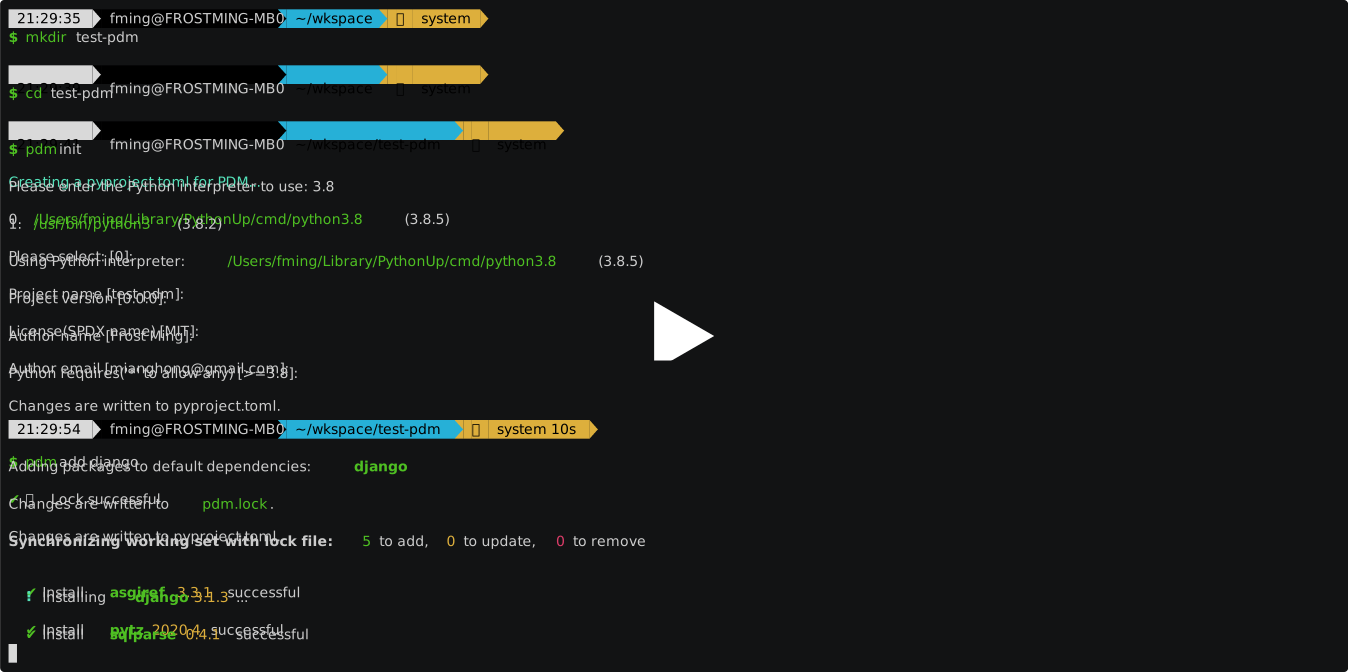
What is PDM?
PDM is meant to be a next generation Python package management tool.
It was originally built for personal use. If you feel you are going well
with Pipenv or Poetry and don't want to introduce another package manager,
just stick to it. But if you are missing something that is not present in those tools,
you can probably find some goodness in pdm.
Highlights of features
- Simple and fast dependency resolver, mainly for large binary distributions.
- A PEP 517 build backend.
- PEP 621 project metadata.
- Flexible and powerful plug-in system.
- Versatile user scripts.
- Opt-in centralized installation cache like pnpm.
Comparisons to other alternatives
Pipenv
Pipenv is a dependency manager that combines pip and venv, as the name implies.
It can install packages from a non-standard Pipfile.lock or Pipfile.
However, Pipenv does not handle any packages related to packaging your code,
so it’s useful only for developing non-installable applications (Django sites, for example).
If you’re a library developer, you need setuptools anyway.
Poetry
Poetry manages environments and dependencies in a similar way to Pipenv,
but it can also build .whl files with your code, and it can upload wheels and source distributions to PyPI.
It has a pretty user interface and users can customize it via a plugin. Poetry uses the pyproject.toml standard,
but it does not follow the standard specifying how metadata should be represented in a pyproject.toml file (PEP 621),
instead using a custom [tool.poetry] table. This is partly because Poetry came out before PEP 621.
Hatch
Hatch can also manage environments, allowing multiple environments per project. By default it has a central location for all environments but it can be configured to put a project's environment(s) in the project root directory. It can manage packages but without lockfile support. It can also be used to package a project (with PEP 621 compliant pyproject.toml files) and upload it to PyPI.
This project
PDM can manage virtual environments (venvs) in both project and centralized locations, similar to Pipenv. It reads project metadata from a standardized pyproject.toml file and supports lockfiles. Users can add additional functionality through plugins, which can be shared by uploading them as distributions.
Unlike Poetry and Hatch, PDM is not limited to a specific build backend; users have the freedom to choose any build backend they prefer.
Installation
PDM requires python version 3.7 or higher.
Via Install Script
Like Pip, PDM provides an installation script that will install PDM into an isolated environment.
For Linux/Mac
curl -sSL https://pdm-project.org/install-pdm.py | python3 -
For Windows
(Invoke-WebRequest -Uri https://pdm-project.org/install-pdm.py -UseBasicParsing).Content | python -
For security reasons, you should verify the checksum of install-pdm.py.
It can be downloaded from install-pdm.py.sha256.
The installer will install PDM into the user site and the location depends on the system:
$HOME/.local/binfor Unix%APPDATA%\Python\Scriptson Windows
You can pass additional options to the script to control how PDM is installed:
usage: install-pdm.py [-h] [-v VERSION] [--prerelease] [--remove] [-p PATH] [-d DEP]

optional arguments:
  -h, --help            show this help message and exit
  -v VERSION, --version VERSION | envvar: PDM_VERSION
                        Specify the version to be installed, or HEAD to install from the main branch
  --prerelease | envvar: PDM_PRERELEASE    Allow prereleases to be installed
  --remove | envvar: PDM_REMOVE            Remove the PDM installation
  -p PATH, --path PATH | envvar: PDM_HOME  Specify the location to install PDM
  -d DEP, --dep DEP | envvar: PDM_DEPS     Specify additional dependencies, can be given multiple times
You can either pass the options after the script or set the env var value.
Alternative Installation Methods
If you are on macOS and using homebrew, install it by:
brew install pdm
If you are on Windows and using Scoop, install it by:
scoop bucket add frostming https://github.com/frostming/scoop-frostming.git
scoop install pdm
Otherwise, it is recommended to install pdm in an isolated environment with pipx:
pipx install pdm
Or you can install it under a user site:
pip install --user pdm
With asdf-vm
asdf plugin add pdm
asdf install pdm latest
Quickstart
Initialize a new PDM project
pdm init
Answer the questions following the guide, and a PDM project with a pyproject.toml file will be ready to use.
Install dependencies
pdm add requests flask
You can add multiple dependencies in the same command. After a while, check the pdm.lock file to see what is locked for each package.
Badges
Tell people you are using PDM in your project by including the markdown code in README.md:
[](https://pdm-project.org)
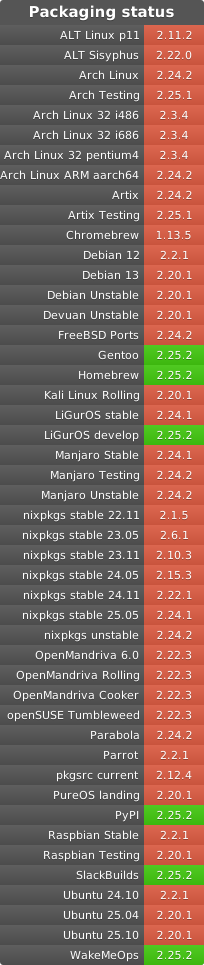
Packaging Status
PDM Eco-system
Awesome PDM is a curated list of awesome PDM plugins and resources.
Sponsors

Credits
This project is strongly inspired by pyflow and poetry.
License
This project is open sourced under MIT license, see the LICENSE file for more details.
Project details
Release history Release notifications | RSS feed


Download files
Download the file for your platform. If you're not sure which to choose, learn more about installing packages.
Source Distribution
Built Distribution
Filter files by name, interpreter, ABI, and platform.
If you're not sure about the file name format, learn more about wheel file names.
Copy a direct link to the current filters
File details
Details for the file pdm-2.10.4.tar.gz.
File metadata
- Download URL: pdm-2.10.4.tar.gz
- Upload date:
- Size: 2.6 MB
- Tags: Source
- Uploaded using Trusted Publishing? Yes
- Uploaded via: pdm/2.10.4 CPython/3.11.6
File hashes
| Algorithm | Hash digest | |
|---|---|---|
| SHA256 |
6dfd9d4cb59043edecb2d0b47d208e55d89d333ba7197deb05cca2dfbc7a4bfb
|
|
| MD5 |
9c1d256bfc656ae67f91e87d8c48201c
|
|
| BLAKE2b-256 |
e7787299699a7e2a319675312d8cbf5978f4a0acbd33b31a15ce297bbdf0fc16
|
File details
Details for the file pdm-2.10.4-py3-none-any.whl.
File metadata
- Download URL: pdm-2.10.4-py3-none-any.whl
- Upload date:
- Size: 244.3 kB
- Tags: Python 3
- Uploaded using Trusted Publishing? Yes
- Uploaded via: pdm/2.10.4 CPython/3.11.6
File hashes
| Algorithm | Hash digest | |
|---|---|---|
| SHA256 |
b7caf7d94435440b1d5e19789c4bd651f994ada254fee71c7274629d408a3764
|
|
| MD5 |
a9185a29b176f6ef7be8563b9559fd97
|
|
| BLAKE2b-256 |
907650b9d7d67aa5845d280c6bd017efdd88cf855845d8df997a36dbcfe87bb1
|






