
peaceofcake
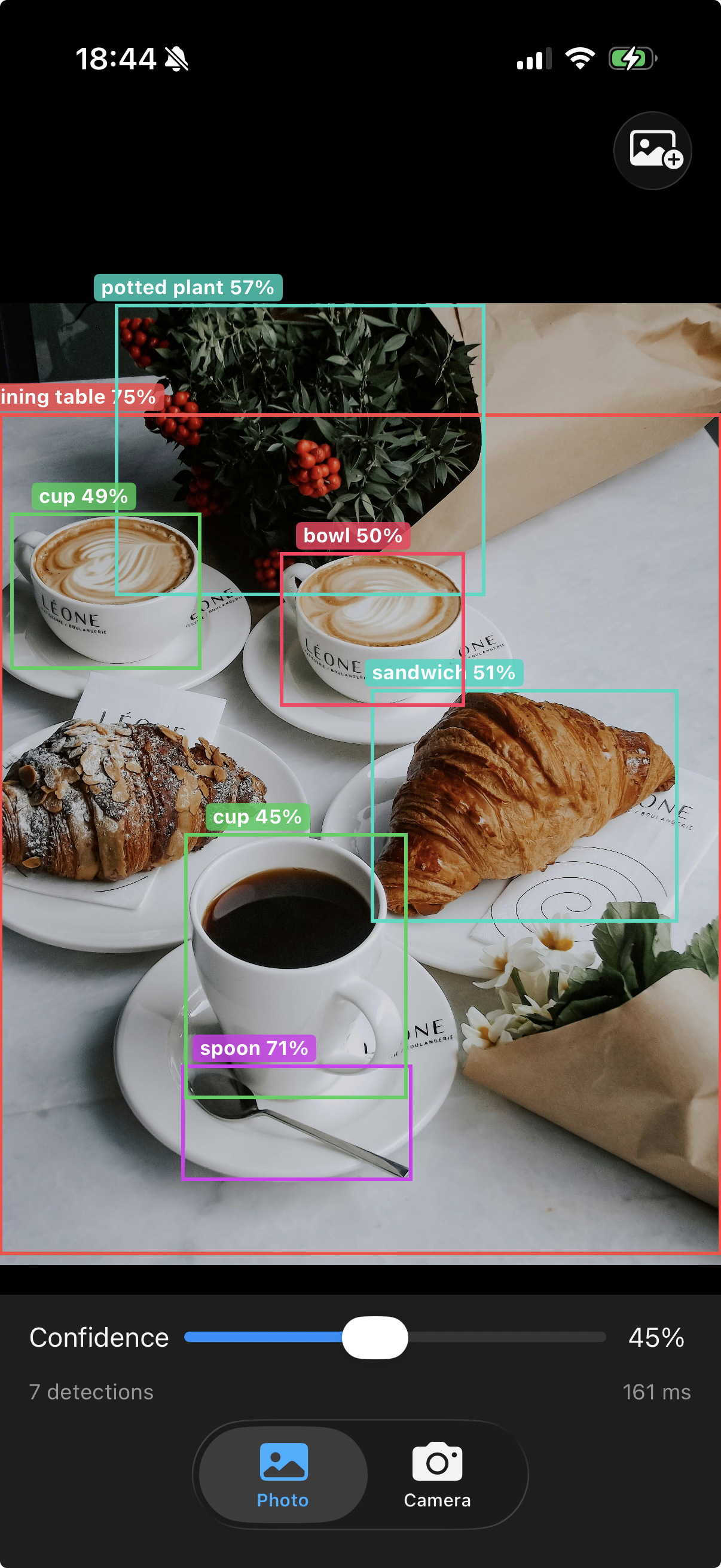
A simple Python wrapper for D-FINE object detection models. Pretrained weights are downloaded automatically. Includes an iOS demo app with real-time camera detection.
Installation
pip install -e .
Requirements: Python >= 3.9, PyTorch >= 2.0
Quick Start
from peaceofcake import DFINE

model = DFINE("dfine-n-coco")
results = model.predict("image.jpg", conf=0.3)
results[0].save("output.jpg")
Available Models
| Model | Dataset | Size |
|---|---|---|
dfine-n-coco |
COCO | Nano (fastest) |
dfine-s-coco |
COCO | Small |
dfine-m-coco |
COCO | Medium |
dfine-l-coco |
COCO | Large |
dfine-x-coco |
COCO | XLarge (best accuracy) |
dfine-s-obj2coco |
Objects365+COCO | Small |
dfine-m-obj2coco |
Objects365+COCO | Medium |
dfine-l-obj2coco |
Objects365+COCO | Large |
dfine-x-obj2coco |
Objects365+COCO | XLarge |
Weights are cached in ~/.cache/peaceofcake/weights/.
API
Inference
from peaceofcake import DFINE

model = DFINE("dfine-n-coco")

# From file path, PIL Image, numpy array, or list of paths
results = model.predict("image.jpg", conf=0.25, device="cpu", img_size=640)
| Parameter | Default | Description |
|---|---|---|
source |
— | File path, list of paths, PIL Image, or numpy array |
conf |
0.25 | Confidence threshold |
device |
auto | "cpu" or "cuda" |
img_size |
640 | Input resolution |
Results
r = results[0]
r.boxes       # (N, 4) bounding boxes in xyxy format
r.labels      # (N,) class indices
r.scores      # (N,) confidence scores
len(r)        # number of detections
print(r)      # human-readable summary

r.plot()      # returns PIL Image with drawn boxes
r.save("out.jpg")  # save visualization
Export
model.export("onnx")                # ONNX
model.export("coreml")              # CoreML (.mlpackage)
model.export("coreml", img_size=640, precision="FLOAT16", min_target="iOS17")
model.export("tensorrt")            # TensorRT (requires trtexec)
CoreML Export Options
| Parameter | Default | Description |
|---|---|---|
img_size |
640 | Input resolution |
min_target |
"iOS17" |
"iOS16", "iOS17", "iOS18" |
precision |
"FLOAT16" |
"FLOAT16", "FLOAT32" |
compute_units |
"ALL" |
"ALL", "CPU_AND_GPU", "CPU_AND_NE", "CPU_ONLY" |
output |
"model.mlpackage" |
Output path |
CoreML model outputs:
confidence—[N, 80]class scorescoordinates—[N, 4]bounding boxes (normalized cxcywh)
iOS Demo App
The DFINEDemo/ directory contains a SwiftUI iOS app with:
- Real-time camera object detection
- Photo library detection
- Confidence threshold slider
- Model picker (when multiple models are bundled)
Setup
-
Export a CoreML model:
from peaceofcake import DFINE
model = DFINE("dfine-n-coco")
model.export("coreml", output="dfine_n_coco.mlpackage")
-
Drag the
.mlpackageintoDFINEDemo/DFINEDemo/in Xcode -
Build and run on device (iOS 17+)
To use multiple models, add more .mlpackage files with dfine prefix. A model picker appears automatically in the toolbar.
Project Structure
peaceofcake/          # Python library
  models/dfine.py     # Model loading and registry
  engine/             # Predictor, exporter, trainer
  results/            # Detection results and plotting
  cfg/                # Model configs and defaults
third_party/dfine/    # Bundled D-FINE inference source
DFINEDemo/            # iOS demo app (SwiftUI)
License
Apache 2.0
Acknowledgments
This project wraps D-FINE by Peterande et al.
D-FINE: Redefine Regression Task of DETRs as Fine-grained Distribution Refinement.
1 maintainer

Metadata
1 maintainer
Release files for peaceofcake 0.2.0
For a detailed explanation of source distributions (sdists) and built distributions (wheels), please see the package formats documentation.
Source distribution (sdist)
| File | Size | Uploaded | |
|---|---|---|---|
| peaceofcake-0.2.0.tar.gz | 109.2 kB | Details |
Built distribution (wheel)
| File | Interpreter | ABI | Platform | Reset |
|---|---|---|---|---|
| peaceofcake-0.2.0-py3-none-any.whl | Python 3 | none | any | Details |
Total release size: 264.8 kB
Release files / peaceofcake-0.2.0.tar.gz
| Download URL | peaceofcake-0.2.0.tar.gz |
|---|---|
| Size | 109.2 kB |
| Tags | Source |
|
SHA-256 checksum How to use checksums |
28b30d87bf03f9a81b26de958caadad0ff01db60e133567b8e5e385bf7daf8a4
|
|
BLAKE2b-256 checksum How to use checksums |
d00f08b4edfe7e321fbe2b757a1123aca53c1aef73576ad6eea07b8547ac4e9b
|
| Upload date | |
|
Uploaded using Trusted Publishing? What is trusted publishing? |
No |
| Uploaded via |
twine/6.2.0 CPython/3.14.0
|
Release files / peaceofcake-0.2.0-py3-none-any.whl
| Download URL | peaceofcake-0.2.0-py3-none-any.whl |
|---|---|
| Size | 155.6 kB |
| Tags | Python 3 |
|
SHA-256 checksum How to use checksums |
ce0a5022706115615fa1882c0cfd10c80b1754acf6f91d7f0450b609ed91eab3
|
|
BLAKE2b-256 checksum How to use checksums |
9d187960a27668c91f15871b656e51db5d4ba0e0d833e42db4b054f4db64b101
|
| Upload date | |
|
Uploaded using Trusted Publishing? What is trusted publishing? |
No |
| Uploaded via |
twine/6.2.0 CPython/3.14.0
|













