
Peak Locator
A robust Python toolkit for deterministic peak detection in one-dimensional, two-dimensional, and higher-dimensional numerical data.








Overview
Peak Locator provides a collection of peak detection algorithms for numerical data represented as arrays or matrices. It supports multiple algorithmic approaches for one-dimensional and two-dimensional inputs, with a unified interface for higher-dimensional data. The library offers automatic algorithm selection based on input characteristics, while allowing explicit configuration when a specific method or performance profile is required.
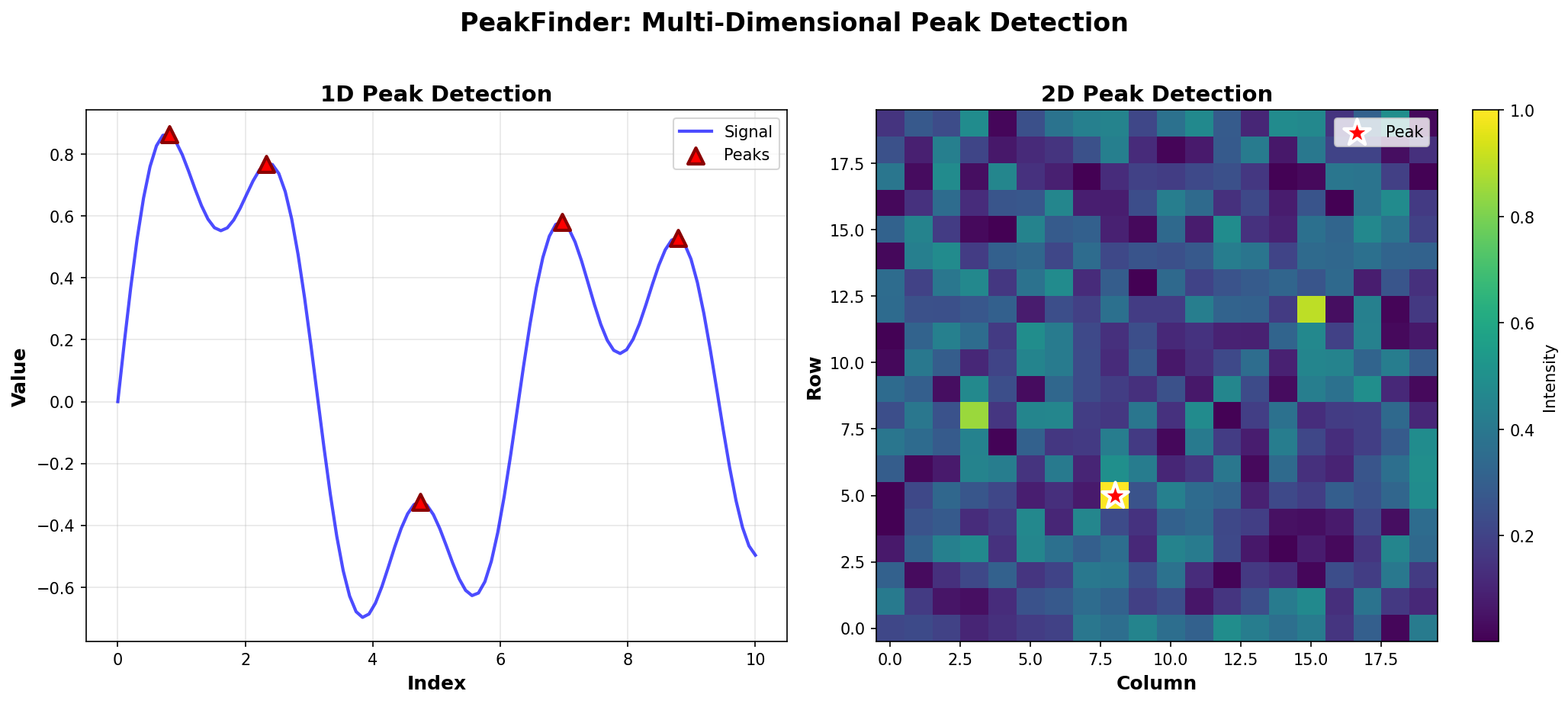
Visualization showing 1D and 2D peak detection in action
Key Features
- 1D Peak Detection: Multiple algorithms (brute force, binary search, hybrid)
- 2D Peak Detection: Divide-and-conquer approach for matrices
- N-Dimensional Support: Conceptual implementation for higher dimensions
- Peak Counting: Linear and segment tree-based approaches
- Automatic Algorithm Selection: Chooses optimal algorithm based on data properties
- Duplicate Handling: Robust handling of arrays with duplicate values
- Visualization Tools: Built-in plotting utilities for 1D and 2D data
- Production Ready: Full type annotations, comprehensive tests, and documentation
Installation
From PyPI (when published)
pip install peak-locator
For visualization support:
pip install peak-locator[viz]
From Source / Local Development
git clone https://github.com/yourusername/peak-locator.git
cd peak-locator

# Install dependencies
pip install -r requirements.txt

# Install in editable mode with development tools
pip install -e ".[dev]"
Quick Start
Basic Usage
from peak_locator import PeakDetector
import numpy as np

# 1D peak detection
arr = np.array([1, 3, 2, 5, 4])
detector = PeakDetector(arr)
peak_idx = detector.find_any_peak()
print(f"Peak found at index: {peak_idx}")

# 2D peak detection
matrix = np.array([[1, 2, 3], [4, 9, 5], [6, 7, 8]])
detector = PeakDetector(matrix)
row, col = detector.find_peak_2d()
print(f"Peak found at ({row}, {col})")
Finding All Peaks
arr = np.array([1, 5, 2, 6, 3])
detector = PeakDetector(arr)
all_peaks = detector.find_all_peaks()
print(f"Found {len(all_peaks)} peaks at indices: {all_peaks}")
Counting Peaks
arr = np.array([1, 5, 2, 6, 3, 4, 2])
detector = PeakDetector(arr)
count = detector.count_peaks()
print(f"Total peaks: {count}")
Supported Algorithms
1D Peak Detection
- Brute Force (
mode="brute"): Linear scan, O(n) time complexity - Binary Search (
mode="binary"): O(log n) time complexity, best for arrays without duplicates - Hybrid (
mode="hybrid"): Compresses duplicates then uses binary search, handles duplicates robustly - Auto (
mode="auto"): Automatically selects the best algorithm based on data properties
2D Peak Detection
- Divide-and-Conquer: O(n log m) time complexity for n×m matrices
Peak Counting
- Linear Scan: O(n) time, suitable for single queries
- Segment Tree: O(n) preprocessing, O(log n) per query, optimal for repeated range queries
Design Philosophy
Peak Locator is designed with the following principles:
- Simplicity: Clean, intuitive API that hides algorithmic complexity
- Robustness: Handles edge cases, duplicates, and invalid inputs gracefully
- Performance: Automatic algorithm selection optimizes for your use case
- Extensibility: Well-structured codebase allows easy addition of new algorithms
- Documentation: Comprehensive docs and examples for all features
- API Stability: Public APIs follow semantic versioning.
Error Handling
Peak Locator performs strict input validation and raises explicit exceptions for:
- Unsupported data types or shapes
- Invalid dimensionality for a selected algorithm
- Ambiguous peak definitions when strict criteria are required
Determinism and Thread Safety
- Algorithms are deterministic
- No global mutable state is used
PeakDetectorinstances are safe for concurrent read-only use
Performance Characteristics
1D Peak Detection
| Algorithm | Time Complexity | Space Complexity | Best For |
|---|---|---|---|
| Brute Force | O(n) | O(1) | Small arrays, simple cases |
| Binary Search | O(log n) | O(1) | Large arrays without duplicates |
| Hybrid | O(n) worst, O(log n) best | O(n) worst, O(1) best | Arrays with duplicates |
2D Peak Detection
- Time: O(n log m) for n×m matrix
- Space: O(log m) for recursion stack
Peak Counting
- Linear: O(n) per query
- Segment Tree: O(n) preprocessing, O(log n) per query
API Reference
PeakDetector
Main interface for peak detection.
detector = PeakDetector(
    data,                    # array-like: Input data
    allow_duplicates=True,     # bool: Handle duplicate values
    mode="auto"              # str: Algorithm mode
)
Methods
find_any_peak(): Find any peak in the datafind_all_peaks(): Find all peaks (1D only)count_peaks(use_segment_tree=False): Count peaks (1D only)find_peak_2d(): Find peak in 2D datafind_peak_nd(): Find peak in N-dimensional data
Properties
data: Underlying numpy arrayshape: Shape of the datandim: Number of dimensions
Examples
Example 1: Signal Processing
import numpy as np
from peak_locator import PeakDetector

# Simulate a signal with noise
signal = np.sin(np.linspace(0, 4*np.pi, 100)) + np.random.normal(0, 0.1, 100)
detector = PeakDetector(signal)
peaks = detector.find_all_peaks()
print(f"Found {len(peaks)} peaks in signal")
Example 2: Image Analysis
import numpy as np
from peak_locator import PeakDetector

# Find peak intensity in an image
image = np.random.rand(100, 100) * 255
detector = PeakDetector(image)
row, col = detector.find_peak_2d()
print(f"Peak intensity at pixel ({row}, {col})")
Example 3: Visualization
import numpy as np
from peak_locator import PeakDetector
from peak_locator.visualization import plot_1d_peaks

arr = np.array([1, 5, 2, 6, 3, 4, 2])
detector = PeakDetector(arr)
peaks = detector.find_all_peaks()
plot_1d_peaks(arr, peaks=peaks, show_all=True)
Documentation
Comprehensive documentation is available in the docs/ directory:
- Quick Start Guide - Get started in 5 minutes
- 1D Peak Detection Examples - Detailed 1D examples
- 2D Peak Detection Examples - Matrix peak detection
- Peak Counting - Counting peaks efficiently
- Segment Tree Usage - Advanced range queries
- N-Dimensional Concepts - Higher-dimensional peak detection
Testing
Run the test suite:
pytest
With coverage:
pytest --cov=peak_locator --cov-report=html
Contributing
Contributions are welcome! Please follow these guidelines:
- Fork the repository
- Create a feature branch
- Make your changes with tests
- Ensure all tests pass and code is formatted
- Submit a pull request
Development Setup
git clone https://github.com/yourusername/peak-locator.git
cd peak-locator
pip install -r requirements.txt
pip install -e ".[dev]"
Code Quality
This project uses:
blackfor code formattingrufffor lintingmypyfor type checkingpytestfor testing
CI
The project uses automated GitHub Actions workflows for:
- CI: Runs tests, linting, and type checking on every push/PR
- Releases: Automatically publishes to PyPI when a GitHub release is created
License
MIT License - see LICENSE file for details.
Changelog
All notable changes are documented in CHANGELOG.md.
This project adheres to Keep a Changelog.
1 maintainer

Metadata
1 maintainer
Release files for peak-locator 1.1.2
For a detailed explanation of source distributions (sdists) and built distributions (wheels), please see the package formats documentation.
Source distribution (sdist)
| File | Size | Uploaded | |
|---|---|---|---|
| peak_locator-1.1.2.tar.gz | 26.4 kB | Details |
Built distribution (wheel)
| File | Interpreter | ABI | Platform | Reset |
|---|---|---|---|---|
| peak_locator-1.1.2-py3-none-any.whl | Python 3 | none | any | Details |
Total release size: 56.5 kB
Release files / peak_locator-1.1.2.tar.gz
| Download URL | peak_locator-1.1.2.tar.gz |
|---|---|
| Size | 26.4 kB |
| Tags | Source |
|
SHA-256 checksum How to use checksums |
cb9d26ca80c246b417a46471b1541b060f000cabff4c85c298a2c136dc59e058
|
|
BLAKE2b-256 checksum How to use checksums |
7332ddfc278d9a9fd849112cf0ea1e79172196c729330570a6a920010709959c
|
| Upload date | |
|
Uploaded using Trusted Publishing? What is trusted publishing? |
No |
| Uploaded via |
twine/6.2.0 CPython/3.12.12
|
Release files / peak_locator-1.1.2-py3-none-any.whl
| Download URL | peak_locator-1.1.2-py3-none-any.whl |
|---|---|
| Size | 30.1 kB |
| Tags | Python 3 |
|
SHA-256 checksum How to use checksums |
57f59ad0c685902201e59b6db9fe74f647308666f77adb88dfd51a6baf9db453
|
|
BLAKE2b-256 checksum How to use checksums |
202b5fbd479c46d95794253bb0b6a48a63d3c3e21a82a1c5f661c3139c70f6e0
|
| Upload date | |
|
Uploaded using Trusted Publishing? What is trusted publishing? |
No |
| Uploaded via |
twine/6.2.0 CPython/3.12.12
|














