
Pedal


A collection of tools to analyze student’s work in a pipeline. Pedal not only provides some of these tools, but it provides a framework around those tools.
Installation
Install from PyPi:
pip install pedal
Or install from the https://github.com/acbart/pedal repository
Important Concepts
Pedal revolves around providing Feedback Functions that can be called in an Instructor Control Script to generate Feedback for a Submission, which are all attached to a Report. A Resolver can then transform that Feedback into something that an Environment can hand off to a learner (or other interested party). These Feedback Functions are organized into Tools.
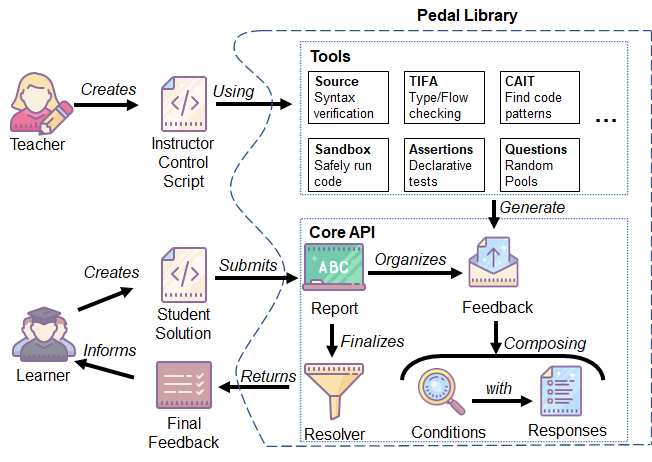
One of our major goals is to attach metadata to feedback to enable easier analysis, versioning, and evaluation. Although Instructor Control Scripts can be written very imperatively to specify very complex (or simple) grading logic, we are trying to reach an elegant, declarative style. This will enable tooling to automatically generate reports on occurrences of feedback, connect to datasets like those in the ProgSnap format, and allow us to “unit test our unit tests”.
One of our other goals for this project is to categorize Feedbacks’ Conditions and Responses, using concepts established by Narciss 2006. For example, we say some Kinds of Responses are “hints” instead of “mistakes”. We also say that Conditions can be Categorized as being from “Specifications” or “Runtime”.
For more information, check out the docs for Pedal.


Download files
Download the file for your platform. If you're not sure which to choose, learn more about installing packages.
Source Distribution
File details
Details for the file pedal-3.0.2.tar.gz.
File metadata
- Download URL: pedal-3.0.2.tar.gz
- Upload date:
- Size: 280.6 kB
- Tags: Source
- Uploaded using Trusted Publishing? No
- Uploaded via:
twine/5.0.0 CPython/3.11.4
File hashes
| Algorithm | Hash digest | |
|---|---|---|
| SHA256 |
0b2357cde3d6e30d224388ea751603356e13ecee64d4caacde00d472ffa58a5a
|
|
| MD5 |
6cafdf5051e3b80e42dff4bc91e5f54f
|
|
| BLAKE2b-256 |
deb26295b155ee13ae074e380943e5ebe4c11016368cb8b1377b9c7018a1ed28
|







