
Parse and analyze workout data exported from stationary bikes

Project description
Pedal Parser

pedalparser is a Python library for parsing workout data from your Body Bike.
Data is loaded as numpy time series with export helpers for pandas, polars, or markdown. The numpy-first approach allows you to use the data efficiently with the tools you know and love, analyzing or plotting selections of the data:
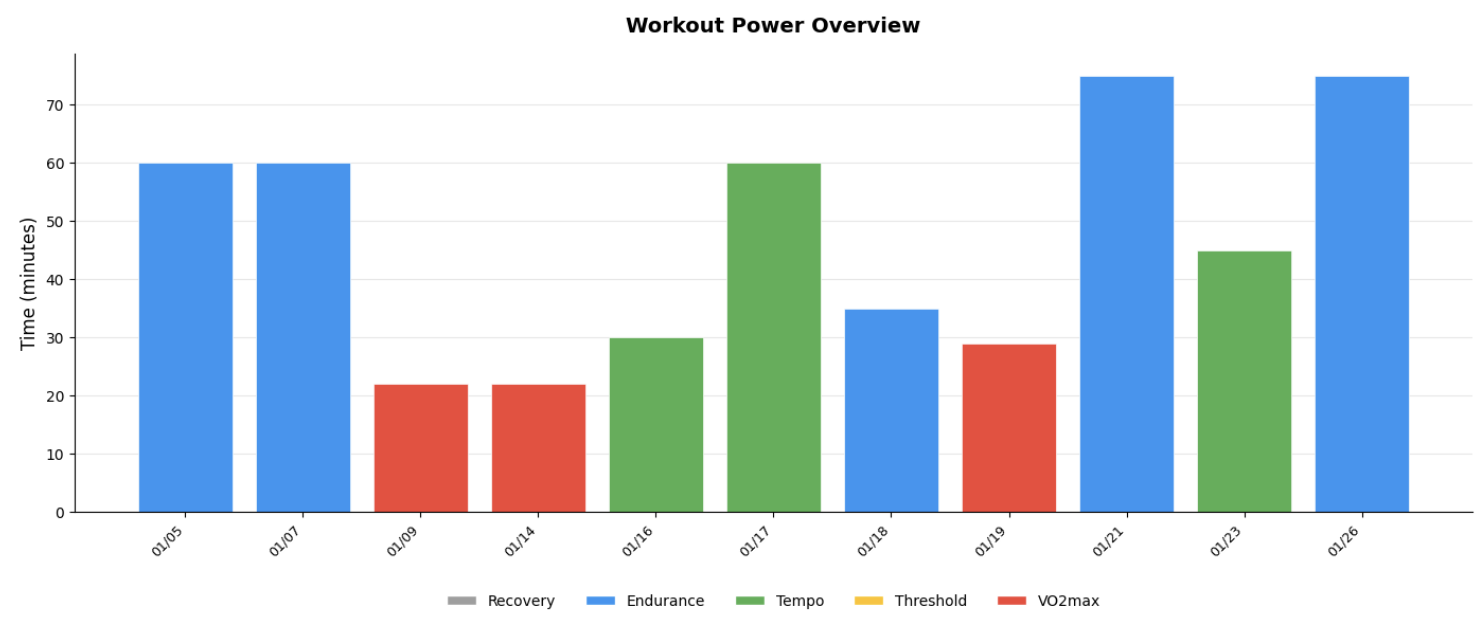
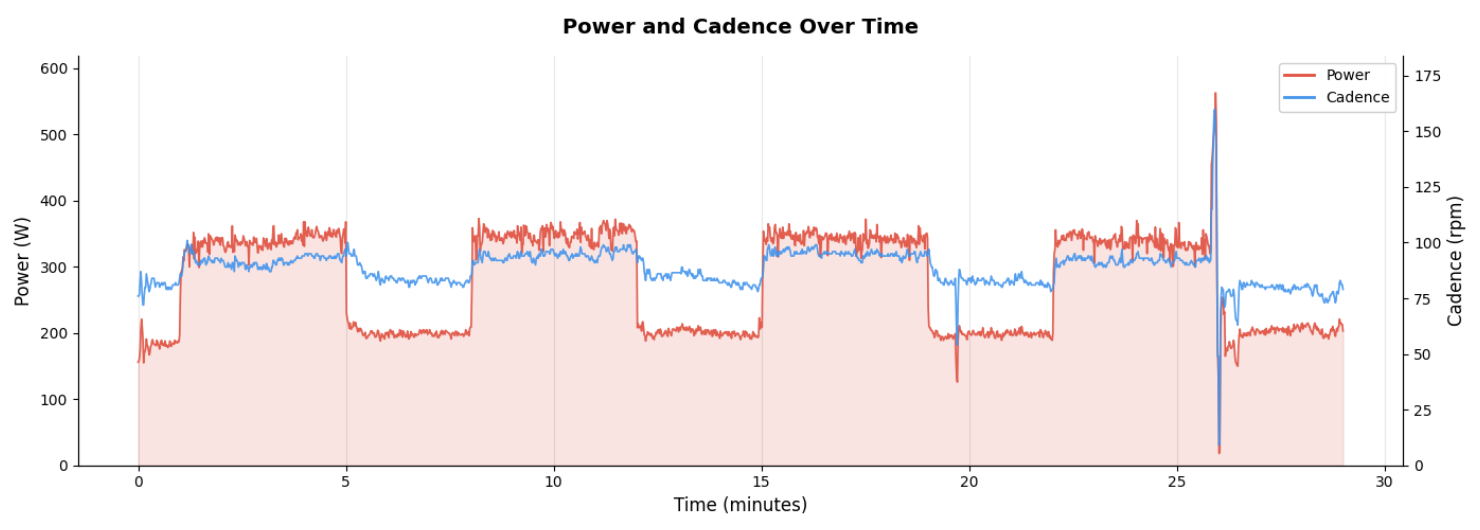
Bike Support
- Body Bike exports (v2.3.4)
- Full coverage of app info, app settings, and user settings
- Overview of workouts with aggregate statistics
- Per-second time series per workout
- Metrics: power, heartrate, cadence, speed, calories, and power zone distributions
- See format documentation for details and quirks.
Contributions for other bikes are welcome.
Installation
pip install pedalparser              # Core library
pip install pedalparser[pandas]      # With pandas support
pip install pedalparser[polars]      # With polars support
Usage
Loading an export
Body Bike allows you to export a snapshot of the app data from the application settings. This file is ready for analysis by the library.
from pedalparser import bodybike

export = bodybike.load("20260128T120516994Z_backup.zip")

print(export.app_info.version)         # "2.3.4"
print(export.app_settings.theme_name)  # "BLACK_ATTACK"
print(export.user_settings.height)     # 188
print(len(export.workouts))            # 73
Collection-level analysis
The returned structure contains a collection of all your workouts with aggregate metrics.
All metrics are available as numpy arrays aligning with the ws.start_times array:
ws = export.workouts

# Same attribute path, array instead of scalar
print(ws.start_times)     # array(['2026-01-05T10:22:44.932', ...])
print(ws.power.mean)      # array([197.0, 215.8, 297.1, ...])
print(ws.power.max)       # array([284., 294., 407., ...])
print(ws.calories.sum)    # array([875.6, 954.8 , 438.5, ...])
Filtering
Use where() to filter the workout collection by any predicate:
from datetime import datetime, timedelta, timezone

# Filter by metric thresholds
high_power = export.workouts.where(lambda w: w.power.mean > 220)
long_rides = export.workouts.where(lambda w: w.duration > timedelta(minutes=60))

# Filter by date
cutoff = datetime(2026, 1, 1, tzinfo=timezone.utc)
recent = export.workouts.where(lambda w: w.start_time >= cutoff)

# Chain filters (note that power zones are 0 indexed)
recent_hiit_sessions = (
    export.workouts
    .where(lambda w: w.start_time >= cutoff)
    .where(lambda w: w.power_zones[1] + w.power_zones[2] > 0.4)
    .where(lambda w: w.power_zones[4] > 0.4)
)
Finding a specific workout
In addition to indexing and slicing, you can use closest_to() to find the workout nearest to a given timestamp:
# Find workout closest to a date
w = export.workouts.closest_to("2026-01-15T10:00:00")

# With a maximum search distance (returns None if nothing within range)
w = export.workouts.closest_to("2026-01-15", max_distance=timedelta(hours=24))
Single workout analysis
Each workout contains their aggregate metrics and a per-second snapshot of each metric:
w = export.workouts[-1]  # Most recent workout

# Aggregate statistics
print(w.power.mean)       # 204.15
print(w.power.max)        # 240
print(w.distance.sum)     # 42.29

# Time series data (numpy arrays)
print(w.cadence.ts)        # array([0, 74.5, 74., ...])
print(w.cadence.ts.std())  # numpy operations work

# Power zone distribution
print(w.power_zones)      # (0.005, 0.93, 0.054, 0, 0)
Exporting to pandas or polars
You can convert workout data to DataFrames for further analysis. pandas and polars are optional dependencies:
pip install pedalparser[pandas] # or [polars]
Collection to DataFrame (one row per workout, aggregate metrics):
df = export.workouts.to_pandas()  # or .to_polars()

# Columns: start_time, duration, power_mean, power_max, heartrate_mean, ...
df.plot(x="start_time", y="power_mean")
Single workout to DataFrame (time series data):
df = export.workouts[-1].to_pandas()  # or .to_polars()

# Columns: time_ms, power, heartrate, cadence, distance, calories
df.plot(x="time_ms", y="power")
Exporting to markdown
Generate human-readable markdown summaries, useful for reports or LLM context:
# Single workout: summary stats, power zones, and time series table
print(export.workouts[-1].to_markdown())

# Control time series granularity (default: 60s)
print(w.to_markdown(sample_interval=10))  # Every 10 seconds

# Collection: table with one row per workout
print(export.workouts[:10].to_markdown())  # Last 10 workouts
print(export.workouts.where(lambda w: w.power.mean > 200).to_markdown())
Heart rate columns are included automatically when HR data is present.
Plotting
import matplotlib.pyplot as plt

# Plot power over time for a single workout
w = export.workouts[-1]
plt.plot(w.time_ms / 1000 / 60, w.power.ts)
plt.xlabel("Time (minutes)")
plt.ylabel("Power (W)")
plt.show()

# Plot average power trend across all workouts
ws = export.workouts
plt.plot(ws.start_times, ws.power.mean)
plt.xlabel("Date")
plt.ylabel("Avg Power (W)")
plt.show()
Quick Reference
BodyBikeExport
| Property | Type | Description |
|---|---|---|
app_info.version |
str |
App version |
app_settings.theme_name |
str |
UI theme |
app_settings.ranges |
MetricRanges |
Gauge display ranges |
user_settings.gender |
Gender |
MALE or FEMALE |
user_settings.date_of_birth |
datetime |
Date of birth |
user_settings.weight |
int |
Weight (kg) |
user_settings.height |
int |
Height (cm) |
user_settings.training_level |
TrainingLevel |
HOURS_1_3, HOURS_3_5, HOURS_5_8, HOURS_8_PLUS |
user_settings.heartrate_max |
int | None |
Max HR (user-set or None for estimated) |
user_settings.ftp |
int | None |
FTP (user-set or None for estimated) |
user_settings.level_system |
LevelSystem |
Medals and challenges |
workouts |
WorkoutCollection |
All workouts |
WorkoutCollection
| Property/Method | Returns | Description |
|---|---|---|
[i], [start:end] |
Workout / WorkoutCollection |
Index or slice |
len(collection) |
int |
Number of workouts |
start_times |
np.ndarray |
Start times (datetime64[ms]) |
durations |
np.ndarray |
Durations (timedelta64[ms]) |
power, heartrate, cadence, distance, calories |
MetricAccessor |
Collection-level metric access |
where(predicate) |
WorkoutCollection |
Filter by predicate |
closest_to(timestamp, max_distance=None) |
Workout | None |
Find nearest workout |
to_pandas(), to_polars() |
DataFrame |
One row per workout |
to_dict() |
dict |
Raw dict of arrays |
to_markdown() |
str |
Markdown table |
MetricAccessor (collection-level)
| Property | Returns | Description |
|---|---|---|
mean, max, min, sum, value |
np.ndarray |
Array with one element per workout |
Workout
| Property | Type | Description |
|---|---|---|
start_time |
datetime |
Start time (UTC) |
duration |
timedelta |
Workout duration |
time_ms |
np.ndarray |
Time axis for time series (ms) |
power, heartrate, cadence, distance, calories |
Metric |
Per-metric stats and time series |
power_zones |
tuple[float, ...] |
Fraction of time in each zone (5 zones) |
to_pandas(), to_polars() |
DataFrame |
Time series as DataFrame |
to_markdown(sample_interval=60) |
str |
Human-readable summary |
Metric (single workout)
| Property | Type | Description |
|---|---|---|
mean, max, min, sum |
float |
Aggregate statistics |
value |
float |
Final value at workout end |
ts |
np.ndarray |
Per-second time series |
Exceptions
| Exception | Description |
|---|---|
InvalidBodyBikeExport |
Raised when archive is missing files or has invalid data |
Development
pedalparser uses uv as project manager, Ruff for linting/formatting, and ty for type checking.
uv run pytest          # Run tests
uv run ruff check      # Lint
uv run ruff format     # Format
uv run ty check        # Type check
License
MIT
Note that this project is not affiliated with Body Bike.
Release history Release notifications | RSS feed


Download files
Download the file for your platform. If you're not sure which to choose, learn more about installing packages.
Source Distribution
Built Distribution
Filter files by name, interpreter, ABI, and platform.
If you're not sure about the file name format, learn more about wheel file names.
Copy a direct link to the current filters
File details
Details for the file pedalparser-0.1.0.tar.gz.
File metadata
- Download URL: pedalparser-0.1.0.tar.gz
- Upload date:
- Size: 13.3 kB
- Tags: Source
- Uploaded using Trusted Publishing? No
- Uploaded via: uv/0.9.15 {"installer":{"name":"uv","version":"0.9.15","subcommand":["publish"]},"python":null,"implementation":{"name":null,"version":null},"distro":{"name":"macOS","version":null,"id":null,"libc":null},"system":{"name":null,"release":null},"cpu":null,"openssl_version":null,"setuptools_version":null,"rustc_version":null,"ci":null}
File hashes
| Algorithm | Hash digest | |
|---|---|---|
| SHA256 |
64c2f79a3fba1cf0f84c91e570bfbcbf533a53befa2e2df73dd6d64b1dc1a102
|
|
| MD5 |
c54d7286f69854791da48566753f3ccc
|
|
| BLAKE2b-256 |
28d3e84a30aefd840c10c45ea903fa060820a56bd3c6dc7d9acae74ff5fc93e4
|
File details
Details for the file pedalparser-0.1.0-py3-none-any.whl.
File metadata
- Download URL: pedalparser-0.1.0-py3-none-any.whl
- Upload date:
- Size: 15.7 kB
- Tags: Python 3
- Uploaded using Trusted Publishing? No
- Uploaded via: uv/0.9.15 {"installer":{"name":"uv","version":"0.9.15","subcommand":["publish"]},"python":null,"implementation":{"name":null,"version":null},"distro":{"name":"macOS","version":null,"id":null,"libc":null},"system":{"name":null,"release":null},"cpu":null,"openssl_version":null,"setuptools_version":null,"rustc_version":null,"ci":null}
File hashes
| Algorithm | Hash digest | |
|---|---|---|
| SHA256 |
c335e7adf327b847fecfd747c0cf03d974789acf101b6931c95ff009c4a88d38
|
|
| MD5 |
8f448a2397d94eab434b516a13e17e1a
|
|
| BLAKE2b-256 |
54cf55860bbf87cb6cf95d90af2a5ca2ba3e3a0e2b035b13806059806c8862af
|






