

P.E.G.A.S.U.S
~ Parsing Extracting Generating Automated Scraping Utility System ~












[🌐 Website] • [🐱 GitHub] [🐦 Twitter] • [🍀 Official Blog]
[!IMPORTANT] このリポジトリのリリースノートやREADME、コミットメッセージの9割近くはclaude.aiやChatGPT4を活用したAIRA, SourceSage, Gaiah, HarmonAI_IIで生成しています。
こんにちは!PEGASUSへようこそ!PEGASUSは、ウェブサイトを再帰的にクロールし、そのコンテンツを美しいMarkdown形式に変換するパワフルで柔軟なPythonパッケージです。
PEGASUSを使えば、指定したURLから始まり、リンクをたどって関連するページを探索し、HTMLコンテンツを見やすいMarkdownドキュメントに変換することができます。コマンドラインインターフェイス(CLI)から実行することも、Pythonスクリプトから直接使用することもできるので、とっても便利なんです!
🚀 インストール
pipを使ってPEGASUSをインストールしましょう。以下のコマンドを実行するだけです!👇
pip install pegasus-surf
🎮 使い方
🖥️ コマンドラインから
PEGASUSをコマンドラインから使用するには、以下のようなコマンドを実行します。
# 単一のURLからスクレイピングを開始 🌐
pegasus --base-url https://example.com/start-page output_directory --exclude-selectors header footer nav --include-domain example.com --exclude-keywords login --output-extension txt

# 探索深度を指定して実行 🔍
pegasus  --base-url  https://docs.eraser.io/docs/what-is-eraser output/eraser_docs2 --exclude-selectors header footer nav aside .sidebar .header .footer .navigation .breadcrumbs --include-domain docs.eraser.io --exclude-keywords login --output-extension .txt --max-depth 2

# URLリストが記載されたテキストファイルからスクレイピングを開始 📜
pegasus --url-file urls.txt output/roomba --exclude-selectors header footer nav aside .sidebar .header .footer .navigation .breadcrumbs --exclude-keywords login --output-extension .txt --max-depth 1

# LLMを使用したサイトの分類を行いながらスクレイピング 🧠
pegasus --url-file urls.txt output/roomba2 --exclude-selectors header footer nav aside .sidebar .header .footer .navigation .breadcrumbs --exclude-keywords login --output-extension .txt --max-depth 1 --system-message "あなたは、与えられたウェブサイトのコンテンツが特定のトピックに関連する有用な情報を含んでいるかどうかを判断するアシスタントです。トピックに関連する有益な情報が含まれている場合は「True」、そうでない場合は「False」と回答してください。" --classification-prompt "次のウェブサイトのコンテンツは、Roomba APIやiRobotに関する有益な情報を提供していますか? 提供している場合は「True」、そうでない場合は「False」と回答してください。"
オプションの意味はこんな感じです!👀
--base-url: スクレイピングを開始するベースURLを指定します。--url-file: スクレイピングするURLが記載されたテキストファイルを指定します。--output-extension: 出力ファイルの拡張子を指定します(デフォルト: .md)。--dust-size: ダストフォルダに移動するファイルサイズのしきい値をバイト単位で指定します(デフォルト: 1000)。--max-depth: 再帰処理の最大深度を指定します(デフォルト: 制限なし)。--system-message: LLMのシステムメッセージを指定します(サイトの分類に使用)。--classification-prompt: LLMのサイト分類プロンプトを指定します。TrueまたはFalseを返すようにしてください。--max-retries: フィルタリングのリトライ回数の上限を指定します(デフォルト: 3)。--model: LLMのモデル名を指定します(デフォルト: gemini/gemini-1.5-pro-latest)。--rate-limit-sleep: レート制限エラー時のスリープ時間を秒単位で指定します(デフォルト: 60)。--other-error-sleep: その他のエラー時のスリープ時間を秒単位で指定します(デフォルト: 10)。
🐍 PythonスクリプトからPEGASUSを使う
PEGASUSをPythonスクリプトから使用するには、以下のようなコードを書きます。
from pegasus import Pegasus

pegasus = Pegasus(
    output_dir="output_directory",
    exclude_selectors=['header', 'footer', 'nav'],
    include_domain="example.com",
    exclude_keywords=["login"],
    output_extension=".txt",
    dust_size=500,
    max_depth=2,
    system_message="You are an assistant to determine if the content of a given website contains useful information related to a specific topic. If it contains relevant and beneficial information about the topic, answer 'True', otherwise answer 'False'.",
    classification_prompt="Does the content of the following website provide beneficial information about the Roomba API or iRobot? If so, answer 'True', if not, answer 'False'.",
    max_retries=5,
    model="gemini/gemini-1.5-pro-latest",
    rate_limit_sleep=30,
    other_error_sleep=5
)
pegasus.run("https://example.com/start-page")
パラメータの意味はこちらです!
output_dir: Markdownファイルを保存するディレクトリを指定します。exclude_selectors: 除外するCSSセレクターのリストを指定します(オプション)。include_domain: クロールを特定のドメインに限定します(オプション)。exclude_keywords: URLに含まれる場合にページを除外するキーワードのリストを指定します(オプション)。output_extension: 出力ファイルの拡張子を指定します(デフォルト: .md)。dust_size: ダストフォルダに移動するファイルサイズのしきい値をバイト単位で指定します(デフォルト: 1000)。max_depth: 再帰処理の最大深度を指定します(デフォルト: 制限なし)。system_message: LLMのシステムメッセージを指定します(サイトの分類に使用)。classification_prompt: LLMのサイト分類プロンプトを指定します。TrueまたはFalseを返すようにしてください。max_retries: フィルタリングのリトライ回数の上限を指定します(デフォルト: 3)。model: LLMのモデル名を指定します(デフォルト: gemini/gemini-1.5-pro-latest)。rate_limit_sleep: レート制限エラー時のスリープ時間を秒単位で指定します(デフォルト: 60)。other_error_sleep: その他のエラー時のスリープ時間を秒単位で指定します(デフォルト: 10)。
✨ PEGASUSの特長
- 指定したURLから始まり、リンクを再帰的にたどってウェブサイトを探索します。🔍
- HTMLコンテンツを美しくフォーマットされたMarkdownに変換します。📝
- 柔軟な設定オプションにより、クロールと変換のプロセスをカスタマイズできます。⚙️
- ヘッダー、フッター、ナビゲーションなどの不要な要素を除外できます。🙅♀️
- 特定のドメインのみをクロールするように制限できます。🌐
- 特定のキーワードを含むURLを除外できます。🚫
- URLリストを記載したテキストファイルを指定してスクレイピングできます。📜
- LLMを使ってスクレイピングしたサイトを分類できます。🧠
⚠️ 注意事項
- PEGASUSは、適切な使用方法とウェブサイトの利用規約に従ってご利用ください。🙏
- 過度なリクエストを送信しないよう、適切な遅延を設けてください。⏰
📜 ライセンス
このプロジェクトはMITライセンスの下で公開されています。詳細については、LICENSEファイルを参照してください。
開発者用
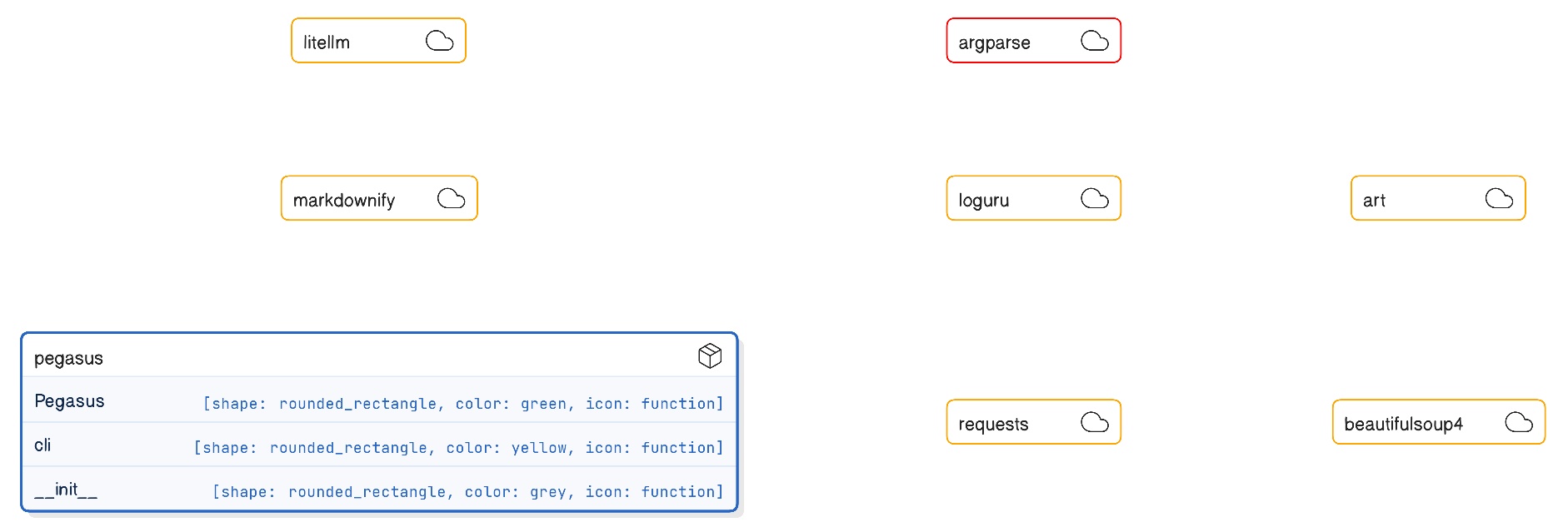
パッケージの構成

パッケージのフローチャート

パッケージのER図
🤝 貢献
プルリクエストや改善案は大歓迎です!🎉 バグ報告や機能リクエストがある場合は、issueを作成してください。😊
PEGASUSを使用すれば、ウェブサイトを再帰的に探索し、コンテンツを美しいMarkdownドキュメントに変換できます。📜✨ ドキュメンテーションの自動化、コンテンツの管理、データ分析などにぜひお役立てください!🙌
1 maintainer

Metadata
1 maintainer
Release files for pegasus-surf 0.2.4
For a detailed explanation of source distributions (sdists) and built distributions (wheels), please see the package formats documentation.
Source distribution (sdist)
| File | Size | Uploaded | Provenance | Actions |
|---|---|---|---|---|
| pegasus_surf-0.2.4.tar.gz | 11.7 kB | Without provenance | Details for pegasus_surf-0.2.4.tar.gz |
Built distribution (wheel)
| File | Interpreter | ABI | Platform | Actions Reset |
|---|---|---|---|---|
| pegasus_surf-0.2.4-py3-none-any.whl | Python 3 | none | any | Details for pegasus_surf-0.2.4-py3-none-any.whl |
Total release size: 21.2 kB
Release files / pegasus_surf-0.2.4.tar.gz
| Download URL | pegasus_surf-0.2.4.tar.gz |
|---|---|
| Size | 11.7 kB |
| Tags | Source |
|
SHA-256 checksum How to use checksums |
b8fce02ce983c1153cdf82b98e3b858b06bdf5da58daeb3ea458dcd6798b0a30
|
|
BLAKE2b-256 checksum How to use checksums |
d9baa0e08e19830393ff37344ea265fc36e957b64693f7ce4ffa60016dc47972
|
| Upload date | |
|
Uploaded using Trusted Publishing? What is trusted publishing? |
Yes |
| Uploaded via |
twine/5.0.0 CPython/3.12.4
|
Release files / pegasus_surf-0.2.4-py3-none-any.whl
| Download URL | pegasus_surf-0.2.4-py3-none-any.whl |
|---|---|
| Size | 9.5 kB |
| Tags | Python 3 |
|
SHA-256 checksum How to use checksums |
693257704d4a3a1677cd2d008d14845606ef12c0dd94b97df7d507606fbeca44
|
|
BLAKE2b-256 checksum How to use checksums |
569b97eb9004bbbfe4f0e2cac4efd921cae88fcaa439c47ee6c0272e9a250a89
|
| Upload date | |
|
Uploaded using Trusted Publishing? What is trusted publishing? |
Yes |
| Uploaded via |
twine/5.0.0 CPython/3.12.4
|
Security for pegasus-surf 0.2.4
Provenance
Provenance describes where a file came from. On PyPI, provenance is shared via attestations, which provide a verifiable record of the build or publishing details. View details, limitations and caveats.
No provenance found
None of the files in this release were uploaded with provenance metadata.
A note on package security
PyPI is a repository for distributing packages, not a service for auditing them. While third-party security researchers and our staff do their best to detect and remove malicious packages, PyPI cannot guarantee the quality, security or suitability of any given package.
To learn more about protecting yourself from malicious actors, visit our package security documentation.














