
A Python package that creates a high-quality Gantt chart to visualize project timelines, work packages, milestones, and deliverables

Project description
Gantt Chart Creator for MSCA Fellowship
- This Python application creates a high-quality Gantt chart to visualize project timelines, work packages, milestones, and deliverables. It uses Plotly for interactive visualization and supports exporting the chart as a PNG image. The tool is tailored for projects, such as those funded by the Marie Skłodowska-Curie Actions (MSCA) fellowship.
Features
- Interactive Gantt chart creation.
- Customizable colors for milestones and deliverables.
- Annotations for explaining work packages.
- Option to save the chart as a high-quality PNG file.
Installation
To use this application, you need to have Python installed. You also need the following Python packages:
plotlykaleido
- You can install these packages using pip:
pip install plotly kaleido
Usage
- To create a Gantt chart, call the create_gantt_chart function with the appropriate parameters.
Function Signature
def create_gantt_chart(work_packages, milestone_color, deliverable_color, annotation_text, start_date, finish_date, project_title, save=False):
Parameters
- work_packages: List of dictionaries, each representing a task with 'Task', 'Start', 'Finish', and 'Type'.
- milestone_color: Color code (e.g., hex color) for milestones.
- deliverable_color: Color code (e.g., hex color) for deliverables.
- annotation_text: Text for the annotation explaining work packages.
- start_date: Start date for the x-axis in 'YYYY-MM-DD' format.
- finish_date: Finish date for the x-axis in 'YYYY-MM-DD' format.
- project_title: Title of the project to be displayed at the top of the chart.
- save: Boolean, if True, the chart is saved as a high-quality PNG file.
Contact
- Email:
pejman.ebrahimi77@gmail.com - Website:
https://giltech-megoldasok.com/
License
- This project is licensed under the MIT License
Example output
- Here is an example of how to use the create_gantt_chart function:
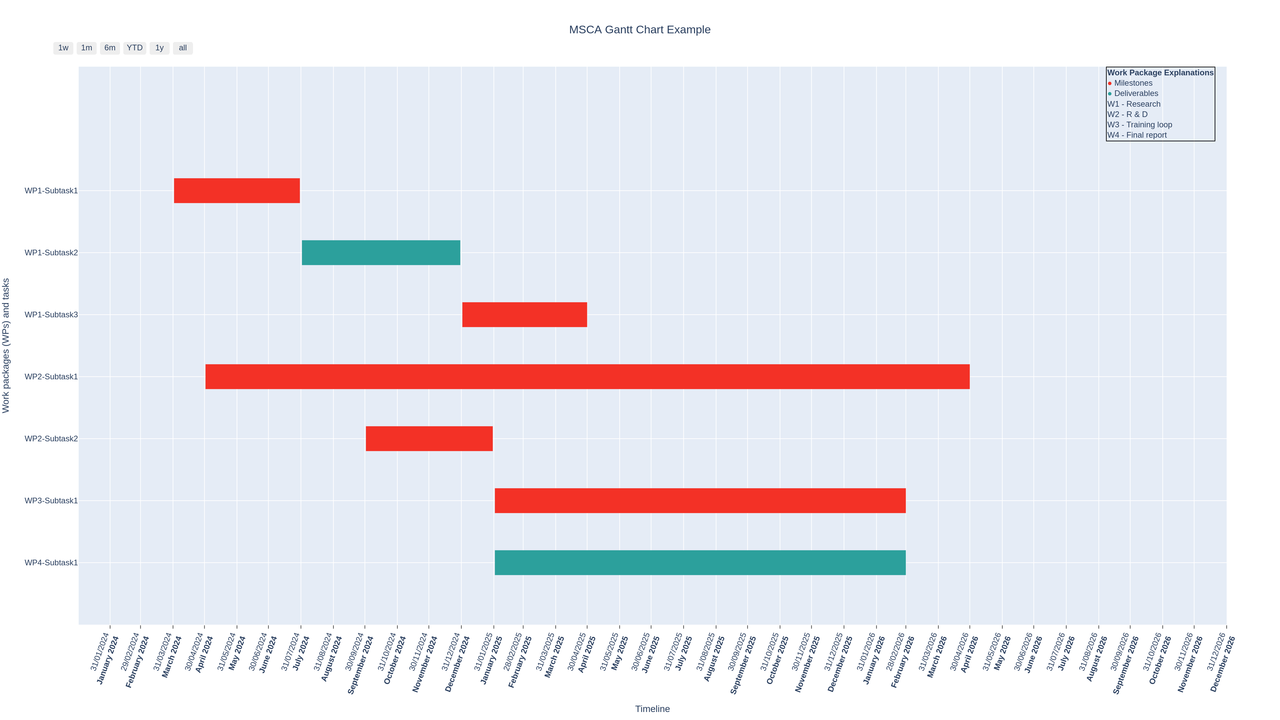
Gantt Chart Example code and inputs
Below is an example of how to use the create_gantt_chart function from the pejmanai_msca.gantt_chart module:
from pejmanai_msca.gantt_chart import create_gantt_chart
work_packages = [
{"Task": "WP1-Subtask1", "Start": "2024-04-01", "Finish": "2024-07-30", "Type": "M1"},
{"Task": "WP1-Subtask2", "Start": "2024-08-01", "Finish": "2024-12-30", "Type": "D1"},
{"Task": "WP1-Subtask3", "Start": "2025-01-01", "Finish": "2025-04-30", "Type": "M2"},
{"Task": "WP2-Subtask1", "Start": "2024-05-01", "Finish": "2026-04-30", "Type": "M3"},
{"Task": "WP2-Subtask2", "Start": "2024-10-01", "Finish": "2025-01-30", "Type": "M4"},
{"Task": "WP3-Subtask1", "Start": "2025-02-01", "Finish": "2026-02-28", "Type": "M5"},
{"Task": "WP4-Subtask1", "Start": "2025-02-01", "Finish": "2026-02-28", "Type": "D2"}
]
milestone_color = '#f33126'
deliverable_color = '#2ca09c'
annotation_text = (
"<span style='color:#f33126;'>●</span> Milestones<br>"
"<span style='color:#2ca09c;'>●</span> Deliverables<br>"
"W1 - Research<br>"
"W2 - R & D<br>"
"W3 - Training loop<br>"
"W4 - Final report"
)
project_title = "MSCA Gantt Chart Example"
create_gantt_chart(work_packages, milestone_color, deliverable_color, annotation_text, '2024-01-01', '2026-12-31', project_title, save=True)```
Release history Release notifications | RSS feed


Download files
Download the file for your platform. If you're not sure which to choose, learn more about installing packages.
Source Distribution
Built Distribution
Filter files by name, interpreter, ABI, and platform.
If you're not sure about the file name format, learn more about wheel file names.
Copy a direct link to the current filters
File details
Details for the file pejmanai_msca-0.0.3.tar.gz.
File metadata
- Download URL: pejmanai_msca-0.0.3.tar.gz
- Upload date:
- Size: 4.2 kB
- Tags: Source
- Uploaded using Trusted Publishing? No
- Uploaded via: twine/5.1.1 CPython/3.10.11
File hashes
| Algorithm | Hash digest | |
|---|---|---|
| SHA256 |
1dcd17f9d0fe99552d7325c17c97a5e3872efdb3be25cac1a4b11a56303e2f26
|
|
| MD5 |
3bee1680a065fec12e8a26d739ba638c
|
|
| BLAKE2b-256 |
3ac0ecc58d251b8bfbdbd74752dc2817a5cbab599f7722931af41c6a7c2c2ee6
|
File details
Details for the file pejmanai_msca-0.0.3-py3-none-any.whl.
File metadata
- Download URL: pejmanai_msca-0.0.3-py3-none-any.whl
- Upload date:
- Size: 4.6 kB
- Tags: Python 3
- Uploaded using Trusted Publishing? No
- Uploaded via: twine/5.1.1 CPython/3.10.11
File hashes
| Algorithm | Hash digest | |
|---|---|---|
| SHA256 |
857905351231e2b20d28701487c1920a44ed5d34f6977762bcd2f3d0a970efcf
|
|
| MD5 |
f865925cb1f52adc4013a87a4e4d7058
|
|
| BLAKE2b-256 |
bd04a65a64a6381205677122c8ad9a0e94c200ac30998146d3ae8fe394d9114a
|






