
Pelak
Pelak is a practical Python library for generating, searching, and analyzing Iranian vehicle license plate codes and images.
It allows you to create high-quality, standard license plate images programmatically, work with city/province mappings, search plate data, and more.
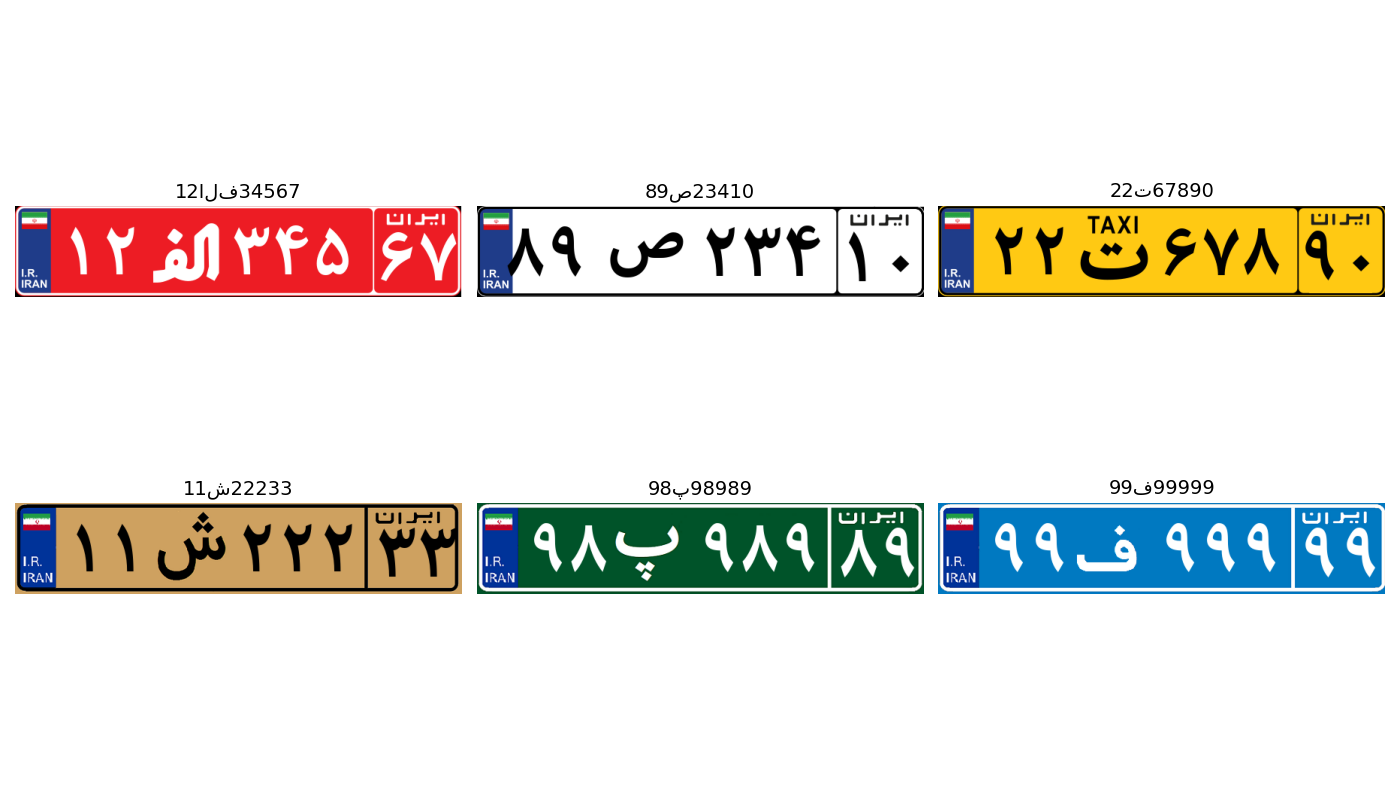
Features
- Generate standard license plate images for almost all types used in Iran (normal, taxi, police, military, etc.) from a plate code string.
- Random and custom plate code/image generation based on city, province (state), and middle letter.
- Easy bidirectional mapping between codes, middle (Persian) letters and cities, customizable for your dataset.
- Search and fetch location (city) by state code and middle letter .
- Batch/generator utilities for producing many plates for data augmentation, ML, or synthetic datasets.
- Fully supports Unicode/Persian letters and conversions between Persian and Latin representations.
- Includes assets (plate layouts, font, mappings) for realistic output without dependencies except Python & Pillow.
- Data-driven: All mapping/search functions use a simple txt file (
city_plateinfo.txt) so you can extend or update data.
Installation
pip install pelak
Requires: Python 3.7+ and Pillow (installed automatically with pip).
Quick Examples
Generate an Image from Plate Code
from pelak import generate_plate

# Create and show "21ب34123" (Tehran style) as an image:
img = generate_plate("21ب34123", show_img=True)
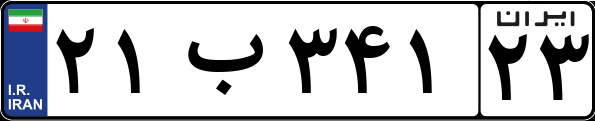
You can also save the image as PNG:
img = generate_plate("13معلول78510", out_path="output2.png")
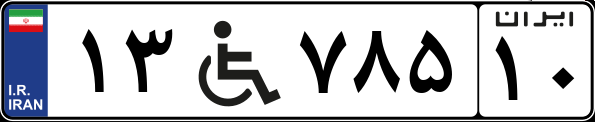
or use both of them for saving and show result.
Random Plate Generation by City, Province, or Letter
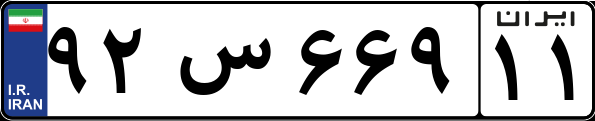
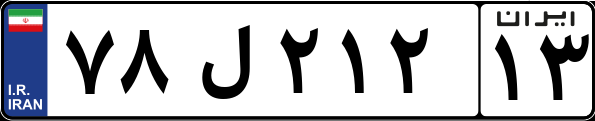
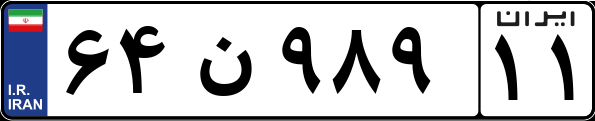
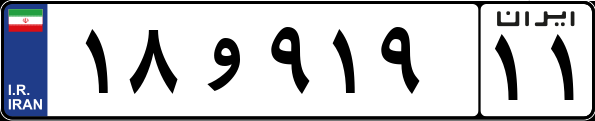
You can generate a random, valid license plate image for example Tehran, province 11, or any valid city, optionally specifying the middle letter:
from pelak import random_generate_plate

# Random valid plate for Tehran
img = random_generate_plate(city="Tehran", show_img=True)

# Random valid plate for province/state code 11
img = random_generate_plate(state_code="11", show_img=True)

# Random valid plate for specific city and province (e.g. Esfahan with code 13)
img = random_generate_plate(city="Esfahan", state_code="13", show_img=True)

# Random valid plate for Tehran and specific middle letter, Persian or Latin input
img = random_generate_plate(city="Tehran", letter="ن", show_img=True)
img = random_generate_plate(city="Tehran", letter="V", show_img=True)
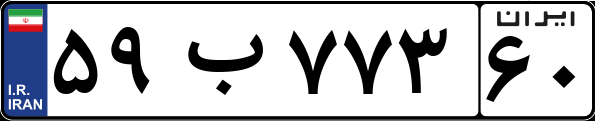
Get City Name by Code and Letter
from pelak import location

city_name = location("11", "b")  # Output: Tehran, Karaj, etc. (depending on your city_plateinfo.txt)
print(city_name)
TEHRAN
Batch Plate Generation
You can generate multiple plate images at once using generate_plates():
from pelak import generate_plates

plate_list = ["21ب34123", "12ج45134", "34س23113"]
images = generate_plates(plate_list, show_img=False)
For special types (e.g. 'گ' for temporary plates) you need to provide dates (Year and month).
Data File
All mapping/searches use the file:
city_plateinfo.txtin the package'sdata/directory
Each line:
latin_middle_letter,state_code,city_name
Example:
B,11,TEHRAN
B,68,KARAJ
S,13,TABRIZ
...
API Reference
generate_plate()
generate_plate(plate_code: str, out_path: str=None, show_img: bool=False,
               extra_month: str=None, extra_year: str=None)
Generate an Iranian license plate PNG image based on a code string.
plate_code: String, e.g."21ب34123". (See below for formatting.)out_path: Path to save the image (optional).show_img: Whether to show the image (default: False).extra_month,extra_year: For special plates only ("گذر" = temporary).
Recognized types:
normal(civilian),معلول(disabled),الف(reserved),ت(taxi),ع(public),پ(police),ث(Sepah),ش(army),گ(temporary),ک(military),ف(leader),ز(defense), …
generate_plates(plates, out_path=None, show_img=False, extra_month=None, extra_year=None)
Batch generator.
If a plate is special type (e.g. 'گ'), provide extra_month and extra_year as lists.
random_generate_plate
random_generate_plate(
    city=None,
    state_code=None,
    letter=None,
    txt_file_path='city_plateinfo.txt',
    show_img=False,
    out_path=None
)
Generate a random, valid Iranian license plate image using flexible filters.
-
Parameters:
city: (str, optional) Name of the city, e.g."Tehran".state_code: (str, optional) 2-digit province code, e.g."11".letter: (str, optional) The middle letter; accepted in both Persian (e.g.ب) and Latin (B), mapping handled internally.txt_file_path: (str, optional) Path to the plate mapping file; defaults to'city_plateinfo.txt'.show_img: (bool, optional) Whether to show the generated image; default isFalse.out_path: (str, optional) Filename to save the image.
-
Returns:
The generated image object, after displaying and/or saving it if requested. -
Usage Example:
img = random_generate_plate(city="Tehran", letter="ب", out_path="random_tehran.png")
-
Letter mapping:
You can specify the middle letter either in Persian (e.g.,ب) or its equivalent Latin character (B). The package will handle mapping and formatting internally.
location
location(state_code, letter, txt_file_path="city_plateinfo.txt")
Return the city name for a specific plate code and middle letter.
-
Parameters:
state_code: (str) 2-digit state/province code, e.g."11".letter: (str) Persian middle letter, e.g.,"ب".txt_file_path: (str, optional) Path to mapping file.
-
Returns:
The city name (str) matching your query. -
Exceptions:
RaisesValueErrorif no matching city is found or the mapping file is missing. -
Usage Example:
city = location("11", "ب")
print(city)  # e.g., Tehran
How Random Generation Works
- You can specify
city,state_code, and/orletteras filters, in any combination. - If only
cityis provided, a random valid combination will be selected from available records for that city. - If a
letteris given (Persian or English), it is mapped internally and used to filter results, and then mapped back for output. - All results are guaranteed to be valid plates for actual cities/codes present within your
city_plateinfo.txtmapping file.
Data & Assets
All necessary templates (PNGs), the required font file (Plate_font.ttf), and the city/plate code mapping text (city_plateinfo.txt) are stored in the package's data/ folder (see setup.py for a full list of included files).
Maintainer Notes
I am developing the initial versions of the library and it may have many bugs, problems and weaknesses that will be fixed in future versions. I would appreciate it if you have any suggestions or bugs, please create an issue on GitHub.
Contributors
License
For bug reports or feature requests, please open an issue on the GitHub repository.
1 maintainer

Metadata
1 maintainer
Release files for pelak 1.1.0
For a detailed explanation of source distributions (sdists) and built distributions (wheels), please see the package formats documentation.
Source distribution (sdist)
| File | Size | Uploaded | |
|---|---|---|---|
| pelak-1.1.0.tar.gz | 178.6 kB | Details |
Built distribution (wheel)
| File | Interpreter | ABI | Platform | Reset |
|---|---|---|---|---|
| pelak-1.1.0-py3-none-any.whl | Python 3 | none | any | Details |
Total release size: 353.8 kB
Release files / pelak-1.1.0.tar.gz
| Download URL | pelak-1.1.0.tar.gz |
|---|---|
| Size | 178.6 kB |
| Tags | Source |
|
SHA-256 checksum How to use checksums |
8e16a59b0bade33063f1e87ecfc1f5f242cae4928f646f87a6cc1e85fd2e9fec
|
|
BLAKE2b-256 checksum How to use checksums |
d7e457e720b5f6cd9a84e6e67cac4d5bddf737618a4de65dee3778b07550985e
|
| Upload date | |
|
Uploaded using Trusted Publishing? What is trusted publishing? |
No |
| Uploaded via |
twine/6.1.0 CPython/3.13.2
|
Release files / pelak-1.1.0-py3-none-any.whl
| Download URL | pelak-1.1.0-py3-none-any.whl |
|---|---|
| Size | 175.2 kB |
| Tags | Python 3 |
|
SHA-256 checksum How to use checksums |
4ee4bdf40ac84e084cc094f1807209ac66013ebe9845d710bc4de429ebbe0a99
|
|
BLAKE2b-256 checksum How to use checksums |
520a1e9653e17eedb077c376a9bc530bef72a60e007dbe530c2f72ca1c79fd4d
|
| Upload date | |
|
Uploaded using Trusted Publishing? What is trusted publishing? |
No |
| Uploaded via |
twine/6.1.0 CPython/3.13.2
|














