
 PenguinBurner — Automatic NVIDIA GPU Undervolting & Overclocking for Linux










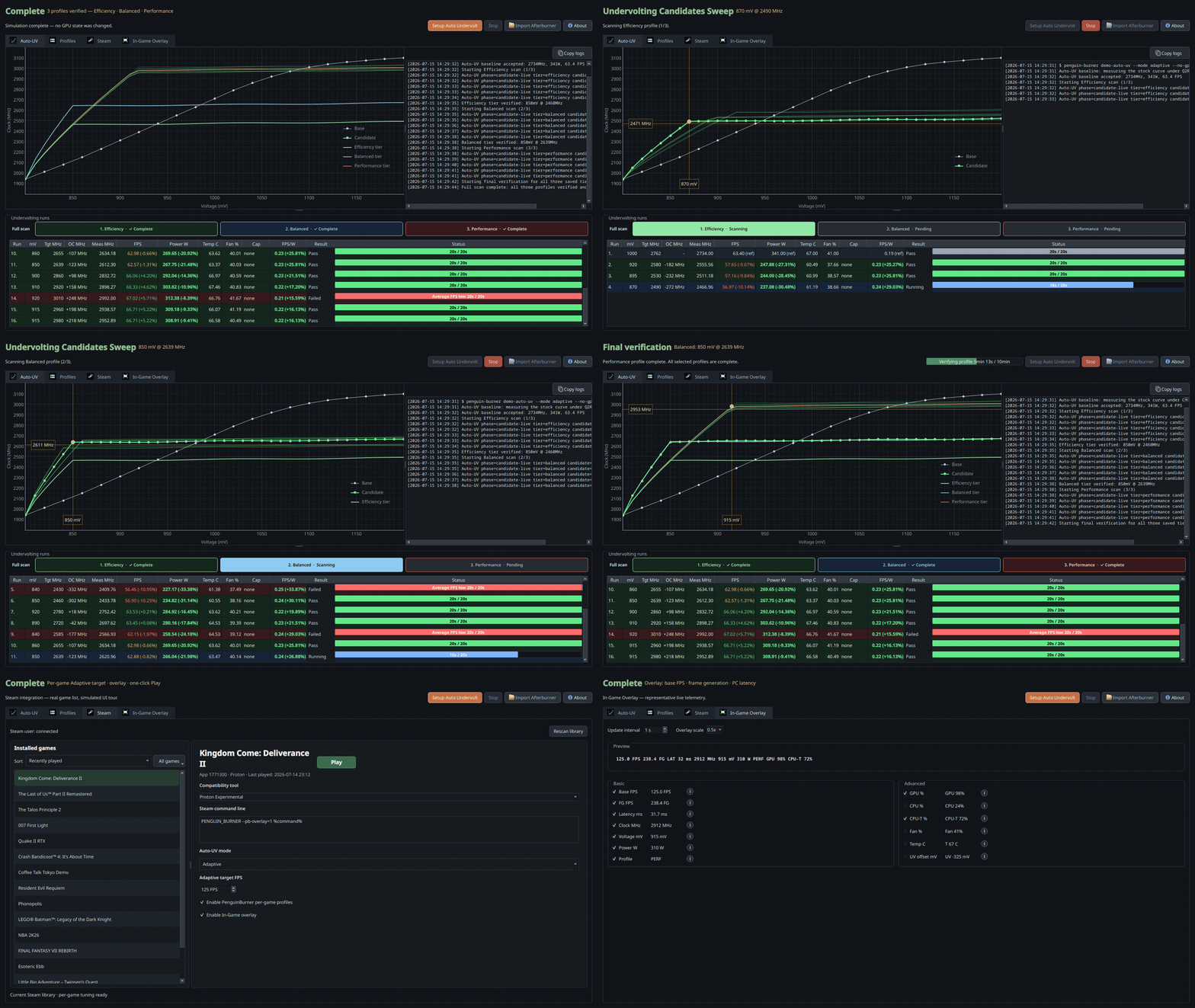
PenguinBurner is an open-source NVIDIA GPU tuning app for Linux with automatic undervolting, overclocking and adaptive per-game profiles for Steam, Lutris, Heroic and Faugus in one Game Library.
One scan. Three verified GPU profiles.
- Efficiency — deepest savings. RTX 5080: 850 mV · 2800 MHz target / 2625 MHz loaded · 254 W.
- Balanced — maintain more loaded clock. RTX 5080: 860 mV · 2775 MHz target / 2745 MHz loaded · 272 W.
- Performance — undervolt and overclock. RTX 5080: 925 mV · 2950 MHz target / 2977 MHz loaded · 313 W.
For scale: the same RTX 5080 at stock uses about 341 W under the same load. Balanced held roughly the same loaded clock at 272 W — about 69 W less.
Verified RTX 5080 examples; every GPU differs. Loaded clocks can fall below the requested target under power or thermal limits. Pre-optimized targets are included for RTX 30, 40, and 50 series cards.
Install
python -m pip install --user --upgrade penguin-burner
If pip reports externally-managed-environment, use pipx install penguin-burner.
Native packages are also available for Fedora (COPR),
Arch / CachyOS (AUR), and
Ubuntu (PPA).
See the Install guide for prerequisites and commands.
Flatpak is available too. Native packages are recommended because the GPU daemon, game wrappers, and Vulkan overlay run on the host.
PyPI, Flatpak with wrappers, COPR, AUR, and PPA installs run the GUI
as penguin-burner or pburn.
PenguinBurner installs its root hardware service once, with an admin prompt. The GUI, CLI, and scans then use that service without further password prompts.
Quick start
- Install (above) with the NVIDIA driver and CUDA already set up.
- Launch PenguinBurner (
penguin-burnerorpburn). Flatpak users without wrappers should use the Flatpak guide. - Click Setup Auto Undervolt, choose a performance bias, and let the scan find and verify a stable curve. When it finishes, the verified profile is applied automatically.
- In Profiles, select a profile and click Apply. Enable Apply on startup to use it at boot, or Silent fan curve for quieter cooling. Restore defaults returns the GPU to stock. See profile management for multi-GPU settings and other actions.
- For per-game tuning — including Adaptive, which switches tiers as your frame rate changes — use Game Library to configure Steam, Lutris, Heroic and Faugus games.
Automatic Undervolting & Overclocking
Auto-UV tests your GPU with a managed headless Q2RTX benchmark and CUDA load. It finds stable settings, builds smooth V/F curves, and preserves the exact tested curves through final verification and saving. Failed probes retry safer settings; completed tiers remain available if a later tier fails.
Leave the GPU free of other demanding work during a scan so its stability and FPS-per-watt measurements remain meaningful.
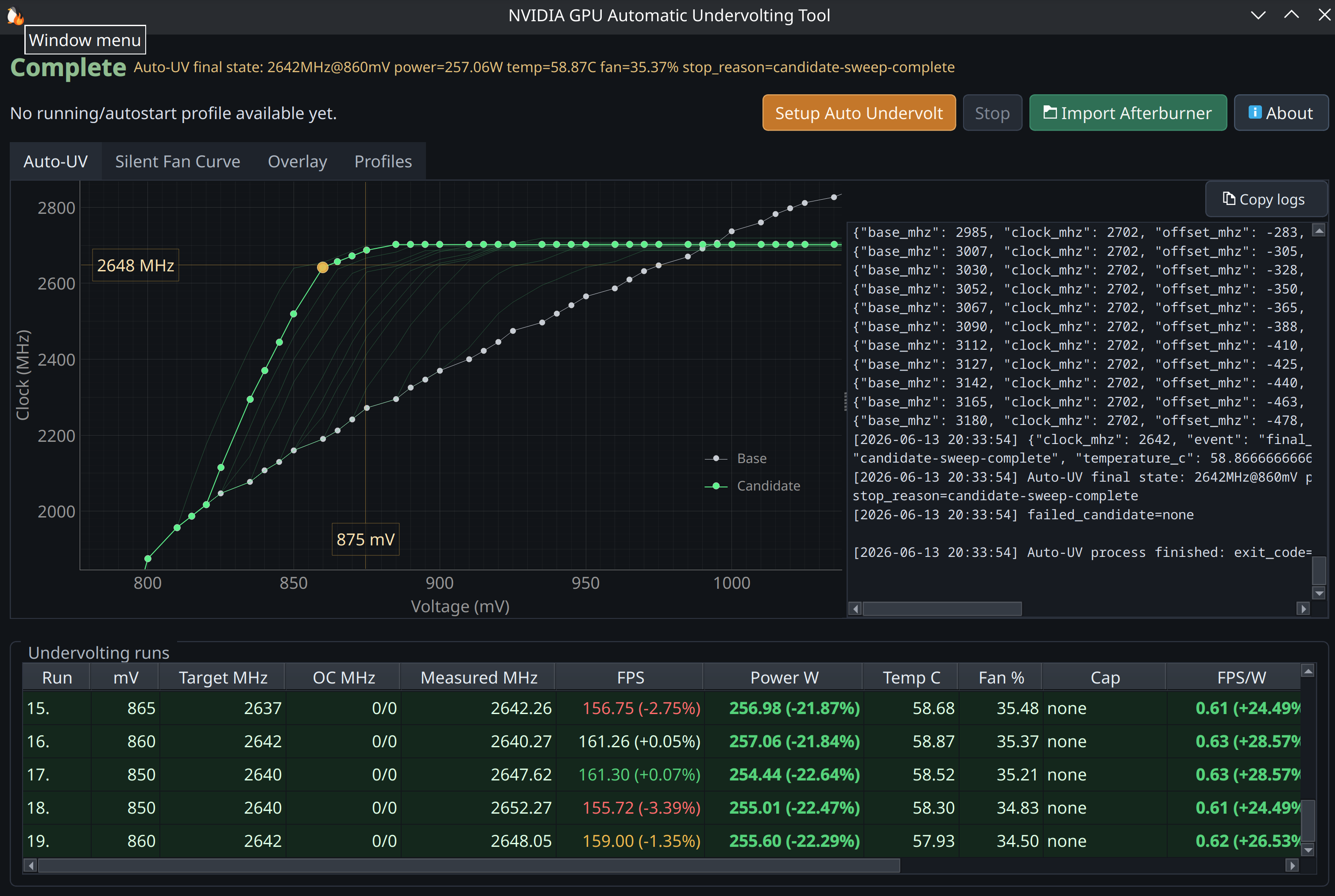
Choose Efficiency, Balanced, Performance, or All tiers. All tiers produces a set for adaptive switching and reuses compatible scan work.
Every tier exposes voltage, clock, memory offset, and power limit in the same order. The defaults suit most GPUs; change them only if you understand GPU tuning. Fixed-power laptop GPUs use their stock limit automatically.
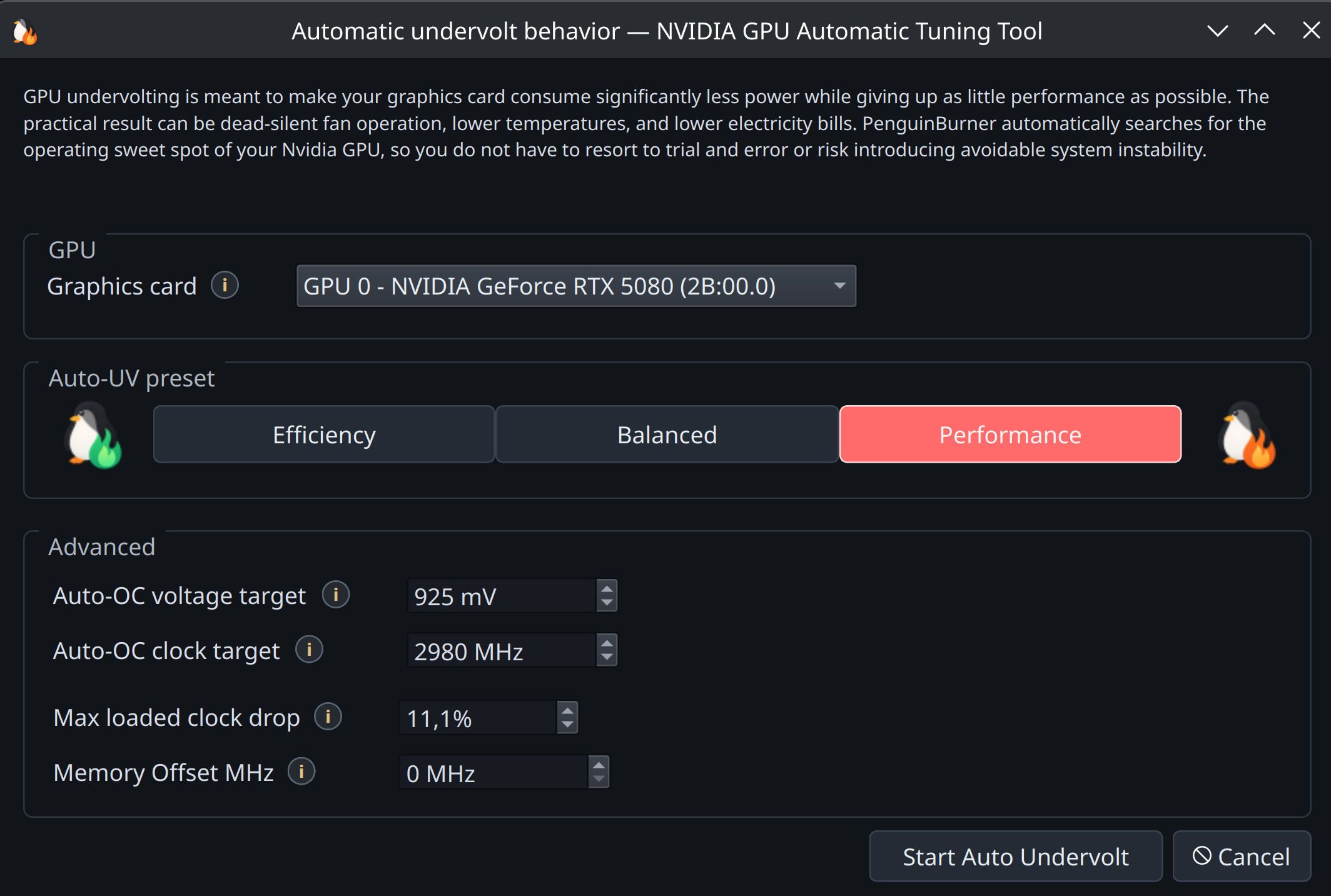
Algorithm and RTX 5080 verification · RTX 5070 Ti curve comparisons
Adaptive Undervolting
PenguinBurner switches between saved tiers to meet your game's FPS target: lower power when there is headroom, more performance when needed. It also recognizes frame caps and idle periods so it can reduce power use.
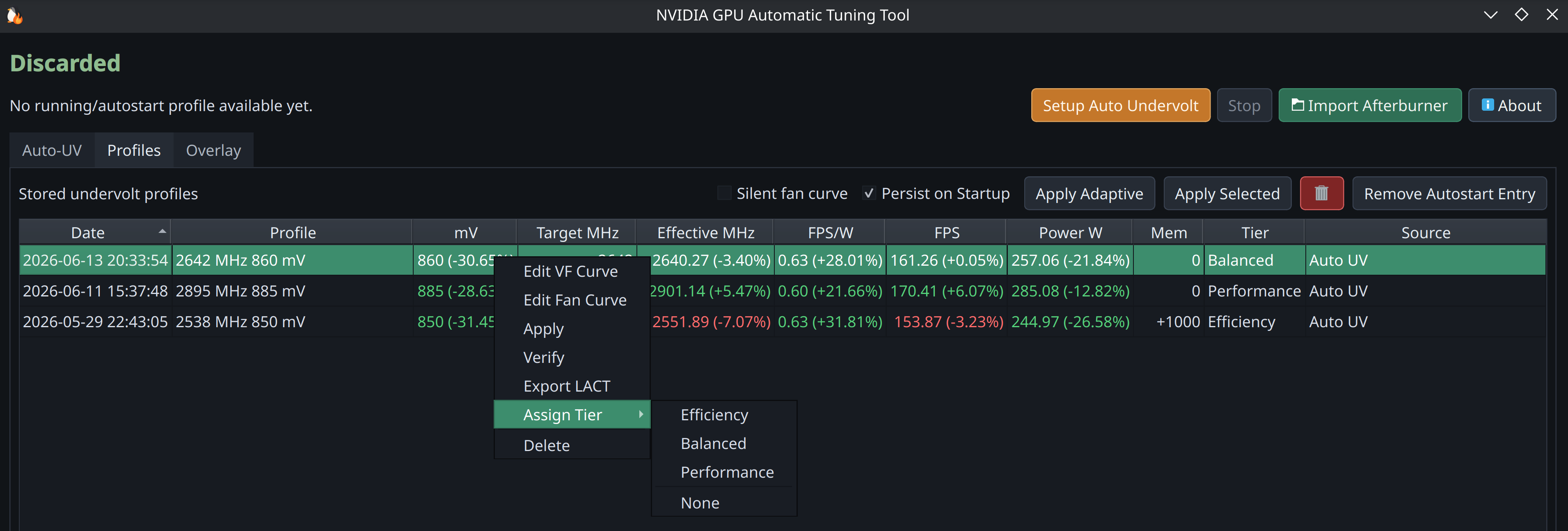
Read the guide — including advanced tuning.
Game Library
Bring your Steam, Lutris, Heroic and Faugus games together in one library, with background discovery, launcher badges, and sorting by launcher, name, recently played or most played. Pick Adaptive, a fixed tier or Stock for each game; PenguinBurner applies it at launch and restores your standing profile when the wrapped session ends.
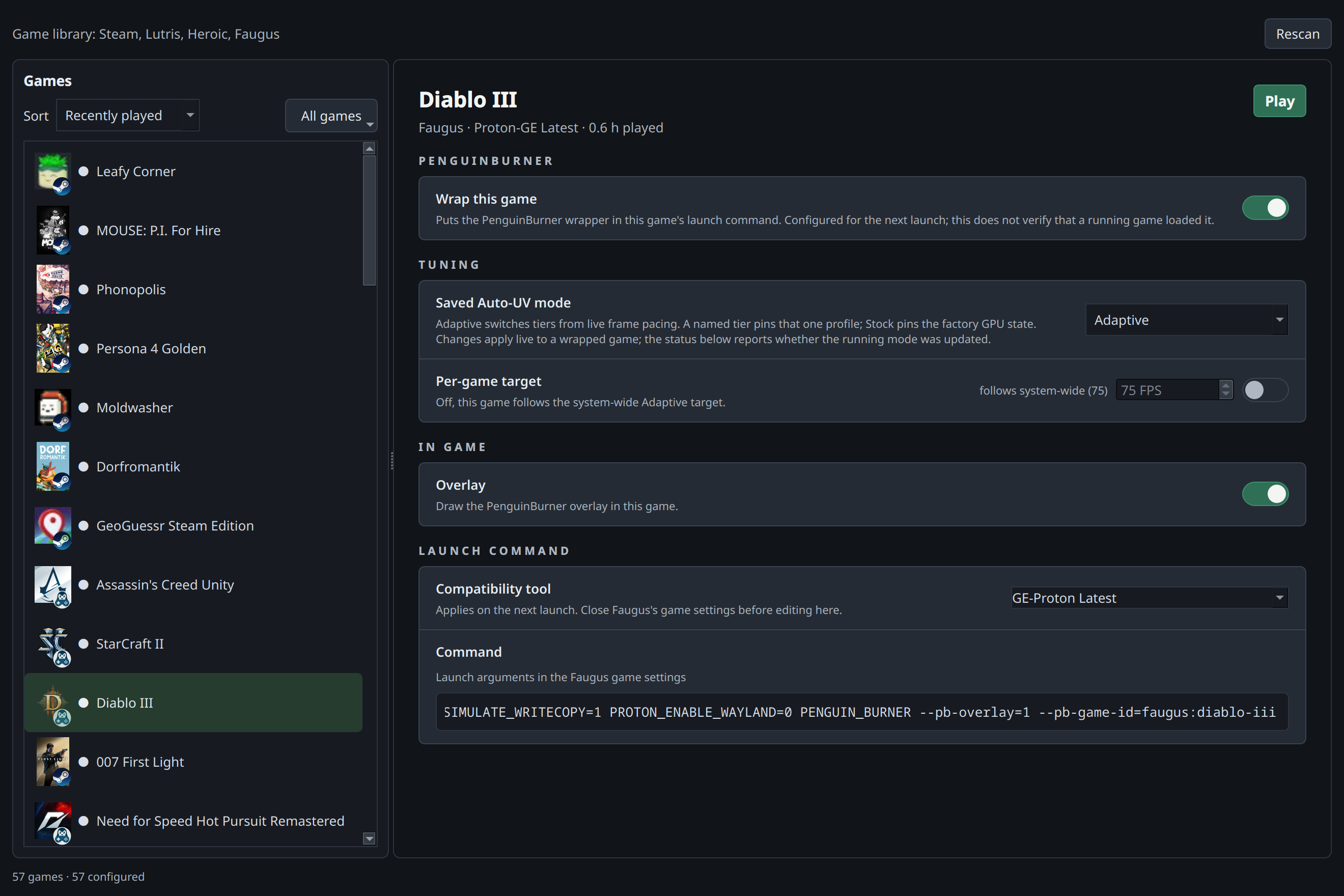
Enable Wrap this game, then choose its GPU profile, Adaptive FPS target, and overlay settings. Existing launch options, Lutris command prefixes and Heroic wrapper rows and Faugus launch arguments are preserved. Use Play / Stop to control a game or All games for bulk edits. Games that start Battle.net, Ubisoft Connect, EA app or another store client can keep the session active after the game exits: fully exit the launcher too.
Game Library guide · Steam setup · Lutris setup · Heroic setup · Faugus setup
Thanks to @Ernold11 for the shared Game Library, the Heroic integration and adaptive tuning improvements. Which launcher should come next? Tell us in Discussions.
PenguinBurner vs LACT (NVIDIA)
LACT is the broader, more established Linux GPU app, and it landed a working Nvidia VF curve setter before we did. It supports more brands and has deeper monitoring than we do. PenguinBurner is narrower on purpose: automatic undervolting & overclocking, an in-game overlay, and adaptive switching. NVIDIA-only comparison, to the best of our knowledge:
| Capability (NVIDIA) | PenguinBurner | LACT |
|---|---|---|
| Automatic undervolt search (stability + perf verified) | ✅ Q2RTX + CUDA sweep | ❌ manual only |
| Rust hardware daemon | ✅ | ✅ |
| Adaptive undervolt (switches tiers by frame rate) | ✅ | ❌ |
| In-game performance overlay | ✅ | ❌ |
| PC latency meter | ✅ | ❌ |
| Pre-frame-generation FPS counter (base vs FG FPS) | ✅ | ❌ |
| Manual V/F curve editor | ✅ | ✅ |
| Fan curve control | ✅ auto silent curve + editor | ✅ custom curves |
| Power limit | ✅ Auto-UV + saved profiles | ✅ |
| Steam, Lutris, Heroic & Faugus game libraries | ✅ shared library with background discovery | ❌ |
| Per-game tuning profiles | ✅ per-game mode, adaptive FPS target, live launch | ❌ |
| Runtime profile switching | ✅ by present-frame FPS pacing | ✅ by running process / gamemode |
| MSI Afterburner import | ✅ | ❌ |
| Historical telemetry charts | 🚧 planned (live overlay today) | ✅ charts + CSV export |
| Detailed GPU info (VBIOS / VRAM / Vulkan / throttling) | ❌ tuning-focused | ✅ |
| Other GPU brands (AMD / Intel) | ❌ NVIDIA-native, for now | ✅ AMD · Intel · NVIDIA |
| systemd daemon · CLI / headless | ✅ · ✅ | ✅ · ✅ |
✅ available · ❌ not available · 🚧 planned/in progress
LACT monitors inside its own window (charts and CSV) and has no in-game overlay; on Linux that is usually a separate tool like MangoHud. PenguinBurner's overlay is built in.
The two interoperate via LACT export, so you can tune with PenguinBurner and run the resulting curve under LACT if you prefer.
Roadmap (planned, not yet shipped)
- Historical data plotting — power, clocks, and FPS over time.
Performance Overlay
Show base FPS, frame-generation FPS, PC latency, GPU clocks, power, temperatures, and the active tier while playing. Enable Overlay for a game in Game Library and select fields in the Overlay tab. Latency requires usable timing markers from the game.
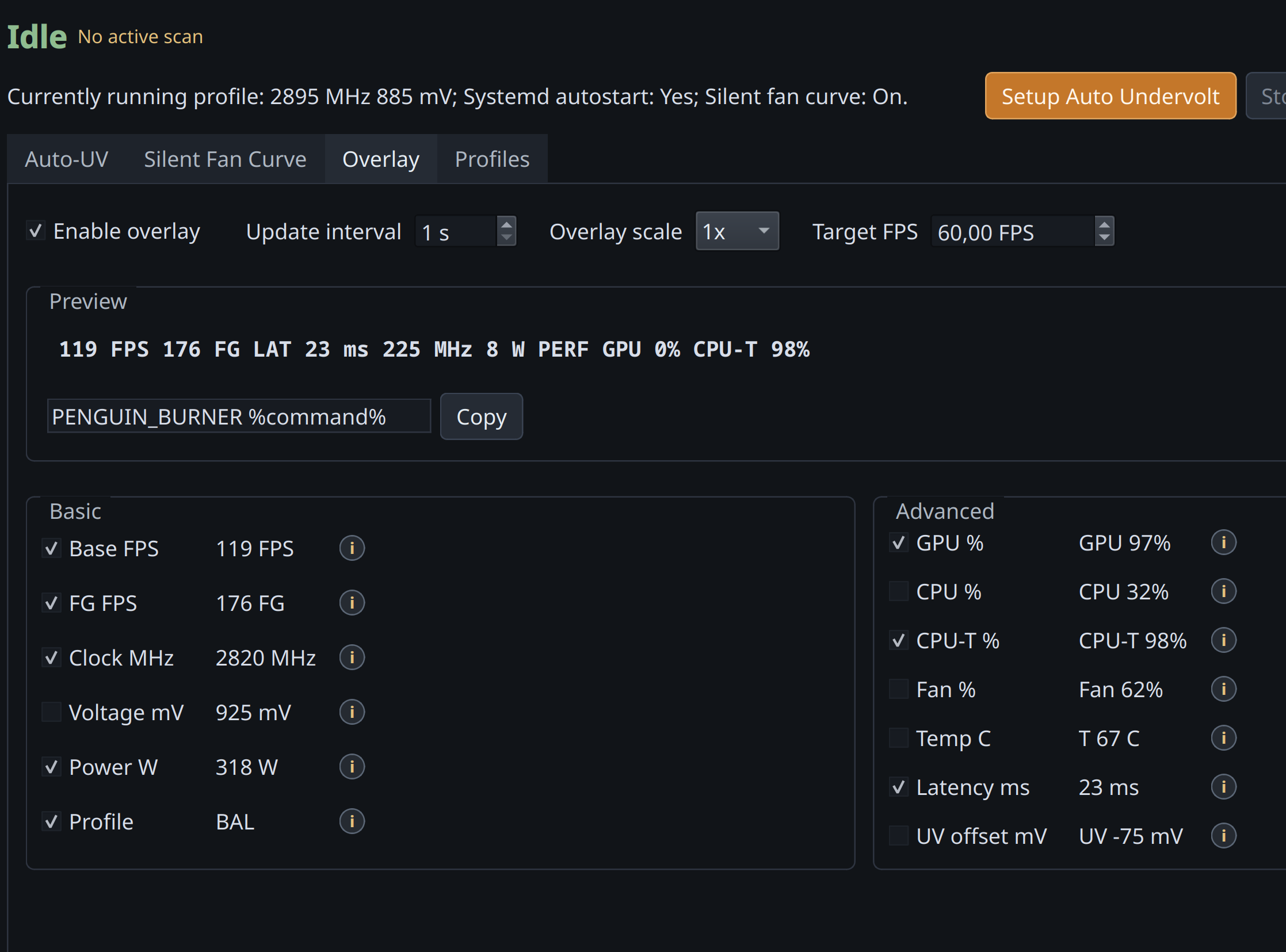
Overlay guide · Latency and FPS details
More features
- Profile management — apply, verify, tier, export, and clean up saved curves.
- Curve editors — Afterburner-style manual V/F and fan curve editors with full keyboard control.
- Silent fan curve — auto-generated quiet fan curve once the undervolt brings temperatures down.
MSI Afterburner Import
Bring your Windows MSI Afterburner profile over and import its V/F curve.
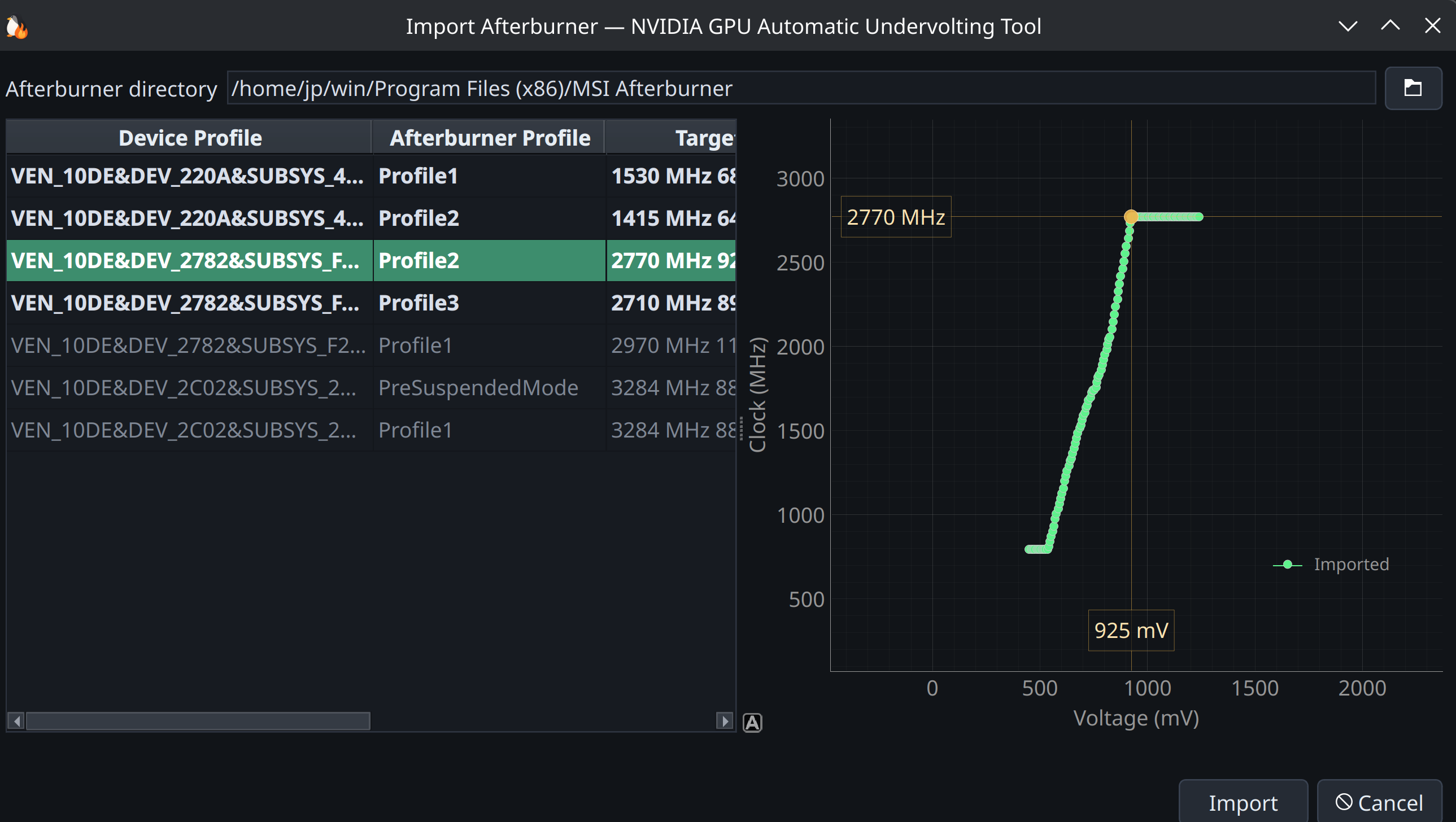
Point PenguinBurner at the real MSI Afterburner directory (no Afterburner binaries or profiles are bundled in this repo). Default Windows path:
C:\Program Files (x86)\MSI Afterburner
LACT Export
Export any saved V/F (and optionally fan) curve as a complete Nvidia LACT config from the Profiles view. See profile management for the workflow.
Run At Your Own Risk
GPU tuning can crash the driver or freeze the system, even during verification. Auto-UV records interrupted probes so later scans avoid the same unsafe region. Performance adds overclocking and is optional.
Read about recovery and crash history before changing targets or clearing scan state.
Acknowledgements
PenguinBurner was built through agentic AI development, guided by human ideas and direction. The implementation, research, and reverse engineering were driven primarily by GPT 5.5 (OpenAI) and Claude Opus (Anthropic), recently most of the codebase (new Rust daemon!) was rewritten with Fable (Anthropic).
- NVIDIA — for the graphics technology that, unfortunately, lacks some features and polish on Linux.
- Qt Project — for the excellent Qt6 UI.
Special thanks to the LACT project and Ilya Zlobintsev for pushing Linux NVIDIA tuning forward — in particular LACT #957 (Nvidia VF curve editor), merged April 18, 2026.
Support
CLI Documentation
See the command reference in readme-cli.md.
Start clean
See resetting user data for a complete reset, or scan recovery to retry Auto-UV while preserving profiles and crash history.
Installing from a local checkout? See the Install guide.
1 maintainer

Metadata
1 maintainer
Release files for penguin-burner 0.8.3
For a detailed explanation of source distributions (sdists) and built distributions (wheels), please see the package formats documentation.
Source distribution (sdist)
| File | Size | Uploaded | |
|---|---|---|---|
| penguin_burner-0.8.3.tar.gz | 4.5 MB | Details |
Built distribution (wheel)
| File | Interpreter | ABI | Platform | Reset |
|---|---|---|---|---|
| penguin_burner-0.8.3-py3-none-manylinux_2_28_x86_64.whl | Python 3 | none | Linux glibc 2.28+ x86-64 | Details |
Total release size: 6.8 MB
Release files / penguin_burner-0.8.3.tar.gz
| Download URL | penguin_burner-0.8.3.tar.gz |
|---|---|
| Size | 4.5 MB |
| Tags | Source |
|
SHA-256 checksum How to use checksums |
e73d70803048f45e8aeb98b09ec6a448d455310ccd5a2e981f5c5252da89c1ef
|
|
BLAKE2b-256 checksum How to use checksums |
0a452f2f92931779662196e1a29e7579c956bae764a08ecf0a3934b2971e5021
|
| Upload date | |
|
Uploaded using Trusted Publishing? What is trusted publishing? |
No |
| Uploaded via |
twine/7.0.0 CPython/3.14.7
|
Release files / penguin_burner-0.8.3-py3-none-manylinux_2_28_x86_64.whl
| Download URL | penguin_burner-0.8.3-py3-none-manylinux_2_28_x86_64.whl |
|---|---|
| Size | 2.2 MB |
| Tags | Linux glibc 2.28+ x86-64 Python 3 |
|
SHA-256 checksum How to use checksums |
bd84bf3494070cd8fa2f497f0bfc8b51d1fa928637b0b7c83bace77da7bfa595
|
|
BLAKE2b-256 checksum How to use checksums |
1778ebde0273fd8defc9de701eacb4afeb33250040f9129723e58b660e7b087c
|
| Upload date | |
|
Uploaded using Trusted Publishing? What is trusted publishing? |
No |
| Uploaded via |
twine/7.0.0 CPython/3.14.7
|














