
pen: terminal notes
pen is a minimalistic note taking app for the command line.





What is this?
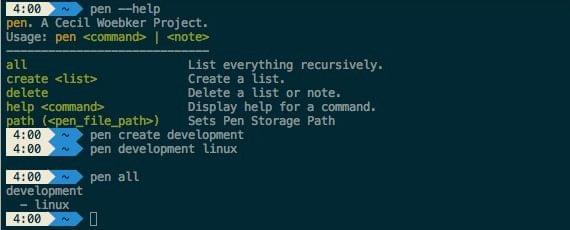
With pen you can have notes everywhere. At least on every unix machine. What makes it special is that it is "only" a command line application. Therefore you can even run it on your own server. Pen has a minimalistic interface; notes can be added and grouped in a simple manner.
Your notes are plain markdown files in plain directories. There is no database and no index. You can read, grep and edit them with anything you already use.
Install
uv tool install penpal
Or with pipx or pip:
pipx install penpal
pip install penpal
Unfortunately "pen" was already taken on PyPI, so the distribution is penpal
while the command is pen.
Requires Python 3.11 or newer.
Usage
pen                          list every list, with note counts
pen all                      list every note in every list
pen <list>                   list the notes in one list
pen <list> <note>            open a note in the editor (creates it if new)
pen create <list>            create a list
pen show <list> <note>       print a note and its metadata
pen delete <list>            delete a list and all of its notes
pen delete <list> <note>     delete a single note
pen path                     print where notes are stored
pen path <dir>               store notes somewhere else
pen path default             go back to the default location
pen --help                   full help; `pen <command> --help` for one command
Flags
| Flag | Applies to | What it does |
|---|---|---|
-v, --version |
Print the version. | |
-h, --help |
any command | Show help. |
--path DIRECTORY |
any command | Use a different store for one invocation, without changing the configured one. |
--external |
pen <list> <note> |
Edit in $VISUAL/$EDITOR instead of the built-in editor. |
--builtin |
pen <list> <note> |
Force the built-in editor. This is the default. |
-y, --yes |
pen delete |
Skip the confirmation prompt. Useful in scripts. |
Every command exits 0 on success and non-zero on failure, so pen works in
scripts with && and set -e.
The editor
The built-in editor is a small urwid screen. esc saves and closes; enter,
backspace and delete edit the text. To use your own editor instead, pass
--external and pen hands the note to $VISUAL or $EDITOR.
Where your notes live
By default, under $XDG_DATA_HOME/pen (~/.local/share/pen unless you have
set XDG_DATA_HOME):
~/.local/share/pen/
├── work/
│   ├── todo.md
│   └── standup.md
└── personal/
    └── groceries.md
Lists are directories. Notes are markdown files with YAML frontmatter:
---
created: 2026-08-06T09:12:44+00:00
modified: 2026-08-06T11:03:07+00:00
---

buy milk
Since it is only files, the data is yours to do what you like with. Point
pen path at a Dropbox or Syncthing folder to keep notes in sync across
machines; a sync conflict there costs you one note, not the whole store.
Search them with rg TODO ~/.local/share/pen. Drop a plain .md file into a
list directory and pen picks it up, no frontmatter required.
Frontmatter keys pen does not own, such as tags or aliases, are written
back byte for byte, including block lists and nested mappings. pen only ever
rewrites created and modified.
Names pen would refuse to create, such as one named after a command or one ending in a space, are listed as ignored. Rename the file and pen picks it up.
To move the store:
pen path ~/Dropbox/pen
You can also set PEN_PATH to override the location for a single command, or
pass --path.
Upgrading from 0.5.x and earlier
Older versions kept everything in one zlib-compressed JSON blob. The first time
you run pen after upgrading, that blob is unpacked into the directory layout
above automatically. The original file is kept as pen.bak and never
deleted, so nothing is lost if you want to go back or check the conversion.
Notes migrated this way get created and modified backfilled from the old
file's modification time, since the old format stored no timestamps at all.
Names the old format allowed but this one does not are imported under a
numbered variant. A list called all becomes all-1, since pen all would
otherwise never reach it.
Development
pen uses mise to pin the toolchain and uv for everything else.
git clone https://github.com/cwoebker/pen
cd pen

mise install          # python 3.11 + uv, as pinned in mise.toml
uv sync               # create .venv and install everything

uv run pen --help     # run it
The same checks CI runs:
uv run ruff check .            # lint
uv run ruff format --check .   # formatting
uv run ty check                # types
uv run pytest                  # tests, with branch coverage
uv run ruff check --fix . and uv run ruff format . fix most of what those
report.
Install the git hooks so the same checks run before each commit:
uv run pre-commit install
uv run pre-commit run --all-files
The test suite never touches a real store, a real home directory or the network.
Releasing
- Add a
## <version> ##section toHISTORY.md. - Run the Bump version workflow and pick
patch,minorormajor.
That bumps pyproject.toml, refreshes uv.lock, tags the commit and starts
the release workflow. The release workflow checks the tag against the project
version and checks the version is not on PyPI already, then builds, runs the
suite on 3.11 to 3.13, publishes with trusted publishing and creates the GitHub
release from the changelog section. If a step fails nothing is published.
Contribute
For questions and suggestions, feel free to shoot me an email at me@cwoebker.com.
Copyright (c) 2013-2026 Cecil Wöbker. License: MIT (see LICENSE for details)
1 maintainer

Download files
Download the file for your platform. If you're not sure which to choose, learn more about installing packages.
Source Distribution
Built Distribution
Filter files by name, interpreter, ABI, and platform.
If you're not sure about the file name format, learn more about wheel file names.
Copy a direct link to the current filters
File details
Details for the file penpal-0.6.1.tar.gz.
File metadata
- Download URL: penpal-0.6.1.tar.gz
- Upload date:
- Size: 37.7 kB
- Tags: Source
- Uploaded using Trusted Publishing? Yes
- Uploaded via:
twine/7.0.0 CPython/3.13.14
File hashes
| Algorithm | Hash digest | |
|---|---|---|
| SHA256 |
cf630fee249e7e5268492777abc63eff3b4bc48e54141670e36ef54dafaf7c6c
|
|
| MD5 |
c9d488ee9ad94ea4e1479f7c59e7135f
|
|
| BLAKE2b-256 |
95e4c3c83215181cdb7db7a642d0c6a824abfa7a00251fa10e08cad9abad76c0
|
Provenance
The following attestation bundles were made for penpal-0.6.1.tar.gz:
Publisher:
release.yml on cwoebker/pen
-
Statement:
-
Statement type:
https://in-toto.io/Statement/v1 -
Predicate type:
https://docs.pypi.org/attestations/publish/v1 -
Subject name:
penpal-0.6.1.tar.gz -
Subject digest:
cf630fee249e7e5268492777abc63eff3b4bc48e54141670e36ef54dafaf7c6c - Sigstore transparency entry: 2475476734
- Sigstore integration time:
-
Permalink:
cwoebker/pen@274485d2652c504227ae9641e1000062c3b8cd52 -
Branch / Tag:
refs/tags/v0.6.1 - Owner: https://github.com/cwoebker
-
Access:
public
-
Token Issuer:
https://token.actions.githubusercontent.com -
Runner Environment:
github-hosted -
Publication workflow:
release.yml@274485d2652c504227ae9641e1000062c3b8cd52 -
Trigger Event:
workflow_dispatch
-
Statement type:
File details
Details for the file penpal-0.6.1-py3-none-any.whl.
File metadata
- Download URL: penpal-0.6.1-py3-none-any.whl
- Upload date:
- Size: 21.5 kB
- Tags: Python 3
- Uploaded using Trusted Publishing? Yes
- Uploaded via:
twine/7.0.0 CPython/3.13.14
File hashes
| Algorithm | Hash digest | |
|---|---|---|
| SHA256 |
39484d6f022d60a3590e153a43ef4b515396277b1b5d16d165360f39cadb9923
|
|
| MD5 |
dfa100b847f11fbf69b8fe46acd59138
|
|
| BLAKE2b-256 |
594a036efbd79dadc4cc70a1708c01af1623f262760ecb0f3a18fe4acdf755ff
|
Provenance
The following attestation bundles were made for penpal-0.6.1-py3-none-any.whl:
Publisher:
release.yml on cwoebker/pen
-
Statement:
-
Statement type:
https://in-toto.io/Statement/v1 -
Predicate type:
https://docs.pypi.org/attestations/publish/v1 -
Subject name:
penpal-0.6.1-py3-none-any.whl -
Subject digest:
39484d6f022d60a3590e153a43ef4b515396277b1b5d16d165360f39cadb9923 - Sigstore transparency entry: 2475476761
- Sigstore integration time:
-
Permalink:
cwoebker/pen@274485d2652c504227ae9641e1000062c3b8cd52 -
Branch / Tag:
refs/tags/v0.6.1 - Owner: https://github.com/cwoebker
-
Access:
public
-
Token Issuer:
https://token.actions.githubusercontent.com -
Runner Environment:
github-hosted -
Publication workflow:
release.yml@274485d2652c504227ae9641e1000062c3b8cd52 -
Trigger Event:
workflow_dispatch
-
Statement type:







