
⚡ Pentool — AI-Powered Web Pentesting, Right in Your Terminal
Fast, easy, lightweight. An AI assistant drives your pentest in the terminal — picks the right checks, bypasses WAF, finds hidden endpoints. No heavy IDE, no lag.





🌐 Languages: English · Русский · 中文 · हिन्दी
Pentool is a terminal-based (TUI) security tool for penetration testers and security researchers.
It combines HTTP interception, vulnerability scanning, automated attacks, AI assistance, and data analysis — all inside your terminal.
Fast, transparent, and built for real-world testing.
Your AI in the loop: point it at a URL once and Pentool spins up the proxy, generates + imports a trusted CA cert into a headless browser, sends the first request, and fills the project — so you can start auditing immediately. No lag, no heavy setup.
⚠️ Use a modern terminal emulator. Pentool's TUI relies on mouse support, true color, and modern rendering (built on the Textual framework). Legacy terminals (e.g. Windows
cmd.exe) will render incorrectly. Recommended: Windows Terminal, iTerm2 (macOS), GNOME Terminal / Kitty / Alacritty / WezTerm (Linux). On Windows, running inside WSL gives the best experience.
🎬 Overview
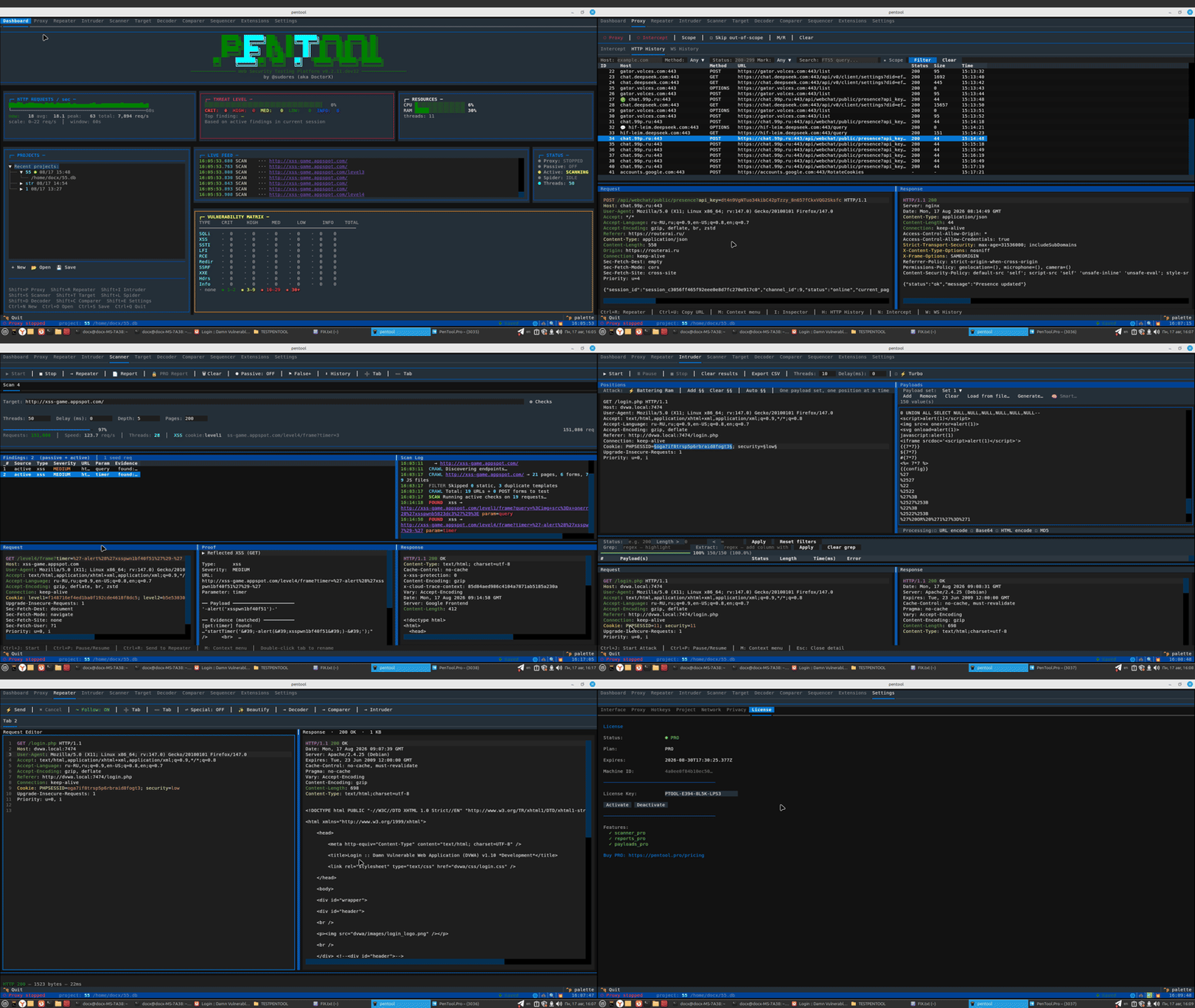
✨ Features
-
🌐 Proxy
Intercept and modify HTTP/HTTPS traffic in real time. Manage scope, apply Match & Replace rules, capture WebSocket messages. -
🔄 Repeater
Replay requests with any modifications. Save tabs between sessions and switch between scenarios instantly. -
💥 Intruder
Run automated payload attacks with four strategies: Sniper, Battering Ram, Pitchfork, Cluster Bomb.
Turbo Mode (PRO) delivers 10× speed via Keep-Alive and connection pooling. -
🔍 Scanner
Active and passive vulnerability analysis: SQLi, XSS, SSTI, LFI, RCE, SSRF, XXE, CORS, JWT flaws, and more.
Smart context-aware payloads, WAF bypass, time-based and boolean-blind techniques. -
🕷 Spider
Crawl targets automatically — collect pages, forms, API endpoints, and JS files.
JavaScript rendering supported (Lightpanda — fast & lightweight, built-in). -
🎯 Target / Site Map
Build a site map from proxy traffic, manage testing scope, and filter hosts directly from the UI. -
🔐 Decoder · Comparer · Sequencer
- Decoder — 19 encode/decode/hash operations with chaining support
- Comparer — side-by-side diff with change highlighting
- Sequencer — entropy analysis of tokens (sessions, CSRF, JWT) with FIPS tests
-
🧩 Plugin System
Extend functionality without touching the core. PRO plugins add advanced scanners, smart payloads, and report generators. -
⚡ Async Core
Fully async engine handles thousands of concurrent connections and hundreds of requests per second. -
📦 One-line Install
uv tool install pentool— no complex setup, works on Linux, macOS, and Windows (WSL). -
🆓 Open Source + PRO Extensions
The base version is free and open. PRO extensions unlock exclusive features and support the project.
🚀 Quick Start
# Install (recommended — isolated, single command)
uv tool install pentool

# Launch the TUI with a new project for the target (host pre-seeded)
pentool --url https://example.com

# Same, but actually load the target in a headless browser THROUGH the proxy,
# so real traffic lands in HTTP History + Target (requires Lightpanda)
pentool --url https://example.com --real

# Headless scan — perfect for CI/CD (GitLab CI, GitHub Actions, Jenkins)
pentool --url https://example.com --headless --output result.json

# Start proxy on custom port
pentool proxy start --port 8080

# Active scan (CLI)
pentool scan active --url https://example.com

# Check for updates
pentool update --check
🤖 CI/CD — Headless Security Scanning
Pentool runs fully headless for CI/CD pipelines. See the full CI/CD Guide.
# Minimal
pentool --url https://example.com --headless --output result.json

# Full pipeline
pentool --url https://example.com --headless \\
    --check xss,sqli,info_leak \\
    --threads 20 --delay 0.2 \\
    --use-ai \\
    --crawl --depth 3 --max-pages 100 \\
    --format html --output report.html
CLI Flags for CI/CD
| Flag | Default | Description |
|---|---|---|
--url URL |
required | Target URL (repeatable) |
--headless |
— | Run without TUI |
--output PATH |
— | Save report |
--check NAMES |
all | Comma-separated checks |
--threads N |
10 | Parallel threads |
--delay SEC |
0.0 | Request delay |
--use-ai |
— | AI-assisted scanning |
--crawl |
— | Crawl before scan |
--depth N |
3 | Crawl depth |
--max-pages N |
100 | Max pages |
--format FMT |
auto | Report format (json/html/csv) |
Full examples and a ready-to-copy GitHub Actions / GitLab CI template — see the CI/CD Guide.
📚 Documentation
- 🚀 First Run: Certificate & First Intercept — start here
- Quick Start Guide
- User Guide
- CI/CD Guide (headless)
- Installation
- Plugin Development
- Plugin API Reference
Full docs: pentool.pro
🧪 Beta / Testing Mode
Pentool is currently in public beta.
All free modules are fully functional. PRO features are actively being built — a 14-day trial is available so you can evaluate everything upfront.
🎙 For Bloggers & Content Creators
Running a security blog, YouTube channel, or Telegram channel?
Write an honest review and recommend Pentool to your audience — we'll give you a permanent PRO license, completely free.
No minimum follower count. We value quality over reach.
→ Reach out: @sudores on Telegram
💰 Support the Project
Pentool is built and maintained by a solo developer in spare time.
If it saves you hours on a pentest — consider giving back. Every contribution directly funds new features, fixes, and faster releases.
- ⭐ Star on GitHub — free, takes 2 seconds, helps visibility enormously
- 💸 Sponsor the project — $5 (individual) or $50 (company, includes logo placement)
- 🔑 PRO license — $29 beta price — early access + lifetime loyalty discount
- 💬 Share — tell a colleague, post a review, or mention Pentool in your writeups
Building tools is lonely work. A star or a kind word genuinely matters. Thank you. 🙏
🤝 Contributing
Contributions are welcome!
Please read CONTRIBUTING.md before opening a PR.
🙏 Acknowledgments
Special thanks to:
- codeby.net — For community support and feedback
📄 License
Distributed under the AGPL-3.0 license. See LICENSE for details.
PRO extensions are available under a commercial license.
📬 Contact
- Website: pentool.pro
- Telegram channel: t.me/pentool_pro
- Telegram: @sudores
- Email: support@pentool.pro
- Author: Anatoly Kashtanov (DoctorX)
⭐ If Pentool saves you time, a GitHub star helps the project grow — thanks!
1 maintainer

Metadata
1 maintainer
Release files for pentool 0.5.1
For a detailed explanation of source distributions (sdists) and built distributions (wheels), please see the package formats documentation.
Source distribution (sdist)
| File | Size | Uploaded | Provenance | |
|---|---|---|---|---|
| pentool-0.5.1.tar.gz | 404.0 kB | Without provenance | Details |
Built distribution (wheel)
| File | Interpreter | ABI | Platform | Reset |
|---|---|---|---|---|
| pentool-0.5.1-py3-none-any.whl | Python 3 | none | any | Details |
Total release size: 888.2 kB
Release files / pentool-0.5.1.tar.gz
| Download URL | pentool-0.5.1.tar.gz |
|---|---|
| Size | 404.0 kB |
| Tags | Source |
|
SHA-256 checksum How to use checksums |
3c3fbf6624c954e43bd300b593b685bd1c3040f34fffc76c7b511b16ff1bef2b
|
|
BLAKE2b-256 checksum How to use checksums |
0ada5104b51c6cb497636788c01575235e59c1c0dc9211f829b28ef7b8aff36a
|
| Upload date | |
|
Uploaded using Trusted Publishing? What is trusted publishing? |
No |
| Uploaded via |
twine/7.0.0 CPython/3.11.16
|
Release files / pentool-0.5.1-py3-none-any.whl
| Download URL | pentool-0.5.1-py3-none-any.whl |
|---|---|
| Size | 484.2 kB |
| Tags | Python 3 |
|
SHA-256 checksum How to use checksums |
36a970e278df05223ee91f97c3d726093ea579bb8b7e36c89ddbc62d959a7b39
|
|
BLAKE2b-256 checksum How to use checksums |
13803c6743c844459353ef6e680479757efcd9bead4392f49d64cec205f14c37
|
| Upload date | |
|
Uploaded using Trusted Publishing? What is trusted publishing? |
No |
| Uploaded via |
twine/7.0.0 CPython/3.11.16
|
Security for pentool 0.5.1
Provenance
Provenance describes where a file came from. On PyPI, provenance is shared via attestations, which provide a verifiable record of the build or publishing details. View details, limitations and caveats.
No provenance found
None of the files in this release were uploaded with provenance metadata.
A note on package security
PyPI is a repository for distributing packages, not a service for auditing them. While third-party security researchers and our staff do their best to detect and remove malicious packages, PyPI cannot guarantee the quality, security or suitability of any given package.
To learn more about protecting yourself from malicious actors, visit our package security documentation.














