
A cross-platform TUI/CLI/API/MCP command library for authorized security testing.

Project description

PentQuiver
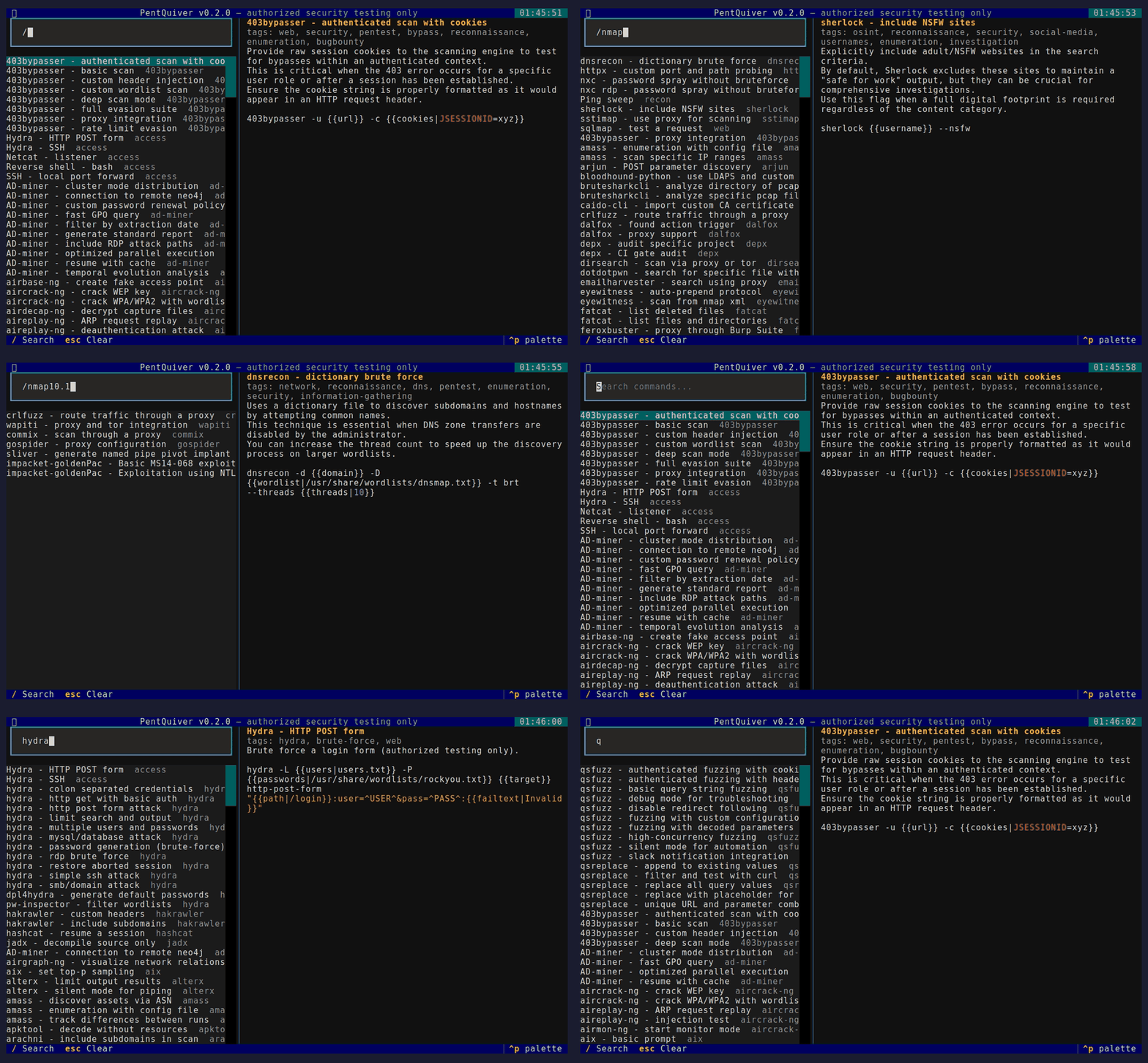
A blazing-fast, cross-platform command library and cheat-sheet launcher for pentesters - TUI, CLI, HTTP API and MCP server in one.
Search 2,800+ security commands, fill in the arguments, and copy or run them - from your terminal, your scripts, or your AI assistant.




Legal notice / Aviso legal
PentQuiver is a command launcher intended solely for authorized security testing, CTF competitions and education.
You are fully responsible for how you use this tool. The author accepts no responsibility and assumes no liability for any misuse, damage, or illegal activity carried out with it. Only test systems that you own or for which you have explicit written permission.
El autor no se hace responsable del uso que se le de a esta herramienta.
This notice is also shown every time the TUI starts and must be accepted first.
Features
- Fuzzy search across 2,800+ commands / 240+ tools (recon, web, Active Directory, credential access, post-exploitation, forensics and more).
- Argument templates -
{{arg}}and{{arg|default}}with a live preview. - Four interfaces, one core: interactive TUI, scriptable CLI, an HTTP API, and an MCP server so AI assistants can query your library.
- Hexagonal architecture (ports and adapters) - clean, testable, extensible.
- Cross-platform - Linux, macOS, Windows, WSL. Pure Python, no OS-specific build constraints.
- Simple YAML cheat-sheets - bring your own, or use the bundled collection.
Install
pip install pentquiver              # TUI + CLI
pip install "pentquiver[api]"       # + HTTP API (FastAPI/uvicorn)
pip install "pentquiver[mcp]"       # + MCP server
pip install "pentquiver[all]"       # everything
On Linux, clipboard copy needs xclip or xsel (sudo apt install -y xclip).
Usage
pentquiver                       # launch the TUI (default)
pentquiver list nmap             # print matching commands (id + name)
pentquiver show nmap/nmap-aggressive-scan
pentquiver api --port 8000       # serve the HTTP API
pentquiver mcp                   # serve the MCP server over stdio
pentquiver --info                # project, author and support info
pentquiver --upgrade             # update to the latest release via pip
pentquiver --version
TUI keys
| Key | Action |
|---|---|
/ |
focus search, Up/Down move, Enter open then fill args then Copy/Run |
c |
quick-copy the raw template, Esc clear / back |
u |
upgrade to the latest release, q quit |
CLI

HTTP API
pentquiver api            # http://127.0.0.1:8000  (interactive docs at /docs)
curl 'localhost:8000/commands?q=nmap&limit=5'
curl -X POST localhost:8000/commands/nmap/nmap-aggressive-scan/resolve \
     -H 'content-type: application/json' -d '{"values":{"target":"10.0.0.0/24"}}'

MCP (AI assistants)
Run it without installing using uv - the server is fetched and cached on first use:
{
  "mcpServers": {
    "pentquiver": {
      "command": "uvx",
      "args": ["--from", "pentquiver[mcp]", "pentquiver", "mcp"]
    }
  }
}
Or, if it is already installed (pip install "pentquiver[mcp]"):
{ "mcpServers": { "pentquiver": { "command": "pentquiver", "args": ["mcp"] } } }
Tools exposed: search_commands, list_sources, get_command,
get_arguments, resolve_command.

Architecture
Hexagonal (ports and adapters) - the domain and use cases never depend on I/O:
pentquiver/
  domain/          entities + pure logic (Command, placeholders, fuzzy search)
  application/     ports (interfaces) + use-case service (CommandLibrary)
  adapters/
    inbound/       tui, cli, api, mcp          (driving)
    outbound/      yaml, system(clipboard/exec) (driven)
  config/          filesystem locations
  container.py     composition root (wires adapters into the service)
Swapping a data source or adding an interface means writing one adapter - the core stays untouched.
Cheat-sheet format
Drop .yml/.yaml files in your user directory:
- Linux/macOS:
~/.config/pentquiver/cheatsheets/ - Windows:
%APPDATA%\pentquiver\cheatsheets\ - or set
PENTQUIVER_HOMEto any directory, or pass-d PATH.
commands:
  - name: Nmap - quick TCP scan
    command: nmap -sV -sC -oA {{outfile|scan}} {{target}}
    description: Service/version detection with default scripts.
    tags: [nmap, scan, recon]
Both the native shape above and the tool/actions shape are auto-detected.
The large bundled collection under pentquiver/cheatsheets/vendor/ is redistributed
under the MIT license - see THIRD-PARTY-NOTICES.md.
Author and support
Built by Eduardo González - www.edggdev.cloud
PRs and new cheat-sheets welcome. If PentQuiver saves you time, you can support it:


License
PentQuiver's own code is MIT. Bundled cheat-sheet data keeps its upstream MIT license (see THIRD-PARTY-NOTICES.md). Use responsibly.
Release history Release notifications | RSS feed


Download files
Download the file for your platform. If you're not sure which to choose, learn more about installing packages.
Source Distribution
Built Distribution
Filter files by name, interpreter, ABI, and platform.
If you're not sure about the file name format, learn more about wheel file names.
Copy a direct link to the current filters
File details
Details for the file pentquiver-0.2.0.tar.gz.
File metadata
- Download URL: pentquiver-0.2.0.tar.gz
- Upload date:
- Size: 438.7 kB
- Tags: Source
- Uploaded using Trusted Publishing? No
- Uploaded via: twine/6.2.0 CPython/3.14.6
File hashes
| Algorithm | Hash digest | |
|---|---|---|
| SHA256 |
9247b789bc7837a5c8095b3e735ea18f752e8577ab5034dffc9027a5ebba5155
|
|
| MD5 |
ab6725881d250062066891f2b805356f
|
|
| BLAKE2b-256 |
d6b680e4bca96f8116bd2748260303f200d7f6a3eaa4cff900438c13a105cfcf
|
File details
Details for the file pentquiver-0.2.0-py3-none-any.whl.
File metadata
- Download URL: pentquiver-0.2.0-py3-none-any.whl
- Upload date:
- Size: 612.5 kB
- Tags: Python 3
- Uploaded using Trusted Publishing? No
- Uploaded via: twine/6.2.0 CPython/3.14.6
File hashes
| Algorithm | Hash digest | |
|---|---|---|
| SHA256 |
f433102713171b8b267fcb2f29ef9147b1ea3e0f218e0c8fd3953420266f3d87
|
|
| MD5 |
c7137fe27ab4e7823a1932fa4f415192
|
|
| BLAKE2b-256 |
7d3fb1c758283e6e02fe8c7d33a51481f00fcfd54438e488158d02badee6d9ef
|






