
PEPSI: PEPtide Sequence Information



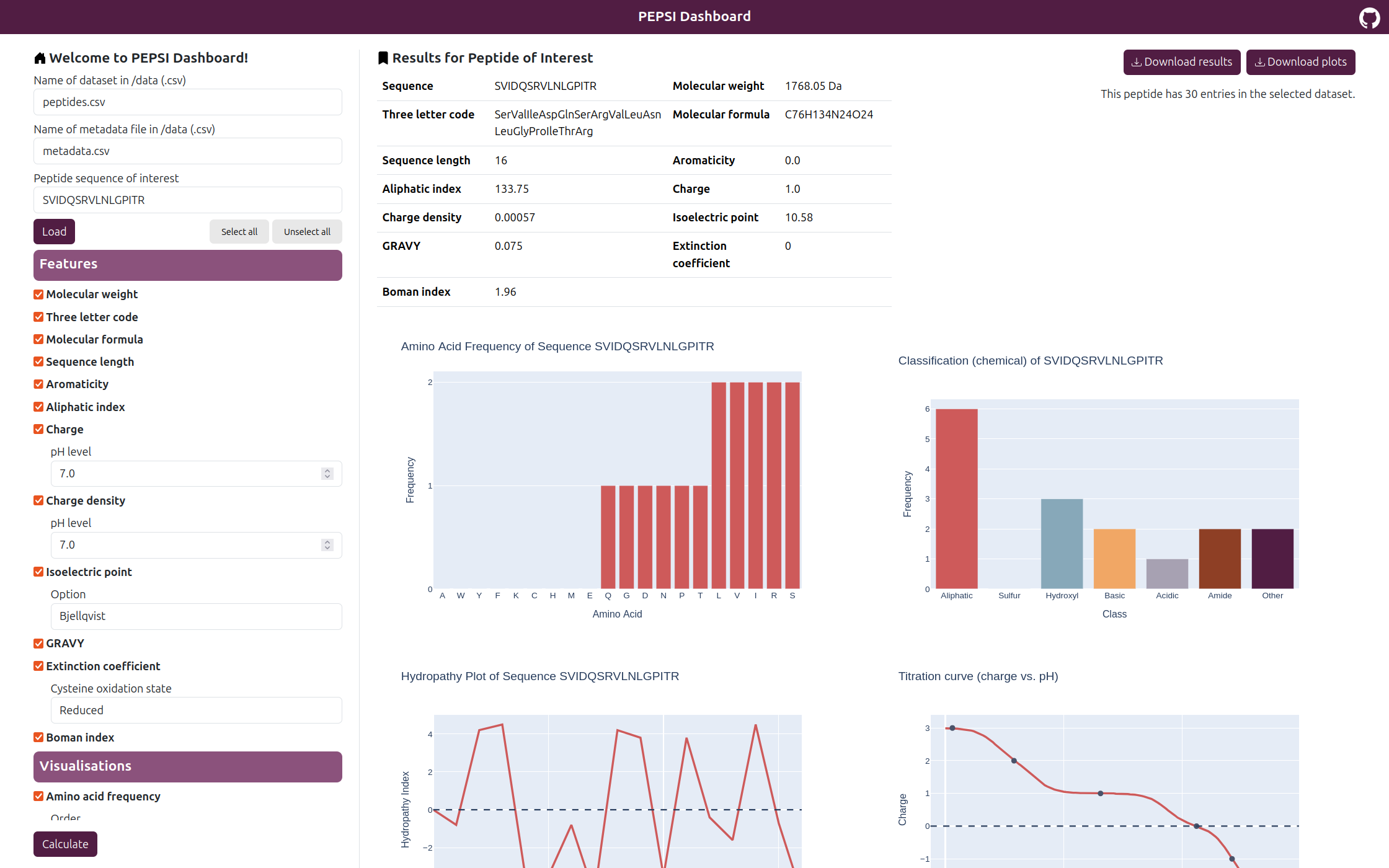
PEPSIPy (PEPtide Sequence Information for Python) is an open-source Python library that provides methods for computing a wide range of peptide features, including sequence composition, charge, hydrophobicity, and other physicochemical properties. All features can be calculated on an entire dataset or on a single peptide sequence of interest. Additionally, PEPSI offers a selection of visualisations, such as hydropathy profile or amino acid classification.
This work was conducted as part of the project 'Veni, Vidi, Visualization: Improving Analysis Communication for a Million-Dollar Machine' at the Data Analytics and Computational Statistics Chair, Hasso Plattner Institute.
| 💻 Python library | 📊 Web-based dashboard | Miscellaneous |
|---|---|---|
| Installation Usage |
Installation Usage |
Third-party resources License |
💻 Python library
Installation
- Make sure you have pip installed
- Install PEPSI
pip install pepsipy - Import and use PEPSI in your project!
Usage
- Initialize a calculator instance
import pandas as pd from pepsipy import Calculator calc = Calculator( dataset=pd.read_csv("data/peptides.csv"), metadata=pd.read_csv("data/metadata.csv"), seq="SVIDQSRVLNLGPITR", ) - Select desired features and plots with related parameters
calc.set_feature_params( gravy=True, molecular_weight=True, ) calc.set_plot_params( hydropathy_profile=True, classification=True, classification_classify_by="charge", ) - Compute and show results
print(calc.get_features())
plots = calc.get_plots()
for plot in plots:
   plot.show()
📊 Web-based dashboard
Installation
- Make sure you have a virtual environment manager available, e.g., venv (recommended), or any other manager such as Conda or Poetry.
- Clone this repository and enter the frontend folder
git clone https://github.com/ronjakrg/pepsipy.git cd pepsipy/frontend - Create and activate a virtual environment and install all necessary requirements
python -m venv .venv source .venv/bin/activate pip install -r requirements.txt - Start the server
python manage.py runserver - Open
http://127.0.0.1:8000/in the browser of your choice to use the PEPSI Dashboard!
Usage
- Select a dataset and a metadata file (must be uploaded to the
/datafolder) and a peptide sequence of interest. - Select desired features and plots with related parameters
- Click on 'Calculate' and inspect results
Third-party resources
| Type | Name | DOI | Saved in |
|---|---|---|---|
| Dataset | Urinary peptidomics in youths with and without type 1 diabetes | 10.1074/mcp.RA119.001858 | - /data/peptides.csv- /data/metadata.csv |
| Code | Isoelectric Point Calculator 2.0 | 10.1093/nar/gkab295 | - /src/pepsipy/external/ipc-2.0.1 |
License
This project is licensed under the MIT License.
1 maintainer

Metadata
1 maintainer
Release files for pepsipy 1.1.0
For a detailed explanation of source distributions (sdists) and built distributions (wheels), please see the package formats documentation.
Source distribution (sdist)
| File | Size | Uploaded | |
|---|---|---|---|
| pepsipy-1.1.0.tar.gz | 23.2 kB | Details |
Built distribution (wheel)
| File | Interpreter | ABI | Platform | Reset |
|---|---|---|---|---|
| pepsipy-1.1.0-py3-none-any.whl | Python 3 | none | any | Details |
Total release size: 43.3 kB
Release files / pepsipy-1.1.0.tar.gz
| Download URL | pepsipy-1.1.0.tar.gz |
|---|---|
| Size | 23.2 kB |
| Tags | Source |
|
SHA-256 checksum How to use checksums |
498ae00b88d0ef4259c68863bbedbfde440c6bbfd38c55fe227d3393278eae1f
|
|
BLAKE2b-256 checksum How to use checksums |
94ab4291674f63d6910c372b2d1d6b0d8d2ba2c6c208115a6ebc2ff54f12d0d5
|
| Upload date | |
|
Uploaded using Trusted Publishing? What is trusted publishing? |
No |
| Uploaded via |
twine/6.2.0 CPython/3.12.3
|
Release files / pepsipy-1.1.0-py3-none-any.whl
| Download URL | pepsipy-1.1.0-py3-none-any.whl |
|---|---|
| Size | 20.1 kB |
| Tags | Python 3 |
|
SHA-256 checksum How to use checksums |
41f6359287c40589beab2d0ba3190c6621aa5b560e1e18b7c84affbcc127192c
|
|
BLAKE2b-256 checksum How to use checksums |
33e970f22f3ff2dfcc1f6eb7354f8585584bbed84c4eb6f46a1da70331a89459
|
| Upload date | |
|
Uploaded using Trusted Publishing? What is trusted publishing? |
No |
| Uploaded via |
twine/6.2.0 CPython/3.12.3
|














