

PerceptionMetrics
Unified evaluation for perception models
Project webpage here
⚠️ PerceptionMetrics was previously known as DetectionMetrics. The original website referenced in our Sensors paper is still available here
PerceptionMetrics is a toolkit designed to unify and streamline the evaluation of object detection and segmentation models across different sensor modalities, frameworks, and datasets. It offers multiple interfaces including a GUI for interactive analysis, a CLI for batch evaluation, and a Python library for seamless integration into your codebase. The toolkit provides consistent abstractions for models, datasets, and metrics, enabling fair, reproducible comparisons across heterogeneous perception systems.
| 💻 Code | 🔧 Installation | 🧩 Compatibility | 📖 Docs | 💻 GUI |
|---|
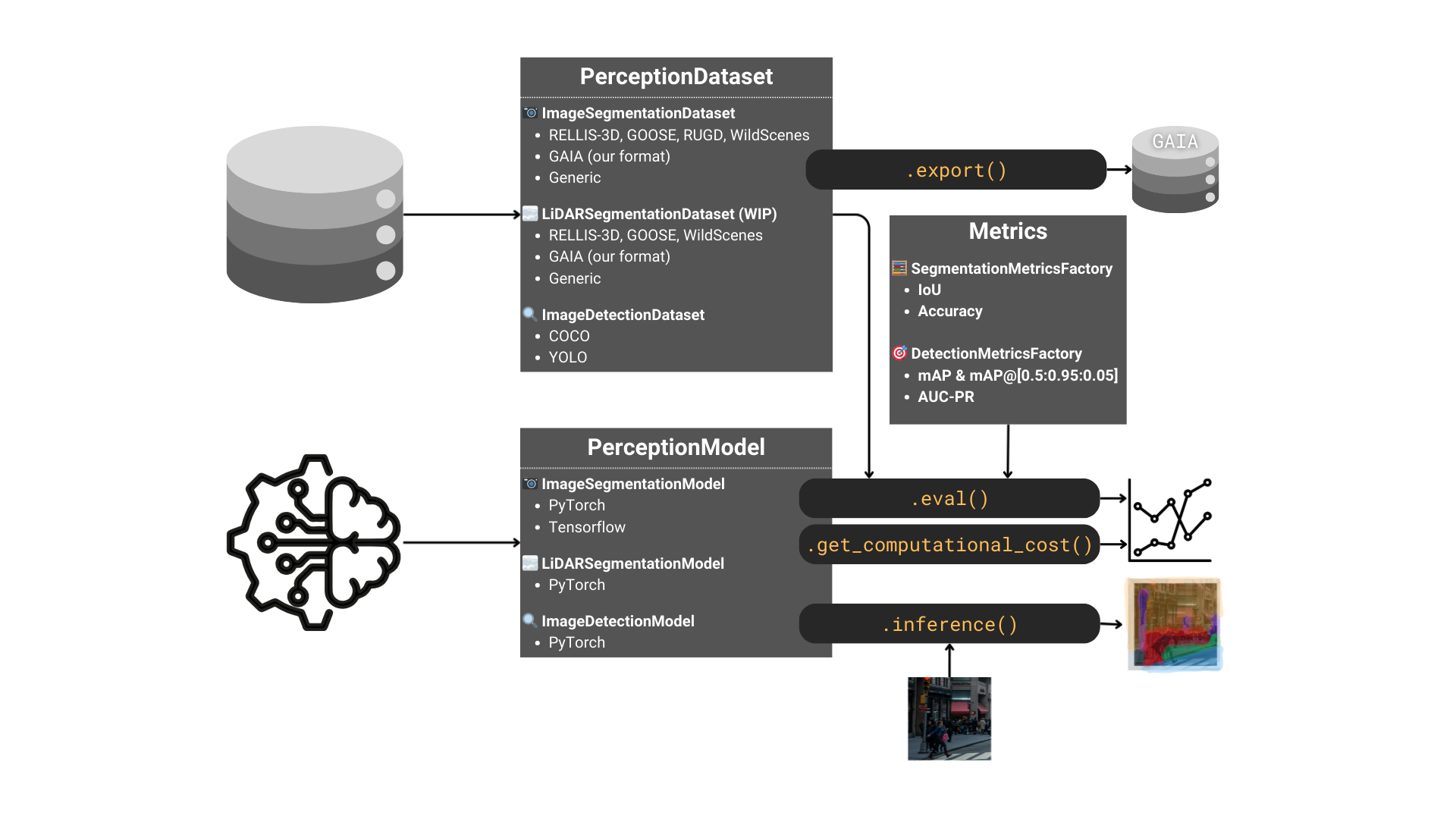
What's supported in PerceptionMetrics
| Task | Modality | Datasets | Framework |
|---|---|---|---|
| Segmentation | Image | RELLIS-3D, GOOSE, RUGD, WildScenes, custom GAIA format | PyTorch, Tensorflow |
| LiDAR | RELLIS-3D, GOOSE, WildScenes, custom GAIA format | PyTorch (tested with Open3D-ML, mmdetection3d, SphereFormer, and LSK3DNet models) | |
| Object detection | Image | COCO, YOLO | PyTorch (tested with torchvision and torchscript-exported YOLO models) |
More details about the specific metrics and input/output formats required fow each framework are provided in the Compatibility section in our webpage.
Installation
PerceptionMetrics can be installed in two different ways depending on your needs:
- Regular users: Install the package directly from PyPI.
- Developers: Clone the repository and install the development environment using Poetry.
Install from PyPI (Recommended for users)
The latest stable release of PerceptionMetrics is available on PyPI.
Install it with:
pip install perceptionmetrics
After installation, you can start using the library in your Python environment.
Developer Installation
If you want to contribute to the project or modify the source code, clone the repository and install the dependencies using Poetry.
Clone the repository
git clone https://github.com/JdeRobot/PerceptionMetrics.git
cd PerceptionMetrics
Using Poetry (Recommended)
Install Poetry (if not done before):
python3 -m pip install --user pipx
pipx install poetry
⚠️ Note: pipx should be installed outside any virtual environment.
If you run this command inside a venv, you may see:
ERROR: Can not perform a '--user' install. User site-packages are not visible in this virtualenv.
Install dependencies:
poetry install
Activate the environment:
Depending on your Poetry version, use one of the following (you can leave the environment by running deactivate or exit):
- For Poetry 2.0+:
poetry env activate
- For Poetry 1.x:
poetry shell
Note: Alternatively, you can run any command directly without activating the environment by prefixing it with poetry run (e.g., poetry run python main.py).
Using venv
Create your virtual environment:
python -m venv .venv
Activate your environment (OS-specific, e.g. source .venv/bin/activate on Linux/macOS or .venv\Scripts\activate on Windows), then install dependencies:
pip install -e .
Common
Install your deep learning framework of preference in your environment. We have tested:
- CUDA Version:
12.6 torch==2.4.1andtorchvision==0.19.1.torch==2.2.2andtorchvision==0.17.2.tensorflow==2.17.1tensorflow==2.16.1
If you are using LiDAR, Open3D currently requires torch==2.2*.
And it's done! You can check the examples directory for inspiration and run some of the scripts provided either by activating the created environment using poetry shell or directly running poetry run python examples/<some_python_script.py>.
Additional environments
Some LiDAR segmentation models, such as SphereFormer and LSK3DNet, require a dedicated installation workflow. Refer to additional_envs/INSTRUCTIONS.md for detailed setup instructions.
Usage
PerceptionMetrics can be used in three ways: through the interactive GUI (detection only), as a Python library, or via the command-line interface (segmentation and detection).
Interactive GUI
The easiest way to get started with PerceptionMetrics is through the GUI (detection tasks only):
# From the project root directory
streamlit run app.py
The GUI provides:
- Dataset Viewer: Browse and visualize your datasets
- Inference: Run real-time inference on images
- Evaluator: Perform comprehensive model evaluation
For detailed GUI documentation, see our GUI guide.
Library
🧑🏫️ Image Segmentation Tutorial
🧑🏫️ Image Detection Tutorial (YOLO)
You can check the examples directory for further inspiration. If you are using poetry, you can run the scripts provided either by activating the created environment using poetry shell or directly running poetry run python examples/<some_python_script.py>.
Command-line interface
PerceptionMetrics provides a CLI with several commands (e.g. pm_eval_model and pm_batch). Thanks to the configuration in the pyproject.toml file, we can simply run poetry install from the root directory and use them without explicitly invoking the Python files. More details are provided in PerceptionMetrics website.
Example Usage
Segmentation:
pm_eval_model segmentation image --model_format torch --model /path/to/model.pt --model_ontology /path/to/ontology.json --model_cfg /path/to/cfg.json --dataset_format rellis3d --dataset_dir /path/to/dataset --dataset_ontology /path/to/ontology.json --out_fname /path/to/results.csv
Detection:
pm_eval_model detection image --model_format torch --model /path/to/model.pt --model_ontology /path/to/ontology.json --model_cfg /path/to/cfg.json --dataset_format coco --dataset_dir /path/to/coco/dataset --out_fname /path/to/results.csv
DetectionMetrics
Our previous release, DetectionMetrics, introduced a versatile suite focused on object detection, supporting cross-framework evaluation and analysis. Cite our work if you use it in your research!
| 💻 Code | 📖 Docs | 🐋 Docker | 📰 Paper |
|---|
Cite our work
@article{PaniegoOSAssessment2022,
  author = {Paniego, Sergio and Sharma, Vinay and Cañas, José María},
  title = {Open Source Assessment of Deep Learning Visual Object Detection},
  journal = {Sensors},
  volume = {22},
  year = {2022},
  number = {12},
  article-number = {4575},
  url = {https://www.mdpi.com/1424-8220/22/12/4575},
  pubmedid = {35746357},
  issn = {1424-8220},
  doi = {10.3390/s22124575},
}
How to Contribute
To make your first contribution, follow this Guide.
Acknowledgements
LiDAR segmentation support is built upon open-source work from Open3D-ML, mmdetection3d, SphereFormer, and LSK3DNet.
1 maintainer

Metadata
1 maintainer
Release files for perceptionmetrics 3.1.0
For a detailed explanation of source distributions (sdists) and built distributions (wheels), please see the package formats documentation.
Source distribution (sdist)
| File | Size | Uploaded | |
|---|---|---|---|
| perceptionmetrics-3.1.0.tar.gz | 82.6 kB | Details |
Built distribution (wheel)
| File | Interpreter | ABI | Platform | Reset |
|---|---|---|---|---|
| perceptionmetrics-3.1.0-py3-none-any.whl | Python 3 | none | any | Details |
Total release size: 192.6 kB
Release files / perceptionmetrics-3.1.0.tar.gz
| Download URL | perceptionmetrics-3.1.0.tar.gz |
|---|---|
| Size | 82.6 kB |
| Tags | Source |
|
SHA-256 checksum How to use checksums |
22ea13deba284f69464faf0047aced524017b8de609256601a21fee3dfd214a6
|
|
BLAKE2b-256 checksum How to use checksums |
b7874bc290e261a9dfc4e622f7b2c56e37135a4cda41787c8535e0fe9fa21aad
|
| Upload date | |
|
Uploaded using Trusted Publishing? What is trusted publishing? |
No |
| Uploaded via |
poetry/2.4.1 CPython/3.10.20 Linux/6.17.0-1015-azure
|
Release files / perceptionmetrics-3.1.0-py3-none-any.whl
| Download URL | perceptionmetrics-3.1.0-py3-none-any.whl |
|---|---|
| Size | 110.0 kB |
| Tags | Python 3 |
|
SHA-256 checksum How to use checksums |
e2dd324d9812f41d922abe16c6e4301143b31f9f1d0bae0963131f8e46ce36b6
|
|
BLAKE2b-256 checksum How to use checksums |
45295afe376f7cdd27f0784e0b6e031124264b6fc8b92bae1964845ef5970c82
|
| Upload date | |
|
Uploaded using Trusted Publishing? What is trusted publishing? |
No |
| Uploaded via |
poetry/2.4.1 CPython/3.10.20 Linux/6.17.0-1015-azure
|














