
A GUI-based physical perceptron emulator with custom hardware-style widgets

Project description
⚡ Perceptron Emulator
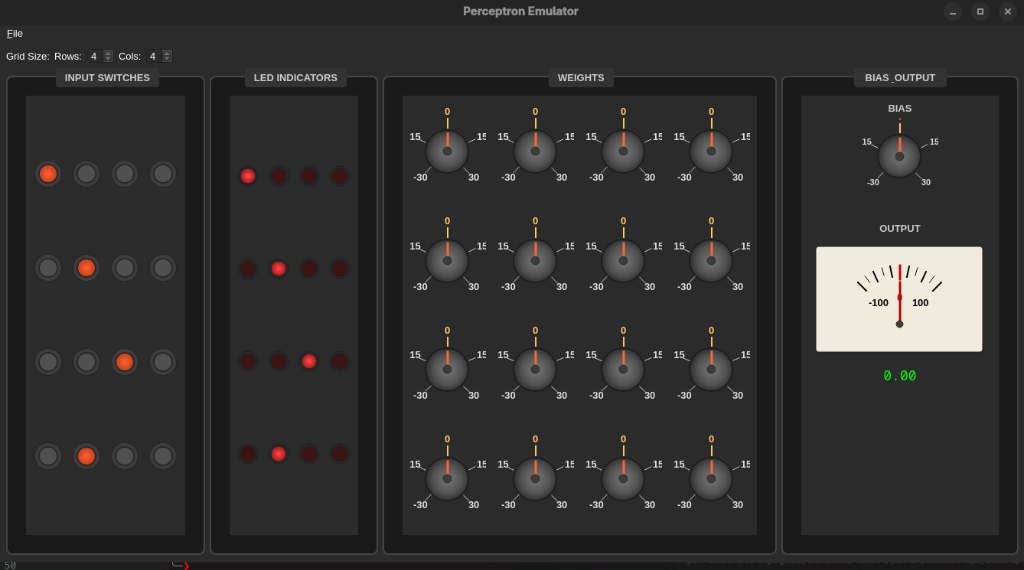
A stunning GUI-based perceptron emulator with physical hardware-style controls


Features • Installation • Usage • Hardware Build • Documentation
✨ Features
🎛️ Physical-Style Interface
- Toggle Switches - Tactile ON/OFF inputs with visual feedback
- LED Indicators - Real-time input state visualization
- Rotary Knobs - Smooth weight adjustment with labeled scales
- Analog Meter - Classic needle display for output visualization
- Zero-Centered Design - Intuitive top-centered zero position
🔧 Dynamic Configuration
- Variable Grid Size - Adjust from 2×2 to 8×8 inputs on the fly
- Relative Sizing - All widgets scale proportionally for perfect visibility
- Responsive Layout - Adapts to different screen sizes
💾 Persistent Storage
- Auto-Save - Weights and bias saved automatically (1s after changes)
- XDG Compliant - Configuration stored in
~/.config/perceptron-emulator/ - Named Presets - Save, load, and manage multiple configurations
- State Restoration - Picks up exactly where you left off
⚙️ Perceptron Logic
Implements the classic perceptron calculation:
output = Σ(input_i × weight_i) + bias
- Up to 64 Binary Inputs (2×2 to 8×8 grid)
- Adjustable Weights (-30 to +30 range)
- Bias Control (-30 to +30 range)
- Real-Time Calculation - Instant visual feedback
🎓 Automatic Training Mode
- Predefined Patterns: AND, OR, NAND logic gates
- Custom Pattern Recognition: Train on YOUR shapes (T vs J, + vs -, etc.)
- Real-Time Visualization:
- Error plot showing convergence
- Weight evolution trajectories
- Delta Rule Learning: Classic perceptron algorithm
- Adjustable Learning Rate: 0.01 to 0.50
- Live Updates: Watch knobs rotate as weights adjust
📦 Installation
From PyPI (Recommended)
pip install perceptron-emulator
From Source
git clone https://github.com/rexackermann/perceptron-emulator.git
cd perceptron-emulator
pip install -r requirements.txt
🚀 Usage
Launch the Application
# If installed via pip
perceptron-emulator

# If running from source
python main.py
Controls
- Toggle Switches - Click to toggle inputs ON/OFF
- Weight Knobs - Click and drag to rotate (positive clockwise, negative counterclockwise)
- Bias Knob - Adjust the bias offset
- Grid Size - Use spinboxes at top to change dimensions
- File Menu - Save/Load/Delete presets (Ctrl+S, Ctrl+O)
Training Mode
Predefined Patterns (AND, OR, NAND)
- Select pattern from dropdown
- Adjust learning rate (0.01-0.50)
- Click "Start Training"
- Watch convergence in real-time
Custom Pattern Recognition 🎨 NEW!
Train the perceptron to recognize YOUR shapes:
Example: T vs J Recognition
1. Select "CUSTOM" from pattern dropdown
2. Draw a T shape using toggle switches:
   [1][1][1][0]
   [0][1][0][0]
   [0][1][0][0]
   [0][0][0][0]
3. Click "Add as Positive (+)" (green button)
4. Repeat with 3-5 variations of T
5. Draw a J shape:
   [0][1][1][0]
   [0][0][1][0]
   [0][0][1][0]
   [1][1][0][0]
6. Click "Add as Negative (-)" (red button)
7. Repeat with 3-5 variations of J
8. Click "Start Training"
9. Watch the perceptron learn to distinguish T from J!
Other Pattern Ideas:
-
- vs - (plus vs minus)
- L vs I (letters)
- Vertical vs Horizontal lines
- Any two distinct shapes!
Tips:
- Add 3-5 examples of each type for better learning
- Make patterns clearly different
- Use "Clear All Patterns" to start over
Keyboard Shortcuts
Ctrl+S- Save current configuration as presetCtrl+O- Load a saved preset
🔨 Build Your Own Hardware
Want to build a physical version? Check out HARDWARE.md for:
- Complete component list (BOM)
- Circuit schematics and wiring diagrams
- Step-by-step assembly instructions
- Calibration procedures
- Troubleshooting guide
📚 Documentation
Project Structure
perceptron-emulator/
├── main.py          # Main application and UI
├── logic.py         # Perceptron calculation engine
├── widgets.py       # Custom PyQt6 widgets
├── config.py        # XDG configuration management
├── HARDWARE.md      # Physical circuit build guide
├── README.md        # This file
└── requirements.txt # Python dependencies
Configuration Files
- Config:
~/.config/perceptron-emulator/config.json - Presets:
~/.config/perceptron-emulator/presets/*.json
Requirements
- Python 3.9+
- PyQt6 >= 6.0.0
- NumPy >= 1.20.0
🎓 How Training Works
The Perceptron Learning Algorithm
The perceptron learns through supervised learning using the delta rule:
For each training pattern:
  1. Calculate output = Σ(input_i × weight_i) + bias
  2. Compare output to target (expected value)
  3. If wrong, adjust weights:
     - weight_i = weight_i + η × error × input_i
     - bias = bias + η × error
     - where error = (target - predicted)
Training Patterns
Important: You train on ALL possible input combinations, not just one pattern!
Example: 2x2 Grid (4 inputs) AND Pattern
The trainer generates 16 total patterns (2^4 combinations):
| Inputs | Target | Type |
|---|---|---|
| [0,0,0,0] | 0 | Negative example |
| [1,0,0,0] | 0 | Negative example |
| [0,1,0,0] | 0 | Negative example |
| ... (12 more) | 0 | Negative examples |
| [1,1,1,1] | 1 | Positive example |
Pattern Breakdown:
- AND: 15 negative (output 0) + 1 positive (output 1) = All inputs must be ON
- OR: 1 negative (output 0) + 15 positive (output 1) = Any input ON
- NAND: 15 positive (output 1) + 1 negative (output 0) = NOT all inputs ON
Training Process
-
Select Pattern: Choose AND, OR, or NAND
-
Set Learning Rate (η): Controls how fast weights change
- Low (0.01-0.05): Slow, stable learning
- Medium (0.10-0.20): Balanced
- High (0.30-0.50): Fast but may oscillate
-
Training Loop: For each epoch:
- Test ALL patterns (e.g., all 16 for 2x2 grid)
- Count errors (misclassified patterns)
- Update weights for each wrong prediction
- Plot error count
-
Convergence: Training stops when:
- All patterns are correctly classified (0 errors), OR
- Maximum epochs reached (1000)
Grid Size Impact
| Grid | Inputs | Patterns | Complexity |
|---|---|---|---|
| 2x2 | 4 | 16 | Fast (~20-50 epochs) |
| 3x3 | 9 | 512 | Moderate (~50-200 epochs) |
| 4x4 | 16 | 65,536 | Slow (may not converge) |
Note: Larger grids have exponentially more patterns (2^n), making training slower.
Visualizations
Error Plot Tab: Shows convergence progress
- X-axis: Epoch number
- Y-axis: Number of misclassified patterns
- Goal: Reach 0 errors (green line)
Weight Evolution Tab: Shows individual weight trajectories
- Each colored line = one weight's journey
- Watch weights adjust to find the decision boundary
- Final values determine the learned function
Example Training Session
1. Set grid to 2x2 (4 inputs, 16 patterns)
2. Select "AND" pattern
3. Set learning rate to 0.10
4. Click "Start Training"
5. Observe:
   - Epoch counter increasing
   - Error count decreasing
   - Knobs rotating to new values
   - Weight evolution plot showing convergence
6. After ~30 epochs: "Status: Converged ✓"
7. Test manually: Toggle all 4 switches ON → output should be high
Why It Works
The perceptron finds a linear decision boundary that separates positive from negative examples:
- AND: Boundary requires ALL inputs active
- OR: Boundary requires ANY input active
- NAND: Boundary is the inverse of AND
The weights determine the boundary's position and orientation, while the bias shifts it.
🎨 Screenshots
Main Interface
Dark-themed interface with physical-style controls and real-time output visualization
🤝 Contributing
Contributions are welcome! Feel free to:
- Report bugs
- Suggest new features
- Submit pull requests
📄 License
This project is licensed under the MIT License - see the LICENSE file for details.
👤 Author
Rex Ackermann
🌟 Acknowledgments
- Inspired by classic analog computing equipment
- Built with PyQt6 for cross-platform compatibility
- Designed for both education and experimentation
⭐ Star this repo if you find it useful! ⭐


Download files
Download the file for your platform. If you're not sure which to choose, learn more about installing packages.
Source Distribution
Built Distribution
Filter files by name, interpreter, ABI, and platform.
If you're not sure about the file name format, learn more about wheel file names.
Copy a direct link to the current filters
File details
Details for the file perceptron_emulator-1.2.0.tar.gz.
File metadata
- Download URL: perceptron_emulator-1.2.0.tar.gz
- Upload date:
- Size: 138.6 kB
- Tags: Source
- Uploaded using Trusted Publishing? No
- Uploaded via: twine/6.2.0 CPython/3.14.2
File hashes
| Algorithm | Hash digest | |
|---|---|---|
| SHA256 |
da1767cc826abd72f8751f2b637eeb8f745f36ad2851f7d9e6e60c74c9fadd2e
|
|
| MD5 |
efa12ab9ee970626d668d894af596bda
|
|
| BLAKE2b-256 |
1723589a3448df398d5315fe835a2f67f9b9bae25c697d10ad2ceda91cca3534
|
File details
Details for the file perceptron_emulator-1.2.0-py3-none-any.whl.
File metadata
- Download URL: perceptron_emulator-1.2.0-py3-none-any.whl
- Upload date:
- Size: 23.0 kB
- Tags: Python 3
- Uploaded using Trusted Publishing? No
- Uploaded via: twine/6.2.0 CPython/3.14.2
File hashes
| Algorithm | Hash digest | |
|---|---|---|
| SHA256 |
60b08a18f3ed99273153582f7a91b34b08fb839affff3deaddd930a87b6184ad
|
|
| MD5 |
846ba31aa905ccc40a545b949fbbc46c
|
|
| BLAKE2b-256 |
b9966b3e239c178e102e069ba332f6e5b76c5d84554af24ad2dcfcbf68f18b84
|






