

Perdix
Perdix is a desktop workbench for feature engineering on tabular and time-series data. You build a recipe, an ordered list of steps, and see the data after every step. The result is checked for leakage and exported as a recipe file, a standalone pandas script or a scikit-learn pipeline.
Install and run
Requires Python 3.10 or newer.
pip install 'perdix[io]'      # io: Parquet/Feather (pyarrow) and Excel (openpyxl)
perdix                        # GUI; reopens your last session
perdix data.csv               # GUI on a table
perdix gui --demo             # GUI on the synthetic machine-sensor dataset
Optional extras: ai (Ask Claude), ts (catch22), calendar (public holidays).
To work on Perdix itself, install a checkout with dev (pytest and ruff):
python3 -m venv .venv
.venv/bin/pip install -e '.[dev,io]'
./perdix.sh                   # the GUI from the checkout
perdix.sh looks for an installed perdix ($PERDIX_VENV, the active venv,
./.venv). If there is none, it runs the checkout with the current python3.
New to Perdix? Click Try the demo dataset on the start screen: it opens the demo with an empty recipe and Getting started beside it.
Documentation and examples
The documentation is bundled with the package and opens inside the app (F1, or the book icon in the app bar). Each step's editor has a Theory link to its section. The same pages can be read on GitLab.
- Getting started and Concepts
- Theory per step family: cleaning, imputation, scaling, transforms, encoding, binning, date/time, generation, time series, text, selection, joins, geo
- Analysis, Leakage, Evaluation and Ask Claude
- Reference: CLI, file formats, exports, writing a step
- What changed between versions: CHANGELOG
Seven example cases come with data, a recipe and a tutorial (overview):
six on synthetic data, which ship with Perdix, and one on NASA's simulated turbofan engines (C-MAPSS),
whose data Perdix downloads from NASA when you ask (Settings → Datasets, or
perdix examples download turbofan-engines).
Open one from the start screen, from Help → Open example, or from the command line.
./perdix.sh gui --example machine-failure
perdix examples                          # list them
perdix examples copy customer-churn ./   # copy data, recipe and tutorial to a folder
The window
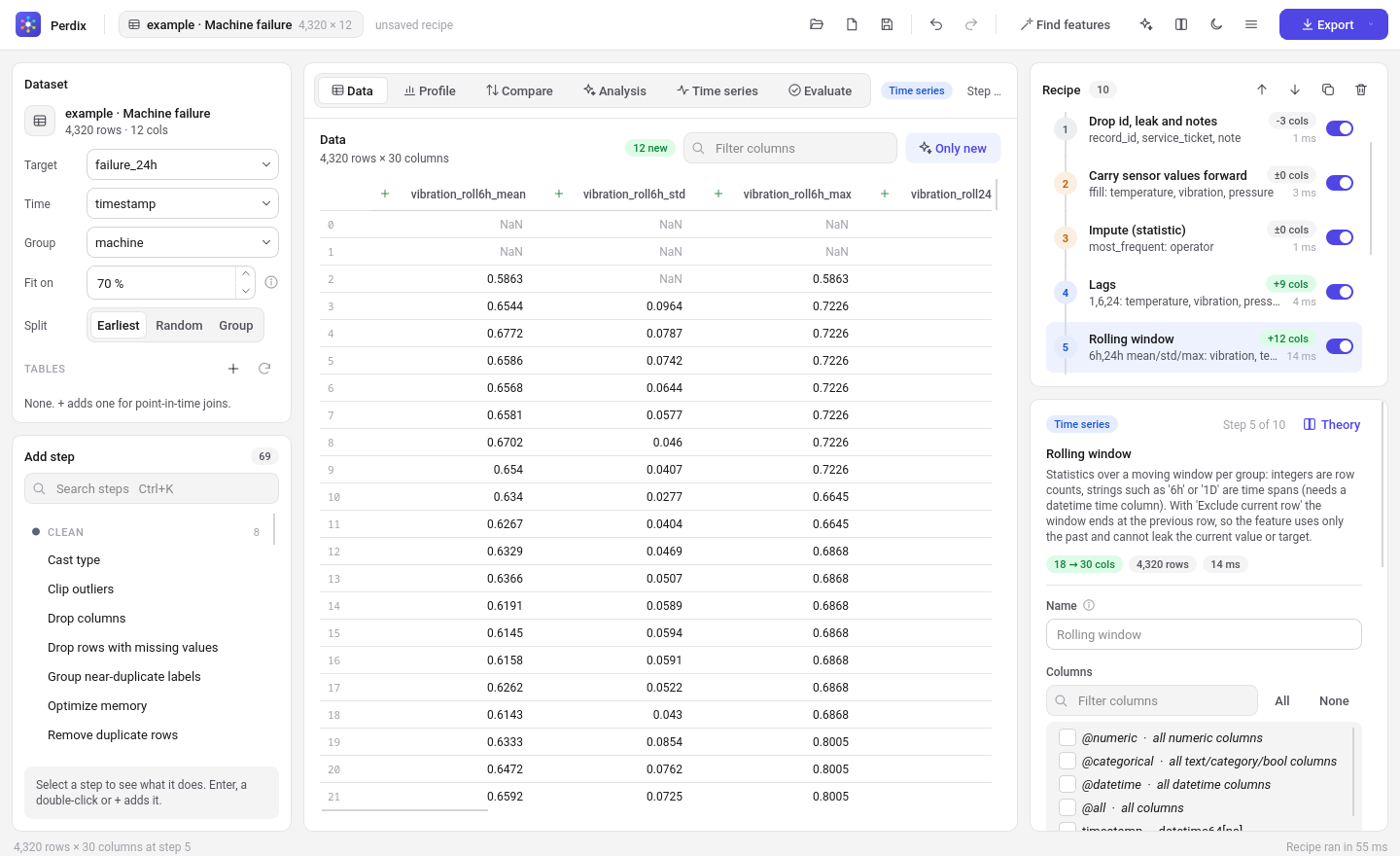
| Area | What it does |
|---|---|
| App bar | The open dataset (or "sample 50,000 of 1,234,567" in sample mode), open/save, undo/redo, Find features, Ask Claude for features, light/dark theme, the menu, and Export (data, Python script, scikit-learn pipeline, SQL for DuckDB, plain scikit-learn; an export a recipe cannot use is greyed out with the reason). |
| Features (menu) | Find features… searches candidate features screened on the training rows; Ask Claude for features… proposes features from a summary of the data (never its rows), each checked and scored before you add it. |
| Dataset (left) | Roles: target, time, group (entity id). A new table starts at Fit on 80 %, with Time set when it has one date/time column. Fit on learns all statistics on the earliest rows only (by time, or a seeded random sample), so fitted values never see the rows you evaluate on. Tables holds second tables for point-in-time joins. A banner lists how loaded data differs from the recipe's data contract. View → Work on a sample… keeps big tables quick. |
| Add step (left) | Searchable catalog (Ctrl+K), grouped by category. Click +, double-click or press Enter to insert after the selected recipe step. |
| Recipe (right) | While empty, the first three suggested steps for the data, each one click away. The steps as a pipeline: number badge in the category colour, columns added, time taken, on/off switch. Drag to reorder; Ctrl+Z/Ctrl+Shift+Z undo/redo. A failing step is marked and the steps after it do not run. |
| Step editor (right) | The form is generated from the step's parameters and applies as you type. Invalid input is shown and changes nothing. Fitted values shows what the step learned. Join steps pick their table and its columns from the Dataset card, and warn when a join is not point in time. |
| Data | The table after the selected step, new and changed columns marked. |
| Profile | Per-column statistics, the distribution of the selected column, and a missing-value map. |
| Compare | What the selected step did: columns added/removed/changed, before/after histograms, before-vs-after scatter. |
| Analysis (F6) | Target relevance (mutual information, F-test, |Spearman|, random-forest importance), correlation heatmap and top pairs, VIF, leakage report. The leakage checks also run in the background; the tab shows how many findings they have. |
| Time series | A column over time for one or more groups, autocorrelation, periodogram. |
| Evaluate (Ctrl+6) | Held-out score of the recipe and of the recipe without each step, so you see what every step adds. |
Errors and confirmations appear as toasts in the bottom-right corner. With no data open, the centre shows a start screen with your recent files. A table or a recipe can also be dropped anywhere on the window.
Selectors such as @numeric and @categorical pick columns by type when the step is fitted.
They never pick the target, time or group columns. Explicit names are used as given.
Steps run in the background and are cached by everything upstream. Editing step 5 recomputes steps 5 and later only. The session (data path and recipe) is autosaved and restored on the next start.
Steps
69 steps in 13 categories.
| Category | Steps |
|---|---|
| Clean | cast type, outliers (IQR, z-score, MAD, quantile; clipped, set to missing or their rows removed), optimize memory (float32, small integers, categories), drop columns, drop rows with missing values, remove duplicates, replace values, fuzzy grouping of near-duplicate labels |
| Impute | statistic (mean, median, mode, constant; optional indicators), fill gaps per group in time order (ffill, bfill, interpolate), k-nearest neighbours |
| Scale | standard, min-max, robust, max-abs; quantile transform (uniform or normal) |
| Transform | math functions, power transform (Yeo-Johnson, Box-Cox), formula (df.eval), percentile rank against the training values |
| Encode | one-hot (top-N + other), ordinal, frequency, target (smoothed, optionally cross-fitted), weight of evidence, James-Stein, ordered (CatBoost-style), rare-label grouping, similarity, hash |
| Bin | discretize (uniform, quantile, k-means), custom edges |
| Datetime | date/time parts (optionally cyclical sin/cos), difference between dates, time since a reference, public holidays |
| Generate | polynomial terms, pairwise arithmetic, group aggregates (with deviation and ratio to group mean), row statistics, PCA, k-means cluster and distances |
| Time series | lags, differences, rolling windows (rows or time spans), EWM, expanding, seasonal Fourier terms, rolling spectrum, time since event, catch22, STL decomposition (causal by default), resample; a forecast horizon on the lag and window steps |
| Join | point-in-time aggregate over a second table (only rows before each row's time) |
| Geo | haversine distance, bearing, geohash |
| Text | text statistics, contains pattern, TF-IDF, LSA embedding |
| Select | keep columns, low variance, mostly missing, quasi-constant, correlated features, best k (mutual information, F-test or chi-square), model importance, Boruta, mRMR, permutation importance, stability selection |
All time-series steps sort by time within each group and put the results back in the original row order. Window steps exclude the current row by default, so a feature uses only the past.
perdix steps -v lists every step with its description and parameters.
Leakage report
Analysis → Leakage checks the data and the recipe for the following.
- features that nearly equal the target (|Spearman| ≥ 0.9, or one feature that predicts it alone);
- columns whose name contains the target name;
- identifiers (unique, or monotonic row counters);
- window steps on the target that include the current row;
- target encoding, and feature selection, fitted on all rows;
- any fitted statistics when Fit on fraction is 1;
- duplicate (group, time) pairs and target missing values.
On the demo dataset it finds the two planted traps, service_ticket, which is recorded after a
failure, and record_id. It cannot see a leak that leaves no trace in the data, such as a weak
column recorded after the outcome. That still needs somebody who knows how the data was made.
Exports
| Export | What you get |
|---|---|
Recipe .json |
Parameters, dataset roles and the fitted values. perdix apply uses the fitted values without refitting. |
Recipe .toml |
Parameters and roles only, for review and version control. Refit on load. |
| Python script | One transform(df) function in pandas/numpy with the fitted values as constants. Perdix is not needed to run it: python fe.py in.csv out.csv. |
| scikit-learn pipeline | A pickled, fitted Pipeline of StepTransformers that works on DataFrames. Pass X without the target; target-aware steps take y. Unpickling needs Perdix installed. Steps that add or remove rows, or that use the target as an input, cannot go in a pipeline and are refused with a message. |
| Data | The table after the last step (CSV, Parquet, Feather, Excel). |
For every step, the test suite checks that the generated script reproduces the recipe's output exactly. The same is checked for the pipeline wherever the step can go in one.
Command line
perdix steps [--category Encode] [-v]
perdix demo demo.csv
perdix fit recipe.toml train.csv -o fitted.json      # fit and keep the learned values
perdix apply fitted.json new.csv -o features.parquet # transform with them
perdix apply recipe.toml data.csv -o out.csv --refit
perdix script fitted.json -o fe.py
perdix pipeline fitted.json -o pipe.pkl
perdix profile data.csv [--csv profile.csv]
perdix leakage data.csv --target y [--time t --group id --recipe r.json]
perdix evaluate fitted.json data.csv                 # held-out score, per-step ablation
perdix stability recipe.toml data.csv                # drift between training and held-out rows
perdix suggest data.csv --target y                   # rule-based step suggestions
perdix suggest data.csv --target y -o recipe.toml    # ... written as a recipe to start from
perdix search recipe.toml data.csv --top 10          # candidate features, screened on training rows
perdix search recipe.toml data.csv --generator gp    # ... or formulas bred by genetic programming
perdix propose recipe.toml data.csv --describe "..." # features proposed by Claude (needs ANTHROPIC_API_KEY)
perdix validate fitted.json new.csv                  # check new data against the recipe's data contract
perdix apply recipe.toml big.csv -o out.csv --chunksize 100000   # row-wise recipes on files larger than memory
perdix export-sql fitted.json -o features.sql        # one DuckDB query
perdix export-sklearn fitted.json data.csv -o plain.pkl          # plain scikit-learn, no Perdix needed
perdix apply r.toml customers.csv --table purchases=tx.csv -o out.csv  # second tables for point-in-time joins
perdix plugins                                       # steps loaded from ~/.perdix/plugins
perdix webapp -o perdix.html                         # the app as one HTML file that runs in a browser
Layout
perdix/core/            no Qt: params, registry, recipe, codegen, exports (script, sklearn, SQL), analysis,
                        evaluate, stability, suggest, search, gp, ai, contract, tables, chunked, io, demo
perdix/core/steps/      one module per category; each step = fit() -> state, transform(), code()
perdix/gui/             PySide6 + pyqtgraph: session (state, cache, undo), panels, editor, pages, theme, docs viewer
perdix/web/             the browser app: api.py (JSON calls into the core), app.html, worker.js, build.py
perdix/docs/            documentation (Markdown, shown in the app and on GitLab)
perdix/examples/        example cases: data.csv + recipe.toml each, generate.py rebuilds the data
                        (cmapss.py downloads and converts NASA's engine data, which are not shipped)
benchmarks/             speed benchmark that also checks every output is bit-identical to a recorded run
tests/                  step contract (stepcheck.py), analysis, CLI, GUI (offscreen)
A step is a class with parameter specs, fit(df) -> state (JSON-serialisable),
transform(df, state) and code(state). Its transform is built from module-level helper
functions. The script generator copies their source, so the script and the GUI share the code.
To add a step, register a class in one of the steps/ modules and add a check_step call in
the tests.
.venv/bin/python -m pytest -q
.venv/bin/ruff check perdix tests
License
Perdix is free software under the GNU Lesser General Public License,
version 3 or later (LGPL-3.0-or-later); see LICENSE,
COPYING.LESSER and COPYING. We may use it from
code under any license, and changes to Perdix itself stay open.
What Perdix writes for us is ours: exported scripts, SQL, recipe files, pipelines and transformed data may be used under any terms, including the helper code copied into an exported script. LICENSE has the exact wording of this exception.
1 maintainer

Metadata
1 maintainer
Release files for perdix 0.3.0
For a detailed explanation of source distributions (sdists) and built distributions (wheels), please see the package formats documentation.
Source distribution (sdist)
| File | Size | Uploaded | Provenance | Actions |
|---|---|---|---|---|
| perdix-0.3.0.tar.gz | 998.2 kB | Without provenance | Details for perdix-0.3.0.tar.gz |
Built distribution (wheel)
| File | Interpreter | ABI | Platform | Actions Reset |
|---|---|---|---|---|
| perdix-0.3.0-py3-none-any.whl | Python 3 | none | any | Details for perdix-0.3.0-py3-none-any.whl |
Total release size: 2.0 MB
Release files / perdix-0.3.0.tar.gz
| Download URL | perdix-0.3.0.tar.gz |
|---|---|
| Size | 998.2 kB |
| Tags | Source |
|
SHA-256 checksum How to use checksums |
b520b7ad4f6e6c3f606670b8427c6eec82a7576f374d0ba01f8667adb2d22fd8
|
|
BLAKE2b-256 checksum How to use checksums |
f170f45df56c07613c96a1706864091279781d66548ef852b056943e351eac1b
|
| Upload date | |
|
Uploaded using Trusted Publishing? What is trusted publishing? |
Yes |
| Uploaded via |
twine/7.0.0 CPython/3.12.16
|
Release files / perdix-0.3.0-py3-none-any.whl
| Download URL | perdix-0.3.0-py3-none-any.whl |
|---|---|
| Size | 980.4 kB |
| Tags | Python 3 |
|
SHA-256 checksum How to use checksums |
7dadca6284b9183d51969060dd5945eb99fa6925d8bd4fd753c862906eba3662
|
|
BLAKE2b-256 checksum How to use checksums |
ee6d3adc045bee9c5ca6c576b7c6f7c33c1700aa0c91811c6ef402e559b91608
|
| Upload date | |
|
Uploaded using Trusted Publishing? What is trusted publishing? |
Yes |
| Uploaded via |
twine/7.0.0 CPython/3.12.16
|
Security for perdix 0.3.0
Provenance
Provenance describes where a file came from. On PyPI, provenance is shared via attestations, which provide a verifiable record of the build or publishing details. View details, limitations and caveats.
No provenance found
None of the files in this release were uploaded with provenance metadata.
A note on package security
PyPI is a repository for distributing packages, not a service for auditing them. While third-party security researchers and our staff do their best to detect and remove malicious packages, PyPI cannot guarantee the quality, security or suitability of any given package.
To learn more about protecting yourself from malicious actors, visit our package security documentation.













