
Permguard Python SDK



Permguard · Documentation · Install · Quick start · Develop
The official Python client of the Permguard Policy Decision Point.
Before your code acts, it asks Permguard whether a subject may perform an action on a resource, and Permguard answers from the policies of a ledger.
This SDK is how Python code asks: one synchronous client for the native, stateless PDP interface permguard.api.pdp.native.v1, over HTTP/JSON or gRPC, with the same request and the same answer on both.
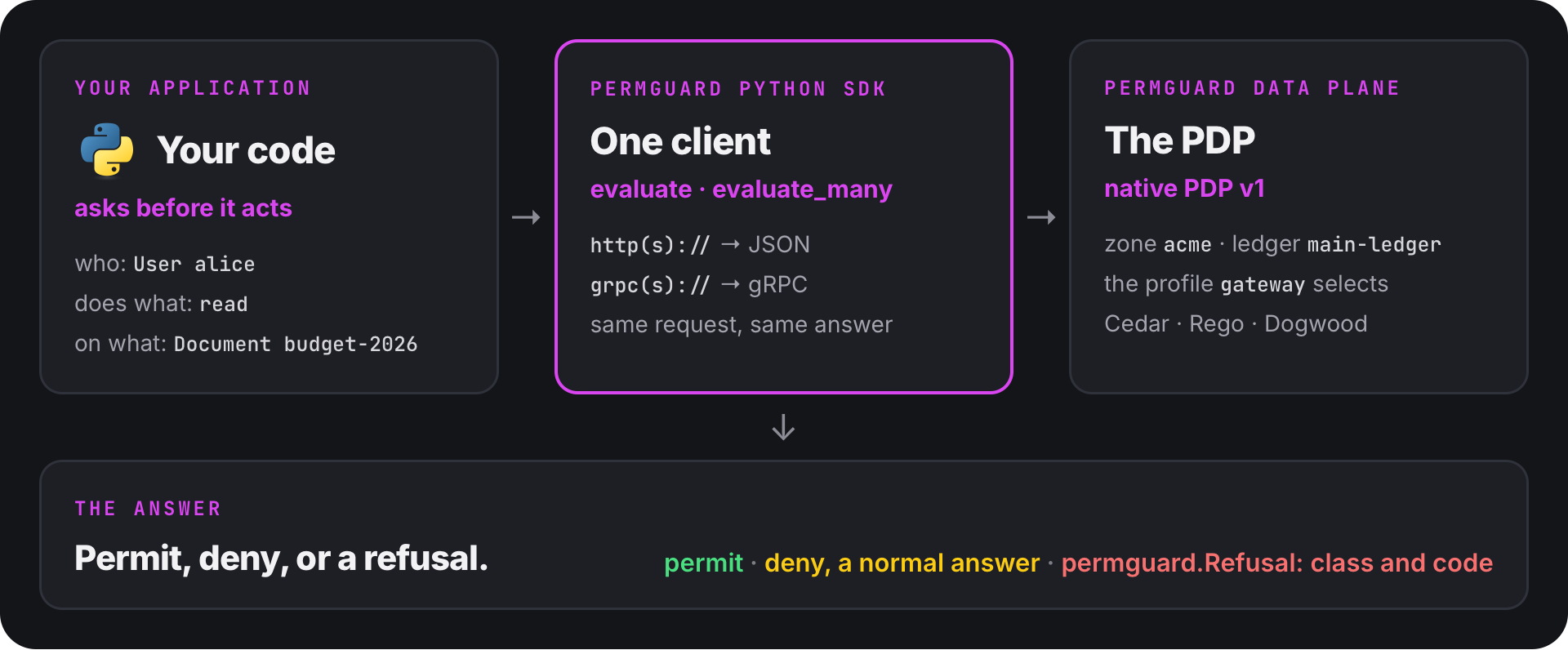
Your code asks, the SDK carries the question, the data plane decides with the ledger's policies.
Install
The SDK needs Python 3.8 or newer, and is published on PyPI.
pip install permguard
With uv, uv add permguard; with Poetry, poetry add permguard.
It needs a Permguard data plane to ask: by default it listens on port 7443, for HTTP and gRPC alike.
See the Permguard repository to run one.
Quick start
from permguard import Action, Client, Entity, EvaluateRequest, Refusal

request = EvaluateRequest(
    zone="acme",
    ledger="main-ledger",
    subject=Entity(type="User", id="alice"),
    resource=Entity(type="Document", id="budget-2026"),
    action=Action(name="read"),
    request_id="example-1",
)

try:
    # grpc:// or grpcs:// speaks gRPC; http:// or https:// speaks JSON.
    with Client("grpc://localhost:7443") as client:
        response = client.evaluate(request)
except Refusal as refusal:
    raise SystemExit(f"refused: class={refusal.error_class} code={refusal.code} message={refusal.message}")

print("permitted:", response.decision)
The same program is in examples/cmd; set PERMGUARD_PDP_URL to point it at another data plane.
A request that names no profile is decided by the ledger's default profile: the manifest permguard init writes declares it, with one partition, cedar.
A ledger whose manifest declares other profiles is asked with the profile's name, and its partition inputs are keyed by that profile's partitions.
The request
| Field | What it says |
|---|---|
zone, ledger |
the ledger whose policies decide, in its zone |
profile |
the profile of the ledger's manifest that selects the partitions to run |
subject |
who asks: a type and an id, with optional properties |
resource |
what is acted on: a type and an id, with optional properties |
action |
what is done: a name, with optional properties |
context |
any other fact the policies read |
partition_inputs |
runtime data for the partitions of the profile, see below |
request_id |
your id for the call, given back in the answer |
request_nonce |
asks for a signed response, see below |
The answer
A deny is not an exception: it is a successful response whose decision is False.
Validation, authorization, availability and server failures raise permguard.Refusal, with their stable error_class and code.
Each decision's context.evidence says how the plane recorded it: its mode, its status and, once recorded, its record_id and position.
A request that sets request_nonce (base64url without padding, 16 to 64 bytes) asks for a signed response, and the answer carries the plane's attestation: the plane signs only for an authenticated caller, and refuses with unauthenticated rather than answer unsigned.
Partition inputs
Runtime data is addressed to the partition name the ledger's profile declares:
from permguard import PartitionInput

request.partition_inputs["cedar"] = PartitionInput(
    type="permguard.cedar.entities.v1",
    data=[
        {
            "uid": {"type": "Team", "id": "engineering"},
            "attrs": {"active": True},
            "parents": [],
        }
    ],
)
The key selects a partition the profile already declares.
The input type is checked against that declaration; it does not select a runtime.
Many evaluations at once
Set the defaults on the request, list the evaluations, and call evaluate_many:
from permguard import (
    Action,
    Entity,
    EvaluateRequest,
    Evaluation,
    EvaluationOptions,
    EvaluationsSemantic,
)

response = client.evaluate_many(
    EvaluateRequest(
        zone="acme",
        ledger="main-ledger",
        subject=Entity(type="User", id="alice"),
        evaluations=[
            Evaluation(
                resource=Entity(type="Document", id="budget-2026"),
                action=Action(name="read"),
                request_id="read",
            ),
            Evaluation(
                resource=Entity(type="Document", id="budget-2026"),
                action=Action(name="update"),
                request_id="update",
            ),
        ],
        options=EvaluationOptions(
            evaluations_semantic=EvaluationsSemantic.EXECUTE_ALL,
        ),
    )
)
Each evaluation inherits what it does not set from the request.
Endpoints and options
| Endpoint | Transport |
|---|---|
http:// |
JSON over HTTP |
https:// |
JSON over HTTPS |
grpc:// |
permguard.data.v1.PolicyDecisionPoint |
grpcs:// |
permguard.data.v1.PolicyDecisionPoint on TLS |
with Client(
    "https://pdp.example.com",
    timeout=5.0,
    headers={"authorization": f"Bearer {token}"},
) as client:
    configuration = client.get_configuration()
| Keyword | Sets |
|---|---|
timeout |
the timeout of every call, in seconds, 5 by default |
headers |
static headers, also sent as gRPC metadata |
tls_context |
the ssl.SSLContext for https:// |
grpc_credentials |
the grpc.ChannelCredentials for grpcs:// |
Every call also takes its own timeout.
get_configuration reads the data plane's discovery document.
The client reuses its HTTP connection or gRPC channel: use it as a context manager, or call close().
Credentials
In production a data plane admits a call only with an access token of its cluster's Authority Plane, issued to a service account whose scopes include decision.evaluate on that data plane.
Obtain one with the account's access key and secret key, then send it on every call as authorization: Bearer <token>, with the header option above.
curl -s -u "$PERMGUARD_ACCESS_KEY:$PERMGUARD_SECRET_KEY" \
  -d grant_type=client_credentials \
  https://permguard.example:8443/authority/v1/token | jq -r .access_token
A token lasts an hour unless asked shorter: obtain another before it expires.
The development configurations Permguard ships grant decision.evaluate to everybody, so the quick start needs no token.
See the Authority Plane for service accounts, their scopes and keys.
Compatibility
This major version implements permguard.api.pdp.native.v1.
Compatibility is tied to that versioned interface, not to a server minor release.
The contract this release carries is the pdp.proto of Permguard v0.1.33, the tag PERMGUARD_CONTRACT names: CI fails when the copy in proto/ differs from it, and runs the tests against a data plane of that release over HTTP and gRPC.
It covers the decision interface: a request may ask for a signed response with request_nonce, and the answer carries the plane's attestation and each decision's context.evidence; the discovery document carries the version, lifecycle, limits and response signing.
The temporal interface, permguard.api.pdp.temporal.v1alpha1, is not covered by this SDK.
Develop
hatch run protoc
hatch run dev
hatch -e lint run all
hatch build
proto/permguard/data/v1/pdp.proto is the canonical contract of the Permguard release PERMGUARD_CONTRACT names; bash scripts/check-contract.sh proto/permguard/data/v1/pdp.proto checks it, and the bindings are regenerated with grpcio-tools 1.70.0 whenever it changes.
bash scripts/e2e-server.sh starts that release with a ledger the end-to-end tests ask (E2E_HTTP=http://127.0.0.1:7443 E2E_GRPC=grpc://127.0.0.1:7443 python -m pytest -q e2e); E2E_PORT_OFFSET moves its ports when another server holds them.
A release tag publishes to PyPI.
The package version is read from permguard/__about__.py and set from the release tag.
License
Apache License 2.0: see LICENSE, NOTICE.md and THIRD_PARTY_NOTICES.md.
Permguard is a trademark of Nitro Agility S.r.l., see TRADEMARKS.md. Python and the Python logos are trademarks of the Python Software Foundation, shown only to name the language this SDK is for.
1 maintainer

Metadata
1 maintainer
Release files for permguard 0.3.0
For a detailed explanation of source distributions (sdists) and built distributions (wheels), please see the package formats documentation.
Source distribution (sdist)
| File | Size | Uploaded | Provenance | Actions |
|---|---|---|---|---|
| permguard-0.3.0.tar.gz | 47.2 kB | With provenance | Details for permguard-0.3.0.tar.gz |
Built distribution (wheel)
| File | Interpreter | ABI | Platform | Actions Reset |
|---|---|---|---|---|
| permguard-0.3.0-py3-none-any.whl | Python 3 | none | any | Details for permguard-0.3.0-py3-none-any.whl |
Total release size: 81.3 kB
Release files / permguard-0.3.0.tar.gz
| Download URL | permguard-0.3.0.tar.gz |
|---|---|
| Size | 47.2 kB |
| Tags | Source |
|
SHA-256 checksum How to use checksums |
d2645cc5a1bbfb69c1cf7fb91d4fe874fb52ac127ec383bd73506762eaa895ad
|
|
BLAKE2b-256 checksum How to use checksums |
204f8d2e39a00841feec8330238322694a42eb474e5273b9989b3067d9e58aee
|
| Upload date | |
|
Uploaded using Trusted Publishing? What is trusted publishing? |
Yes |
| Uploaded via |
twine/7.0.0 CPython/3.13.16
|
Provenance
Provenance describes where a file came from. On PyPI, provenance is shared via attestations, which provide a verifiable record of the build or publishing details. View details, limitations and caveats.


PyPI Publish Attestation
PyPI verified that this artifact, at this checksum, originated from the publisher listed below.
Signed by GitHub Actions, verified by PyPI on Nov 20, 2026.
Transparency logRelease files / permguard-0.3.0-py3-none-any.whl
| Download URL | permguard-0.3.0-py3-none-any.whl |
|---|---|
| Size | 34.1 kB |
| Tags | Python 3 |
|
SHA-256 checksum How to use checksums |
7d2f00bd92b4394c27fc12df18812da1a145a838a43573b37887c995ed671434
|
|
BLAKE2b-256 checksum How to use checksums |
908f7b16033172ab612b350ac7066373ea29587b60cb61297dd6e984bb03dd4e
|
| Upload date | |
|
Uploaded using Trusted Publishing? What is trusted publishing? |
Yes |
| Uploaded via |
twine/7.0.0 CPython/3.13.16
|
Provenance
Provenance describes where a file came from. On PyPI, provenance is shared via attestations, which provide a verifiable record of the build or publishing details. View details, limitations and caveats.
PyPI Publish Attestation
PyPI verified that this artifact, at this checksum, originated from the publisher listed below.
Signed by GitHub Actions, verified by PyPI on Nov 20, 2026.
Transparency logSecurity for permguard 0.3.0
Provenance
Provenance describes where a file came from. On PyPI, provenance is shared via attestations, which provide a verifiable record of the build or publishing details. View details, limitations and caveats.
Full provenance
Both files in this release have been uploaded with provenance metadata.
Attestation for permguard-0.3.0.tar.gz
PyPI Publish Attestation
PyPI verified that this artifact, at this checksum, originated from the publisher listed below.
Signed by GitHub Actions, verified by PyPI on Nov 20, 2026.
Transparency logA note on package security
PyPI is a repository for distributing packages, not a service for auditing them. While third-party security researchers and our staff do their best to detect and remove malicious packages, PyPI cannot guarantee the quality, security or suitability of any given package.
To learn more about protecting yourself from malicious actors, visit our package security documentation.














