
Python inline calendar for telegram bots with persian jalali date support

Project description
python-telegram-bot-calendar


This is fork of artembakhanov/python-telegram-bot-calendar which support jalali calendar. Very simple inline calendar for your bot.

Getting Started
This library is tested on Python 3.6 - 3.12.
Installation
pip install persian-telegram-bot-calendar
Usage
There is one main class - DetailedTelegramCalendar that can be used as follows. This is the example for pyTelegramBotAPI library. Other libraries are also supported.
from telegram_bot_calendar import DetailedTelegramCalendar, LSTEP

...
@bot.message_handler(commands=['start'])
def start(m):
    calendar, step = DetailedTelegramCalendar(locale='fa').build()
    bot.send_message(m.chat.id,
                     f"Select {LSTEP[step]}",
                     reply_markup=calendar)


@bot.callback_query_handler(func=DetailedTelegramCalendar.func())
def cal(c):
    result, key, step = DetailedTelegramCalendar(locale='fa').process(c.data)
    if not result and key:
        bot.edit_message_text(f"Select {LSTEP[step]}",
                              c.message.chat.id,
                              c.message.message_id,
                              reply_markup=key)
    elif result:
        bot.edit_message_text(f"You selected {result}",
                              c.message.chat.id,
                              c.message.message_id)
In start handler the calendar is created. Several arguments can be passed:
calendar_id- small integer or string, used for calendar identification. It used when you need several different calendars (default - 0)current_date-datetime.dateobject, initial date value (default - today date)additional_buttons- 1D list of buttons that will be added to the bottom of the calendarlocale- eitheren,ru,eoorfacan be added more. fa is required to work in persianmin_dateandmax_date- both are used as min and max values for the calendar
As you can see, special function that is provided should be passed to callback query handler. It will automatically work. The function takes only one argument - calendar_id that is 0 by default.
In the body of the handler function you need to call process function on callback data. WARNING! You need to create the calendar object again if it was not saved before.
The function process return tuple of size 3 - result, keyboard, step.
result-datetime.dateobject if user finished selecting. OtherwiseNonekeyboard- inline keyboard markup if the result is not ready. OtherwiseNonestep-YEAR,MONTH, orDAYif not ready.Noneis also possible if there is no change in keyboard.
Advanced use
Several calendars
You can create as many calendars as you want. However, in order to handle them properly set different calendar_id's when you want to distinguish them. Take a look at examples.
Date ranges
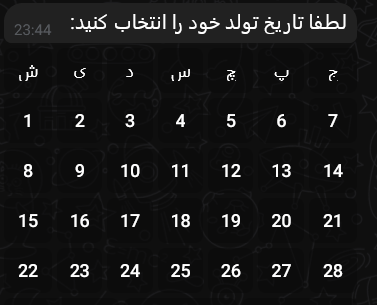
In the class constructor min_date and max_date - both are used as min and max values for the calendar. If you add them, the calendar will not show undesired dates. Example:
Custom style
You can also write your own code. One of the examples is redefining the steps order.
In the package you can find WMonthTelegramCalendar and WYearTelegramCalendar that start from day and month selecting, not from year.
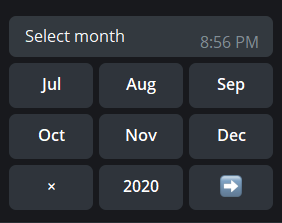
You can also redefine style parameters. Example:
class MyStyleCalendar(DetailedTelegramCalendar):
    # previous and next buttons style. they are emoji now!
    prev_button = "⬅️"
    next_button = "➡️"
    # you do not want empty cells when month and year are being selected
    empty_month_button = ""
    empty_year_button = ""
You will get:
Custom Translation
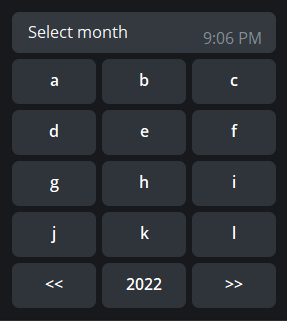
your_translation_months = list('abcdefghijkl')
your_translation_days_of_week = list('yourtra')

class MyTranslationCalendar(DetailedTelegramCalendar):
    def __init__(self, **kwargs):
        super().__init__(**kwargs)
        self.days_of_week['yourtransl'] = your_translation_days_of_week
        self.months['yourtransl'] = your_translation_months
Examples
- simple_pytelegrambotapi.py - simple example with pyTelegramBotAPI
- simple_aiogram.py - simple example with aiogram
- simple_telethon.py - simple example with telethon
- custom_translation.py - custom translation of calendar
- date_ranges.py - define date ranges for the bot
- redefine_style.py - simple example of redefining styles
- several_calendars.py - several calendars in one bot
Contributing
Contributions are what make the open source community such an amazing place to be learn, inspire, and create. Any contributions you make are greatly appreciated.
- Fork the Project
- Create your Feature Branch (
git checkout -b feature/yourFeature) - Commit your Changes (
git commit -m 'Add some yourFeature') - Push to the Branch (
git push origin feature/yourFeature) - Open a Pull Request
Authors
- Artem Bakhanov - @artembakhanov
License
This project is licensed under the MIT License - see the LICENSE file for details


Download files
Download the file for your platform. If you're not sure which to choose, learn more about installing packages.
Source Distribution
Built Distribution
Filter files by name, interpreter, ABI, and platform.
If you're not sure about the file name format, learn more about wheel file names.
Copy a direct link to the current filters
File details
Details for the file persian_telegram_bot_calendar-1.0.7.tar.gz.
File metadata
- Download URL: persian_telegram_bot_calendar-1.0.7.tar.gz
- Upload date:
- Size: 11.6 kB
- Tags: Source
- Uploaded using Trusted Publishing? No
- Uploaded via: twine/6.2.0 CPython/3.12.3
File hashes
| Algorithm | Hash digest | |
|---|---|---|
| SHA256 |
bcad6660b064b1188e5aa303d032621f230b5d603ae1f0692ca4990b2e51f340
|
|
| MD5 |
7b47918c703c77b96260a42c07628244
|
|
| BLAKE2b-256 |
b25351ac32db8e3684298bf8334bbfaf496f1d8cde19c9150b9debb40275372b
|
File details
Details for the file persian_telegram_bot_calendar-1.0.7-py3-none-any.whl.
File metadata
- Download URL: persian_telegram_bot_calendar-1.0.7-py3-none-any.whl
- Upload date:
- Size: 11.4 kB
- Tags: Python 3
- Uploaded using Trusted Publishing? No
- Uploaded via: twine/6.2.0 CPython/3.12.3
File hashes
| Algorithm | Hash digest | |
|---|---|---|
| SHA256 |
afc4d4ec22f2230f789037b79b7661f534fcbef2ecd9acc56da9c9bbe0432b88
|
|
| MD5 |
9bfd4354b7662b5ab706c8830e2da076
|
|
| BLAKE2b-256 |
8c457eb9f7b44ce881430ded80fbd266873cb5d81a18626a4e0d251ed8560607
|






