







An open-source voice agent that operates your computer instead of just answering questions about it.
A typical voice assistant talks back. Personal Jarvis does the thing. A small, fast router brain listens, decides how much the request actually needs, and handles the short stuff itself. Anything heavier goes to a coding-agent worker (Claude Code, Codex CLI, Gemini CLI, or an in-process worker on whatever API key you already have), which runs in isolation, gets checked by a critic, and reports back in the language you spoke.
You pick the provider: Gemini, Claude, OpenAI, or OpenRouter, one setting for each. It can rewrite its own configuration, and it runs on a headless server just as well as on a desktop with a microphone.
What you can say
| You say | What happens |
|---|---|
| "Research vector databases." | An isolated agent does the research. The finished report lands in Outputs as a file you can download. |
| "Call the clinic and book the next open appointment." | A real outbound phone call goes out over the optional Twilio line. |
| "Remember: Alex prefers Signal over email." | Written to the Knowledge Wiki, and still known in every later session. |
| "Switch the voice over to Cartesia." | The speech provider changes while you talk, and Jarvis reads the change back to you, old then new. |
| "Tell T1 to run the tests." | The instruction lands in terminal 1 of the Agentic IDE workspace. |
| "Open the browser and pull up the weather." | Jarvis takes the mouse and keyboard and does it on your screen. |
All six work today; none of this is a roadmap item. Two need extra setup: the phone call
needs the optional [telephony] extra plus your own Twilio account, a number, and a
publicly reachable HTTPS URL for the webhooks, and computer use needs a desktop install
with a screen, not the headless one.
Which model answers you
Three models sit behind that table, and you never choose between them: the handover happens mid-sentence, based on what the request needs.
The realtime model carries the conversation itself. It hears you and answers in under a second, built for talking, not for thinking hard. The moment a request needs an actual tool, that turn hands off to a second model, slower and noticeably smarter, the one that reads your wiki, changes a setting, places the call, or takes the screen. It answers in the same voice, so from where you're sitting it never stopped being one conversation. Real work, the kind that takes minutes, goes to a third: a coding agent running in its own isolated copy of the workspace, reviewed by a critic, that comes back with a file instead of just an answer.
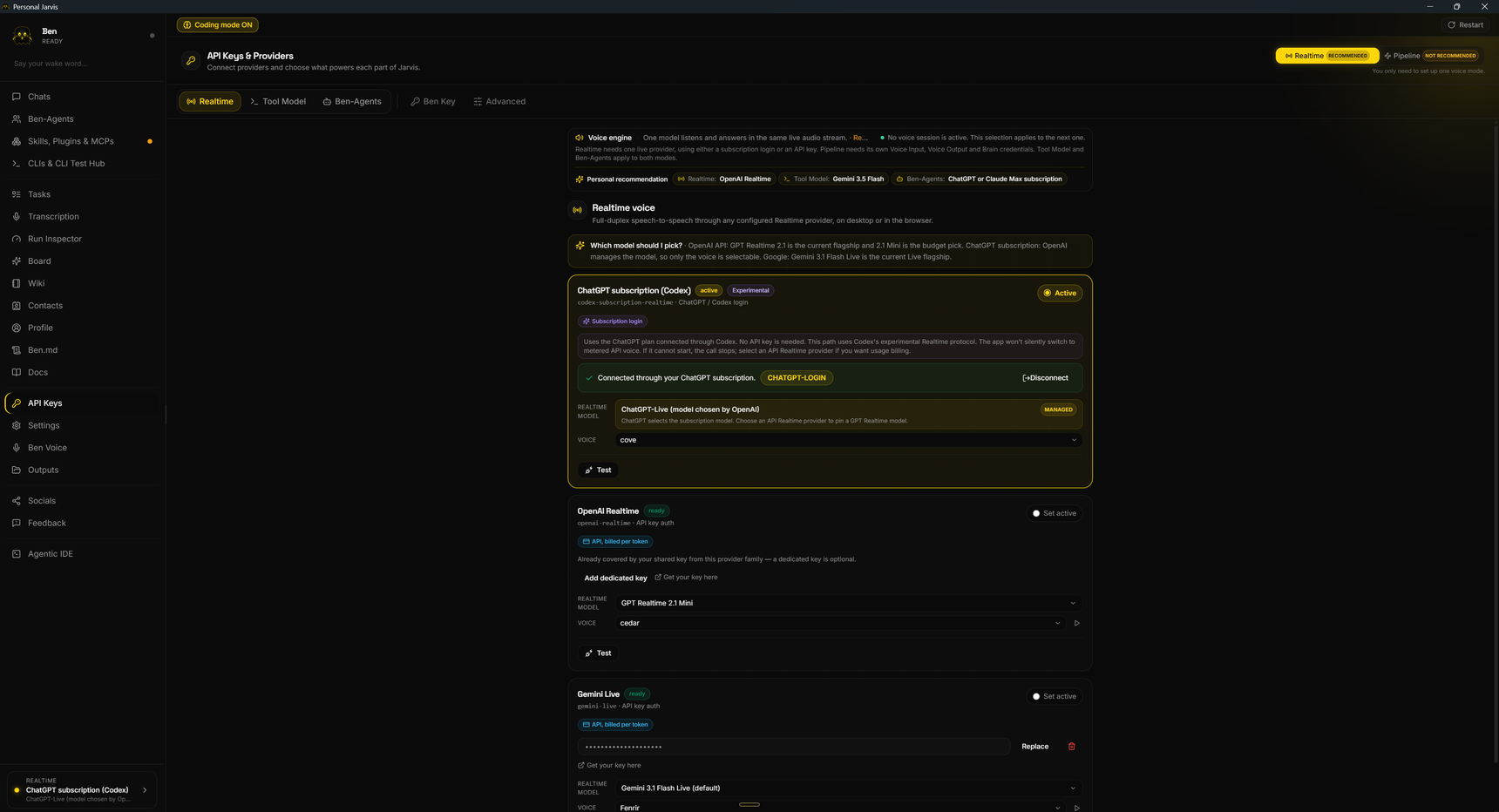
One tab per tier, each with its own provider, and you only need keys for the tiers you use. Every provider says how it bills: a subscription login you already have, or an API key charged per token.
Demo
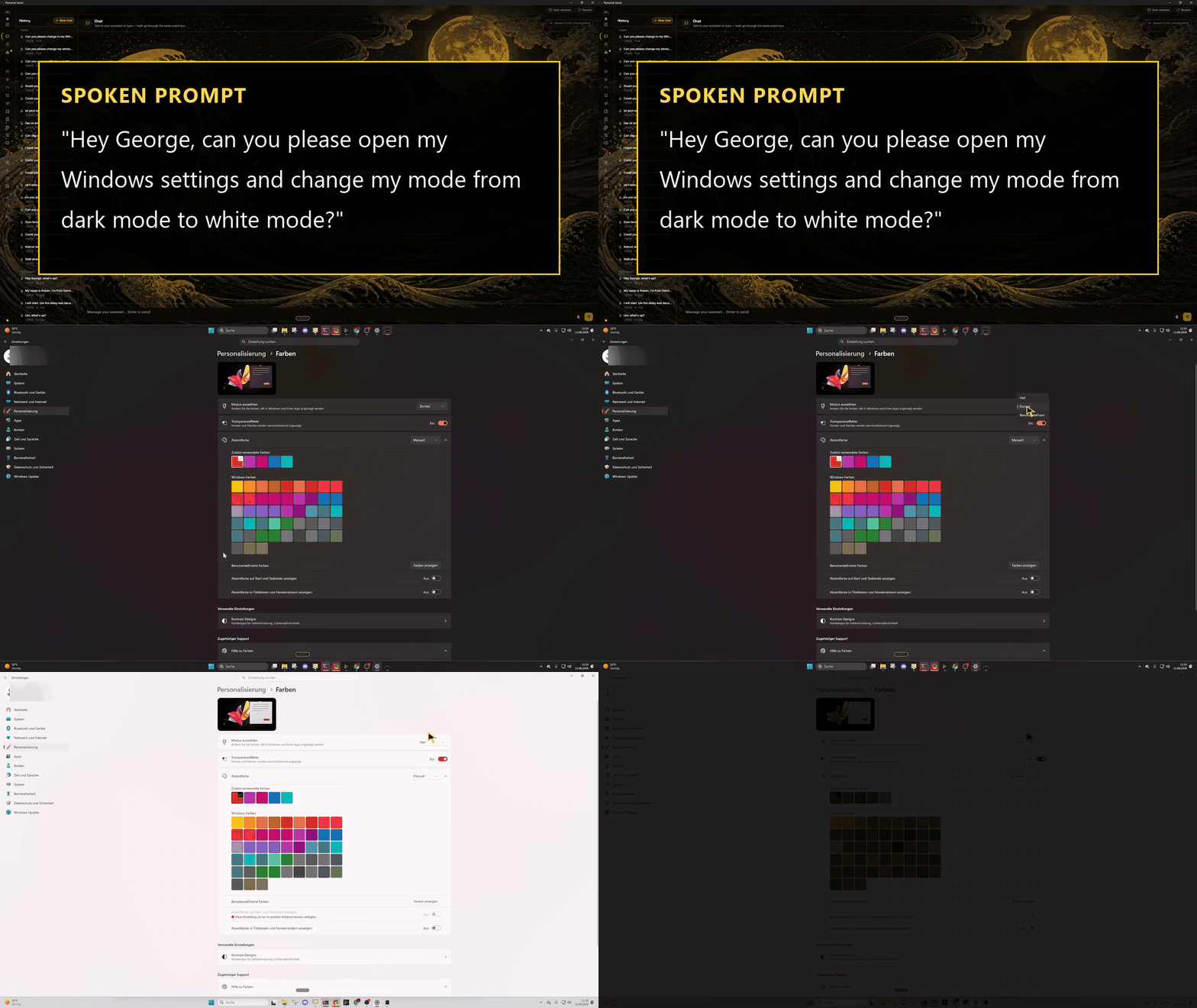
One voice command, and the router takes the screen and does it live · watch the full demo on YouTube
What it does differently
The router itself stays small. It works out what you said, picks a tool or a worker, and gets out of the way; there is no single giant prompt trying to be everything. Anything non-trivial runs as a mission in an isolated worktree and gets a critic's review before you ever hear the result. You are not left listening to silence while that happens, either: the moment the router picks an action, Jarvis says one line about that specific action, not a generic "working on it".
Providers are interchangeable, and that matters most on the day one of them fails. If the configured provider is unreachable or out of quota, Jarvis crosses to a different provider family instead of leaving you stuck. Workers run on a subscription login or a pay-per-token key, whichever you have. Speech and voice providers can be switched by voice mid- conversation; the brain provider cannot, on purpose, that one stays yours to change from the app or the CLI.
It also remembers: a Knowledge Wiki of plain Markdown files, plus an awareness layer, build up a picture of you across sessions. And it can change its own settings through a guarded, audited pipeline, the full mechanics are under Self-modification below.
How it works
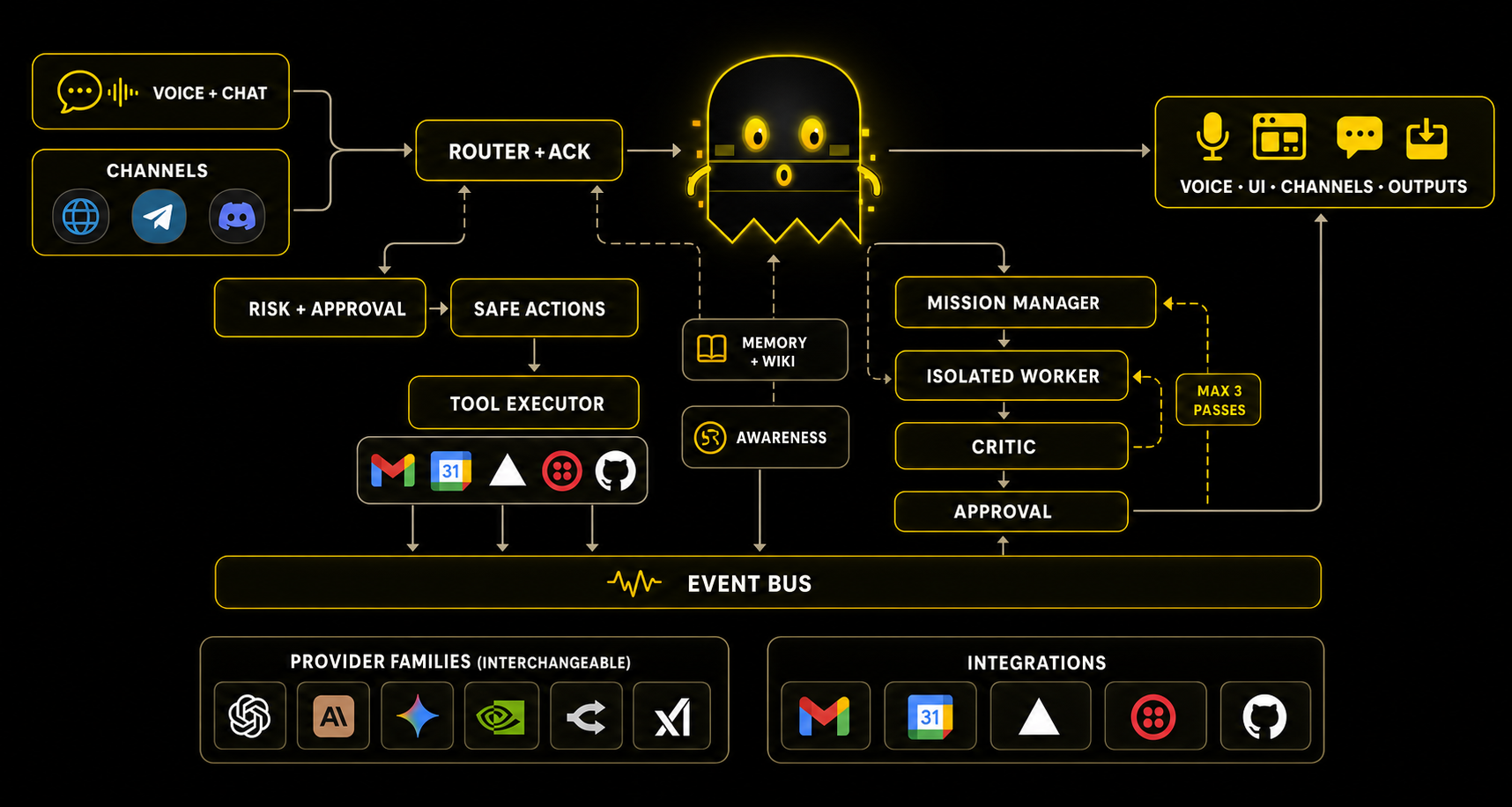
Higher layers can only reach lower ones through protocols; everything else talks over a typed, immutable EventBus. That's the strict seam that makes harnesses, providers, and plugins swappable in the first place.
The 8-layer map
L7  UI/UX           Desktop app (FastAPI + React + pywebview), tray, Orb overlay
L6  Orchestrator    State machine, Router, BrainManager, Mission-Manager + workers, Controller
L5  Harness adapter python-script, computer-use  (coding agents are L6 mission workers)
L4  Brain           Gemini · Claude · OpenAI · Grok · OpenRouter  +  sub-second Ack-Brain
L3  Intent / Risk   Classifier, four-tier risk policy, approval, rate-limit tracking
L2  Speech          Wake → VAD → STT → TTS  (cloud or local, your choice)
L1  Audio I/O       Device routing, chime feedback
L0  OS / Hardware   Mic, speakers, global hotkeys, optional GPU
A deeper engineering map, with anti-patterns, bug classes, and phase status down to
file:line, lives in docs/LLM-CONTEXT.md.
Install
One command on Windows, macOS, or Linux. You need Python 3.11 or newer and Git; the installer checks for both and stops with a download link if one is missing. It asks nothing in the terminal. It launches the app, and the app walks you through a one-time setup for language, wake word, and API keys.
What it costs: nothing to us. Personal Jarvis is MIT-licensed software you run on your own machine. There is no subscription for it, no paid tier, no marketplace cut, and no referral link behind any provider named on this page. What you do need is access to a model, and that is billed by whoever provides it, straight to you. An AI subscription you already pay for works, and so does a pay-per-token API key. The same goes for the optional pieces: a phone call runs on your own Twilio account at Twilio's prices.
Windows (PowerShell)
irm https://raw.githubusercontent.com/PersonalJarvis/PersonalJarvis/main/install/install.ps1 | iex
macOS and Linux
curl -fsSL https://raw.githubusercontent.com/PersonalJarvis/PersonalJarvis/main/install/install.sh | bash
This is open source, so read the installer before you run it. It creates a venv, installs dependencies, prefetches the voice models, and launches the app. Your keys land in your operating system's credential manager, never in the repo. Re-running the same one-liner updates in place.
Uninstall is one command as well. It removes the install folder, the autostart entry,
and the keychain entries. Add --dry-run to preview, --yes to skip the confirmation:
# Windows (PowerShell)
& "$env:USERPROFILE\.personal-jarvis\install\uninstall.ps1"
# macOS · Linux
bash ~/.personal-jarvis/install/uninstall.sh
Both of those run the uninstaller that is already on your disk. If it is missing or refuses
to start, the app can uninstall itself instead: see
install/README.md.
Optional extras, install flags, pipx & manual clone
Everything below is optional. Each item unlocks one specific thing:
| Optional | Unlocks |
|---|---|
| A provider API key or subscription login (Gemini, Claude, OpenAI, or OpenRouter) | Actually talking to a brain. The in-app setup stores it in your credential manager. |
| Node.js 18+ | The coding-agent worker CLIs, such as Claude Code and Codex, that heavy missions delegate to. Add it any time. |
| libportaudio (Linux only) | Local microphone and speakers (apt install libportaudio2). |
| A GPU | Faster fully-offline speech. Everything also runs on CPU. |
| Install flag | Effect |
|---|---|
--headless |
Minimal server install: API and WebSocket only, torch-free base, no Node.js. The tiny-VPS path. |
--no-launch |
Install only, do not start the app |
pipx, isolated, no clone, any OS, straight from PyPI:
pipx install personal-jarvis && jarvis serve
pip, into an environment you already have:
pip install personal-jarvis          # cloud-first base: API + WebSocket + browser UI
pip install "personal-jarvis[full]"  # everything: desktop app, telephony, channels, local voice
Manual: clone it, read every line, then run:
git clone https://github.com/PersonalJarvis/PersonalJarvis
cd PersonalJarvis
python -m venv .venv && source .venv/bin/activate   # Windows: .\.venv\Scripts\Activate.ps1
pip install -e .[full]
jarvis serve
Run it
jarvis          # full desktop: window + voice + Orb overlay
jarvis serve    # headless server: API + WebSocket + browser UI, no local audio needed
Headless / server notes
On a server, open http://localhost:47821. The full experience lives in the browser,
including voice through the browser microphone. The one-time setup runs there too, and you
can also set a provider key such as GEMINI_API_KEY in the environment or a .env file.
Browser microphone access needs a secure context. localhost works as it is; for a remote
VPS, terminate TLS with an HTTPS reverse proxy such as Caddy or Nginx. Plain
http://server-ip stays usable for text, but browsers will block voice.
What's inside
Missions
Anything non-trivial, say "research X and write me a report", spawns a worker in an
isolated git worktree: a private sandbox copy of the workspace, with crash containment. A
critic reviews the result, for up to three rounds, before you ever hear it, and
deliverables land in Outputs as downloadable files.
Agentic IDE
Pick a folder, choose how many terminals to open and which coding agent runs in each one, Claude Code or Codex, and you get a grid of real terminals inside the app. Every terminal carries a spoken call sign (Mika, Nova, Aria), so the whole workspace is addressable by voice: "what is Mika doing?", "tell Nova to run the tests". A focus mode narrows Jarvis to that workspace for as long as you want, then switches back cleanly.
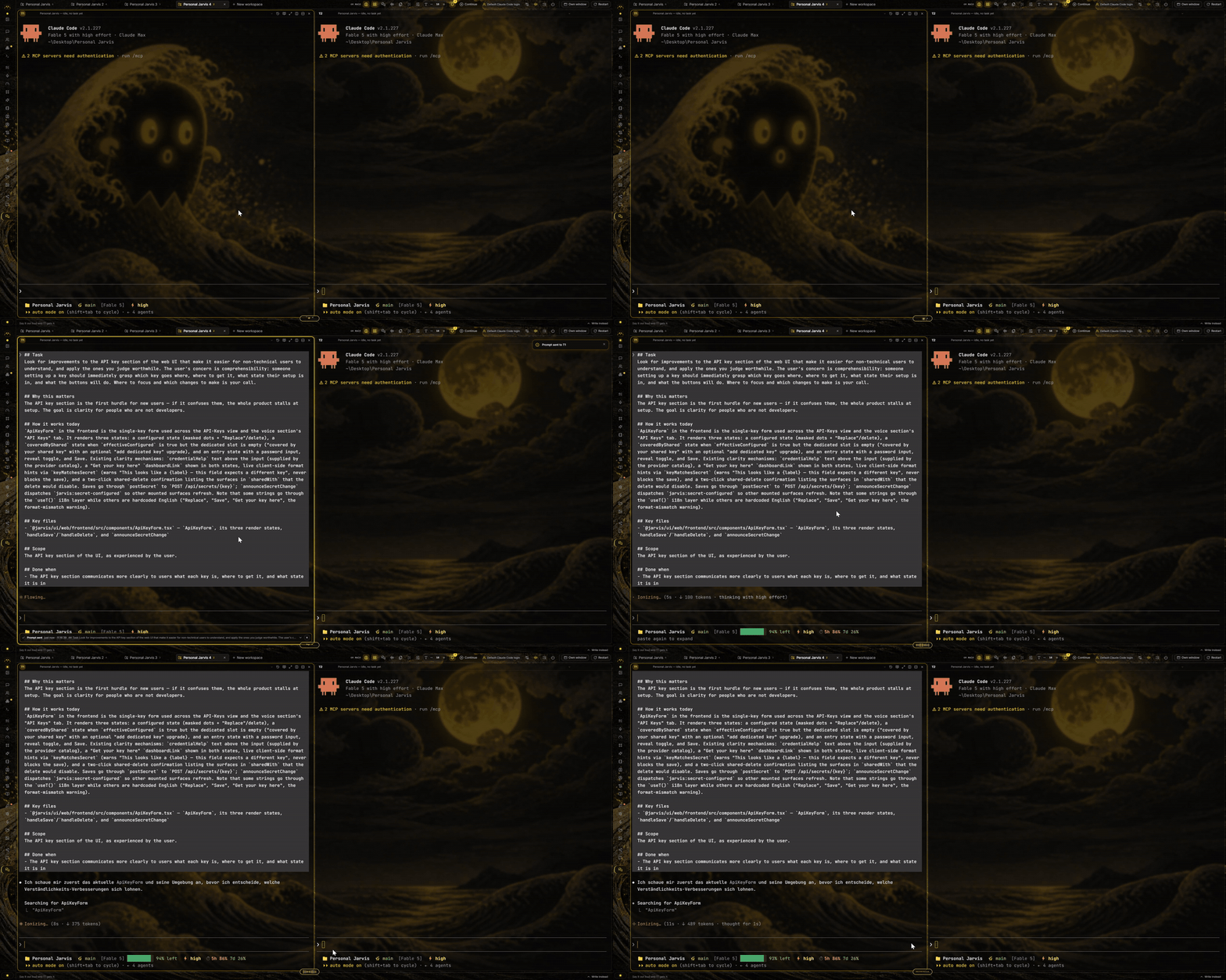
A prompt lands in terminal 1, carrying the task, the key files and how that part of the code works today. The counter underneath shows how long that agent has been thinking · watch the full Agentic IDE demo on YouTube
Knowledge Wiki
An Obsidian-compatible Markdown vault that Jarvis reads and writes. Tell it something once and every future session knows it. Because it is plain files on your disk, you can read, edit, and sync it yourself.
Computer use
Ask for something that has no API, and Jarvis takes the mouse and keyboard: opening apps, clicking, typing, navigating. There is no scripted path per application. It works the way you would.
The loop is perceive, act, verify. Jarvis takes a screenshot, a vision model says what to click next, the click is made through the platform's own input layer, and then it looks again to check that what it intended actually happened. Two details keep that honest. Coordinates are resolved against the exact frame the model saw, not against a stale picture of the screen, so a window that moved between two steps cannot send a click into nothing. And every action goes through a ledger that refuses duplicates, so a model that repeats itself does not click Send twice.
While it drives, a border sits around the screen so you can see it is not you. That border
comes from a small Qt companion in the [desktop] extra. Where the companion is absent, on
a base or headless install and on aarch64 Linux, it degrades to a logged no-op and the
control itself still works.
Channels and telephony
The desktop window, the browser, Telegram, and Discord all reach the same brain and share
the same memory. Real outbound phone calls are possible but not out of the box: they need
the optional [telephony] extra, your own Twilio account and number, and a publicly
reachable HTTPS URL that Twilio can call back for the voice webhook and the media socket.
Safety tiers
Every action is classified as safe, monitor, ask, or block before it runs. Destructive things ask first, whitelisted routines stop nagging you, and the blacklist always outranks the whitelist.
Self-modification
Jarvis can change its own settings by voice, through a guarded pipeline that validates, backs up, applies, verifies, and rolls back on failure, with a full audit trail. Some things are deliberately out of its reach: secrets and keys, the safety tiers, the review gates, and the active brain provider, which only you can change from the app or the CLI. Generated skills always land as drafts for your review. Nothing self-activates.
Dictation
Hold a key, talk, and the text lands in whatever field has focus, in any application: a browser, an editor, a chat box, some internal tool's form. Jarvis writes it through the clipboard, sends the paste chord, and restores your old clipboard afterward; if a paste doesn't land, it tells you instead of silently losing what you said. One key is a hold, a second is a toggle, both can be armed together, and a third re-pastes the last thing you dictated into whatever field just ate it.
Recognition runs on whatever speech provider you have configured, local model included, in which case your voice never leaves the machine. Cleanup happens in two passes: a plain pattern match strips filler sounds per language with no model involved at all, and an optional second pass, capped by a hard latency budget, handles punctuation, capitalization, false starts, and spoken numbers, falling back to your raw transcript unchanged if it fails. A separate pass translates instead of cleaning, writing what you said in one fixed target language. Words the recognizer keeps getting wrong go into a dictionary you control. Everything, raw transcript, cleaned version, and the original audio, stays on disk: you can see exactly what a cleanup pass changed, revert it, or retry a transcription that came back empty because a provider was briefly down.
Realtime voice
An optional speech-to-speech mode (OpenAI Realtime, Gemini Live) for sub-second conversational latency, with automatic fallback to the classic wake, STT, brain, TTS pipeline when it is unavailable.
Drive it from the terminal
The jarvis CLI (aliases jarvisctl, jctl) controls a running instance. Same actions as
the app, same safety checks, just scriptable. Anything you can click, you or your scripts
or another coding agent can type:
jarvis system status          # {"reachable": true} when Jarvis is up
jarvis --json brain status    # which provider is live, as machine-readable JSON
jarvis api <tag> <op>         # EVERY REST endpoint, auto-generated from OpenAPI
It is a thin client over the local REST API on 127.0.0.1:47821, so it inherits every
guardrail (risk tiers, atomic config writes, the audit log) instead of going around them.
Full guide: docs/jarvis-cli.md.
Configuration
You do not need a config file. Every setting has a built-in default, and the one-time
in-app setup covers the rest. For finer control there is one optional, documented file
(jarvis.toml.example):
[profile]
language = "auto"          # "de" | "en" | "auto" (bilingual auto-detect)

[trigger.wake_word]
phrase = ""                # YOUR word; nothing is preset for you
engine = "auto"            # resolves the best engine for your phrase

[stt]
provider = "groq-api"      # or openai-api, openrouter-stt, gemini-api, faster-whisper (local)

[tts]
provider = "gemini-flash-tts"
fallback = "grok-voice"    # cross-provider fallback is the norm everywhere
Overrides cascade from jarvis.toml to ENV (JARVIS__SECTION__KEY=…). Secrets never go in
this file. API keys live in your operating system's credential manager, or in .env, and
you enter them in the app.
Privacy
Your keys stay yours. They are stored in the operating system's credential manager, never in the repo, and never in a file you could commit by accident.
The always-on part is local. Wake-word listening runs entirely on your machine, and audio
only goes to a cloud speech provider after you have addressed Jarvis, and only if you chose
a cloud provider in the first place. Speech recognition can run fully offline with the
[local-voice] extra. Brain and voice output use whichever provider you configure.
Memory is plain files. The Knowledge Wiki is Markdown on your disk, not a hosted database.
Extend it
Every pluggable part is a Python entry point. Write a class against the protocols in
jarvis/core/protocols.py, register one line in
pyproject.toml, reinstall. No fork, no core edits.
| Plugin group | What you can add |
|---|---|
jarvis.brain |
A new LLM provider |
jarvis.stt / jarvis.tts |
Speech recognition / synthesis backends |
jarvis.wakeword |
Wake-word engines |
jarvis.realtime |
Speech-to-speech providers |
jarvis.harness |
Harness adapters the router and when-then tasks dispatch to |
jarvis.tool |
Actions the router can call directly |
jarvis.channel |
New surfaces, such as chat platforms and transports |
Three rules keep it stable: implement the protocol, stream everything (AsyncIterator,
where non-streaming yields one element), and pass the contract suite
(pytest tests/contract/). The deep engineering map, with anti-patterns, recurring bug
classes, and phase status, lives in
docs/LLM-CONTEXT.md, and is built to be pasted into
an LLM chat whole.
Project structure
Inside jarvis/ the layout mirrors the 8-layer model, so you can usually guess where
something lives from the layer it belongs to:
PersonalJarvis/
├── jarvis/                  # The application
│   ├── core/                #   L6  EventBus, protocols, config + atomic writer
│   ├── orchestrator/        #   L6  State machine and turn control
│   ├── brain/               #   L4  Providers, the router, the Ack-Brain, persona
│   ├── missions/            #   L6  Worker and critic loop, worktree isolation
│   ├── agentic_ide/         #   L6  Terminal grid, call signs, prompt delivery
│   ├── speech/              #   L2  Wake → VAD → STT → TTS
│   ├── dictation/           #   L2  Cleanup, clipboard insert, polish, history
│   ├── realtime/            #   L2  Speech-to-speech providers
│   ├── memory/              #   L6  Knowledge Wiki, awareness, long-term recall
│   ├── cu/                  #   L5  Computer use: see the screen, drive it
│   ├── safety/              #   L3  The four risk tiers and the approval path
│   ├── channels/            #   L7  Telegram, Discord, and the shared brain behind them
│   ├── telephony/           #   L7  Outbound and inbound calls (optional extra)
│   ├── plugins/             #       Every pluggable backend, wired by entry point
│   ├── cli_ctl/             #       The jarvis / jarvisctl / jctl client
│   └── ui/web/              #   L7  FastAPI server + the React desktop app
├── ui/                      # Orb overlay; loaded by jarvis at runtime
├── board-backend/           # Standalone federation service (signed Board aggregates)
├── conductor/               # YAML-first agentic-workflow canvas, mounted in the app
├── wiki/                    # Seed knowledge vault, created on first run
├── install/                 # One-line installers + release verification (cosign / TUF)
├── tests/                   # Unit, integration, contract, and end-to-end suites
├── docs/                    # Architecture docs, ADRs, the philosophy, design specs
├── assets/                  # Brand art, banner, screenshots, demo recordings
├── .github/                 # CI workflows + issue / pull-request templates
├── scoop-bucket/            # Windows install manifest (Scoop)
├── homebrew-tap/            # macOS install formula (Homebrew)
└── README · LICENSE · CONTRIBUTING · SECURITY · TRADEMARK · CHANGELOG
Documentation
| Document | What's in it |
|---|---|
docs/architecture-overview.md |
The full architecture: layers, module catalog, data flow |
docs/LLM-CONTEXT.md |
Dense project snapshot, built to paste into an LLM chat whole |
CLAUDE.md |
Binding contributor guide: conventions, doctrine, anti-patterns |
docs/PHILOSOPHY.md |
Cross-platform, provider-agnostic design doctrine |
docs/adr/ |
Architecture Decision Records |
docs/BUGS.md |
The recurring-bug register |
docs/BRAND.md |
Brand guidelines: colors, typography, the wordmark |
Community
Development happens in the open. The roadmap and the bug hunts land on Discord before they land anywhere else, and questions are welcome there.


Discord · @Ruben_Luetke · Instagram · GitHub
Contributing
Pull requests are welcome, and CONTRIBUTING.md has the full
guide. The short version: artifacts are English, read CLAUDE.md
before larger changes, new providers must pass pytest tests/contract/, and security issues
go to SECURITY.md privately.
License
MIT. Free to use, modify, and distribute, including commercially; see
LICENSE. Third-party names and logos belong to their owners,
see TRADEMARK.md.
Created by Ruben Lütke · @Ruben_Luetke · © 2026 · MIT
Discord · X · Instagram
1 maintainer

Download files
Download the file for your platform. If you're not sure which to choose, learn more about installing packages.
Source Distribution
Built Distribution
Filter files by name, interpreter, ABI, and platform.
If you're not sure about the file name format, learn more about wheel file names.
Copy a direct link to the current filters
File details
Details for the file personal_jarvis-1.2.3.tar.gz.
File metadata
- Download URL: personal_jarvis-1.2.3.tar.gz
- Upload date:
- Size: 19.4 MB
- Tags: Source
- Uploaded using Trusted Publishing? Yes
- Uploaded via:
twine/6.1.0 CPython/3.13.14
File hashes
| Algorithm | Hash digest | |
|---|---|---|
| SHA256 |
b0a443d574a959d2c47a13fca790501690a5908b85cd408d7053c24392eaf678
|
|
| MD5 |
6c7b2204ebce6a90bd09976e06a98ad5
|
|
| BLAKE2b-256 |
ba4038dd3ad2f8f6afa491d7a8e13b357f7b8d8d1ff93e172af7d8a336a53311
|
Provenance
The following attestation bundles were made for personal_jarvis-1.2.3.tar.gz:
Publisher:
release.yml on PersonalJarvis/PersonalJarvis
-
Statement:
-
Statement type:
https://in-toto.io/Statement/v1 -
Predicate type:
https://docs.pypi.org/attestations/publish/v1 -
Subject name:
personal_jarvis-1.2.3.tar.gz -
Subject digest:
b0a443d574a959d2c47a13fca790501690a5908b85cd408d7053c24392eaf678 - Sigstore transparency entry: 2370706115
- Sigstore integration time:
-
Permalink:
PersonalJarvis/PersonalJarvis@c2d97c25faaa053bc6324372df1a3fd8e468a723 -
Branch / Tag:
refs/tags/v1.2.3 - Owner: https://github.com/PersonalJarvis
-
Access:
public
-
Token Issuer:
https://token.actions.githubusercontent.com -
Runner Environment:
github-hosted -
Publication workflow:
release.yml@c2d97c25faaa053bc6324372df1a3fd8e468a723 -
Trigger Event:
push
-
Statement type:
File details
Details for the file personal_jarvis-1.2.3-py3-none-any.whl.
File metadata
- Download URL: personal_jarvis-1.2.3-py3-none-any.whl
- Upload date:
- Size: 20.3 MB
- Tags: Python 3
- Uploaded using Trusted Publishing? Yes
- Uploaded via:
twine/6.1.0 CPython/3.13.14
File hashes
| Algorithm | Hash digest | |
|---|---|---|
| SHA256 |
329298ee59b63a5b02fb230524f2d8dc6ba37101c4b83c9cc930f79a522fbefb
|
|
| MD5 |
d79ae08a6cb697ba5a96617fe8a931a3
|
|
| BLAKE2b-256 |
0dd3da91de54efd19c77032e01cab473ee99ca9b8f75d1e9f11fc3ab9675d509
|
Provenance
The following attestation bundles were made for personal_jarvis-1.2.3-py3-none-any.whl:
Publisher:
release.yml on PersonalJarvis/PersonalJarvis
-
Statement:
-
Statement type:
https://in-toto.io/Statement/v1 -
Predicate type:
https://docs.pypi.org/attestations/publish/v1 -
Subject name:
personal_jarvis-1.2.3-py3-none-any.whl -
Subject digest:
329298ee59b63a5b02fb230524f2d8dc6ba37101c4b83c9cc930f79a522fbefb - Sigstore transparency entry: 2370706164
- Sigstore integration time:
-
Permalink:
PersonalJarvis/PersonalJarvis@c2d97c25faaa053bc6324372df1a3fd8e468a723 -
Branch / Tag:
refs/tags/v1.2.3 - Owner: https://github.com/PersonalJarvis
-
Access:
public
-
Token Issuer:
https://token.actions.githubusercontent.com -
Runner Environment:
github-hosted -
Publication workflow:
release.yml@c2d97c25faaa053bc6324372df1a3fd8e468a723 -
Trigger Event:
push
-
Statement type:







