
Image Perspective Transformer




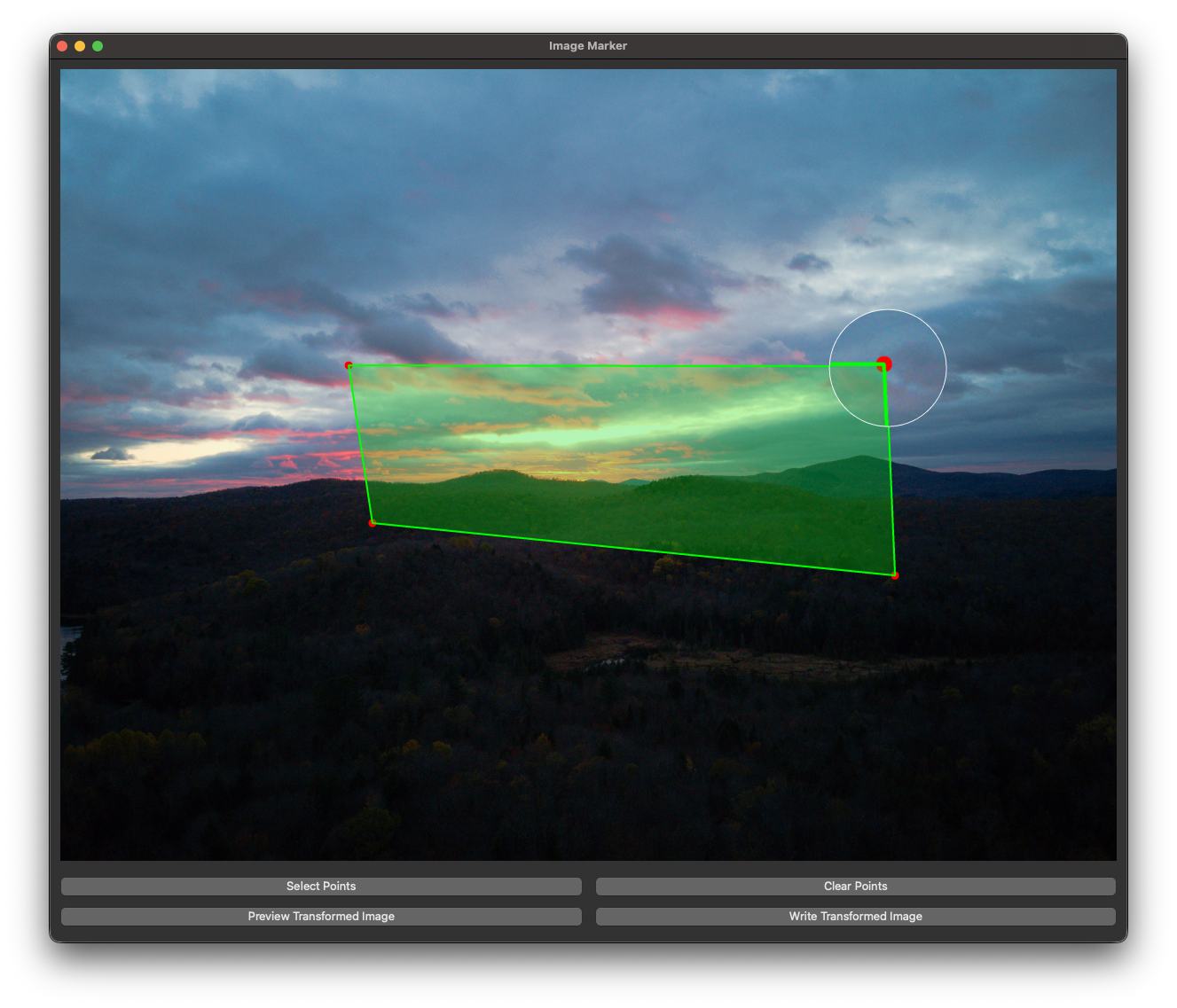
This project provides a PySide6 GUI for marking four points on an image, applying a perspective transform, and exporting a clean crop for documents (e.g., LaTeX). It supports interactive point editing, live preview, and automatic downscaling to a maximum side length for consistent output sizes.
Features
- Smart image view: Fit-to-screen display with accurate coordinate mapping.
- Fast point selection: Click up to four points to define the transform region.
- Editable points: Drag points to refine corners; lines and area shading update live.
- Area highlight: The selected quadrilateral is shaded for clear visual feedback.
- Detail magnifier: Hold Ctrl near a point for a 2x zoom lens on the corner.
- Preview + export: Preview the transformed image and save to a chosen path.
- Max-side downscale: Cap output size via
--max-side(default 1024) for LaTeX-friendly images. - Shortcuts: Ctrl+Q to quit, Ctrl+S to save, Ctrl+P to preview, Ctrl+Enter to apply.
Ensure the following are installed on your system:
- Python 3.8+
Install Steps
- Install from PyPI:
pip install perspective-transformer
- Run the application:
perspective-transformer <image_path> [output_path] [--max-side 1024]
How to Use
-
Run the Application:
-
Replace image.jpg in the code with the path to your image or place your image in the same directory as the script.
-
Start the application:
perspective-transformer <image_path> [output_path] [--max-side 1024]
-
-
Mark Points:
Click on the image to select four points in any order. These points define the region for perspective transformation. Drag any point to adjust.
-
Confirm Points:
After selecting four points, click "Select Points" (or Ctrl+Enter) to apply the transformation.
-
Preview Transformed Image:
Click "Preview Transformed Image" to see the transformed result in the same window. If the result is unsatisfactory, click "Clear Points" to reset and reselect points.
-
Save Transformed Image:
When satisfied, click "Write Transformed Image" (or Ctrl+S) to save the output as transformed_image.jpg or the specified output path.
License
This project is open-source and can be modified and used for personal or educational purposes. Attribution to the original creator is appreciated. (MIT License)
Enjoy transforming your images! 🚀
1 maintainer

Metadata
1 maintainer
Release files for perspective-transformer 1.1.0
For a detailed explanation of source distributions (sdists) and built distributions (wheels), please see the package formats documentation.
Source distribution (sdist)
| File | Size | Uploaded | |
|---|---|---|---|
| perspective_transformer-1.1.0.tar.gz | 156.3 kB | Details |
Release files / perspective_transformer-1.1.0.tar.gz
| Download URL | perspective_transformer-1.1.0.tar.gz |
|---|---|
| Size | 156.3 kB |
| Tags | Source |
|
SHA-256 checksum How to use checksums |
c888c3d17a98f2782cc298594c9c4a3db378b354177b8fadbf0631dcd54baeee
|
|
BLAKE2b-256 checksum How to use checksums |
e14e72d118b4cd87ccff8ef257529c2ce6f2cbd980cec1d3b643c9ee79d9f090
|
| Upload date | |
|
Uploaded using Trusted Publishing? What is trusted publishing? |
Yes |
| Uploaded via |
twine/6.1.0 CPython/3.13.7
|
Provenance
Provenance describes where a file came from. On PyPI, provenance is shared via attestations, which provide a verifiable record of the build or publishing details. View details, limitations and caveats.


PyPI Publish Attestation
PyPI verified that this artifact, at this checksum, originated from the publisher listed below.
Signed by GitHub Actions, verified by PyPI on Feb 13, 2026.
Transparency log













