
Accountability engine for founders — stable core CLI with beta integrations for sync, bot, and remote MCP

Project description
pester





An accountability engine for founders. Markdown in. Decisions out.
The Problem
Your meeting notes are in Notion. Your action items are in Linear. Your decisions are in Google Docs. Your transcripts are in Otter. Every tool has a piece of the picture. None of them have the whole thing.
You spend more time searching for context than making decisions. And when something falls through the cracks, you don't find out until the board meeting.
The Way Out
pester turns a folder of markdown files into a structured operating system for running a company. You write in markdown. pester reads your vault and tells you exactly where things stand: who owes what by when, what's overdue, what's stale, and what needs your attention.
The founder's job is accountability. Not strategy decks. Not culture docs. Knowing who owes what by when, and whether it's happening. pester makes that trivially easy.
Philosophy
Why markdown. Markdown survives every tool migration. Your Notion export is markdown. Your Obsidian vault is markdown. Every SaaS product will eventually die. Your .md files won't.
Why CLI. CLIs compose. Pipe pester actions --overdue into whatever you want. AI tools speak CLI natively. And it's fast.
Why accountability. Because that's the job. Everything else is noise unless it feeds into the loop of: who owes what, by when, is it happening.
Quick Start
# Install
pip install pester

# Create a new vault
pester init my-vault
cd my-vault

# Track an action
pester actions add --owner stan --due 2026-03-25 --desc "Ship v1"

# Check vault health
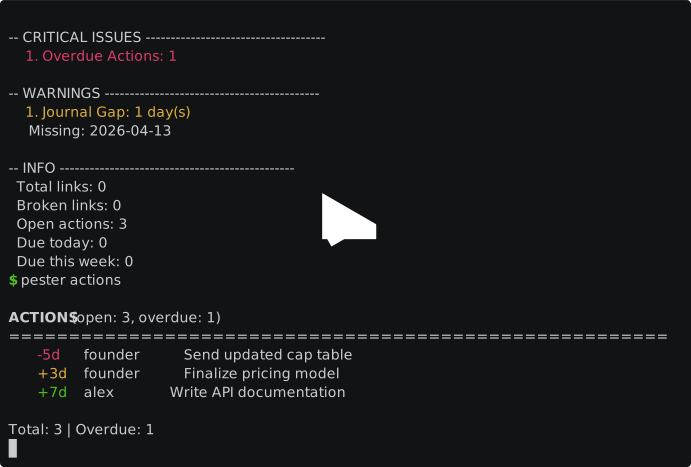
pester health

# View dashboard
pester dashboard
Or try with sample data: cd examples/sample-vault && pester health
Status for 1.0.0: the core CLI and PyPI package are the stable surface. Google Drive sync, Telegram sync, bot/daemon automation, and remote self-hosted MCP are beta surfaces for this soft launch. The web Custom Connector is not supported yet.
Features
- Action Tracking — Extract and track action items from meetings, messages, and documents. AI + regex hybrid extraction with automatic deduplication. See what's overdue at a glance.
- Semantic Search — RAG-powered search using ONNX E5 multilingual embeddings and ChromaDB. Find anything by meaning, not just keywords.
- Health Checks — Detect stale journals, orphaned documents, broken wikilinks, and overdue actions across your entire vault.
- Dashboard — HTML dashboard with auto-refresh, terminal output, or a local web server. Full visibility into vault status.
- Multi-Source Sync (Beta) — Pull content from Google Drive and Telegram into your vault automatically.
- Background Daemon (Beta) — File watcher with auto-extraction, scheduled briefings/digests, and escalation alerts. Runs as a macOS launchd service.
- Escalation Engine — Automatically escalates overdue actions through warning, critical, and blocked levels with smart suppression.
- Interactive Bot Agent (Beta) — DM the Telegram bot to manage tasks, search the vault, and get health reports. OpenAI and Anthropic function calling with persistent conversation history and access control.
- Coaching System (Beta) — Copilot (directive) and provocateur (reflective) modes with automatic time-of-day switching. Scheduled daily, weekly, monthly, and quarterly coaching prompts.
- Goal Tracking — Track OKRs and milestones in
goals/with progress computed from tagged actions. Energy budget and capacity enforcement. - Voice Transcription (Beta) — Voice, audio, and video note messages transcribed via Groq Whisper and processed as text by the bot agent.
- LLM Provider Abstraction — Swap between OpenAI and Anthropic for both bot chat and action extraction. Provider-agnostic tool format with automatic model fallback.
- MCP Integration — Expose your vault to Claude Code via MCP tools for AI-assisted knowledge work. Local stdio is supported today; remote streamable-http deployments are beta.
Use with Claude Code
pester is designed to work as an AI agent's accountability backend. Install the MCP extra and connect Claude Code to your vault:
Stable today: local stdio MCP with Claude Code / Claude Desktop. Beta: remote streamable-http MCP behind bearer auth. The web Custom Connector is still coming soon pending OAuth support.
pip install pester[mcp]
pester mcp  # starts the MCP server
Add to your project's .mcp.json:
{
  "mcpServers": {
    "pester": {
      "command": "pester",
      "args": ["--vault", "/path/to/your/vault", "mcp"]
    }
  }
}
Then ask Claude: "What actions are overdue?", "Add an action for stan to review the pitch deck by Friday", or "Give me a standup report." Claude calls structured vault tools, not grep. 17 tools available: actions, search, health, goals, standup, briefing, and more.
How It Compares
| Feature | pester | Notion | Obsidian | Linear |
|---|---|---|---|---|
| Accountability tracking | Built-in (actions, owners, deadlines) | Manual databases | Plugin-dependent | Issues only |
| Markdown-native | Yes, files on disk | Proprietary format | Yes | No |
| CLI-first | Yes, composable | No | No | No |
| Semantic search | Built-in (E5 + ChromaDB) | Built-in | Plugin | Built-in |
| AI extraction | Hybrid LLM + regex | AI add-ons | Plugin | No |
| Self-hosted | Yes, your filesystem | Cloud | Local files | Cloud |
| Free / OSS | MIT, free forever | Freemium | Freemium + paid sync | Paid |
| Background automation | Daemon with escalation | Automations | No | Automations |
| AI agent integration | 17 MCP tools | No native MCP | Agent skills (new) | No |
As of April 2026.
Installation
Extras status for 1.0.0: [drive], [telegram], [bot], [daemon], and remote
[mcp] deployments are beta surfaces in this soft launch.
| Command | What you get |
|---|---|
pip install pester |
Core CLI — actions, health, dashboard, init (~5MB) |
pip install pester[search] |
+ Semantic search with ChromaDB + ONNX E5 (~1.1GB with model) |
pip install pester[drive] |
+ Google Drive sync (beta) |
pip install pester[telegram] |
+ Telegram sync + notifications (Bot API, beta) |
pip install pester[mcp] |
+ MCP server for Claude Code (remote bearer-auth beta) |
pip install pester[daemon] |
+ Background daemon with file watching (beta) |
pip install pester[llm] |
+ LLM-powered action extraction (OpenAI + Anthropic) |
pip install pester[bot] |
+ Interactive Telegram bot agent (beta) |
pip install pester[all] |
Everything |
pip install pester[dev] |
+ pytest, pytest-cov, ruff, build (for contributors) |
Install from source:
git clone https://github.com/stansolo93/pester.git
cd pester
pip install -e ".[all,dev]"
Architecture
See docs/architecture.md for the full component diagram and storage layout.
CLI Reference
| Command | Description |
|---|---|
pester init <path> |
Create a new vault from template |
pester actions |
List all actions (default: open only) |
pester actions add |
Add a new action item |
pester actions done <slug> |
Mark an action as complete |
pester actions extract |
Extract actions from meeting notes |
pester health |
Run vault health checks |
pester dashboard |
Generate HTML dashboard (opens in browser) |
pester dashboard --terminal |
Print dashboard to terminal (ANSI) |
pester dashboard --serve |
Start local dashboard server with auto-refresh |
pester briefing <slug> |
Generate a briefing for a person or project |
pester digest |
Generate a weekly digest |
pester search <query> |
Semantic search across vault (requires [search]) |
pester index |
Build or update the search index |
pester standup |
Generate standup notes (yesterday done + today planned) |
pester status |
One-line vault health summary with health score |
pester model download |
Download the embedding model |
pester model status |
Check embedding model status |
pester wikilinks validate |
Find broken wikilinks in vault |
pester sync |
Sync from all configured sources |
pester sync drive |
Sync from Google Drive (requires [drive]) |
pester sync telegram |
Sync from Telegram (requires [telegram]) |
pester mcp |
Start MCP server (requires [mcp]) |
pester config check |
Validate pester.yaml — catches unknown keys and invalid values |
pester status |
One-line vault health summary (for terminal prompt integration) |
pester daemon run |
Start the background daemon (file watcher + scheduler) |
pester daemon status |
Check if the daemon is running |
pester adopt [path] |
Onboard an existing vault (scan, map folders, generate config) |
pester daemon install |
Install as a system service (macOS launchd or Linux systemd) |
pester daemon uninstall |
Remove the system service (launchd or systemd) |
pester diff-scope |
Output scope variables for CI/diff analysis |
Global flags:
| Flag | Description |
|---|---|
-v / --verbose |
Enable debug logging to stderr |
-q / --quiet |
Suppress non-essential output |
Configuration
pester is configured via pester.yaml at the root of your vault. See docs/vault-structure.md for the full schema reference.
vault:
  name: "Acme"
  language: en
  owner: "Your Name"

priorities:
  - name: "Q1 Launch"
    deadline: 2026-03-20

health:
  journal_stale_days: 3
  decision_review_days: 60

# Bot agent (requires: pip install pester[bot])
bot:
  enabled: true
  provider: openai          # or "anthropic"
  allowed_users: [123456789]

# LLM extraction (requires: pip install pester[llm])
llm:
  provider: openai
  model: gpt-5.4-mini

# Scheduled coaching prompts
scheduler:
  scheduled_prompts:
    morning_focus:
      time: "08:00"
      template: morning_focus
Documentation
- Getting Started — Step-by-step setup guide
- Vault Structure — Directory layout, pester.yaml schema, templates
- Integrations — Google Drive, Telegram, bot agent, and MCP setup with beta notes
Contributing
See CONTRIBUTING.md for development setup, testing, and PR process.
Security
See SECURITY.md for vulnerability reporting.
License
MIT
Release history Release notifications | RSS feed


Download files
Download the file for your platform. If you're not sure which to choose, learn more about installing packages.
Source Distribution
Built Distribution
Filter files by name, interpreter, ABI, and platform.
If you're not sure about the file name format, learn more about wheel file names.
Copy a direct link to the current filters
File details
Details for the file pester-1.0.0.tar.gz.
File metadata
- Download URL: pester-1.0.0.tar.gz
- Upload date:
- Size: 440.5 kB
- Tags: Source
- Uploaded using Trusted Publishing? No
- Uploaded via: uv/0.10.4 {"installer":{"name":"uv","version":"0.10.4","subcommand":["publish"]},"python":null,"implementation":{"name":null,"version":null},"distro":{"name":"macOS","version":null,"id":null,"libc":null},"system":{"name":null,"release":null},"cpu":null,"openssl_version":null,"setuptools_version":null,"rustc_version":null,"ci":null}
File hashes
| Algorithm | Hash digest | |
|---|---|---|
| SHA256 |
cf56aff7f2eae2bad1628d39f8c205614691a6556f98f4a0ad20c53588166d82
|
|
| MD5 |
b42ec5d0850d15b21f02a79e914d8adf
|
|
| BLAKE2b-256 |
5692076b79c55a5757dcb67d88ab7a76288acb53229d0b094f07b639657a1440
|
File details
Details for the file pester-1.0.0-py3-none-any.whl.
File metadata
- Download URL: pester-1.0.0-py3-none-any.whl
- Upload date:
- Size: 198.9 kB
- Tags: Python 3
- Uploaded using Trusted Publishing? No
- Uploaded via: uv/0.10.4 {"installer":{"name":"uv","version":"0.10.4","subcommand":["publish"]},"python":null,"implementation":{"name":null,"version":null},"distro":{"name":"macOS","version":null,"id":null,"libc":null},"system":{"name":null,"release":null},"cpu":null,"openssl_version":null,"setuptools_version":null,"rustc_version":null,"ci":null}
File hashes
| Algorithm | Hash digest | |
|---|---|---|
| SHA256 |
2f7eeb90c7c534358c4e2c3183c8ccd279715ec3e882c888ca43cea6d318b835
|
|
| MD5 |
dd2c13f43995574823514dd0d5813b96
|
|
| BLAKE2b-256 |
ef217830db7edd5da030fdc2a43f03a16c1b469e48c26f086781b06b1a1aa2b5
|






