
PESTO
Prior Evidence Status from Text and Ontologies. Given a gene and a phenotype, PESTO says how much prior evidence links them, on four ordered levels:
| Level | Meaning |
|---|---|
| Novel | no identified prior association |
| Hypothesized | mechanistic, animal or indirect support, no human genetic evidence for this pair |
| Existing | reported human genetic evidence |
| Established | replicated, accepted human genetic evidence |
Two branches answer independently, and are kept apart on purpose:
- Literature. PubMed is searched under the phenotype's synonyms and the gene's aliases, Claude Haiku 4.5 sorts every hit into four relevance bands, and Claude Opus 5 reads up to twenty abstracts and spreads 100 points over the four levels, citing the PMIDs it relied on.
- Open Targets. The gene's associated traits are fetched from the Open Targets Platform, the twenty nearest to the phenotype are ranked by an embedding model (BioLORD-2023), and Claude grades how each relates to the queried phenotype. The association score of a matching trait sets the level.
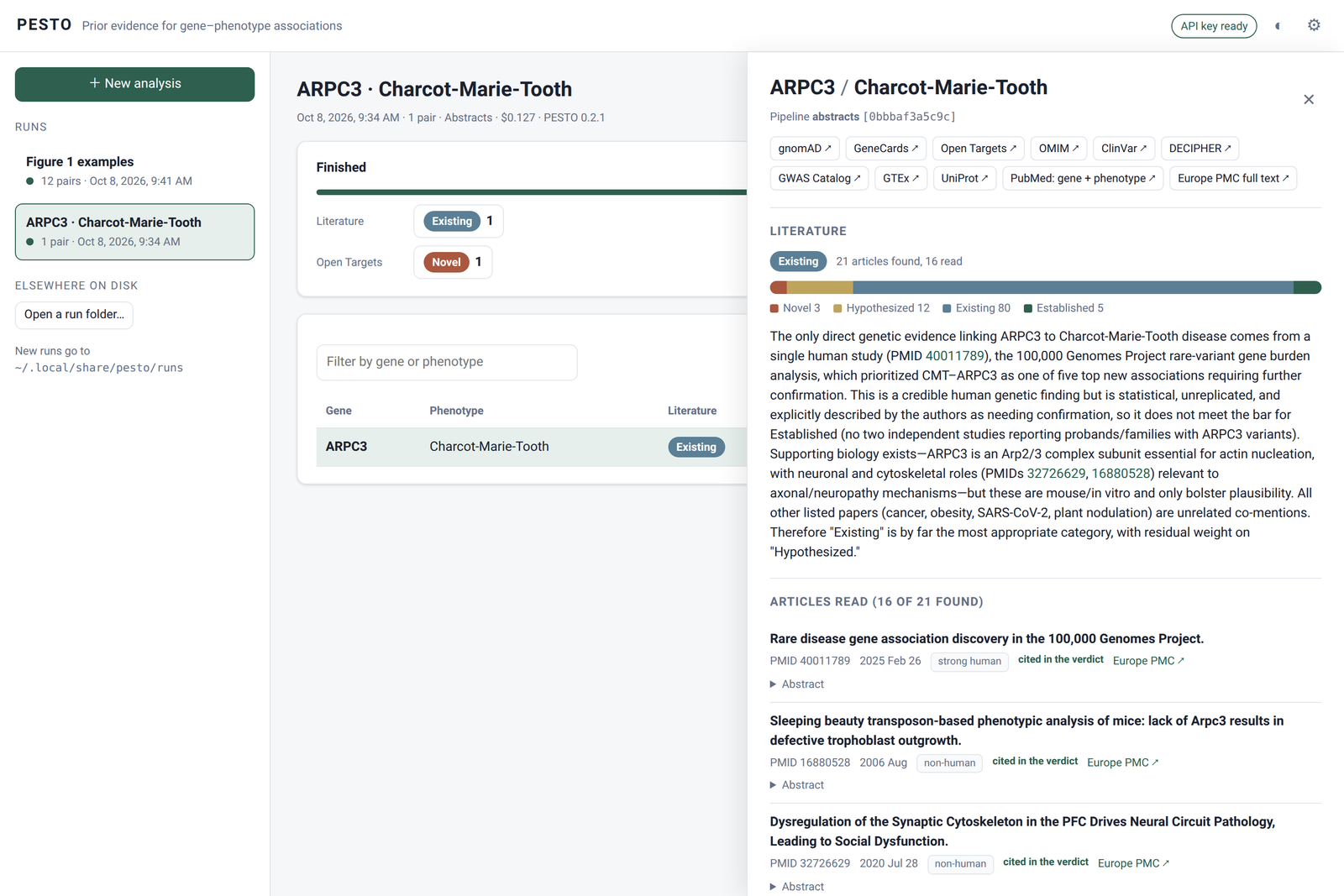
PESTO runs from the command line, or in a web page on your own computer with
pesto browser: one pair or a whole table at a time, each pair opening on its
verdict, the reasoning behind it, the articles read and links to gene databases.
This is the code of Large language model classifies prior evidence in
gene–phenotype associations (Guez et al., 2026). The paper/ directory
redraws every figure and table of the manuscript.
Install
PESTO is a command-line tool with a web interface, and pipx installs it in an environment of its own:
pipx install pesto-genetics
or, in a virtual environment you manage yourself:
python3 -m venv ~/venvs/pesto
~/venvs/pesto/bin/pip install pesto-genetics
~/venvs/pesto/bin/pesto --help
On Debian and Ubuntu a plain pip install outside a virtual environment is
refused (externally-managed-environment); use one of the two above. On macOS,
brew install pipx provides pipx. PESTO runs on Linux and macOS.
To update: pipx upgrade pesto-genetics.
The install is about 1.3 GB, nearly all of it PyTorch, which the Open Targets branch uses to rank traits locally. On Linux, pip's default index serves the CUDA build of torch; nothing here uses a GPU, and the CPU build is several hundred megabytes smaller (on macOS the default build is already the right one):
pipx install pesto-genetics --pip-args="--extra-index-url https://download.pytorch.org/whl/cpu"
The embedding model weights (439 MB) are downloaded on first use into
~/.cache/huggingface. pesto --download-models fetches them beforehand.
Without PyTorch
PyTorch serves one step only: ranking a gene's Open Targets traits by closeness to the phenotype, so that Claude grades the 20 nearest. Without it the install is about 200 MB:
pipx install pesto-genetics --pip-args="--no-deps"
pipx inject pesto-genetics anthropic pandas numpy requests python-dotenv
or, in a virtual environment:
python3 -m venv ~/venvs/pesto
~/venvs/pesto/bin/pip install anthropic pandas numpy requests python-dotenv
~/venvs/pesto/bin/pip install --no-deps pesto-genetics
PESTO notices that PyTorch is missing, says so, and reads every trait Open
Targets associates with the gene instead of the 20 nearest (the same as
--ot-encoder none). What that changes:
- The literature branch is unaffected: same searches, same reading, same verdicts.
- The Open Targets branch costs much more for well-studied genes, because Claude Opus grades every trait instead of 20. The cost grows with the number of traits Open Targets associates with the gene: a few cents for a gene with a few dozen, about $0.50 for one with several hundred (PCSK9 and familial hypercholesterolemia: 438 traits, $0.53 for this branch against $0.03 with PyTorch, and three minutes instead of one).
- Its verdicts can differ at the margin from the paper's, which used the BioLORD ranking. The grader sees every associated trait rather than the 20 nearest, so it can find a related trait the ranking would have left out, and it reads a list of several hundred less closely than a list of 20.
Installing torch and transformers afterwards restores the default.
In a web page
pesto browser
opens PESTO in your browser: run one pair, or drop a table of pairs and follow it as it runs; scroll through the answers, filter them by verdict, and open a pair to read its summary, the distribution over the four levels, the articles read (each opens in PubMed or Europe PMC), the Open Targets traits and how each relates to the phenotype, the cost, and links to gnomAD, GeneCards, Open Targets, OMIM, ClinVar, DECIPHER, the GWAS Catalog, GTEx and UniProt.
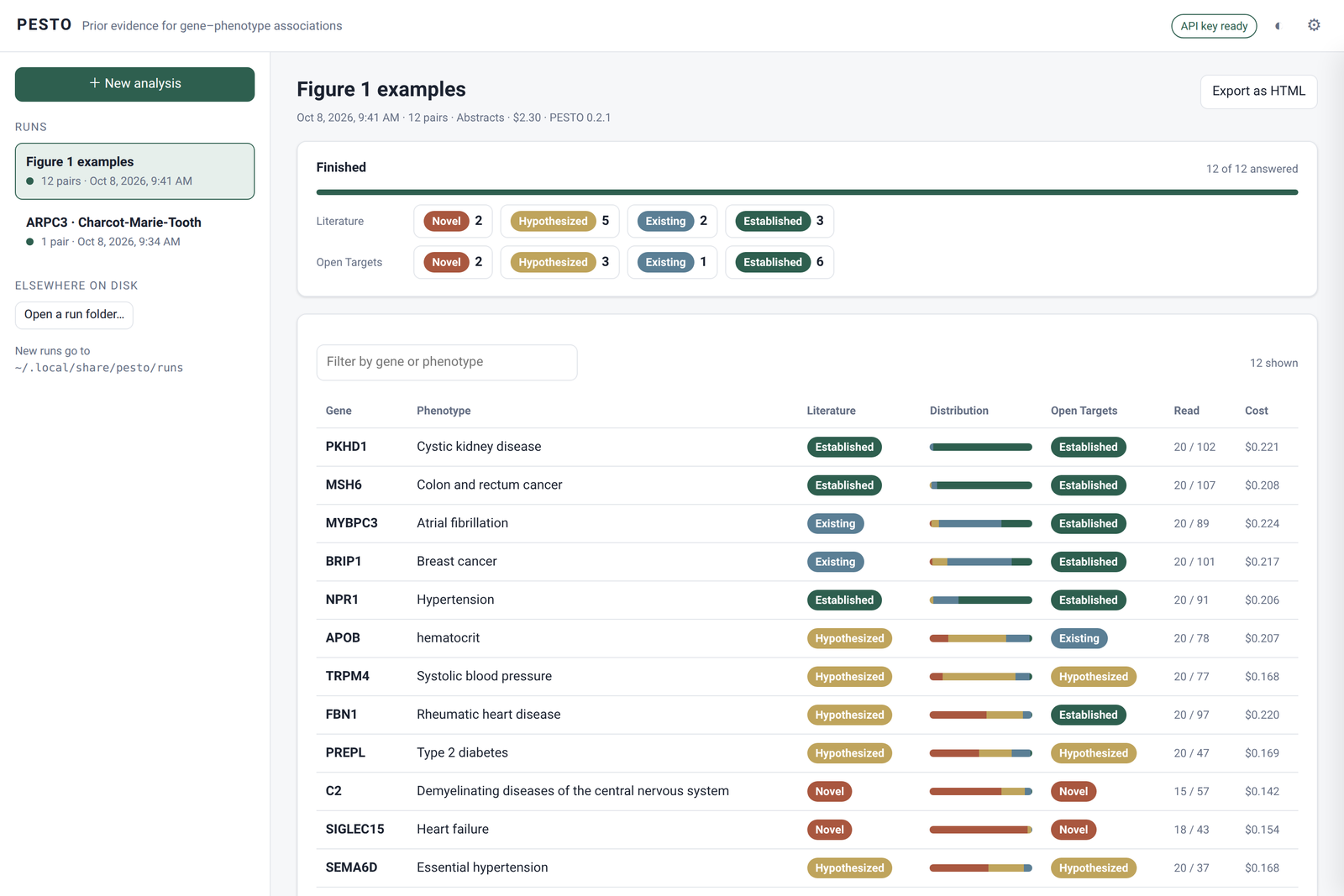
- Every table is a run of its own, kept in a folder under
~/.local/share/pesto/runs(change it in the settings, or withpesto browser --runs-dir DIR). The sidebar lists them; a run stopped or interrupted resumes where it was, without paying again for the pairs done. - Runs made elsewhere open too: a folder written by
pesto --bench(it holdspesto.tsv) opens with Open a run folder. - Export as HTML saves a run as a single file that opens by double-clicking, with no installation: it can be read and shared, not run again.
- The API key is read from
ANTHROPIC_API_KEYas on the command line. If it is not set, the page asks for it; the key is then kept in memory whilepesto browserruns, never written to disk, and sent only to api.anthropic.com. The optional NCBI key can be pasted in the settings the same way, or read fromNCBI_API_KEY.
The page is served on 127.0.0.1 only, and every request must carry the token in
the address pesto browser opens, so no other site open in the browser can start
a run. Before a table runs, the page shows its estimated cost.
Your Anthropic API key
PESTO calls Claude through the Anthropic API, with your own key, billed to your account. Create one at console.anthropic.com, then:
export ANTHROPIC_API_KEY=sk-ant-...
or put the same line, without export, in ~/.local/share/pesto/.env.
The key stays on your machine. PESTO never writes it to disk, never prints it,
and never stores it in a saved run. It is read in one place,
src/pesto/credentials.py, and handed only to the
official anthropic client in
src/pesto/services/llm_service.py, which
sends it to api.anthropic.com and nowhere else. Those two files are short; read
them to check.
An NCBI key (NCBI_API_KEY, optional) raises the PubMed rate limit from 3 to 10
requests a second and is handled the same way.
On the command line
pesto --gene DDX41 --phenotype "myelodysplastic syndrome"
prints the literature verdict, the Open Targets verdict, how many articles were
found and read, and what the pair cost. --json returns everything, including
the probability distribution, the justification and the supporting PMIDs.
A table of pairs (tab-separated, columns gene and phenotype) runs in parallel:
pesto --bench pairs.tsv --workers 10 # writes pesto.tsv and cost.tsv beside it
| Option | What it does |
|---|---|
--fulltext |
also search Europe PMC for articles that name the gene only in their body (see below) |
--arm NAME |
run one pipeline by name instead of choosing automatically |
--json |
the whole result as JSON |
--no-cache |
read the literature again even if this pair was already answered |
--resume |
with --bench, keep the rows an earlier attempt finished |
--max-date DATE |
search only articles published up to DATE; Open Targets is not run (see below) |
--note TEXT |
add a sentence to the reading prompt, before the articles; repeat for several |
--model ID, --model-fast ID |
use other Claude models; the fingerprint records it |
--ot-encoder biolord|sapbert|none |
how Open Targets traits are ranked; none reads them all |
--show-pipeline |
print the blocks of the pipeline and their fingerprints, call nothing |
pesto --help lists the rest.
As of a past date
pesto --gene DDX41 --phenotype "myelodysplastic syndrome" --max-date 2014
asks what the literature said at the end of 2014. DATE is YYYY, YYYY/MM or
YYYY/MM/DD, and a year or a month stands for its last day. Every PubMed search,
and the Europe PMC search of --fulltext, is restricted to articles published by
then, and any article whose displayed year is later is dropped as well.
The model that reads the abstracts is also told, in a note added before them,
that they are the literature as it stood on that date and that it should judge
from them alone, drawing on nothing else it knows
(prompts/max_date_note.txt).
--no-date-note sends the standard prompt instead.
Three things it does not do, and PESTO says so when it starts:
- Open Targets is not run. Its API serves only the current release, whose
association scores cannot be restricted to a date, so the Open Targets columns
are left empty (
ot_channelreadsnot run: --max-date). - The reading model is not dated. Claude may know of work published after the date. The note asks it not to use that knowledge, which narrows the leak without closing it.
- The
knowledgearm searches nothing, so the date has nothing to restrict, and it is sent no note.
The date is part of the pipeline's fingerprint, so a cached run, or a row kept by
--resume, is reused only for the same date; runs without --max-date keep their
fingerprint. Tables carry it in a max_date column.
Notes to the reader
--note "..." adds a sentence to the reading prompt, on a line of its own before
the articles, and can be repeated:
pesto --gene DDX41 --phenotype "myelodysplastic syndrome" \
      --note "Somatic variants in tumours do not count as evidence."
With --max-date, the date note comes first and yours follow in the order given.
Notes are part of the fingerprint, so a run is reused only for the same notes,
and tables carry them in a notes column. A run with notes no longer reads the
prompt the paper's numbers were measured with. The knowledge arm refuses notes,
having no articles to put them before.
Pipelines
A pipeline ("arm") is declared in src/pesto/flow/arms.py
as a list of blocks. Its fingerprint hashes every block's parameters and prompts,
and every saved run carries it, so a result says exactly which pipeline produced it.
By default PESTO asks Claude whether the phenotype is a disease, and runs:
abstractsfor a disease: PESTO as in the paper.abstracts-traitotherwise: the same pipeline with prompts that do not assume a disease, so replicated cohort and GWAS evidence can reach Established.
With --fulltext, it runs fulltext or fulltext-trait instead. These add a
Europe PMC search for articles that report the gene only in their body (a results
table, a supplementary file) and append the passages naming it for the reader.
PubMed cannot return those articles, and the deciding paper is often one of them.
On 20 GWAS associations whose deciding article names the gene only in its body,
abstracts placed 1 at Existing or above and fulltext 18, and both kept all 20
negative controls at Novel or Hypothesized (Supplementary Figure 3). fulltext was not used for the analyses of the paper,
and fulltext-trait has not been benchmarked.
The other arms reproduce the paper's comparisons: titles (titles only),
knowledge (the model's own knowledge, no search), and abstracts-bare,
abstracts-open and abstracts-score (reading-prompt ablations).
Cost
At Anthropic list prices, the literature branch costs about $0.07–0.11 a pair
with abstracts (Extended Data Fig. 2 and Supplementary Figure 3), and 2–3%
more with fulltext; the Open Targets branch about $0.03. Well-studied genes cost more. A
pair already answered by the same pipeline is read from the cache and costs
nothing. With --bench, the cost of every pair is written to cost.tsv as it
runs.
Where things are written
Runs are saved under ~/.local/share/pesto (or $PESTO_PROJECT_ROOT), one JSON
per pair with the corpus, the prompts and the model's answer.
Reproducing the paper
See paper/README.md. Every figure and table is redrawn from
the tables in paper/results/ without calling any model. The saved model answers
behind them are on Zenodo:
doi:10.5281/zenodo.23230222.
Tests
Free, no model calls, no network:
python3 tests/replay.py           # fingerprints, prompts, selection rules, parsing
python3 tests/script_imports.py   # every paper script still imports
Citation
Guez J, Auwerx C, Lu W, Satterstrom FK, Berkowitz J, Fu JM, Betancur C, Talkowski ME, Daly MJ, Karczewski KJ. Large language model classifies prior evidence in gene–phenotype associations. 2026. Code and data: doi:10.5281/zenodo.23230222.
Licence
Code: MIT. Tables and model answers produced for the paper: CC-BY 4.0. Third-party content they include keeps the terms of its source.
1 maintainer

Metadata
1 maintainer
Release files for pesto-genetics 0.3.2
For a detailed explanation of source distributions (sdists) and built distributions (wheels), please see the package formats documentation.
Source distribution (sdist)
| File | Size | Uploaded | |
|---|---|---|---|
| pesto_genetics-0.3.2.tar.gz | 709.7 kB | Details |
Built distribution (wheel)
| File | Interpreter | ABI | Platform | Reset |
|---|---|---|---|---|
| pesto_genetics-0.3.2-py3-none-any.whl | Python 3 | none | any | Details |
Total release size: 1.4 MB
Release files / pesto_genetics-0.3.2.tar.gz
| Download URL | pesto_genetics-0.3.2.tar.gz |
|---|---|
| Size | 709.7 kB |
| Tags | Source |
|
SHA-256 checksum How to use checksums |
3f39fa2d70fd676e821a82f3229d7cfd8f46c2ba38a32e8033346c2c56bc3421
|
|
BLAKE2b-256 checksum How to use checksums |
4c87f4ef09e9c4592a4d4a0c848e76da9519b2e29f0288eba85b29efbafd4240
|
| Upload date | |
|
Uploaded using Trusted Publishing? What is trusted publishing? |
Yes |
| Uploaded via |
twine/7.0.0 CPython/3.13.14
|
Provenance
Provenance describes where a file came from. On PyPI, provenance is shared via attestations, which provide a verifiable record of the build or publishing details. View details, limitations and caveats.


PyPI Publish Attestation
PyPI verified that this artifact, at this checksum, originated from the publisher listed below.
Signed by GitHub Actions, verified by PyPI on Oct 10, 2026.
Transparency logRelease files / pesto_genetics-0.3.2-py3-none-any.whl
| Download URL | pesto_genetics-0.3.2-py3-none-any.whl |
|---|---|
| Size | 735.8 kB |
| Tags | Python 3 |
|
SHA-256 checksum How to use checksums |
5fd4f28eab1f190d69be003f279f48867938eeaab7f03db59aea4b72e5504b49
|
|
BLAKE2b-256 checksum How to use checksums |
df8574615e4647271c409dde8078751310c5b868b76cd6b101dea199a8d360d3
|
| Upload date | |
|
Uploaded using Trusted Publishing? What is trusted publishing? |
Yes |
| Uploaded via |
twine/7.0.0 CPython/3.13.14
|
Provenance
Provenance describes where a file came from. On PyPI, provenance is shared via attestations, which provide a verifiable record of the build or publishing details. View details, limitations and caveats.
PyPI Publish Attestation
PyPI verified that this artifact, at this checksum, originated from the publisher listed below.
Signed by GitHub Actions, verified by PyPI on Oct 10, 2026.
Transparency log













