
peter: Your Linux Command Translator (Peter Griffin Edition)

Hey Lois, ever wanted to understand those geeky Linux commands but were afraid you'd end up more confused than a monkey trying to do its taxes? Well, fear no more! peter is here to break down those brainy terminal things in a way even I can understand (well, mostly).
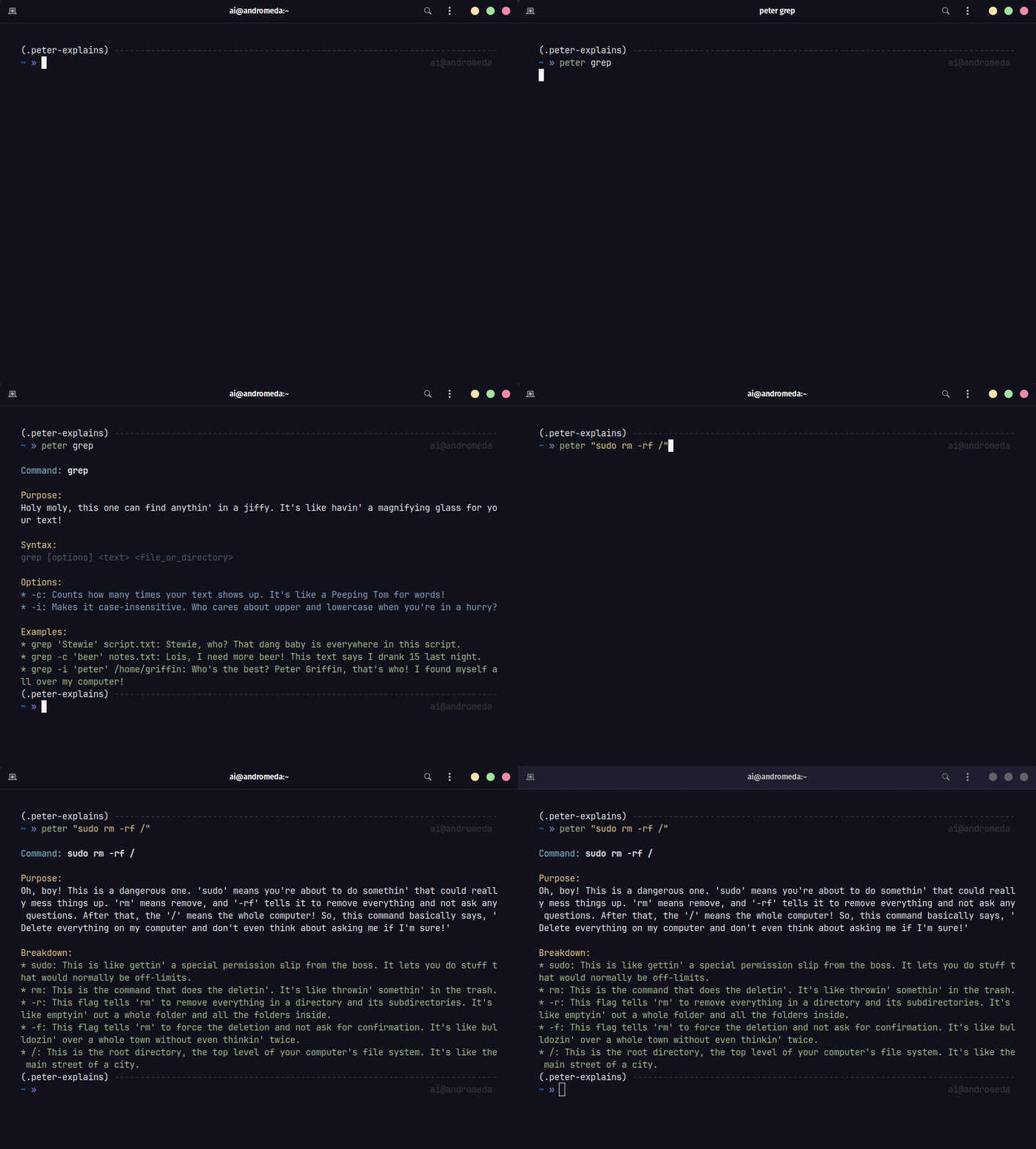
How the Heck Does This Work?
- You type somethin' like:
peter lsorpeter "grep hello world.txt" - I whip out my trusty Gemini AI translator: This thing's smarter than Stewie after a bowl of spinach, and it'll turn that boring command into a hilarious hot mess of an explanation.
- You laugh (or groan), but hey, at least you learn somethin': Maybe you'll actually remember what those commands do instead of just blindly copying stuff from the internet like a parrot.
Gettin' Started (For Dummies Like Me) 
- Make sure you got that pip thing installed: You know, for downloading packages and stuff.
- Use pip to install this amazingness:
$ pip install peter-explains
- Set the API Key: Get one o those for free from here. The run:
 $ peter --api <YOUR_API_KEY>
 $ peter --api <YOUR_CORRECT_API_KEY>
- Boom! Unleash the Peter: Try something like
peter grep. Just don't ask me to explain it – that's the AI's job. - Too Slow? I know. This thing can be slow at first. But try running the same command again. See that? That's the magic of cache.
[!TIP] Confused about what a fancy-ass command does? Put em inside
" "after peter. I'll handle the rest.$ peter "find . -name "node_modules" -type d -prune -exec rm -rf '{}' +"
[!WARNING]
Retep is gonna ruin your day if you try to use it without the API KEY
Don't worry. Meg's here to help. You need a FREE Google Gemini API KEY.

- Get yours from here: [https://aistudio.google.com/app/](https://aistudio.google.com/app/)
- Save the `API KEY` to your Environment by running the following:

  $ peter --api <YOUR_API_KEY>
[!TIP] If yo dumbass scews up setting the API key, run the following to delete and try setting it up again.
$ peter --delete-api
Help
Run the following for help. Probally won't help.
$ peter --help
Need more?

For the Brainiacs (a.k.a. Potential Contributors)
Hey Meg, turns out even I can't make this thing perfect on my own. If you're the type who knows their way around Python and AI, feel free to poke around the code and make it even funnier (or, dare I say, educational).
$ git clone https://github.com/atick-faisal/peter-explains
$ cd peter-explains
$ pip install -r requirements.txt
$ pip install -r requirements-dev.txt
$ pip install -e .
[!NOTE] Make sure you test your crap before making a PR. I ain't got time for yo buggy code. You're gonna need the API key in your exvironment to run the tests.
$ export GOOGLE_API_KEY=<YOUR_API_KEY>Run the tests like this:
$ pytestDon't forget to check your linting before pushing:
$ python -m pylint $(git ls-files '*.py') --rcfile .pylintrc
Disclaimer 
I ain't responsible if this tool makes you dumber, offends your delicate sensibilities, or causes your computer to explode. Use at your own risk, and remember: laughter is the best medicine... unless you're choking on a hot dog. Then you probably need a doctor.
Let me know if you want me to make it even more absurd or add specific installation instructions based on your project setup!
1 maintainer

Download files
Download the file for your platform. If you're not sure which to choose, learn more about installing packages.
Source Distribution
Built Distribution
Filter files by name, interpreter, ABI, and platform.
If you're not sure about the file name format, learn more about wheel file names.
Copy a direct link to the current filters
File details
Details for the file peter_explains-0.0.14.tar.gz.
File metadata
- Download URL: peter_explains-0.0.14.tar.gz
- Upload date:
- Size: 1.1 MB
- Tags: Source
- Uploaded using Trusted Publishing? Yes
- Uploaded via: twine/7.0.0 CPython/3.13.14
File hashes
| Algorithm | Hash digest | |
|---|---|---|
| SHA256 |
76af137936c69d8a824b3a56932a52c5b84eb5482f0fe79b095ec7bce6b6438f
|
|
| MD5 |
a8bda6c4082ae59212e7cf3416293238
|
|
| BLAKE2b-256 |
489d67729ac3b2a5721395fccb2d841b2c83e207f9ac67190ba344c876ec37d5
|
Provenance
The following attestation bundles were made for peter_explains-0.0.14.tar.gz:
Publisher:
cd.yml on atick-faisal/peter-explains
-
Statement:
-
Statement type:
https://in-toto.io/Statement/v1 -
Predicate type:
https://docs.pypi.org/attestations/publish/v1 -
Subject name:
peter_explains-0.0.14.tar.gz -
Subject digest:
76af137936c69d8a824b3a56932a52c5b84eb5482f0fe79b095ec7bce6b6438f - Sigstore transparency entry: 2340529879
- Sigstore integration time:
-
Permalink:
atick-faisal/peter-explains@e4b2f3609bf13195d395a5c9582cee37e78ec2f7 -
Branch / Tag:
refs/tags/v0.0.14 - Owner: https://github.com/atick-faisal
-
Access:
public
-
Token Issuer:
https://token.actions.githubusercontent.com -
Runner Environment:
github-hosted -
Publication workflow:
cd.yml@e4b2f3609bf13195d395a5c9582cee37e78ec2f7 -
Trigger Event:
push
-
Statement type:
File details
Details for the file peter_explains-0.0.14-py3-none-any.whl.
File metadata
- Download URL: peter_explains-0.0.14-py3-none-any.whl
- Upload date:
- Size: 15.1 kB
- Tags: Python 3
- Uploaded using Trusted Publishing? Yes
- Uploaded via: twine/7.0.0 CPython/3.13.14
File hashes
| Algorithm | Hash digest | |
|---|---|---|
| SHA256 |
c698ea8f96be9db81c7f32049bf39ff460b5109add6e22640aeb4d178f426432
|
|
| MD5 |
9abeb1cba6136611dcc7ea0c4873a27d
|
|
| BLAKE2b-256 |
9f32934058959c3af40a23bdc109591c3082dd552607726fd92ce64bc7ddbbb0
|
Provenance
The following attestation bundles were made for peter_explains-0.0.14-py3-none-any.whl:
Publisher:
cd.yml on atick-faisal/peter-explains
-
Statement:
-
Statement type:
https://in-toto.io/Statement/v1 -
Predicate type:
https://docs.pypi.org/attestations/publish/v1 -
Subject name:
peter_explains-0.0.14-py3-none-any.whl -
Subject digest:
c698ea8f96be9db81c7f32049bf39ff460b5109add6e22640aeb4d178f426432 - Sigstore transparency entry: 2340529898
- Sigstore integration time:
-
Permalink:
atick-faisal/peter-explains@e4b2f3609bf13195d395a5c9582cee37e78ec2f7 -
Branch / Tag:
refs/tags/v0.0.14 - Owner: https://github.com/atick-faisal
-
Access:
public
-
Token Issuer:
https://token.actions.githubusercontent.com -
Runner Environment:
github-hosted -
Publication workflow:
cd.yml@e4b2f3609bf13195d395a5c9582cee37e78ec2f7 -
Trigger Event:
push
-
Statement type:







