
PetroFit











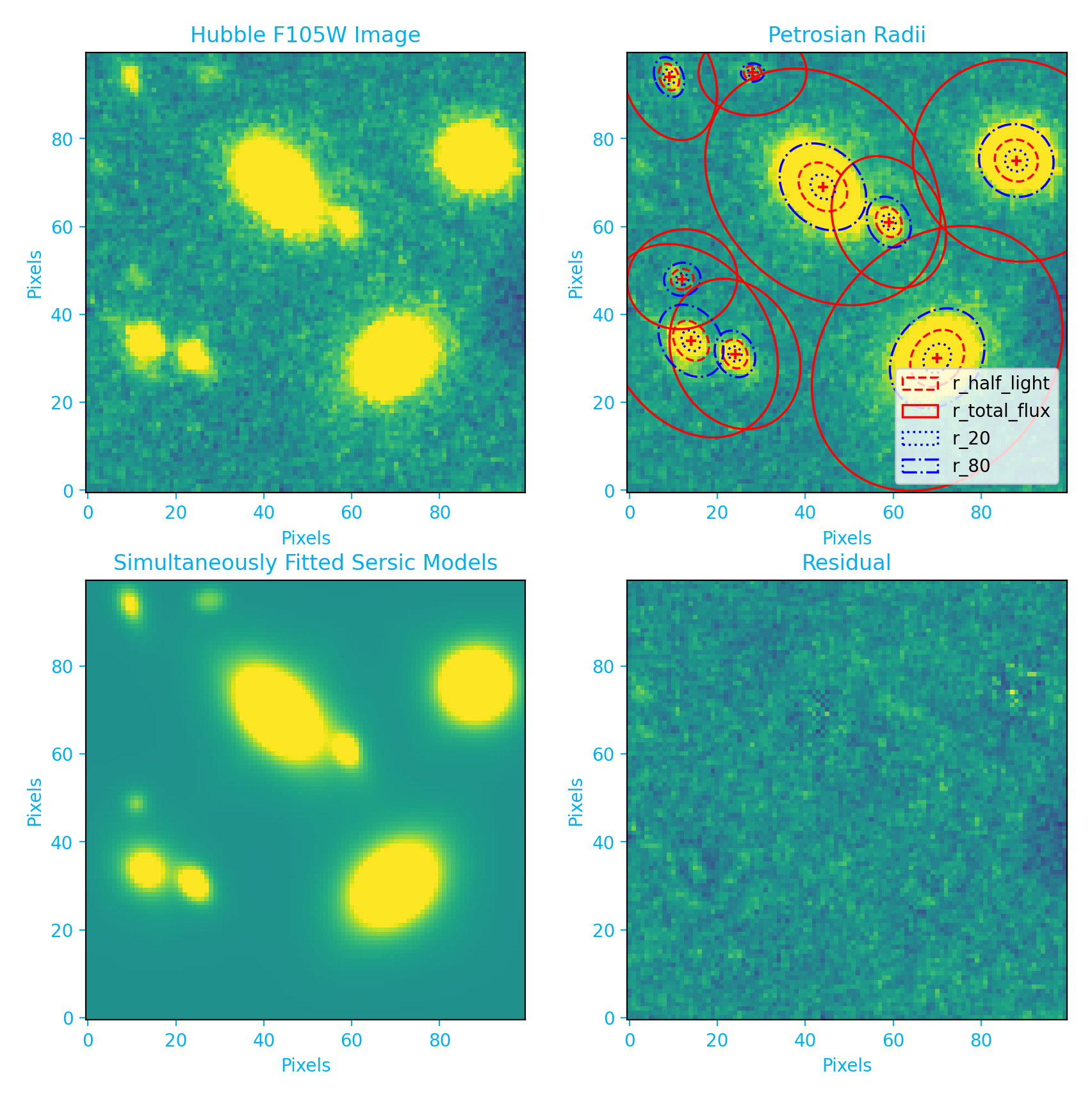
PetroFit is a package for calculating Petrosian properties, such as radii and concentration indices, as well as fitting galaxy light profiles. In particular, PetroFit includes tools for performing accurate photometry, segmentations, Petrosian profiling, and Sérsic fitting. Please see the petrofit documentation for installation instructions and a guide to the petrofit module.
Installation
You can install PetroFit using pip or build a jupyter lab environment using hatch . Please see the petrofit documentation for detailed installation instructions.
pip Install:
pip install petrofithatch Jupyter Lab:
cd into the dir you want to launch jupyter lab in, and then run:
hatch run jupyter:labExamples
Please see the petrofit documentation for detailed examples, a quick stat guide, and instructions.
Image Fitting:
PetroFit can be used with astropy models to fit psf convolved galaxy light profiles. Given a 2D image (image) and a psf (PSF), the following code snippet demonstrates how to fit a Sérsic model to the image:
import petrofit as pf
from astropy.modeling import models

sersic_model = models.Sersic2D(
        amplitude=1,
        r_eff=10,
        n=4,
        x_0=0, y_0=0,
        ellip=0.2,
        theta=25,
        bounds=pf.get_default_sersic_bounds(),
)

psf_sersic_model = pf.PSFConvolvedModel2D(
    sersic_model, psf=PSF, oversample=4, psf_oversample=1
)

fitted_model, fit_info = pf.fit_model(
    image, psf_sersic_model,
)
Photometry and Petrosian:
Given a 2D image (image) the following code snippet demonstrates how to create a Petrosian profile:
import petrofit as pf

# Make a segmentation map and
# catalog using Photutils wrapper
cat, segm, segm_deblend = pf.make_catalog(
    image,
    threshold=image.std()*3,
    wcs=None, deblend=True,
    npixels=4**2, nlevels=30, contrast=0.001,
)

# Photomerty on first source in catalog
r_list = pf.make_radius_list(max_pix=50, n=50)
flux_arr, area_arr, error_arr = pf.source_photometry(
    cat[0], # Source (`photutils.segmentation.catalog.SourceCatalog`)
    image, # Image as 2D array
    segm_deblend, # Deblended segmentation map of image
    r_list, # list of aperture radii
    cutout_size=max(r_list)*2, # Cutout out size, set to double the max radius
)

# Make a Petrosian profile
p = pf.Petrosian(r_list, area_arr, flux_arr)
print("{:0.4f} pix".format(p.r_half_light))
Citation
Please see the PetroFit citation documentation for citation instructions. This information is also available in the CITATION.rst file in the PetroFit repo.
License
This project is Copyright (c) The PetroFit Team and licensed under the terms of the BSD 3-Clause license. This package is based upon the Astropy package template which is licensed under the BSD 3-clause license. See the licenses folder for more information.
Generative AI Policy
To maintain scientific rigor and reproducibility, no generative AI-produced code is permitted within this repository. All code contributions must be manually authored or closely supervised to ensure our standards. Generative AI can be used, however, for documentation, issues, and PR descriptions (i.e git and GitHub workflow).
Contributing
We love contributions! petrofit is open source, built on open source, and we’d love to have you hang out in our community.
Imposter syndrome disclaimer: We want your help. No, really.
There may be a little voice inside your head that is telling you that you’re not ready to be an open source contributor; that your skills aren’t nearly good enough to contribute. What could you possibly offer a project like this one?
We assure you - the little voice in your head is wrong. If you can write code at all, you can contribute code to open source. Contributing to open source projects is a fantastic way to advance one’s coding skills. Writing perfect code isn’t the measure of a good developer (that would disqualify all of us!); it’s trying to create something, making mistakes, and learning from those mistakes. That’s how we all improve, and we are happy to help others learn.
Being an open source contributor doesn’t just mean writing code, either. You can help out by writing documentation, tests, or even giving feedback about the project (and yes - that includes giving feedback about the contribution process). Some of these contributions may be the most valuable to the project as a whole, because you’re coming to the project with fresh eyes, so you can see the errors and assumptions that seasoned contributors have glossed over.
Note: This disclaimer was originally written by Adrienne Lowe for a PyCon talk, and was adapted by petrofit based on its use in the README file for the MetPy project.
Acknowledgments
We thank Dr. Gregory D. Wirth, Dr. D. J. Pisano, and Dr. Alan Kahn for their guidance and support throughout this project. We would also like to thank the developers of Photutils, as much of this work is built on top of the tools they provid. This work was made possible by NASA grant AR 15058. Lastly, we give thanks to the Space Telescope Science Institute and the Technical Staff Research Committee (TSRC), a group that facilitates matching research projects with interested technical staff.


1 maintainer

Metadata
1 maintainer
Release files for petrofit 0.6.0
For a detailed explanation of source distributions (sdists) and built distributions (wheels), please see the package formats documentation.
Source distribution (sdist)
| File | Size | Uploaded | Provenance | |
|---|---|---|---|---|
| petrofit-0.6.0.tar.gz | 46.3 kB | Without provenance | Details |
Release files / petrofit-0.6.0.tar.gz
| Download URL | petrofit-0.6.0.tar.gz |
|---|---|
| Size | 46.3 kB |
| Tags | Source |
|
SHA-256 checksum How to use checksums |
3bcbd5176b9f4e47847ed4582fed8beafc85792ab4fc30c7d9c27adc132f0d3e
|
|
BLAKE2b-256 checksum How to use checksums |
f9c5b0b2a1cc2ecdc28d5cb13c8e4cd7665d2994468ee708f04f6e500c83d68c
|
| Upload date | |
|
Uploaded using Trusted Publishing? What is trusted publishing? |
No |
| Uploaded via |
twine/6.1.0 CPython/3.12.9
|
Security for petrofit 0.6.0
Provenance
Provenance describes where a file came from. On PyPI, provenance is shared via attestations, which provide a verifiable record of the build or publishing details. View details, limitations and caveats.
No provenance found
None of the files in this release were uploaded with provenance metadata.
A note on package security
PyPI is a repository for distributing packages, not a service for auditing them. While third-party security researchers and our staff do their best to detect and remove malicious packages, PyPI cannot guarantee the quality, security or suitability of any given package.














