

An agentic harness that makes formation evaluation
auditable and more accurate.
Give it a raw LAS file and a question in plain language. A language model investigates the well step by step, Petrophys does every calculation, and code checks and records each step, so every number in the answer traces back to the log.
Website · Documentation · Quick start · Results · Features





Quick start
1. Install
pip install petroharness
Python 3.10 or later; Petrophys comes with it.
From source, to change the code
git clone https://github.com/sambalshikhar/PetroHarness.git && cd PetroHarness
python3.10 -m venv .venv && source .venv/bin/activate
pip install -r requirements.lock      # the versions the tests run with
pip install -e .
2. Launch the UI
petroharness --launch-ui
The page opens at http://localhost:7860. With nothing else set, the model is WellLogLLM-3.7B, our post-trained
model for well-log interpretation, run by Ollama on your computer, with or without a GPU (a Mac's
GPU, an NVIDIA or an AMD one is used). There is nothing else to install: the first time, PetroHarness downloads Ollama
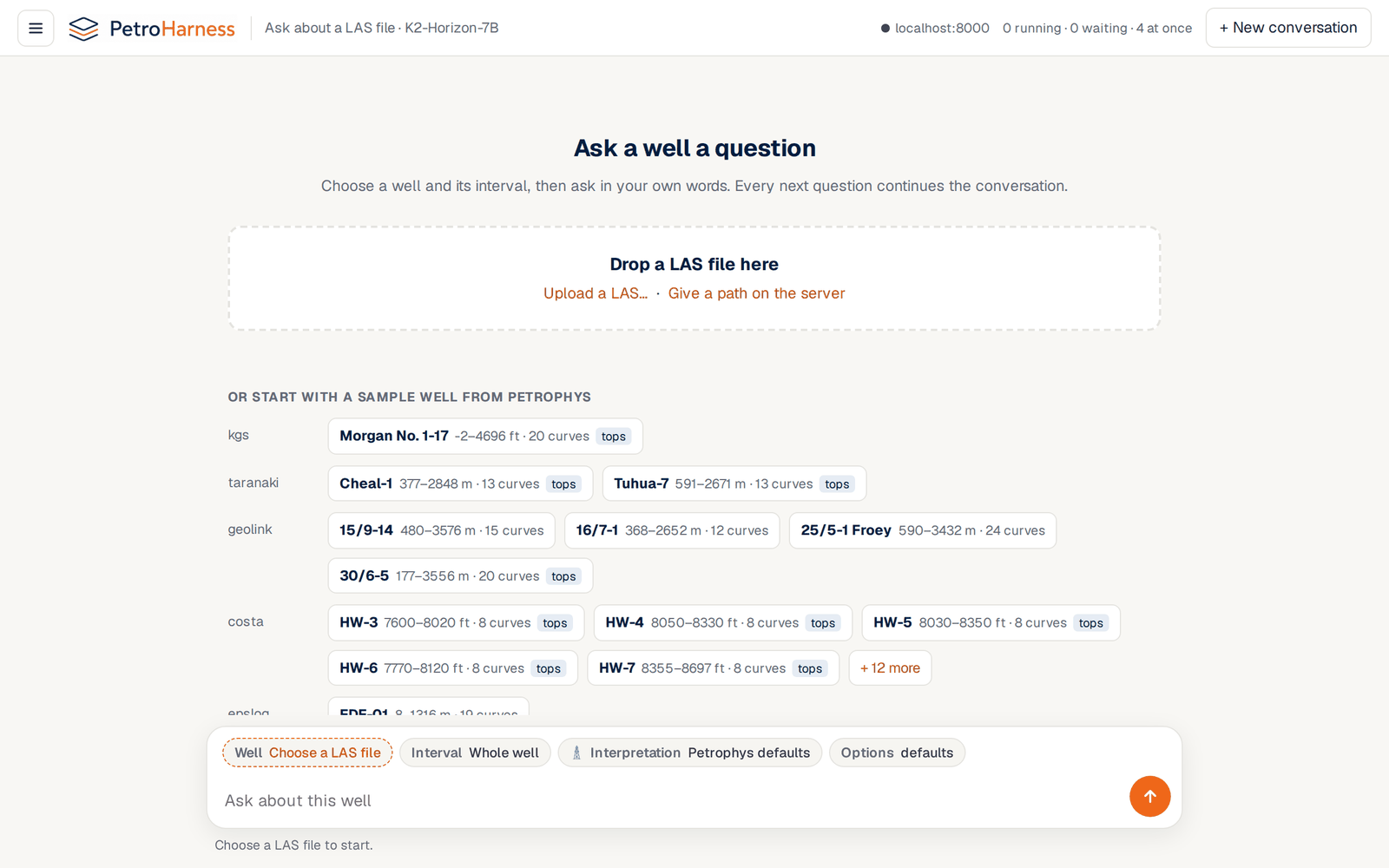
(or uses yours) and the model (5.4 GB). Pick one of Petrophys's sample wells
or drop your own LAS file, choose the interval, and ask in your own words. On a remote machine, forward the port first
(ssh -L 7860:localhost:7860 HOST) and open the same address.
3. Or choose another model
Model (top right of the page) connects WellLogLLM-7B or the full WellLogLLM-3.7B on your own GPU server (the dialog shows the vLLM commands that start them, with a Copy button), any model a vLLM server or Ollama serves, or a hosted model through OpenRouter with your API key. PetroHarness keeps the choice for the next start and for the command. From the command line:
petroharness --launch-ui --model Qwen/Qwen3-32B --model-url http://localhost:8000/v1 # any model a server serves
Every step, per system, with sizes and what to do when something goes wrong: Install and set up. Serving models and model cards: Models.
4. Or ask from the command line
GeoLink well 30/6-5 ships with Petrophys, so this runs as it is:
LAS=$(python -c "import petrophys; print(petrophys.sample('30/6-5'))")
TOPS=$(python -c "import petrophys; print(petrophys.sample('formations_30_6-5.csv'))")

petroharness --las $LAS --tops $TOPS --formation "BRENT GP." \
  --question "What are the porosity, water saturation and permeability of the Brent Group, and is any of it hydrocarbon-bearing?"
It uses the model you chose in the page, or WellLogLLM-3.7B in Ollama when you chose none. The answer is printed, and
answer.md and trace.json (every model call and every result opened) go to ./petroharness-out/<LAS name>/.
Go further
| To | Run | Read |
|---|---|---|
| Ask in the browser | petroharness --launch-ui (petroharness ui starts the server without opening a browser) |
Web UI |
| Use another model | --model NAME --model-url URL, or --model-card FILE |
Models |
| Keep asking about the interval | petroharness chat --las $LAS --tops $TOPS --formation "BRENT GP." --session brent |
Conversations |
| Audit every answer of a conversation | petroharness audit brent |
Audit an answer |
| Use your own well | --las FILE with --tops FILE --formation NAME, or --top D --base D, or neither for the whole log |
Evaluate a formation |
| Call it from Python | from petroharness.ask import ask |
Python API |
Results
More accurate with PetroHarness. On the 347 single-formation questions of WellLogBench, the models we tested score +3.0 to +8.6 points higher with PetroHarness. Our post-trained K2-Horizon-7B goes from 64.0 to 69.3.
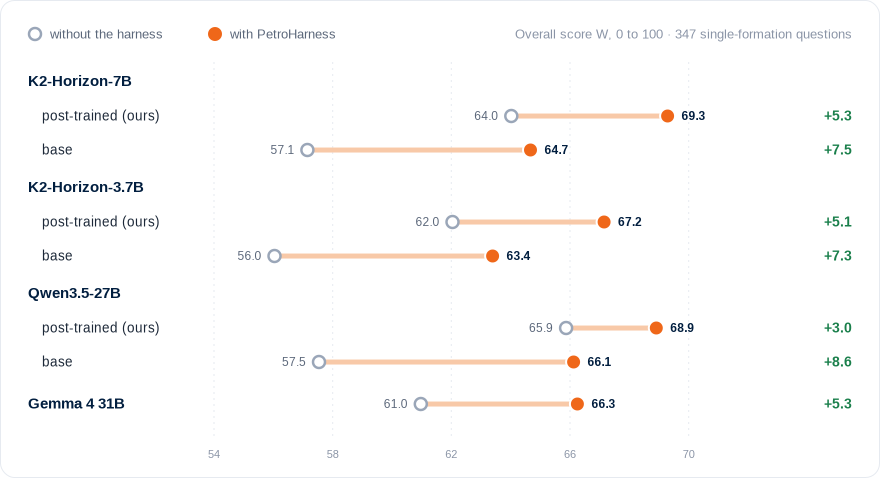
W is WellLogBench's overall score, from 0 to 100. Without the harness, the same model answers from the well's full Petrophys interpretation, given to it in one prompt. Post-trained (ours): after our WellLogLLM post-training for well logs. Base: the open model as released.
The numbers, with 95% confidence intervals
| Model | Without the harness | With PetroHarness | Gain (95% CI) |
|---|---|---|---|
| K2-Horizon-7B post-trained (ours) | 64.02 | 69.29 | +5.27 (+3.95 to +6.58) |
| K2-Horizon-7B base * † | 57.15 | 64.67 | +7.51 (+6.00 to +9.10) |
| K2-Horizon-3.7B post-trained (ours) | 62.04 | 67.15 | +5.10 (+3.67 to +6.54) |
| K2-Horizon-3.7B base * | 56.04 | 63.39 | +7.35 (+5.97 to +8.77) |
| Qwen3.5-27B post-trained (ours) | 65.87 | 68.91 | +3.04 (+1.70 to +4.34) |
| Qwen3.5-27B base | 57.54 | 66.12 | +8.58 (+7.19 to +9.98) |
| Gemma 4 31B | 60.97 | 66.25 | +5.28 (+3.76 to +6.79) |
Each model runs inside PetroHarness unchanged. Gains are paired per question; two runs are averaged for our post-trained K2-Horizon-7B and Qwen3.5-27B. * On 346 of the 347 questions. † Its run without the harness read a truncated context.
Every score, by component: welllogbench.com/petroharness.
Features
Ask anything
|
Any LAS file |
Any question |
Conversations |
Check everything
|
Every number traced |
The work on screen |
Checked before you read it |
Make it yours
|
Custom skills |
Your model, your machines |
Your interpretation |
Three ways in: a web UI, a command line and a Python API. To add a tool, a report style or a model card, follow the recipes in Extending.
See it work
One question on GeoLink well 30/6-5, Brent Group, from the first page to an answer you can check. The same tour, screen by screen: A tour in pictures.
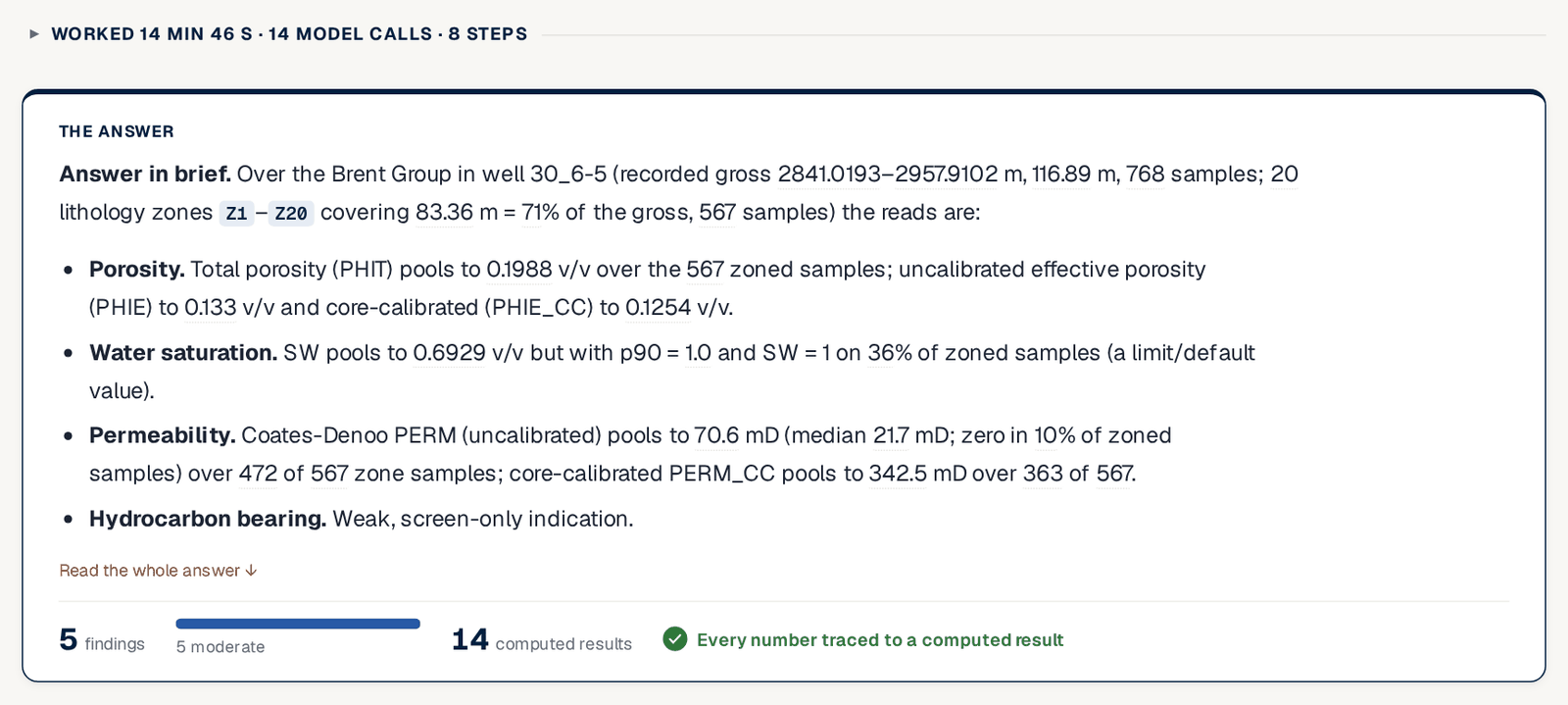
The answer. Conclusion first, then its findings by confidence, the computed results they rest on, and the checker's outcome.
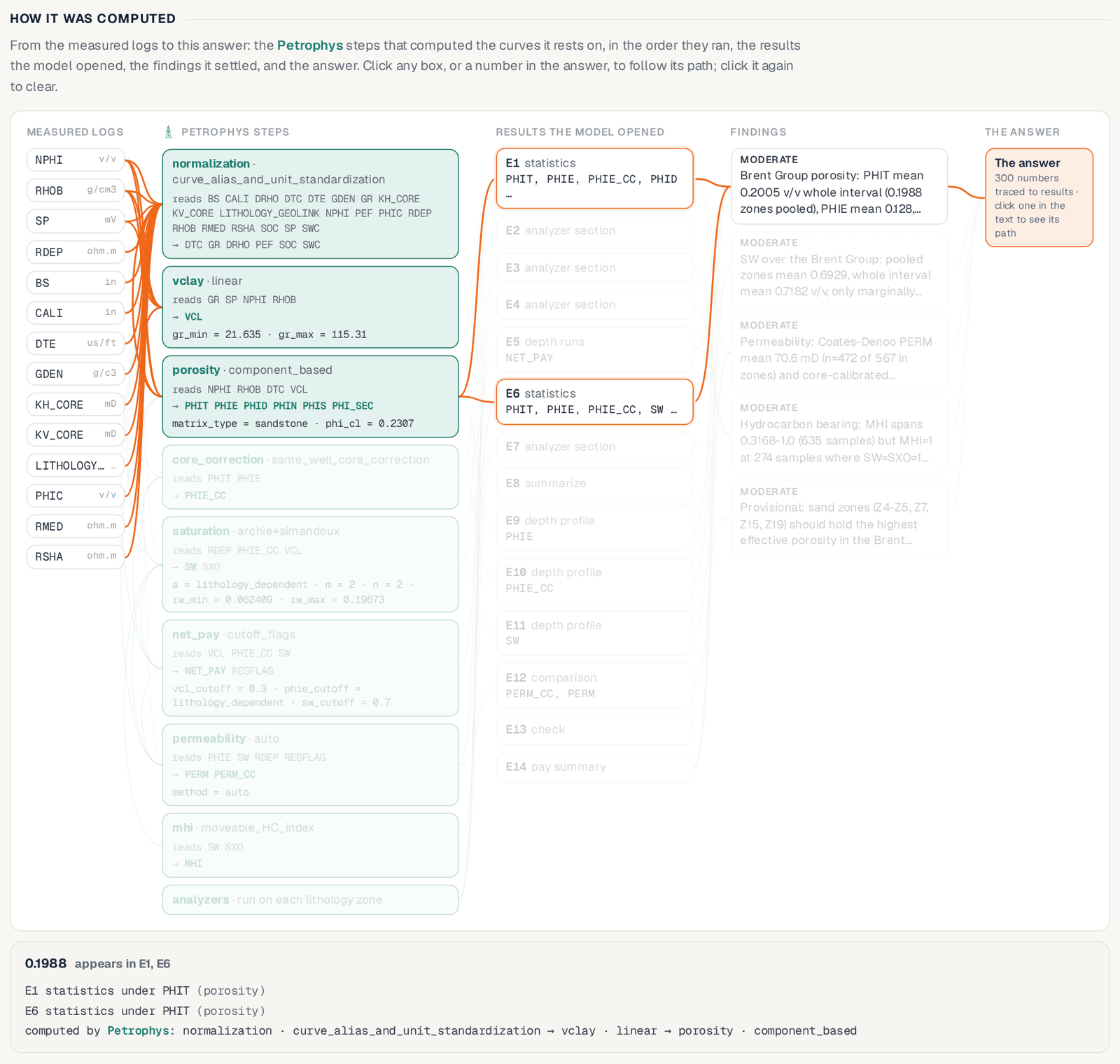
Every number, traced. A click on 0.1988 v/v lights its path: the measured logs, the Petrophys steps that computed the curve, the two results that show it, the finding that cites them and the answer.
Data: GeoLink, CC BY-SA 4.0.
How it works
Petrophys calculates · the model investigates · the harness records · you decide
flowchart LR
    las["Raw LAS file"]:::input
    where["Tops file, depths,<br/>or the whole well"]:::input
    q["Your question"]:::input
    pp["Petrophys<br/>interprets the well"]:::petrophys
    rec[("The record<br/>zones, curves, classes,<br/>statistics")]:::record
    read["Read<br/>topics and named<br/>measurements"]:::model
    inv["Investigate<br/>up to 8 steps: tools,<br/>ledger, cited claims"]:::model
    skills[("Skill library<br/>sourced guides")]:::record
    settle["Settle<br/>final claims"]:::model
    write["Write from the evidence<br/>points + limits + every result;<br/>code checks, repairs"]:::model
    out["Answer and<br/>full trace"]:::output

    las --> pp
    where --> pp
    pp --> rec
    rec -- "map and first look" --> inv
    q --> read --> inv
    skills -. "guides" .-> inv
    inv --> settle --> write --> out

    classDef input fill:#ffffff,stroke:#011e3f,color:#011e3f
    classDef petrophys fill:#e3f2ee,stroke:#197e6f,color:#0f4f45
    classDef record fill:#f0eeea,stroke:#9aa0aa,color:#1c2433
    classDef model fill:#e6ecf4,stroke:#011e3f,color:#011e3f
    classDef output fill:#fdeee4,stroke:#ef6719,color:#7a3410
| Stage | What happens |
|---|---|
| 1 · The well | Petrophys interprets the raw LAS and cuts it to your interval, zoned by its lithology. |
| 2 · Read | The model reads the question: its topics, the measurements it names, and whether a lookup answers it or it needs an investigation. |
| 3 · Investigate | Up to eight steps. The model opens results with tools, has Petrophys compute what the record does not hold, and builds claims that cite them. |
| 4 · Settle | With every opened result in view, the claims become final. |
| 5 · Write and check | The writer concludes from the evidence. A checker sends back any number that nothing supports, for repair. |
In depth: Architecture · The question graph · Design rules.
What you can ask
Ask what you would ask a petrophysicist, about a formation, a depth window or the whole log.
| Ask it to | For example |
|---|---|
| Interpret | Where are the best reservoir intervals, and is any of them hydrocarbon-bearing? |
| Check the data | Where is the hole washed out, and does it affect the density log? |
| Recompute with another method | Compute saturation with Simandoux and give me the statistics. |
| Test a what-if | How does net pay change if the water saturation cutoff is 0.5? |
| Estimate a parameter | What cementation exponent does a Pickett plot give? |
More kinds of question, and the topics the skill library covers
| Ask it to | For example |
|---|---|
| Describe and compare | Is porosity higher where shale volume is lower? · Which zone has the highest resistivity? |
| Classify | What minerals make up this formation? · Define flow units. · Is there any moveable hydrocarbon? |
| Summarize | Net pay, net-to-gross and hydrocarbon pore thickness per zone at a 0.5 SW cutoff. · What would the oil in place be for a 640-acre drainage area? |
| Calibrate and model | Fit a saturation-height function with the free-water level at 870 m. · Predict the shear sonic from the compressional sonic. |
| Go further | Split the shale into laminated, dispersed and structural parts with Thomas–Stieber. · How heterogeneous is the permeability (Lorenz, Dykstra–Parsons)? |
When a method needs what the well does not carry (Rwb for dual water, CEC for Waxman–Smits, a normal-compaction trend for Eaton), the answer says what is missing.
The skill library holds a sourced guide for each of these topic areas, and the model picks the guides a question needs. They guide the investigation; they do not limit what you can ask.
| Rock | Fluids | Reservoir quality | Data and methods |
|---|---|---|---|
| lithology and mineralogy | water saturation | porosity | data quality |
| shale and clay | hydrocarbon detection | permeability and rock quality | statistics and data analysis |
| log facies and stratigraphy | fluid contacts | net reservoir and pay | core-log integration |
| elastic properties | invasion and movability |
Eleven questions worked through on wells that ship with Petrophys: Examples.
Built on Petrophys
|
Petrophys turns well logs into traceable petrophysical interpretations: clay volume, porosity, water saturation, permeability, rock quality and net pay. Every step records its method, inputs, outputs and parameters. PetroHarness reads that record and never recomputes petrophysics on its own. Documentation: welllogbench.com/petrophys/docs. |
Documentation
The documentation site: welllogbench.com/petroharness/docs. The same pages live in this repository under docs/.
Contributing: CONTRIBUTING.md. Releases: CHANGELOG.md.
Data and acknowledgements
The results come from WellLogBench, built on public well data: we thank GEOLINK and the Norwegian Offshore Directorate for the North Sea wells (GeoLink), Jorge Costa Gomes, Sebastian Geiger and Daniel Arnold of Heriot-Watt University for the COSTA model, and the Geological Survey of Denmark and Greenland (GEUS) for the Danish wells and their formation tops. The quick start, the documentation and the tests use wells that ship with Petrophys, from GeoLink, COSTA, the Taranaki Basin Curated Well Logs Dataset, the Kansas Geological Survey and Teapot Dome (RMOTC, U.S. Department of Energy). We thank the domain experts from ThinkOnward for their contributions to defining the problem scope and validating the benchmark requirements.
Each dataset keeps its own licence and attribution, and so does material here derived from it: sources, licences and citations are in THIRD_PARTY_DATA.md.
Citation
If you use PetroHarness in your work, please cite the paper:
PetroHarness: An Open-Source Agentic Harness for Auditable Formation Evaluation
S. Shikhar, Z. Kabashev, S. Umurzak, M. Lee, L. Barillas, S. Bharadwaj, J. Thomas, J. Lahoud, F. Castanedo, H. Cholakkal
ADIPEC 2026, paper SPE-236034-MS
Mohamed bin Zayed University of Artificial Intelligence (MBZUAI) · Khalifa University · Inception42 · AIQ; Abu Dhabi, United Arab Emirates
@inproceedings{shikhar2026petroharness,
  title     = {PetroHarness: An Open-Source Agentic Harness for Auditable Formation Evaluation},
  author    = {Shikhar, S. and Kabashev, Z. and Umurzak, S. and Lee, M. and Barillas, L. and Bharadwaj, S. and Thomas, J. and Lahoud, J. and Castanedo, F. and Cholakkal, H.},
  booktitle = {ADIPEC 2026},
  number    = {SPE-236034-MS},
  publisher = {Society of Petroleum Engineers},
  year      = {2026}
}
Licence
PetroHarness is released under the Creative Commons Attribution 4.0 International licence (CC BY 4.0): you may share and adapt it, with credit. Petrophys and the datasets keep their own licences: see Data and acknowledgements.
1 maintainer

Metadata
1 maintainer
Release files for petroharness 1.3.2
For a detailed explanation of source distributions (sdists) and built distributions (wheels), please see the package formats documentation.
Source distribution (sdist)
| File | Size | Uploaded | Provenance | Actions |
|---|---|---|---|---|
| petroharness-1.3.2.tar.gz | 970.0 kB | Without provenance | Details for petroharness-1.3.2.tar.gz |
Built distribution (wheel)
| File | Interpreter | ABI | Platform | Actions Reset |
|---|---|---|---|---|
| petroharness-1.3.2-py3-none-any.whl | Python 3 | none | any | Details for petroharness-1.3.2-py3-none-any.whl |
Total release size: 1.9 MB
Release files / petroharness-1.3.2.tar.gz
| Download URL | petroharness-1.3.2.tar.gz |
|---|---|
| Size | 970.0 kB |
| Tags | Source |
|
SHA-256 checksum How to use checksums |
bc151315b5704c4df3fff412f4e5ed4656bd4610048bef5c040b9a3b97f45ef8
|
|
BLAKE2b-256 checksum How to use checksums |
bbe7c334a64576fc83e6602e09b0131cd66f09f56deba42121e93b6034a64870
|
| Upload date | |
|
Uploaded using Trusted Publishing? What is trusted publishing? |
No |
| Uploaded via |
twine/7.0.0 CPython/3.10.9
|
Release files / petroharness-1.3.2-py3-none-any.whl
| Download URL | petroharness-1.3.2-py3-none-any.whl |
|---|---|
| Size | 944.4 kB |
| Tags | Python 3 |
|
SHA-256 checksum How to use checksums |
72cc7afa14b260d6a5836823123c296b3f20ff1f79188a4467d0f58b780a2213
|
|
BLAKE2b-256 checksum How to use checksums |
c80f6fd53e0c4ecea01df7819cf794551c136046610ae1e85d368e9a4fb35c34
|
| Upload date | |
|
Uploaded using Trusted Publishing? What is trusted publishing? |
No |
| Uploaded via |
twine/7.0.0 CPython/3.10.9
|
Security for petroharness 1.3.2
Provenance
Provenance describes where a file came from. On PyPI, provenance is shared via attestations, which provide a verifiable record of the build or publishing details. View details, limitations and caveats.
No provenance found
None of the files in this release were uploaded with provenance metadata.
A note on package security
PyPI is a repository for distributing packages, not a service for auditing them. While third-party security researchers and our staff do their best to detect and remove malicious packages, PyPI cannot guarantee the quality, security or suitability of any given package.
To learn more about protecting yourself from malicious actors, visit our package security documentation.














