
OpenAI-compatible proxy that adds functionality to models through tricks

Project description

Petsitter, part of the DAY50 suite of open-source tools for on-prem local AI workflows, is an OpenAI-compatible proxy that layers smart harnesses on top of language models to give them capabilities they don't natively have. It also makes finicky behaviors reliable and dependable.
Smaller models can't do tool calling? Petsitter tricks them into it. Need structured JSON output? Petsitter will loop until it gets it right.
But that's only the beginning. Cyclomatic complexity? Halstead metrics? Chidamber and Kemerer? Why not!
There's even a GUI where you can modify things dynamically, look at logs, point to different models...
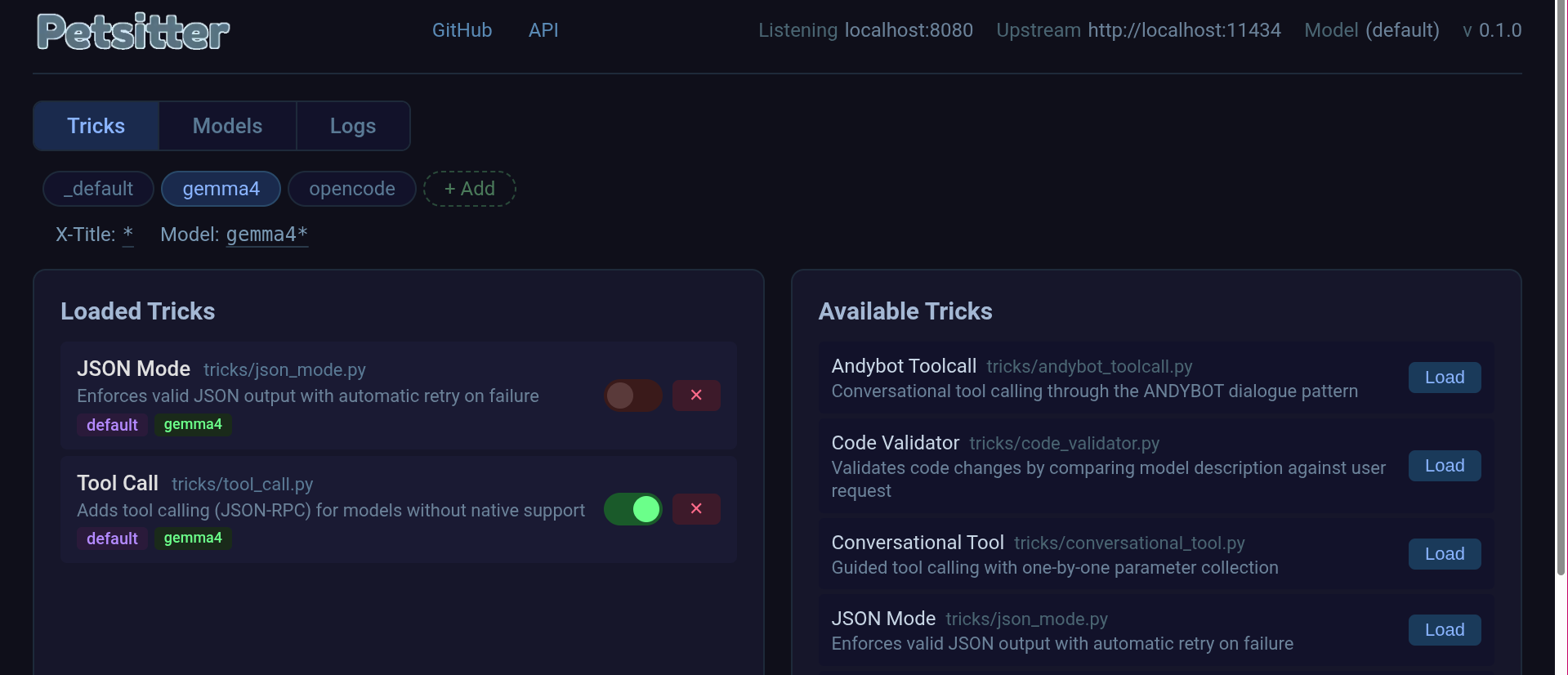
Petsitter sits between your application and your model or one or more inference providers, intercepting requests and responses to apply "tricks" - pluggable transformations. Some examples include:
- Prompt engineering - Inject instructions and tool definitions
- Context manipulation - Modify messages before/after the model sees them
- Retry loops - Call the model again if output doesn't meet requirements
- Response transformation - Convert outputs to expected formats (e.g., OpenAI tool_calls)
It can combine multiple local specialized models, filter for certain harnesses, do dynamic routing, and also, none of that stuff and just be easy and simple.
Why Use It?
- No model changes required - Works with any OpenAI-compatible endpoint
- Pluggable architecture - Write your own tricks in Python
- Transparent to your app - Point your existing code at petsitter instead of the model
- Mix and match - Combine multiple tricks for compound effects
Quick Start
# Start your model backend (e.g., Ollama)
ollama serve

# Activate the virtual environment
source .venv/bin/activate

# Run petsitter with tricks
./petsitter -u http://localhost:11434 \
            -m llama3:8b \
            -t tricks/json_mode.py \
            -t tricks/tool_call.py \
            -l localhost:8080
Now point your AI applications to http://localhost:8080/v1.
CLI Options
| Option | Short | Description |
|---|---|---|
--url |
-u |
Base URL of upstream model (e.g., http://localhost:11434) |
--model |
-m |
Model name (optional for vllm, sglang, llama.cpp) |
--key |
-k |
API key for upstream (if required) |
--trick |
-t |
Path to a trick module (can be repeated) |
--trick-config |
-tc |
Path to a trickset JSON file (can be repeated) |
--model-config |
-mc |
Path to a model config JSON file (MAS URIs for multi-model tricks) |
--listen |
-l |
Host:port to listen on (default: localhost:8080) |
Built-in Tricks
Output Control
- JSON Mode - Enforce valid JSON output
- Code Validator - Self-healing validation through model self-description
Capability Injection
- Tool Calling - Add tool calling to models without native support
Pipeline
- Kennel - Route cognitive subtasks to specialized models
Security
- Secrets Protector - Detect and pseudonymize secrets/PII before they reach the model
JSON Mode
Enforces valid JSON output by adding formatting instructions to the system prompt, stripping markdown code blocks, and retrying with feedback if the response isn't valid JSON.
./petsitter -u http://localhost:11434 -t tricks/json_mode.py
Code Validator
After the model proposes a code change, asks it to describe what the change does, compares the description against the original user request, and retries with feedback if they don't match.
./petsitter -u http://localhost:11434 -t tricks/code_validator.py
Tool Calling
Enables tool calling for models without native support by injecting tool definitions into the prompt, parsing JSONRPC-style tool call responses, and converting them to OpenAI tool_calls format.
./petsitter -u http://localhost:11434 -t tricks/tool_call.py
Kennel
Routes different cognitive subtasks to specialized models running in parallel. The emitter is the model specified with -u/--url; the thinker and tool-caller are read from a model config file (MAS format).
# Pull three small models that together fit on modest hardware (< 6B total)
ollama pull VibeThinker-3B    # reasoning / chain-of-thought
ollama pull LFM2.5-230M       # tool-calling (tiny, fast)
ollama pull Qwen3.5-2B        # response generation

# Each model sees a procedurally constructed context optimized for its role
./petsitter -mc examples/modelset.json \
            -t tricks/kennel.py
Example modelset.json:
{
    "default": "http://localhost:11434#m=Qwen3.5:8b",
    "thinker": "http://localhost:11434#m=VibeThinker-3B-GGUF:q4_K_M",
    "toolcall": "http://localhost:11434#m=lfm2.5:latest"
}
Pipeline:
- Thinker gets the conversation + "think step by step" → produces reasoning
- Tool-caller (if tools are present) gets context + reasoning + tool definitions → decides which tool to call
- Emitter receives the enriched context and generates the final response
Secrets Protector
Detects and pseudonymizes sensitive information before it reaches the model, then restores original values in the response:
- Detection - regex patterns for API keys (OpenAI, Anthropic, AWS, Google, Stripe), tokens (JWT, GitHub, Slack, Bearer), credentials (database URLs, private keys), and PII (emails, phones, SSNs, credit cards, IPs)
- Format-preserving substitutes - realistic replacements (e.g.,
alice@example.com→user.0001@sanitized.local) that preserve token boundaries so the model's tokenizer doesn't conflate distinct entries - Bidirectional vault - consistent pseudonyms across the session (same secret → same substitute) with automatic restoration in both natural-language responses and tool call arguments
./petsitter -u http://localhost:11434 -t tricks/secrets_protector.py
Tricksets
A trickset bundles a group of tricks with routing filters. When a request comes in, petsitter matches the X-Title header and model field against each loaded trickset's filters, then runs only the tricks from matching sets.
Tricksets live as JSON files in the tricksets/ directory:
{
  "schema": "0.5.0",
  "name": "my-trickset",
  "filters": {
    "X-Title": "opencode*",
    "Model": "*"
  },
  "tricks": [
    "tricks/json_mode.py",
    "tricks/tool_call.py"
  ]
}
Each loaded trickset is also exposed as a model named trickset/<name> (e.g., trickset/gemma4). Selecting this model in a client bypasses the filter matching and runs that trickset's tricks directly on every request.
Using tricksets
# Load a trickset at startup (can be combined with -t)
petsitter -u http://localhost:11434 \
          -tc tricksets/opencode.json \
          -t tricks/json_mode.py
Managing tricksets at runtime
The control panel at / has a full trickset manager. You can also use the API:
# List loaded tricksets
curl http://localhost:8080/api/tricksets

# List available trickset files
curl http://localhost:8080/api/tricksets/available

# Load a trickset
curl -X POST http://localhost:8080/api/tricksets/load \
  -d '{"path": "tricksets/gemma4.json"}'

# Update filters
curl -X PUT http://localhost:8080/api/tricksets/opencode \
  -d '{"filters": {"X-Title": "myagent*", "Model": "*"}}'

# Unload a trickset
curl -X POST http://localhost:8080/api/tricksets/unload \
  -d '{"name": "opencode"}'
How routing works
- Extract
X-Titlefrom the request header andmodelfrom the request body. - For each loaded trickset, check if its filters match using
fnmatch. - Collect tricks from all matching sets, deduplicating by class name.
- Run the pipeline with only those tricks.
The default catch-all trickset matches {"X-Title": "*", "Model": "*"} so --trick trick works the same as before.
The schema field in a trickset JSON file records the petsitter version that wrote it. This tells tools how to interpret the file without needing an external lookup table.
Model Configs
A model config JSON file lets you run multi-model tricks like Kennel that need different models for different subtasks. Each key maps to a MAS URI - a URL with a fragment (#m=) specifying the model name:
{
    "default": "http://localhost:11434#m=Qwen3.5:8b",
    "thinker": "http://localhost:11434#m=VibeThinker-3B-GGUF:q4_K_M",
    "toolcall": "http://localhost:11434#m=lfm2.5:latest"
}
The "default" key sets the primary model (equivalent to -u/--url + -m/--model). Tricks declare what keys they need - for example, KennelTrick requires ["default", "thinker", "toolcall"]. If a key is missing, petsitter prints a helpful error with the expected format.
# Use a model config instead of -u / -m
petsitter -mc modelset-example.json -t tricks/kennel.py -l localhost:8080
If -u/--url is also given, it overrides the "default" from the model config.
Creating Custom Tricks
The Trick class has four hooks you can implement. Each hook is optional - only implement what you need.
system_prompt(to_add: str) -> str
When: Called once per request, before any messages are sent to the model.
Purpose: Append instructions to the system prompt. This is how you "prime" the model to behave a certain way.
Example:
def system_prompt(self, to_add: str) -> str:
    return "IMPORTANT: Respond only in valid JSON. No markdown, no explanations."
pre_hook(context: list, params: dict) -> list
When: Called after the system prompt is set, before the model receives the messages.
Purpose: Modify the conversation context. You can inject tool definitions, add few-shot examples, or restructure messages.
Parameters:
context: List of message dicts ([{"role": "user", "content": "..."}])params: Request parameters includingtools,temperature, etc.
Example:
def pre_hook(self, context: list, params: dict) -> list:
    if "tools" in params:
        tools_json = json.dumps(params["tools"])
        context[0]["content"] += f"\n\nAvailable tools: {tools_json}"
    return context
post_hook(context: list) -> list
When: Called after the model responds, before the response goes back to your application.
Purpose: Validate, transform, or retry. This is where you can:
- Parse the response and convert it to a different format
- Detect when the model failed and call it again with feedback
- Extract tool calls from natural language
Example (JSON validation with retry):
def post_hook(self, context: list) -> list:
    attempts = 3
    while attempts > 0:
        try:
            json.loads(context[-1]["content"])
            break
        except json.JSONDecodeError:
            attempts -= 1
            if attempts == 0:
                break
            context = callmodel(context, "That wasn't valid JSON. Try again.")
    return context
Example (Tool call detection):
def post_hook(self, context: list) -> list:
    content = context[-1]["content"]
    if self._looks_like_tool_call(content):
        context[-1]["tool_calls"] = [self._parse_tool_call(content)]
        context[-1]["content"] = None
    return context
info(capabilities: dict) -> dict
When: Called when building the response to your application.
Purpose: Declare what capabilities this trick provides. Some frameworks check for capabilities before using certain features.
Example:
def info(self, capabilities: dict) -> dict:
    capabilities["json_mode"] = True
    capabilities["tools_support"] = True
    return capabilities
Keyword-activated
Set keywords on your trick class to activate only when the user includes that word in their message - the keyword is stripped before the model sees it. See tricks/multiround.py for a working example.
# Trick fires when "multiround" is present
curl http://localhost:8080/v1/chat/completions \
  -d '{"messages":[{"role":"user","content":"multiround explain the CAP theorem"}]}'

# Trick does nothing without the keyword
curl http://localhost:8080/v1/chat/completions \
  -d '{"messages":[{"role":"user","content":"explain the CAP theorem"}]}'
API Endpoints
Petsitter exposes OpenAI-compatible endpoints plus management endpoints:
Proxy:
POST /v1/chat/completions- Chat completions (proxied + transformed)GET /v1/models- List available models (proxied)GET /health- Health check
Management:
GET /api/info- Server informationGET /api/tricks- List loaded tricksGET /api/tricks/available- List available trick modulesPOST /api/tricks/load- Load a trickPOST /api/tricks/unload- Unload a trickPOST /api/tricks/reorder- Reorder loaded tricksGET /api/logs- Activity logGET /api/tricksets- List loaded tricksetsGET /api/tricksets/available- List available trickset filesPOST /api/tricksets/load- Load a tricksetPOST /api/tricksets/unload- Unload a tricksetGET /api/tricksets/{name}- Get trickset detailsPUT /api/tricksets/{name}- Update trickset filters/tricks
A Swagger UI is available at /docs and the OpenAPI spec at /static/openapi.json.
Running Tests
# Activate virtual environment
source .venv/bin/activate

# Install test dependencies
pip install -e ".[test]"

# Run tests
pytest tests/
Example: Using with an Agentic Framework
from openai import OpenAI

client = OpenAI(
    base_url="http://localhost:8080/v1",
    api_key="not-needed"
)

response = client.chat.completions.create(
    model="any-model-name",
    messages=[{"role": "user", "content": "List files in /tmp"}],
    tools=[{"type": "function", "function": {"name": "get_weather", "parameters": ...}}]
)
License
MIT
Release history Release notifications | RSS feed


Download files
Download the file for your platform. If you're not sure which to choose, learn more about installing packages.
Source Distribution
Built Distribution
Filter files by name, interpreter, ABI, and platform.
If you're not sure about the file name format, learn more about wheel file names.
Copy a direct link to the current filters
File details
Details for the file petsitter-0.5.1.tar.gz.
File metadata
- Download URL: petsitter-0.5.1.tar.gz
- Upload date:
- Size: 113.5 kB
- Tags: Source
- Uploaded using Trusted Publishing? No
- Uploaded via: twine/6.1.0 CPython/3.13.12
File hashes
| Algorithm | Hash digest | |
|---|---|---|
| SHA256 |
1c397cb6dfe9778e73792ea80899dce11a16062e22e121d86a50d7453a472d61
|
|
| MD5 |
b813b4c5237bab23c3bb737aca9d56ab
|
|
| BLAKE2b-256 |
3cd004763b70bed243662eb96d0ded08b753b6c72b6cb1254b32a76260e3f814
|
File details
Details for the file petsitter-0.5.1-py3-none-any.whl.
File metadata
- Download URL: petsitter-0.5.1-py3-none-any.whl
- Upload date:
- Size: 58.1 kB
- Tags: Python 3
- Uploaded using Trusted Publishing? No
- Uploaded via: twine/6.1.0 CPython/3.13.12
File hashes
| Algorithm | Hash digest | |
|---|---|---|
| SHA256 |
1f1e538c53477c74dac170ecd26ab5032a31180f6838fe664df088932db3ea1b
|
|
| MD5 |
51dff6fd7e9276d31cf06392143b577f
|
|
| BLAKE2b-256 |
3b7ac24cfd284d5c84d9d7745ed91dca65ba1fcd76c2b669a7cc0a4d95c511e7
|






