
pexel-downloader


Download high-quality photos and videos from Pexels.com with a simple CLI.

Quick Start
1. Install
# Using uv (recommended)
uv tool install pexel-downloader

# Or using pip
pip install pexel-downloader
2. Set your API key
Create a free account at pexels.com to get an API key, then run:
pexel-downloader config --api-key YOUR_API_KEY
Or just run pexel-downloader config and you'll be prompted to enter it.
3. Download
# Download 10 images of nature (uses your configured defaults)
pexel-downloader download nature 10

# Download 5 videos of ocean
pexel-downloader download ocean 5 video
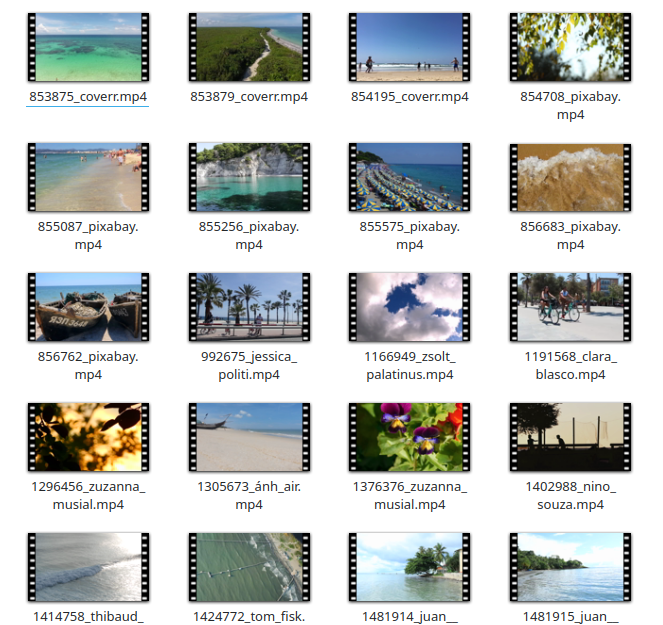
That's it! Files are saved to your configured download directory (default: downloads/) and the full path is shown after each download.
Installation
Prerequisites
- Python 3.10+
- Pexels account for an API key: pexels.com
Install uv
uv is a fast Python package manager.
Linux / macOS:
curl -LsSf https://astral.sh/uv/install.sh | sh
Windows (PowerShell):
powershell -ExecutionPolicy ByPass -c "irm https://astral.sh/uv/install.ps1 | iex"
Using pip (any platform):
pip install uv
Install pexel-downloader
As a CLI tool [recommend]:
uv tool install pexel-downloader
As a library in your project:
uv add pexel-downloader
Run without installing:
uvx pexel-downloader download nature 5 image
Configuration
Interactive setup
Run pexel-downloader config to configure all settings at once. You'll be prompted for:
- API key — your Pexels API key
- Download directory — where files are saved (default:
downloads) - Content type —
imageorvideo(default:image) - Size — download size (default:
medium)
pexel-downloader config
Set individual settings
pexel-downloader config --api-key YOUR_API_KEY
pexel-downloader config --download-dir ~/Pictures/pexels
pexel-downloader config --content-type video
pexel-downloader config --size large
The configuration is stored at:
- Linux:
~/.config/pexel-downloader/config.json - macOS:
~/Library/Application Support/pexel-downloader/config.json - Windows:
C:\Users\<user>\AppData\Roaming\pexel-downloader\config.json
API key via environment variable
You can also use the PEXEL_API_KEY environment variable (takes priority over the config file):
Linux / macOS:
export PEXEL_API_KEY="your_api_key"
Windows (Command Prompt):
set PEXEL_API_KEY=your_api_key
Windows (PowerShell):
$env:PEXEL_API_KEY = "your_api_key"
CLI Usage
pexel-downloader download QUERY NUM [CONTENT_TYPE] [OPTIONS]
CONTENT_TYPE is optional — if omitted, uses your configured default (image by default).
Examples
# Download 10 images of "nature" (uses default content type and size)
pexel-downloader download nature 10

# Download 5 videos of "ocean" starting from page 2
pexel-downloader download ocean 5 video --start-page 2

# Specify output directory and size
pexel-downloader download cats 20 image --size large -o ./my_images

# Show help
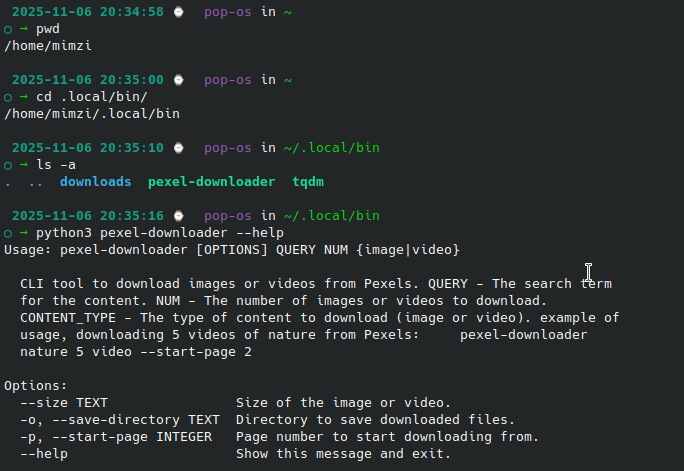
pexel-downloader --help
pexel-downloader download --help
Options
| Option | Short | Default | Description |
|---|---|---|---|
--size |
from config or medium |
Size of the image or video | |
--save-directory |
-o |
from config or downloads |
Directory to save files |
--start-page |
-p |
1 |
Page number to start from |
Available sizes
Images: original, large2x, large, medium, small, portrait, landscape, tiny
Videos: large, medium, small
Python API
import os
from pexel_downloader import PexelDownloader

api_key = os.environ.get("PEXEL_API_KEY")
downloader = PexelDownloader(api_key=api_key)

# Download images
downloader.download_images(query="beaches", num_images=100, save_directory="./images")

# Download videos
downloader.download_videos(query="nature", num_videos=5, save_directory="./videos", size="medium")

# Search without downloading
results = downloader.search_images(query="sunset", per_page=10)
print(results["photos"])
Demonstration

Development
# Clone the repo
git clone https://github.com/Gabriellgpc/pexel-downloader.git
cd pexel-downloader

# Install dependencies (including dev)
uv sync --group dev

# Run tests
uv run pytest tests/ -v

# Run the CLI locally
uv run pexel-downloader --help
License
MIT License. See LICENSE for details.
1 maintainer

Download files
Download the file for your platform. If you're not sure which to choose, learn more about installing packages.
Source Distribution
Built Distribution
Filter files by name, interpreter, ABI, and platform.
If you're not sure about the file name format, learn more about wheel file names.
Copy a direct link to the current filters
File details
Details for the file pexel_downloader-0.2.0.tar.gz.
File metadata
- Download URL: pexel_downloader-0.2.0.tar.gz
- Upload date:
- Size: 674.2 kB
- Tags: Source
- Uploaded using Trusted Publishing? Yes
- Uploaded via:
twine/6.1.0 CPython/3.13.7
File hashes
| Algorithm | Hash digest | |
|---|---|---|
| SHA256 |
24c2733d8d22ec311695e842d0d5f76098fbd0e0d26b977f91979ef9c28d5558
|
|
| MD5 |
3f4e8e0d22dfeb61200eafa30f6a9c53
|
|
| BLAKE2b-256 |
2855f9c1ef62744d371ec35f0a94a5fd3810798fbeee850f67ffa00934ed6423
|
Provenance
The following attestation bundles were made for pexel_downloader-0.2.0.tar.gz:
Publisher:
publish.yml on CondadosAI/pexel-downloader
-
Statement:
-
Statement type:
https://in-toto.io/Statement/v1 -
Predicate type:
https://docs.pypi.org/attestations/publish/v1 -
Subject name:
pexel_downloader-0.2.0.tar.gz -
Subject digest:
24c2733d8d22ec311695e842d0d5f76098fbd0e0d26b977f91979ef9c28d5558 - Sigstore transparency entry: 1105889056
- Sigstore integration time:
-
Permalink:
CondadosAI/pexel-downloader@536b5b906e65b36a17f36ddc7ec95cd79d6aad2b -
Branch / Tag:
refs/tags/v0.2.0 - Owner: https://github.com/CondadosAI
-
Access:
public
-
Token Issuer:
https://token.actions.githubusercontent.com -
Runner Environment:
github-hosted -
Publication workflow:
publish.yml@536b5b906e65b36a17f36ddc7ec95cd79d6aad2b -
Trigger Event:
release
-
Statement type:
File details
Details for the file pexel_downloader-0.2.0-py3-none-any.whl.
File metadata
- Download URL: pexel_downloader-0.2.0-py3-none-any.whl
- Upload date:
- Size: 10.4 kB
- Tags: Python 3
- Uploaded using Trusted Publishing? Yes
- Uploaded via:
twine/6.1.0 CPython/3.13.7
File hashes
| Algorithm | Hash digest | |
|---|---|---|
| SHA256 |
d8156001624f92ec21703dde09a6738a0db1ec5913df8c6337b6cedb1c5ee316
|
|
| MD5 |
45431b649acc932861bd81cd8eac95f6
|
|
| BLAKE2b-256 |
71e150faf51a0b5403d287483ee8668d4d0664120827d679f814204d9ad44b90
|
Provenance
The following attestation bundles were made for pexel_downloader-0.2.0-py3-none-any.whl:
Publisher:
publish.yml on CondadosAI/pexel-downloader
-
Statement:
-
Statement type:
https://in-toto.io/Statement/v1 -
Predicate type:
https://docs.pypi.org/attestations/publish/v1 -
Subject name:
pexel_downloader-0.2.0-py3-none-any.whl -
Subject digest:
d8156001624f92ec21703dde09a6738a0db1ec5913df8c6337b6cedb1c5ee316 - Sigstore transparency entry: 1105889090
- Sigstore integration time:
-
Permalink:
CondadosAI/pexel-downloader@536b5b906e65b36a17f36ddc7ec95cd79d6aad2b -
Branch / Tag:
refs/tags/v0.2.0 - Owner: https://github.com/CondadosAI
-
Access:
public
-
Token Issuer:
https://token.actions.githubusercontent.com -
Runner Environment:
github-hosted -
Publication workflow:
publish.yml@536b5b906e65b36a17f36ddc7ec95cd79d6aad2b -
Trigger Event:
release
-
Statement type:














