
pfsense-mcp-server





Safe, least-privilege pfSense access for AI assistants. MCP server that gives an AI assistant strongly typed, read-only visibility into one pfSense appliance — system, network, firewall, DHCP, DNS, VPN, certificates, and diagnostics — without raw shell access, an unaudited scripting surface, or any way to change the appliance by accident.
What it does
- 95 public READ tools + 1 documentation guidance tool. Covers roughly 90% of pfSense's useful REST API READ surface. Every tool is strongly typed (Pydantic) — no untyped JSON passthrough.
- 0 WRITE tools by default. A fully built, twice live-verified protected-WRITE path exists but requires an explicit operator opt-in — see Safety by default.
- Ask it things like: "List my VLANs and which interface each one rides on," "Is my WAN gateway up right now?", "Which certificates expire soon?", "What DHCP leases are active on the LAN?" — every question maps to one typed, capability-gated tool.
Safety by default
- READ-oriented public MCP surface, 0 default-reachable WRITE. Enforced by an automated snapshot test, not just documented — a change to the public tool contract that isn't reflected in the approved snapshot fails CI.
- Explicit tool registration, never generic API dispatch. There is
no
call_endpoint(path, method)escape hatch an AI (or a bug) could use to reach an unregistered endpoint. - Capability-based least privilege, with secret-bearing fields excluded from the response model by construction wherever confirmed present — never relying on the upstream API's own redaction alone.
- Guidance is data, never authority. The one documentation-guidance tool structurally cannot influence, select, or authorize any action — see Tool & guidance reference.
I built this because I wanted AI assistance for pfSense without giving an LLM the ability to accidentally disconnect my own network — a firewall deserves a higher safety standard than "the model probably won't make a bad change." See Why this project exists for the full reasoning.
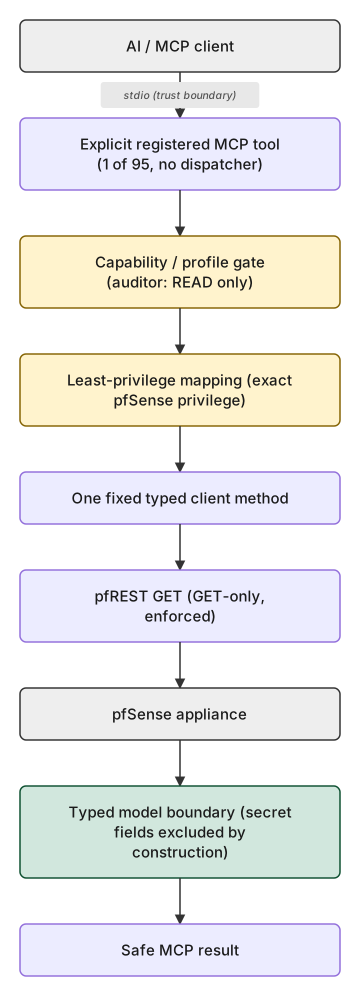
Every one of the 95 READ tools takes this same path — no exceptions.
The protected-WRITE path (built, not default-reachable)
A fully built, twice live-verified WRITE architecture exists for exactly
one operation (a firewall alias's description field) but stays
unreachable unless an operator explicitly opts in: write_protected
must be selected, an off-host Ed25519 signature the running server never
holds the key for must authorize it, and a separate confirmation
authority must confirm it — see
the security setup wizard
and the security model
for exactly what it requires and does not do by default.
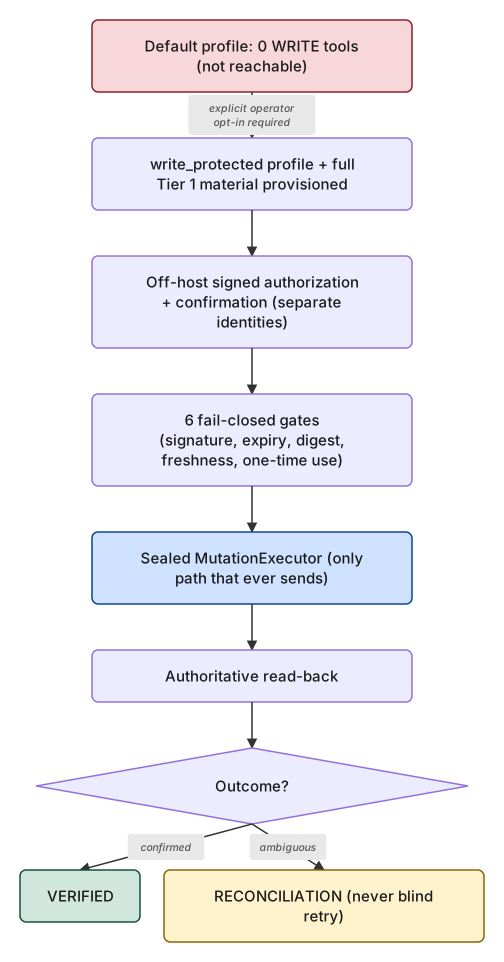
See the full architecture diagrams page for the gate-by-gate detail behind both diagrams above.
Requirements
- Python 3.11, 3.12, or 3.13.
- pfSense with the REST API package (
pfrest/pfSense-pkg-RESTAPI, API v2) installed and enabled.
See Compatibility for exactly which pfSense editions/releases are directly verified vs. merely expected to work.
Quick start
python -m venv .venv
.venv/bin/python -m pip install --upgrade pip
.venv/bin/python -m pip install --upgrade pfsense-mcp-server
install -m 600 /dev/null /absolute/private/path/pfsense-api.key
# paste your pfSense API key as the file's first line, then:
{
  "command": "/absolute/path/to/.venv/bin/pfsense-mcp-server",
  "env": {
    "PFSENSE_API_URL": "https://pfsense.example.invalid",
    "PFSENSE_IDENTITY": "api-mcp-admin",
    "PFSENSE_API_KEY_FILE": "/absolute/private/path/pfsense-api.key",
    "PFSENSE_TLS_MODE": "strict"
  }
}
Point your MCP client at that command (see Connect your MCP client below), confirm it shows 96 tools (95 READ + 1 guidance, 0 WRITE), then try one of the prompts from What it does above. Full walkthrough, credential handling, and verification steps: Installation.
First setup
Prefer a dedicated, least-privilege pfSense identity over reusing an existing credential? The bundled operator CLI can provision and verify one for you:
pfsense-mcp-security setup
This is a guided, non-mutating wizard — it only plans; nothing is
provisioned until a separate, explicit setup apply step with a
confirmation token you've reviewed. Full walkthrough, including the
optional protected-WRITE opt-in:
Security setup wizard.
Connect your MCP client
Once your server configuration works, generate the exact client config block automatically:
pfsense-mcp-security setup write-client-config \
  --client claude-desktop --config-path /absolute/path/to/claude_desktop_config.json \
  --capability-posture read_only --anchor-assurance none
Or copy one of the ready-made per-client guides — Claude Desktop,
Claude Code, Codex CLI, ChatGPT desktop, Cursor, VS Code, Continue — from
examples/README.md.
Full detail on both paths:
Connect your MCP client.
What you get
| Category | Tools | Examples |
|---|---|---|
| System | 26 | hostname, DNS, version, packages, REST API settings, diagnostics |
| VPN | 17 | IPsec, OpenVPN, WireGuard status/config, CARP |
| Firewall | 15 | rules, aliases, states, NAT, schedules, virtual IPs, traffic shapers |
| DNS | 7 | resolver settings, overrides, access lists |
| Interfaces | 9 | status, VLANs, groups, bridges, LAGG |
| DHCP | 7 | servers, static mappings, leases, relay |
| Routing / Gateways | 6 | gateways, gateway status, static routes |
| Certificates / PKI | 3 | certificates, certificate authorities, CRLs |
| Users / API identities | 3 | local users, user groups, API keys |
| Services / Monitoring | 2 | service status, FreeRADIUS EAP |
Full per-tool reference, parameters, and provenance: MCP tool reference · Tool & guidance reference.
Documentation
- Installation · Compatibility
- Security setup wizard · Connect your MCP client
- Configuration reference (env vars, troubleshooting)
- MCP tool reference · Tool & guidance reference
- Security model · Threat model
- Architecture diagrams · Architecture decisions
- Tier 1 safety architecture · Public roadmap
- Contributing · Support · Security policy
Release status
v0.8.0 is the immutable production baseline, published on PyPI —
95 pfSense READ tools + 1 official-guidance tool, 0 WRITE tools. A
CLI-only expansion of the pfsense-mcp-security operator tooling
(ADR-021/ADR-033) over v0.7.2 — no MCP capability change, public
contract byte-identical to v0.7.2. Adds the pfsense-mcp-security recover CLI subcommand and the full guided setup/setup apply/setup write-client-config provisioning wizard, plus a restart-classification
correctness fix for bootstrap. See CHANGELOG.md's [0.8.0] entry
and docs/ACCEPTANCE_v0.8.0.md for the complete, independently verified
evidence, and CHANGELOG.md in full for every prior release's own
complete history — every past release's tag, GitHub Release, and PyPI
artifact remains unmoved as an accurate historical record.
Contributing
Contributions are welcome within the documented security and approval boundaries. Read CONTRIBUTING.md before opening a change.
License
Licensed under the MIT License.
1 maintainer

Metadata
1 maintainer
Release files for pfsense-mcp-server 0.9.0
For a detailed explanation of source distributions (sdists) and built distributions (wheels), please see the package formats documentation.
Source distribution (sdist)
| File | Size | Uploaded | |
|---|---|---|---|
| pfsense_mcp_server-0.9.0.tar.gz | 526.5 kB | Details |
Built distribution (wheel)
| File | Interpreter | ABI | Platform | Reset |
|---|---|---|---|---|
| pfsense_mcp_server-0.9.0-py3-none-any.whl | Python 3 | none | any | Details |
Total release size: 1.1 MB
Release files / pfsense_mcp_server-0.9.0.tar.gz
| Download URL | pfsense_mcp_server-0.9.0.tar.gz |
|---|---|
| Size | 526.5 kB |
| Tags | Source |
|
SHA-256 checksum How to use checksums |
61cb86d3ef7bd2827159e61171da29cae99f27657e0de1a31a1861ebc9e88aac
|
|
BLAKE2b-256 checksum How to use checksums |
a1c68c0fda7fc23173ad03750d448554651ae1978fd992df7e3f55787623dce6
|
| Upload date | |
|
Uploaded using Trusted Publishing? What is trusted publishing? |
Yes |
| Uploaded via |
twine/7.0.0 CPython/3.13.14
|
Provenance
Provenance describes where a file came from. On PyPI, provenance is shared via attestations, which provide a verifiable record of the build or publishing details. View details, limitations and caveats.


PyPI Publish Attestation
PyPI verified that this artifact, at this checksum, originated from the publisher listed below.
Signed by GitHub Actions, verified by PyPI on Aug 28, 2026.
Transparency logRelease files / pfsense_mcp_server-0.9.0-py3-none-any.whl
| Download URL | pfsense_mcp_server-0.9.0-py3-none-any.whl |
|---|---|
| Size | 595.2 kB |
| Tags | Python 3 |
|
SHA-256 checksum How to use checksums |
1ba2d9d446aefaa1f55418fd14000cc0a95991fb7b38e8a34b384c25784917ab
|
|
BLAKE2b-256 checksum How to use checksums |
8a61d9a9794d53e03f27571cb50dddf342ee6dde5cb732acf489c357096a3a70
|
| Upload date | |
|
Uploaded using Trusted Publishing? What is trusted publishing? |
Yes |
| Uploaded via |
twine/7.0.0 CPython/3.13.14
|
Provenance
Provenance describes where a file came from. On PyPI, provenance is shared via attestations, which provide a verifiable record of the build or publishing details. View details, limitations and caveats.
PyPI Publish Attestation
PyPI verified that this artifact, at this checksum, originated from the publisher listed below.
Signed by GitHub Actions, verified by PyPI on Aug 28, 2026.
Transparency log













